Web Application Architecture
Where This Fits
Section titled “Where This Fits”
As the central infra team, you define golden paths for web application deployment. Tenant teams choose from approved architecture patterns — 3-tier, microservices, or serverless — and you provide the underlying compute, networking, caching, and CDN infrastructure.
Architecture Pattern 1: Classic 3-Tier
Section titled “Architecture Pattern 1: Classic 3-Tier”The workhorse of enterprise applications. Presentation, application logic, and data are separated into distinct tiers.

Architecture Pattern 2: Microservices on Kubernetes
Section titled “Architecture Pattern 2: Microservices on Kubernetes”
Architecture Pattern 3: Serverless Event-Driven
Section titled “Architecture Pattern 3: Serverless Event-Driven”
Architecture Pattern 4: Static Site + API Backend
Section titled “Architecture Pattern 4: Static Site + API Backend”
Architecture Pattern 5: Multi-Region Active-Active
Section titled “Architecture Pattern 5: Multi-Region Active-Active”
Architecture Pattern 6: BFF (Backend for Frontend)
Section titled “Architecture Pattern 6: BFF (Backend for Frontend)”
Architecture Pattern 7: CQRS + Event Sourcing
Section titled “Architecture Pattern 7: CQRS + Event Sourcing”
CDN and Edge Caching
Section titled “CDN and Edge Caching”
# CloudFront with S3 originresource "aws_cloudfront_distribution" "web_app" {  origin {    domain_name              = aws_s3_bucket.static.bucket_regional_domain_name    origin_id                = "s3-static"    origin_access_control_id = aws_cloudfront_origin_access_control.oac.id  }
  origin {    domain_name = aws_lb.api.dns_name    origin_id   = "api-backend"
    custom_origin_config {      http_port              = 80      https_port             = 443      origin_protocol_policy = "https-only"      origin_ssl_protocols   = ["TLSv1.2"]    }  }
  default_cache_behavior {    allowed_methods        = ["GET", "HEAD"]    cached_methods         = ["GET", "HEAD"]    target_origin_id       = "s3-static"    viewer_protocol_policy = "redirect-to-https"    compress               = true
    cache_policy_id = aws_cloudfront_cache_policy.optimized.id  }
  ordered_cache_behavior {    path_pattern           = "/api/*"    allowed_methods        = ["DELETE", "GET", "HEAD", "OPTIONS", "PATCH", "POST", "PUT"]    target_origin_id       = "api-backend"    viewer_protocol_policy = "https-only"    cache_policy_id        = data.aws_cloudfront_cache_policy.disabled.id
    origin_request_policy_id = data.aws_cloudfront_origin_request_policy.all_viewer.id  }
  restrictions {    geo_restriction { restriction_type = "none" }  }
  viewer_certificate {    acm_certificate_arn      = aws_acm_certificate.cert.arn    ssl_support_method       = "sni-only"    minimum_protocol_version = "TLSv1.2_2021"  }
  web_acl_id = aws_wafv2_web_acl.main.arn
  tags = local.common_tags}
# Global External HTTP(S) LB with Cloud CDNresource "google_compute_global_address" "web_app" {  name = "web-app-ip"}
resource "google_compute_backend_bucket" "static" {  name        = "static-assets"  bucket_name = google_storage_bucket.static.name  enable_cdn  = true
  cdn_policy {    cache_mode                   = "CACHE_ALL_STATIC"    default_ttl                  = 86400    max_ttl                      = 2592000    serve_while_stale            = 86400    signed_url_cache_max_age_sec = 3600  }}
resource "google_compute_backend_service" "api" {  name                  = "api-backend"  protocol              = "HTTP2"  timeout_sec           = 30  enable_cdn            = false  health_checks         = [google_compute_health_check.api.id]  load_balancing_scheme = "EXTERNAL_MANAGED"
  backend {    group = google_compute_network_endpoint_group.api_neg.id  }
  security_policy = google_compute_security_policy.armor.id}
resource "google_compute_url_map" "web_app" {  name            = "web-app"  default_service = google_compute_backend_bucket.static.id
  host_rule {    hosts        = ["app.example.com"]    path_matcher = "main"  }
  path_matcher {    name            = "main"    default_service = google_compute_backend_bucket.static.id
    path_rule {      paths   = ["/api/*"]      service = google_compute_backend_service.api.id    }  }}
Caching Strategy
Section titled “Caching Strategy”Cache Hierarchy
Section titled “Cache Hierarchy”
Cache Invalidation Patterns
Section titled “Cache Invalidation Patterns”| Pattern | How It Works | Use Case |
|---|---|---|
| TTL-based | Cache expires after N seconds | Static assets, config |
| Write-through | Write to cache + DB simultaneously | Session data, profiles |
| Write-behind | Write to cache, async write to DB | High-write workloads |
| Cache-aside | App reads cache, on miss reads DB and populates cache | General purpose |
| Event-driven | DB change event → invalidate cache | Product catalog |
# ElastiCache Redis cluster (replication group)# Terraformresource "aws_elasticache_replication_group" "session" {  replication_group_id = "session-cache"  description          = "Session cache for web app"  node_type            = "cache.r7g.large"  num_cache_clusters   = 3  # 1 primary + 2 replicas  engine               = "redis"  engine_version       = "7.1"
  automatic_failover_enabled = true  multi_az_enabled           = true  at_rest_encryption_enabled = true  transit_encryption_enabled = true  auth_token                 = var.redis_auth_token
  subnet_group_name = aws_elasticache_subnet_group.private.name  security_group_ids = [aws_security_group.redis.id]
  parameter_group_name = aws_elasticache_parameter_group.custom.name
  tags = local.common_tags}
# Memorystore for Redisresource "google_redis_instance" "session" { name = "session-cache" tier = "STANDARD_HA" # Primary + replica memory_size_gb = 5 region = var.region redis_version = "REDIS_7_0"
auth_enabled = true transit_encryption_mode = "SERVER_AUTHENTICATION"
authorized_network = google_compute_network.vpc.id
redis_configs = { maxmemory-policy = "allkeys-lru" notify-keyspace-events = "Ex" # Expired key events }
labels = local.common_labels}Database Selection Framework
Section titled “Database Selection Framework”| Workload | AWS | GCP | When to Use |
|---|---|---|---|
| OLTP (relational) | Aurora PostgreSQL/MySQL | Cloud SQL / AlloyDB | Transactions, joins, ACID |
| Global relational | Aurora Global Database | Spanner | Multi-region writes, financial ledger |
| Key-value | DynamoDB | Firestore / Bigtable | High-throughput, simple access patterns |
| Document | DocumentDB | Firestore | Flexible schema, nested data |
| Cache | ElastiCache Redis | Memorystore Redis | Session, hot data, leaderboards |
| Search | OpenSearch | Vertex AI Search | Full-text search, log analytics |
| Time-series | Timestream | Bigtable | IoT, metrics, financial tick data |
| Graph | Neptune | No native (use Neo4j) | Fraud detection, social networks |
Session Management
Section titled “Session Management”Approaches
Section titled “Approaches”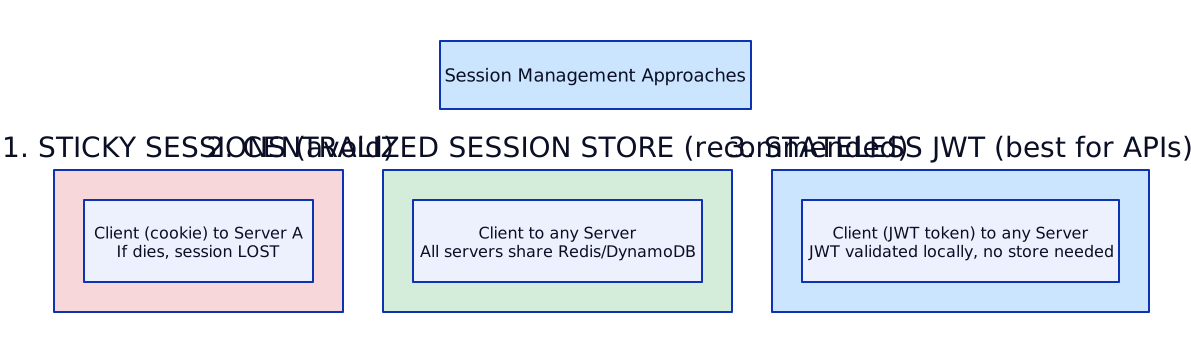
SSL/TLS Termination
Section titled “SSL/TLS Termination”Where to Terminate
Section titled “Where to Terminate”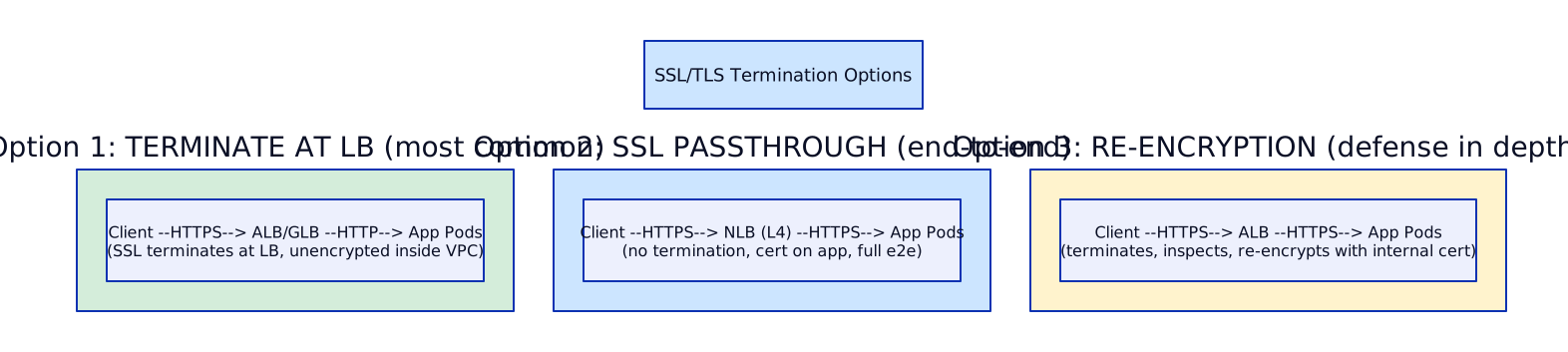
AWS Certificate Management:
- ACM (AWS Certificate Manager) — free public certs, auto-renew
- Attach to ALB, CloudFront, API Gateway
- ACM Private CA for internal mTLS (service mesh)
GCP Certificate Management:
- Google-managed SSL certificates — auto-provision, auto-renew
- Certificate Manager for advanced (wildcard, multi-domain)
- CAS (Certificate Authority Service) for internal mTLS
resource "aws_acm_certificate" "web" {  domain_name               = "app.example.com"  subject_alternative_names = ["*.app.example.com"]  validation_method         = "DNS"
  lifecycle {    create_before_destroy = true  }}
# Auto-validate via Route 53resource "aws_route53_record" "cert_validation" {  for_each = {    for dvo in aws_acm_certificate.web.domain_validation_options :    dvo.domain_name => dvo  }  name    = each.value.resource_record_name  type    = each.value.resource_record_type  zone_id = data.aws_route53_zone.main.zone_id  records = [each.value.resource_record_value]  ttl     = 60}
resource "google_compute_managed_ssl_certificate" "web" { name = "web-app-cert"
managed { domains = ["app.example.com"] }}
# Or Certificate Manager for wildcardsresource "google_certificate_manager_certificate" "web" { name = "web-app-wildcard"
managed { domains = ["app.example.com", "*.app.example.com"] dns_authorizations = [google_certificate_manager_dns_authorization.web.id] }}Health Checks and Graceful Shutdown
Section titled “Health Checks and Graceful Shutdown”# Kubernetes readiness + liveness probesapiVersion: apps/v1kind: Deploymentmetadata: name: web-apispec: replicas: 3 template: spec: terminationGracePeriodSeconds: 60 containers: - name: api image: registry.example.com/web-api:v2.1.0 ports: - containerPort: 8080 readinessProbe: httpGet: path: /healthz/ready port: 8080 initialDelaySeconds: 5 periodSeconds: 10 failureThreshold: 3 livenessProbe: httpGet: path: /healthz/live port: 8080 initialDelaySeconds: 15 periodSeconds: 20 failureThreshold: 3 lifecycle: preStop: exec: command: ["/bin/sh", "-c", "sleep 10"] resources: requests: cpu: 250m memory: 512Mi limits: memory: 1GiWell-Architected Framework
Section titled “Well-Architected Framework”Building production systems without a structured review framework is like constructing a skyscraper without engineering standards. The Well-Architected Framework provides a consistent set of lenses through which architects evaluate every design decision. AWS codified this into 6 pillars (updated 2024-2025), while GCP organizes their Architecture Framework around 4 themes. Both aim for the same outcome: systems that are secure, reliable, performant, cost-effective, and operationally sound. A principal-level architect doesn’t just know the pillar names — they apply them as a mental checklist during every design review and post-incident analysis.
The real skill is recognizing that these pillars often conflict with each other. You cannot maximize all six simultaneously. Every architecture is a set of trade-offs, and your job is to make those trade-offs deliberately rather than accidentally. A system optimized purely for cost will sacrifice reliability. A system optimized purely for security will frustrate developers. The Well-Architected Review is a structured conversation about which trade-offs are acceptable for a given workload.
AWS Well-Architected Framework — 6 Pillars
Section titled “AWS Well-Architected Framework — 6 Pillars”1. Operational Excellence
Operational excellence is about running and monitoring systems to deliver business value, and continually improving processes and procedures. In practice, this means IaC everywhere (no ClickOps), small frequent deployments (not quarterly big-bang releases), observability-first design (structured logs, metrics, traces from day one), runbooks for every alert (no alert without a documented response), and blameless postmortems after every incident.
What goes wrong when you ignore it: Your team deploys via SSH and manual kubectl commands. When the senior engineer goes on vacation, nobody can deploy. An alert fires at 3 AM and the on-call engineer spends 2 hours figuring out what the alert even means because there’s no runbook. Deployments are monthly, risky, and require a change advisory board meeting.
Operational Excellence Maturity Model:
Level 1: Manual         → SSH into servers, manual deployments, no runbooksLevel 2: Scripted       → Shell scripts, basic CI, some documentationLevel 3: Automated      → IaC (Terraform), CI/CD pipelines, basic monitoringLevel 4: Observable     → Structured logging, distributed tracing, SLOs definedLevel 5: Continuously   → Automated canary deployments, chaos engineering,         Improving        blameless postmortems, OKRs tied to operational metrics
2. Security
Security is not a feature you bolt on — it’s a property of the entire system. IAM least privilege means every service account, role, and user has only the permissions they need and nothing more. Defense in depth means multiple layers: WAF at the edge, security groups at the network layer, IRSA/Workload Identity at the application layer, encryption at rest and in transit, and automated security testing in CI (SAST, DAST, container scanning). Every team must have an incident response plan that’s been rehearsed, not just documented.
What goes wrong when you ignore it: A developer hardcodes an AWS access key in a GitHub repo. A bot scrapes it within 5 minutes and spins up crypto miners in your account. Your monthly bill goes from $10K to $500K before anyone notices. Or a SQL injection in a forgotten admin endpoint leaks 100K customer records because there was no WAF and no input validation.
3. Reliability
Reliability means the system performs its intended function correctly and consistently. Multi-AZ by default for every stateful component (RDS, ElastiCache, EKS control plane). Auto-scaling configured with appropriate metrics (CPU, custom metrics, queue depth — not just CPU). Health checks that test actual functionality (can the app connect to the database?), not just “is the process running.” Circuit breakers to prevent cascade failures. Chaos testing to validate assumptions. DR drills quarterly — not annually.
What goes wrong when you ignore it: Your single-AZ RDS instance goes down during an AZ outage. Your “multi-AZ” EKS cluster has all pods scheduled on nodes in one AZ because you didn’t configure topology spread constraints. Your auto-scaling is set to CPU but your bottleneck is database connections, so you scale pods that can’t actually serve traffic.
4. Performance Efficiency
Performance efficiency is about using computing resources efficiently to meet system requirements and maintaining that efficiency as demand changes. Right-size compute (don’t run m5.4xlarge for a service that uses 2 vCPUs). Layer caching appropriately (CDN → API cache → application cache → database cache). Use read replicas for read-heavy workloads. Process asynchronously where possible (queue instead of synchronous HTTP calls). Choose the right database for the access pattern (don’t force DynamoDB into a relational use case).
What goes wrong when you ignore it: Every service runs on the same instance type regardless of workload profile. No caching layer, so every request hits the database. Synchronous calls chain 6 microservices together, resulting in P99 latency of 5 seconds. The team provisions for peak traffic 24/7 because there’s no auto-scaling.
5. Cost Optimization
Cost optimization is about avoiding unnecessary costs. Right-sizing is the easiest win (use AWS Compute Optimizer or GCP Recommender). Savings Plans and CUDs for baseline compute. Spot/preemptible instances for fault-tolerant workloads (batch processing, CI runners, stateless web tier with graceful handling). Tagging everything for cost allocation. Waste elimination: delete unused EBS volumes, old snapshots, idle load balancers. For Kubernetes workloads, Kubecost or OpenCost to attribute costs to teams and services.
What goes wrong when you ignore it: Your AWS bill is $200K/month but nobody knows which team or service is responsible for what. Development environments run 24/7 including weekends. You’re paying for 50 TB of EBS snapshots from a service that was decommissioned 2 years ago. Every engineer provisions “large” instances “just in case.”
6. Sustainability
Sustainability is the newest pillar — minimizing the environmental impact of running cloud workloads. Use managed services over self-hosted (cloud providers run shared infrastructure more efficiently than dedicated servers). Right-sizing reduces energy consumption. Serverless for bursty workloads eliminates idle compute. Choose regions with lower carbon intensity when latency requirements allow.
GCP Architecture Framework — 4 Themes
Section titled “GCP Architecture Framework — 4 Themes”GCP organizes its framework around 4 themes that map closely to the AWS pillars but with different emphasis:
| GCP Theme | What It Covers | AWS Pillar Equivalent |
|---|---|---|
| System Design | Scalability, performance, resource efficiency | Performance Efficiency + Reliability |
| Operational Excellence | Monitoring, incident response, deployment practices | Operational Excellence |
| Security, Privacy & Compliance | IAM, encryption, data residency, audit | Security |
| Reliability | Fault tolerance, DR, SLOs/SLIs/SLAs | Reliability |
GCP places stronger emphasis on SLO-driven design (define your SLOs first, then architect to meet them) and treats cost optimization as a cross-cutting concern rather than a separate pillar.
Pillar Trade-offs
Section titled “Pillar Trade-offs”| Trade-off | Example |
|---|---|
| Cost vs Reliability | Multi-region doubles cost but provides 99.99% availability |
| Security vs Developer Experience | MFA + bastion adds friction but prevents breaches |
| Performance vs Cost | Provisioned IOPS on RDS costs 3x but guarantees latency |
| Reliability vs Deployment Speed | Blue-green doubles infra cost but enables instant rollback |
| Sustainability vs Performance | Smaller instances reduce carbon but may increase latency |
| Cost vs Operational Excellence | Comprehensive observability stack adds $5K/month but cuts MTTR by 80% |
Well-Architected Review Process
Section titled “Well-Architected Review Process”Well-Architected Review Workflow:
1. IDENTIFY workload → Define scope (which services, which accounts)
2. ANSWER lens questions → 50-60 questions across all pillars → Rate each: "Not applicable" / "Not started" / "In progress" / "Complete"
3. IDENTIFY high-risk issues (HRIs) → Issues that could cause business impact → Prioritize by blast radius and likelihood
4. CREATE improvement plan → Each HRI gets an owner, timeline, and acceptance criteria → Track in backlog alongside feature work
5. MEASURE progress → Re-run review quarterly → Track HRI resolution rate → Report to leadership on risk posture
AWS Tool: AWS Well-Architected Tool (free, built into console)GCP Tool: Architecture Framework review (manual, using docs)Links:
- AWS Well-Architected Labs — hands-on labs for each pillar
- GCP Architecture Center — reference architectures and framework guides
Interview Scenarios:
“This system went down for 4 hours during a deployment. Which pillar was violated and how would you fix it?”
Strong Answer: “Two pillars were violated. Operational Excellence — a 4-hour outage during deployment means there’s no canary/blue-green strategy, no automated rollback, and likely no deployment runbook. Fix: implement progressive delivery (Argo Rollouts canary with automated analysis — rollback if error rate exceeds 1%). Reliability — no health checks caught the bad deployment. Fix: readiness probes that test downstream dependencies, not just HTTP 200 on /healthz. Also implement deployment windows (never deploy Friday afternoon) and feature flags to separate deployment from release.”
“Review this 3-tier architecture diagram — what would you improve from a Well-Architected perspective?”
Strong Answer: “I’d walk through each pillar systematically: Security — is there a WAF? Are security groups least-privilege? Is traffic encrypted between tiers? Reliability — is every tier multi-AZ? What happens when a single component fails? Performance — is there a caching layer? Are database queries optimized? Cost — are instances right-sized? Is auto-scaling configured? Operational Excellence — how is this deployed? Is there observability? Sustainability — could any tier be serverless?”
Resilience Patterns
Section titled “Resilience Patterns”Distributed systems fail in partial and unpredictable ways. A single slow downstream service can consume all your threads, exhaust connection pools, and bring down your entire application — even though your code is perfectly healthy. Resilience patterns are defensive programming strategies that contain failures, prevent cascades, and keep your system functional even when dependencies are degraded. These are not optional nice-to-haves; they are requirements for any production microservices architecture.
The key insight is that resilience patterns work best when combined. A circuit breaker alone is useful, but a circuit breaker with retries, timeouts, bulkheads, and fallbacks creates a robust defense-in-depth strategy. The challenge is configuring them correctly — overly aggressive circuit breakers cause unnecessary outages, while overly lenient ones don’t protect you.
Circuit Breaker
Section titled “Circuit Breaker”The circuit breaker pattern prevents an application from repeatedly trying to call a failing service. It tracks failures and “trips” when a threshold is exceeded, failing fast instead of waiting for timeouts.
Configuration parameters:
- Failure threshold: e.g., 5 failures in 10 seconds triggers OPEN
- Timeout duration: e.g., 30 seconds in OPEN state before trying HALF-OPEN
- Success threshold: e.g., 3 consecutive successes in HALF-OPEN to return to CLOSED
Istio implementation (service mesh level — no code changes needed):
apiVersion: networking.istio.io/v1beta1kind: DestinationRulemetadata: name: payment-servicespec: host: payment-service trafficPolicy: connectionPool: tcp: maxConnections: 100 http: h2UpgradePolicy: DEFAULT maxRequestsPerConnection: 10 outlierDetection: consecutive5xxErrors: 5 interval: 10s baseEjectionTime: 30s maxEjectionPercent: 50Application-level implementations:
- Java: Resilience4j (successor to Hystrix)
- .NET: Polly
- Go: sony/gobreaker
- Python: pybreaker or custom decorator
Retry with Exponential Backoff + Jitter
Section titled “Retry with Exponential Backoff + Jitter”Retries are essential for handling transient failures (network blips, temporary overload), but naive retries cause thundering herd problems. Without jitter, all clients retry at the same time, amplifying the load spike that caused the failure.
Formula: wait = min(cap, base * 2^attempt) + random(0, base * 2^attempt)
Example progression:
Attempt 1: wait = min(60s, 1s * 2^1) + random(0, 2s) = 2s + 0.7s = 2.7sAttempt 2: wait = min(60s, 1s * 2^2) + random(0, 4s) = 4s + 3.1s = 7.1sAttempt 3: wait = min(60s, 1s * 2^3) + random(0, 8s) = 8s + 1.4s = 9.4sRetry budget: Limit retries to prevent amplification.
- Max N retries per individual request (e.g., 3)
- Max % of total requests that can be retries (e.g., 20% — if more than 20% of your traffic is retries, stop retrying and let the circuit breaker trip)
Istio retry configuration:
apiVersion: networking.istio.io/v1beta1kind: VirtualServicemetadata: name: payment-servicespec: hosts: - payment-service http: - retries: attempts: 3 perTryTimeout: 2s retryOn: 5xx,reset,connect-failure,retriable-4xxBulkhead Pattern
Section titled “Bulkhead Pattern”Named after ship bulkheads that contain flooding to one compartment. The bulkhead pattern isolates failures so that a problem with one downstream service doesn’t consume all resources and affect calls to other services.
Thread pool isolation: Each downstream service gets its own thread pool. If Service B is slow and exhausts its 20-thread pool, calls to Service C still have their own 20 threads available.
Connection pool isolation: Separate HTTP connection pools per downstream. A slow downstream that holds connections open doesn’t starve connections to healthy services.
Kubernetes implementation:
- Separate Deployments per criticality tier (critical path vs best-effort)
- Resource limits per container (CPU/memory limits prevent one pod from starving the node)
- PodDisruptionBudgets per service (ensure minimum availability during maintenance)
- Namespace ResourceQuotas (prevent one team from consuming all cluster resources)
Istio connection pool isolation:
trafficPolicy: connectionPool: tcp: maxConnections: 100 # Max TCP connections to this service http: maxRequestsPerConnection: 10 http2MaxRequests: 1000 # Max concurrent HTTP/2 requests maxRetries: 3 # Max concurrent retriesTimeout Patterns
Section titled “Timeout Patterns”Every network call must have a timeout. Without timeouts, a hung downstream service causes your threads to block indefinitely, eventually exhausting your application’s capacity.
Cascading timeouts: Each service layer MUST have a shorter timeout than its caller. Otherwise, the caller times out first and the downstream work is wasted.
API Gateway: 30s timeout  → Service A: 25s timeout    → Service B: 10s timeout    → Service C: 10s timeout
If Service B takes 15s, Service A times out at 10s and returnsa fallback. The API Gateway never hits its 30s limit becauseService A responds (with degraded data) within 25s.
gRPC deadline propagation: gRPC has first-class support for deadlines. The client sets a deadline, and each hop decrements the remaining time. If the deadline has passed, the service immediately returns DEADLINE_EXCEEDED without doing work.
Kubernetes timeout settings:
terminationGracePeriodSeconds— how long K8s waits for a pod to shut down gracefully before SIGKILLactiveDeadlineSeconds— maximum runtime for Jobs- Ingress/Gateway timeout annotations for external traffic
Fallback Strategies
Section titled “Fallback Strategies”When a dependency fails even after retries and circuit breaking, you need a fallback to maintain partial functionality:
| Strategy | How It Works | Example |
|---|---|---|
| Cached response | Return last known good data | Show yesterday’s account balance instead of error |
| Default value | Return a safe static default | Show 0 items in cart instead of error page |
| Graceful degradation | Disable non-critical features | Recommendations unavailable but checkout works |
| Queue for retry | Queue the operation for async processing | Payment fails sync → queue for async retry with notification |
Combining Patterns — Defense in Depth
Section titled “Combining Patterns — Defense in Depth”
Resilience Testing
Section titled “Resilience Testing”Chaos Engineering Progression:
1. Game Days (manual) → Kill a pod manually, observe behavior → Validate runbooks work
2. Automated Chaos (LitmusChaos / Chaos Mesh) → Pod kill, network partition, CPU stress → Run in staging on schedule
3. Production Chaos (advanced) → Inject latency to specific % of traffic → Verify circuit breakers trip correctly → Only after observability is mature
Key metrics to validate: ✓ Circuit breaker trips within expected threshold ✓ Fallbacks return correct degraded response ✓ No cascade failures (bulkheads hold) ✓ Recovery time after fault removed (< 30s) ✓ Error budget not exhaustedInterview Scenarios:
“Your payment service depends on 3 downstream APIs. One starts timing out. What happens and how do you prevent cascade failure?”
Strong Answer: “Without resilience patterns, the slow downstream consumes all of Service A’s threads waiting for responses. Service A stops responding to all requests, including ones to healthy downstreams B and C. This cascades up to the API gateway and the user sees a full outage. To prevent this: (1) Timeout of 10s on each downstream call — don’t wait forever. (2) Circuit breaker per downstream — after 5 timeouts in 10 seconds, trip the breaker and stop calling the failing service. (3) Bulkhead — separate thread pools per downstream so a slow Service B can’t exhaust threads needed for Service C. (4) Fallback — when the circuit is open for the payment service, queue the payment for async retry and return ‘payment processing’ to the user.”
“Design retry logic for a payment processing system that won’t cause a retry storm.”
Strong Answer: “Three safeguards: (1) Exponential backoff with full jitter — wait = random(0, min(cap, base * 2^attempt)) — prevents synchronized retries. (2) Retry budget — max 3 retries per request AND total retry traffic must not exceed 20% of normal traffic. If it does, stop retrying globally. (3) Idempotency keys — every payment request carries a client-generated idempotency key. The payment service stores the key and result; duplicate keys return the cached result without re-processing. This makes retries safe even for payment creation.”
Common mistake: “Retrying non-idempotent operations without idempotency keys — causes duplicate payments, double-charges, or duplicate order creation.”
12-Factor Application Principles
Section titled “12-Factor Application Principles”The 12-Factor App methodology, originally published by Heroku engineers, provides a set of principles for building software-as-a-service applications that are portable, scalable, and suitable for cloud deployment. While the original factors were written in the context of PaaS platforms, they map perfectly to modern Kubernetes-based architectures. A cloud architect should be able to map every factor to concrete infrastructure decisions and identify when a team’s application violates these principles — because violations are what cause deployment pain, scaling issues, and environment drift.
Understanding 12-Factor is not academic — it’s practical. When a team tells you “it works on my machine but not in production,” they’ve usually violated Factor X (Dev/Prod Parity) or Factor III (Config). When scaling doesn’t work, they’ve violated Factor VI (Stateless Processes). When deployments require downtime, they’ve violated Factor IX (Disposability). These factors give you a diagnostic checklist for the most common cloud-native application problems.
| Factor | Principle | Cloud-Native Implementation |
|---|---|---|
| I. Codebase | One codebase, many deploys | Git repo, ArgoCD deploys to dev/staging/prod from same container image |
| II. Dependencies | Explicitly declare and isolate | Dockerfile, requirements.txt, go.mod, package-lock.json |
| III. Config | Store in environment | K8s ConfigMaps + Secrets, AWS Parameter Store, GCP Secret Manager |
| IV. Backing Services | Treat as attached resources | RDS endpoint in env var, not hardcoded connection string |
| V. Build, Release, Run | Strict separation of stages | CI builds container image, CD releases to environment, K8s runs |
| VI. Processes | Stateless, share-nothing | No local session storage — use Redis/DynamoDB for state |
| VII. Port Binding | Export via port | Container EXPOSE, K8s Service port mapping |
| VIII. Concurrency | Scale via processes | HPA scales pods, Karpenter scales nodes — not bigger VMs |
| IX. Disposability | Fast startup, graceful shutdown | Readiness probes, preStop hooks, SIGTERM handling, connection draining |
| X. Dev/Prod Parity | Keep environments similar | Same Docker image everywhere, different ConfigMaps per env |
| XI. Logs | Treat as event streams | stdout/stderr → Fluentd/Alloy → Loki/CloudWatch, never write to local files |
| XII. Admin Processes | Run as one-off tasks | K8s Jobs, Cloud Run Jobs, Lambda — not SSH into running pods |
Kubernetes Mapping
Section titled “Kubernetes Mapping”12-Factor → Kubernetes Implementation:
Factor III (Config): ConfigMap for non-sensitive config Secret (+ External Secrets Operator) for credentials NEVER bake env-specific values into Docker image
Factor V (Build, Release, Run): Build: GitHub Actions → docker build → push to ECR/GAR Release: ArgoCD Application manifest per environment Run: K8s Deployment + HPA
Factor VI (Processes): Pod = process No local state → ReplicaSet can scale freely Session state in Redis, not in pod memory
Factor IX (Disposability): readinessProbe: ensures traffic only routes to ready pods preStop hook: sleep 10 → allows LB deregistration SIGTERM handler: drain connections, finish in-flight requests Pod startup time target: < 10 seconds
Factor XI (Logs): Container writes to stdout/stderr K8s node agent (Fluentd/Alloy) collects Ships to Loki/CloudWatch/BigQuery NEVER: log to /var/log/app.log inside containerBeyond 12-Factor: The 15-Factor App
Section titled “Beyond 12-Factor: The 15-Factor App”The original 12 factors were written in 2012. Modern cloud-native development adds three more:
| Factor | Principle | Implementation |
|---|---|---|
| XIII. API-First | Design API contract before implementation | OpenAPI spec reviewed before coding starts |
| XIV. Telemetry | Observability as a first-class concern | OpenTelemetry auto-instrumentation, SLO dashboards |
| XV. Security | Security integrated into development lifecycle | SAST/DAST in CI, dependency scanning, IRSA/Workload Identity |
Interview Scenarios:
“How does your application architecture align with 12-factor principles? Which factor do teams most commonly violate?”
Strong Answer: “In our platform, we enforce 12-factor through golden paths: our service template starts with Factor-compliant defaults — config via ConfigMaps, logs to stdout, stateless processes, health checks for disposability. The most commonly violated factors are: Factor III (Config) — teams bake environment-specific values into Docker images (database URLs, API keys), which means they need different images per environment. Fix: externalize all config into ConfigMaps/Secrets, use the same image everywhere. Factor VI (Processes) — teams store session data or uploaded files in local pod storage, which breaks when HPA scales or pods restart. Fix: use Redis for sessions, S3/GCS for file uploads. Factor XI (Logs) — teams write to local log files inside containers, which are lost on pod restart and can’t be aggregated. Fix: configure logging frameworks to write to stdout, let the platform collect and ship logs.”
Common mistake: “Storing config in code (Factor III violation) — environment-specific values baked into Docker images means you need separate images for dev, staging, and prod, defeating the purpose of container portability.”
Managed vs Self-Hosted — Decision Framework
Section titled “Managed vs Self-Hosted — Decision Framework”This is the question that separates senior engineers from principal architects. Senior engineers have opinions (“I prefer self-hosted Kafka because I know it better”). Principal architects have frameworks (“Here’s how I evaluate this decision based on team size, operational maturity, cost at scale, and compliance requirements”). The default position should always be managed services, with the burden of proof on self-hosted to justify the operational investment.
Every self-hosted service you run is a service you must patch, upgrade, monitor, back up, scale, secure, and staff an on-call rotation for. The question is never “can we run it ourselves?” — of course you can. The question is “should we run it ourselves, given the opportunity cost of our engineering time?” A Kafka expert who spends 40% of their time managing Kafka infrastructure is a Kafka expert who spends 40% less time building product features.
The decision also changes over time. A startup should use managed everything. A company at massive scale (thousands of instances) may find that self-hosted is cheaper because managed service pricing includes margins that dominate at volume. The inflection point is different for every technology.
Decision Matrix
Section titled “Decision Matrix”| Criterion | Favors Managed | Favors Self-Hosted |
|---|---|---|
| Team size | Small team (< 5 for that tech) | Dedicated team of experts |
| Customization | Standard use case | Need custom plugins, configs, forks |
| Cost at scale | Low-medium scale | 500+ instances (licensing costs dominate) |
| Compliance | Standard compliance | Air-gapped, specific audit requirements |
| Vendor lock-in tolerance | Single-cloud commitment | Multi-cloud portability required |
| Operational maturity | Early cloud adoption | Mature ops team with on-call |
| Time to market | Need it running this week | Can invest months in setup |
| Upgrade cadence | Vendor handles upgrades | Need specific versions day-0 |
Concrete Examples with Reasoning
Section titled “Concrete Examples with Reasoning”RDS vs PostgreSQL on EC2: RDS wins in almost every case. You get automated backups, patching, Multi-AZ failover, read replicas, Performance Insights, and IAM auth — all managed. Self-host only when you need pg_cron, custom extensions (PostGIS with a custom GEOS build), logical replication with custom plugins, or you have 100+ database instances where RDS per-instance overhead exceeds the cost of a dedicated DBA team.
MSK vs Self-Hosted Kafka: MSK when your team has fewer than 5 Kafka engineers. MSK handles broker patching, ZooKeeper management (or KRaft), storage scaling, and rack awareness. Self-host when you need custom Kafka Streams topology, specific Kafka versions on day-0 (MSK lags 3-6 months), multi-cloud Kafka clusters (MirrorMaker across AWS and GCP), or custom authentication plugins.
ElastiCache vs Self-Hosted Redis: ElastiCache virtually always. Redis deployment is a commodity — there’s no competitive advantage in managing it yourself. ElastiCache gives you Multi-AZ failover, automatic backups, encryption, and patching. The only exception: you need Redis modules that ElastiCache doesn’t support, or you’re running Redis in a non-AWS environment.
EKS vs Self-Managed Kubernetes: EKS always in AWS. The control plane costs $73/month — that’s 1-2 hours of an engineer’s time. Self-managing etcd, the API server, the scheduler, and the controller manager is an enormous operational burden with no business value. The only case for self-managed: air-gapped environments where you can’t use managed services, or multi-cloud with a platform like Rancher/Tanzu.
Prometheus vs CloudWatch: Prometheus (or Grafana Cloud/Mimir) for multi-cluster Kubernetes environments where you need PromQL, Grafana dashboards, and portability across clouds. CloudWatch for Lambda, RDS, and managed services where native integration provides zero-setup metrics. Many organizations use both: CloudWatch for AWS service metrics, Prometheus for application and Kubernetes metrics.

Total Cost of Ownership: Managed vs Self-Hosted
Section titled “Total Cost of Ownership: Managed vs Self-Hosted”Managed Service Cost: Monthly fee $5,000 ───────────────────────────────────── Total $5,000/month
Self-Hosted Equivalent Cost: Infrastructure (EC2, EBS) $3,000 Engineer time (20% of 1 FTE) $3,000 ← Often invisible/underestimated On-call burden (rotation) $1,000 ← Opportunity cost Incident response (MTTR) $500 ← Averaged over incidents Security patching $500 ← Monthly CVE remediation Upgrade cycles (quarterly) $500 ← Averaged monthly ───────────────────────────────────── Total $8,500/month
Delta: Self-hosted costs 70% MORE when you account for people costs.Interview Scenarios:
“When would you NOT use a managed database service?”
Strong Answer: “Three situations: (1) You need custom PostgreSQL extensions that RDS/Cloud SQL doesn’t support — like a custom GEOS build for PostGIS, or pg_cron for in-database scheduling. (2) You’re at massive scale — 200+ database instances where the per-instance managed service premium exceeds the cost of a dedicated DBA team. (3) Compliance requirements mandate air-gapped or on-premises deployment where managed services aren’t available. In every other case, managed databases are the right choice. The operational burden of patching, backups, failover, and monitoring is not where your team should spend its time.”
“Your team wants to self-host Kafka instead of using MSK. How do you evaluate this decision?”
Strong Answer: “I’d ask five questions: (1) Why? What specific feature does MSK not provide? If the answer is ‘control’ or ‘flexibility’ without specifics, that’s a red flag. (2) Who will operate it? Kafka requires deep expertise — ZooKeeper/KRaft management, partition rebalancing, broker upgrades, consumer group management. Do we have 2+ Kafka experts? (3) What’s the on-call plan? Someone will get paged at 2 AM when a broker runs out of disk or replication falls behind. (4) Total cost? MSK costs X. Self-hosted infrastructure costs 0.7X but add 30% of an engineer’s salary plus on-call compensation. (5) What’s the migration path back? If self-hosting becomes unsustainable, can we migrate to MSK without downtime? If the team can’t give strong answers to all five, we use MSK.”
Common mistake: “Choosing self-hosted ‘for flexibility’ without quantifying the operational cost — on-call rotations, patching cycles, upgrade planning, backup verification, monitoring setup, capacity planning, and incident response.”
Cell-Based Architecture
Section titled “Cell-Based Architecture”Cell-based architecture is a deployment pattern where you partition your system into independent, isolated units called “cells” that share nothing. Each cell contains a complete copy of your application stack — compute, database, cache, storage — and serves a subset of your users or tenants. The critical property: a failure in Cell A does NOT affect users in Cell B. This is blast radius containment at the infrastructure level. Amazon uses this pattern internally for services like Route 53 and DynamoDB, where a total outage would be catastrophic.
The traditional approach to scaling is a single large deployment that serves all users. This works until it doesn’t — a bad deployment, a database corruption, or a runaway query affects everyone simultaneously. Cell-based architecture trades operational simplicity for failure isolation. You accept the complexity of managing N independent clusters in exchange for the guarantee that no single failure can take down your entire customer base. For SaaS platforms, payment systems, and any service where an outage has contractual or regulatory consequences, this trade-off is worth it.
The pattern is inspired by biological cells: each cell is self-contained, and the failure of individual cells doesn’t kill the organism. The hardest part is the cell router — the component that directs each request to the correct cell. This router itself must be the most resilient component in the entire system, because it’s a shared dependency across all cells.
Cell Architecture Diagram
Section titled “Cell Architecture Diagram”
Key Design Decisions
Section titled “Key Design Decisions”Cell Sizing: How many users per cell? This is a capacity planning question with competing concerns:
- Too small (1K users per cell) → Operational overhead of managing hundreds of cells, underutilization of resources
- Too large (500K users per cell) → Blast radius too big, defeats the purpose
- Sweet spot: typically 10K-100K users per cell depending on workload intensity
- Size cells based on your SLA: if you promise 99.99%, a cell outage affecting 50K users for 5 minutes is acceptable but affecting 500K is not
Cell Routing:
- DNS-based (Route 53 / Cloud DNS): Route each tenant to their cell’s endpoints. Simple but slow to update (DNS TTL). Best for stable tenant-to-cell assignments.
- Application-layer (API Gateway): Lookup tenant → cell mapping in a low-latency store (DynamoDB/Redis), route to correct cell’s backend. Faster reassignment but adds a lookup to every request.
- Hybrid: DNS for the broad routing, application layer for fine-grained control.
Shared Services: Some services necessarily span cells — authentication (users log in once), billing (one invoice per customer across cells), and the cell router itself. These shared services are single points of failure and must be the most resilient components:
- Multi-region, active-active deployment
- Separate scaling from cell infrastructure
- Circuit breakers between shared services and cells
- Fallback behavior if shared service is degraded
Data Partitioning: Each cell owns its data completely. Cross-cell queries require an aggregation layer (e.g., analytics pipeline that reads from all cells’ databases). This means:
- No cross-cell joins in the application
- Reporting and analytics must aggregate asynchronously
- Cell migration (moving a tenant from Cell A to Cell B) requires data migration
Cell Deployment Strategy
Section titled “Cell Deployment Strategy”Cell Deployment with Canary:
Step 1: Deploy to Cell-0 (canary cell, internal users only) Monitor for 30 minutes │ ├── Errors > threshold? → Rollback Cell-0, investigate │ └── Healthy? → Step 2
Step 2: Deploy to Cell-1 (smallest customer cell) Monitor for 2 hours │ ├── Errors > threshold? → Rollback Cell-0 + Cell-1 │ └── Healthy? → Step 3
Step 3: Deploy to remaining cells in batches Batch 1: Cells 2-5 (4 cells) Batch 2: Cells 6-15 (10 cells) Batch 3: Cells 16+ (all remaining)
Each batch: monitor → validate → proceed or rollback
Total deployment time: 4-8 hours (not minutes)Trade-off: Slower deployment for dramatically reduced blast radiusTrade-offs
Section titled “Trade-offs”| Aspect | Cell-Based | Monolithic Deployment |
|---|---|---|
| Blast radius | Limited to one cell | Entire system |
| Operational complexity | High (N clusters to manage) | Low (one cluster) |
| Cost | Higher (duplicate infrastructure per cell) | Lower (shared resources) |
| Deployment | Per-cell canary possible | All-at-once risk |
| Cross-cell operations | Complex (aggregation needed) | Simple (single database) |
| Tenant isolation | Strong (separate infrastructure) | Weak (shared everything) |
| Scaling | Add new cells | Scale existing infrastructure |
| Compliance | Per-cell data residency possible | Complex with single deployment |
When to Use Cell-Based Architecture
Section titled “When to Use Cell-Based Architecture”- SaaS platforms with strict SLAs where a total outage triggers contractual penalties
- Payment systems where a single failure cannot take down all transactions
- Multi-tenant platforms where one tenant’s traffic spike shouldn’t affect others
- Regulated industries where data residency requires different regions per customer segment
- Systems at scale where a single database or cluster has hit its ceiling
When NOT to Use
Section titled “When NOT to Use”- Internal tools with relaxed SLAs
- Early-stage products (premature complexity)
- Systems with heavy cross-tenant interactions (social features, shared dashboards)
- Teams without mature infrastructure automation (you need IaC to manage N cells)
Terraform Pattern for Cell Provisioning
Section titled “Terraform Pattern for Cell Provisioning”# Cell module — each cell gets the full stackmodule "cell" { source = "./modules/cell" for_each = var.cells
cell_id = each.key cell_name = each.value.name region = each.value.region user_range = each.value.user_range instance_type = each.value.instance_type db_instance = each.value.db_instance_class
# Each cell gets its own: # - VPC # - EKS cluster # - Aurora cluster # - ElastiCache cluster # - S3 buckets
common_tags = merge(local.common_tags, { Cell = each.key })}
# Cell configurationvariable "cells" { default = { "cell-a" = { name = "cell-a" region = "us-east-1" user_range = "1-50000" instance_type = "m6i.xlarge" db_instance_class = "db.r6g.xlarge" } "cell-b" = { name = "cell-b" region = "us-east-1" user_range = "50001-100000" instance_type = "m6i.xlarge" db_instance_class = "db.r6g.xlarge" } "cell-c" = { name = "cell-c" region = "eu-west-1" # EU data residency user_range = "100001-150000" instance_type = "m6i.xlarge" db_instance_class = "db.r6g.xlarge" } }}Interview Scenarios:
“Design a payment processing system where a single failure can’t take down all transactions.”
Strong Answer: “Cell-based architecture. Partition merchants into cells based on merchant ID hash. Each cell contains an independent EKS cluster, Aurora database, and ElastiCache instance. A cell router (Route 53 + API Gateway) directs each transaction to the correct cell based on merchant ID. If Cell A’s database corrupts, only merchants in Cell A are affected — Cell B continues processing normally. The cell router itself is the critical shared component — it must be multi-region active-active with health checks that automatically route around failing cells. Shared services (fraud detection, settlement) are deployed independently with circuit breakers. New merchants are assigned to the cell with the most headroom.”
“How would you partition users across cells? What happens when a cell reaches capacity?”
Strong Answer: “Three partitioning strategies: (1) Hash-based — hash(tenant_id) mod N assigns tenants deterministically. Simple but rebalancing requires data migration. (2) Range-based — tenants 1-50K in Cell A, 50K+ in Cell B. Easy to reason about but can create hotspots if large tenants cluster. (3) Lookup table — DynamoDB/Redis maps each tenant to a cell. Most flexible, allows moving individual tenants without affecting others. I’d use the lookup table approach. When a cell reaches 80% capacity, provision a new cell (automated via Terraform). New tenants are assigned to the new cell. Existing tenants can be migrated: mark tenant as migrating → dual-write to old and new cell → verify consistency → switch routing → decommission old assignment.”
Common mistake: “Making the cell router itself a single point of failure — it must be the most resilient component in the system. Deploy it multi-region active-active with health checks, and keep it as simple as possible (lookup + route, no business logic).”
Interview Scenarios
Section titled “Interview Scenarios”Scenario 1: Design a Web Application Architecture
Section titled “Scenario 1: Design a Web Application Architecture”“Design the architecture for a customer-facing banking portal that handles 10K concurrent users, has a React frontend and Java backend.”
Strong Answer:
“I’d use a 3-tier architecture on EKS within our enterprise landing zone:
-
Frontend: React SPA hosted in S3, served via CloudFront with WAF (OWASP managed rules + rate limiting). CloudFront origin access control restricts direct S3 access.
-
API tier: Java Spring Boot services on EKS behind an internal ALB. The ALB Ingress Controller manages routing. Each microservice (auth, accounts, transactions) runs in its own namespace with ResourceQuotas.
-
Data tier: Aurora PostgreSQL in Multi-AZ for transactional data. ElastiCache Redis for session management (not sticky sessions — we need horizontal scaling). DynamoDB for audit logs (high write throughput, TTL for retention).
-
Security: SSL terminates at CloudFront (public cert) and re-encrypts to ALB (internal cert). Istio provides mTLS between pods. IRSA for AWS API access — no static credentials.
-
Session handling: Centralized Redis store with 30-minute TTL. JWT for API authentication with opaque refresh tokens stored in Redis for revocation capability.”
Scenario 2: Caching Strategy
Section titled “Scenario 2: Caching Strategy”“Your API has 500ms P99 latency. The CTO wants it under 100ms. How do you approach this?”
Strong Answer:
“I’d profile first, then layer caching:
-
Identify the bottleneck: Check application traces in Tempo/Jaeger. Is it DB queries, external API calls, or compute? 80% of the time it’s database round trips.
-
Cache-aside with Redis: For read-heavy endpoints (account balance, transaction history), cache DB results in ElastiCache/Memorystore Redis with appropriate TTLs (30s for balances, 5 min for transaction history).
-
API response caching: CloudFront/Cloud CDN for cacheable GET responses. Set
Cache-Control: max-age=60for semi-static data. -
Connection pooling: PgBouncer sidecar or RDS Proxy to reduce DB connection overhead.
-
Expected results: DB queries that took 200ms now hit Redis in 1-2ms. CDN-cached responses return in 10-20ms from edge. Overall P99 drops to 50-80ms.”
Scenario 3: Microservices vs Monolith Decision
Section titled “Scenario 3: Microservices vs Monolith Decision”“A team wants to break their monolith into 30 microservices. As the platform architect, what do you advise?”
Strong Answer:
“I’d push back on 30 services for a team of 10. That’s 3 services per developer — too many to own effectively. My advice:
-
Start with the Strangler Fig pattern: Don’t rewrite everything. Extract 3-5 high-value, high-change-rate domains first (e.g., payments, notifications). Keep the rest in the monolith.
-
Service sizing: Each service should be owned by a team of 3-5. With 10 developers, you can sustain 2-3 services plus the remaining monolith.
-
Platform team provides: Service template (golden path), CI/CD pipeline, observability (auto-instrumented), namespace with quotas, service mesh for mTLS.
-
Anti-patterns to avoid: Distributed monolith (synchronous calls everywhere), shared databases across services, nano-services that add latency without value.
-
Success criteria: Each extracted service should have its own data store, independent deploy cycle, and clear API contract.”
Scenario 4: CDN and Edge Architecture
Section titled “Scenario 4: CDN and Edge Architecture”“Your banking app serves customers in 15 countries. How do you optimize performance globally?”
Strong Answer:
“Multi-region with edge caching:
-
CDN for static content: CloudFront with 400+ edge locations. React SPA, images, fonts all cached at edge. Set
Cache-Control: public, max-age=31536000, immutablefor versioned assets. -
API optimization: Two regions — us-east-1 and eu-west-1 with Route 53 latency-based routing. Each region has its own EKS cluster and Aurora cluster (Global Database for cross-region reads).
-
Edge compute: CloudFront Functions for lightweight tasks (header manipulation, URL rewrites, A/B testing). Lambda@Edge for origin-side auth token validation.
-
Regulatory: Some banking data must stay in-region (GDPR, UAE data residency). Use geo-restriction and ensure PII never caches at edge. API responses with personal data:
Cache-Control: private, no-store.”
Scenario 5: Database Selection
Section titled “Scenario 5: Database Selection”“You’re building a transaction processing system that handles 50K transactions per second with strict consistency. What database do you choose?”
Strong Answer:
“At 50K TPS with strict consistency, my shortlist is:
-
Aurora PostgreSQL (if single-region): Handles 50K TPS with r6g.8xlarge writer + multiple readers. ACID compliance, strong consistency on reads from writer. Cost: ~$5K/month. This is my default recommendation for most banking workloads.
-
Spanner (if multi-region writes needed): True global consistency with TrueTime. If we need active-active writes across UAE and India, Spanner is the only managed option. Cost: significantly higher (~$10-15K/month for multi-region).
-
DynamoDB (if access pattern is simple key-value): 50K WCU on-demand. Eventually consistent reads by default, but single-item transactions are strongly consistent. Not suitable if you need complex joins.
I’d choose Aurora PostgreSQL for this use case — it’s relational, supports complex queries, handles the throughput, and our teams already have PostgreSQL expertise.”
Scenario 6: Handling State in Cloud-Native Apps
Section titled “Scenario 6: Handling State in Cloud-Native Apps”“How do you handle session state for a web app running on Kubernetes with autoscaling?”
Strong Answer:
“Never store session state in the pod. Three options, in order of preference:
-
Stateless with JWT (for APIs): JWT access tokens (15 min TTL) + opaque refresh tokens stored in Redis. The pod validates JWTs locally — no session lookup needed. Scales perfectly.
-
Centralized session store (for traditional web apps): Redis cluster (ElastiCache/Memorystore) as the session backend. Any pod can serve any request. Configure Spring Session or express-session to use Redis.
-
Client-side session (limited use): Encrypted session cookie. No server-side storage. Works for small session data (<4KB). Not suitable for banking apps with large session contexts.
What I explicitly avoid: Sticky sessions (breaks autoscaling, creates hot spots), in-memory session (lost on pod restart), local file storage (not shared across pods).”
Scenario 7: SSL/TLS Architecture
Section titled “Scenario 7: SSL/TLS Architecture”“Walk me through how you handle SSL/TLS for an enterprise web application.”
Strong Answer:
“Layered TLS with different termination points:
-
External edge: CloudFront with ACM-managed certificate. TLS 1.2+ enforced via SSL policy. HSTS header with 1-year max-age.
-
ALB layer: Re-encrypts from CloudFront to ALB using internal certificate. ALB does L7 inspection (path routing, header matching, WAF).
-
Pod layer: Istio service mesh provides mTLS between all pods automatically. Certificates rotated every 24 hours via Istio CA (or cert-manager with private CA).
-
Database layer: SSL/TLS enforced for all database connections.
sslmode=verify-fullfor PostgreSQL. RDS uses AWS-managed certificates. -
Certificate management: ACM for public certificates (auto-renewal). ACM PCA or cert-manager for internal PKI. All certificates monitored — Prometheus alert when cert expires within 30 days.”
Scenario 8: Migration from On-Prem to Cloud
Section titled “Scenario 8: Migration from On-Prem to Cloud”“You have a legacy .NET monolith on VMware serving 5K users. The bank wants it in the cloud. What’s your approach?”
Strong Answer:
“Phased migration using Strangler Fig:
Phase 1 (Week 1-4): Rehost — Lift the existing .NET app to EC2/Compute Engine in our landing zone. VMware to cloud migration using AWS MGN or Migrate for Compute Engine. This gets it into the cloud quickly with minimal changes.
Phase 2 (Month 2-3): Containerize — Package the monolith in a Docker container, deploy to EKS/GKE. No code changes, just infrastructure modernization. Set up CI/CD pipeline.
Phase 3 (Month 3-6): Extract services — Identify bounded contexts (authentication, notifications, reporting). Extract one at a time behind an API gateway. The monolith still handles most traffic.
Phase 4 (Month 6-12): Modernize data — Migrate from SQL Server to Aurora PostgreSQL (using DMS for zero-downtime migration). Each extracted service gets its own database.
Key risk mitigation: Keep the VMware environment running until Phase 2 is validated. Use Route 53 weighted routing to gradually shift traffic.”
References
Section titled “References”- AWS Well-Architected Framework — six-pillar framework for building reliable, secure, efficient architectures
- Amazon CloudFront Developer Guide — CDN distribution, behaviors, edge functions, and caching
- Amazon ElastiCache for Redis — managed Redis for caching, sessions, and real-time workloads
- Amazon Aurora User Guide — PostgreSQL and MySQL compatible relational database
- Google Cloud Architecture Center — reference architectures, best practices, and design guides
- Cloud CDN Documentation — caching, cache keys, signed URLs, and backend configuration
- Memorystore for Redis Documentation — managed Redis for caching and session management
- AlloyDB Documentation — PostgreSQL-compatible database for enterprise workloads
Tools & Frameworks
Section titled “Tools & Frameworks”- Twelve-Factor App — methodology for building cloud-native web applications
- Martin Fowler: Microservices — foundational article on microservices architecture patterns
- OWASP Top 10 — web application security risks and mitigations