Service Mesh — Istio, ECS Service Connect
Where This Fits
Section titled “Where This Fits”Service mesh is a platform capability provided by the central infra team. You deploy and operate the mesh infrastructure (istiod, control plane). Tenant teams get mTLS, observability, and traffic management automatically — they do not manage Envoy sidecars or certificates themselves.

Why Service Mesh?
Section titled “Why Service Mesh?”Without a service mesh, each application team must implement their own:
| Concern | Without Mesh | With Mesh |
|---|---|---|
| Encryption (mTLS) | Each app configures TLS certs | Automatic — Istio provisions and rotates certs |
| Auth between services | Custom middleware per language | Declarative AuthorizationPolicy |
| Retry/timeout/circuit breaker | Code in every service | Envoy handles at proxy layer |
| Observability (L7 metrics) | Instrument every service | Envoy emits metrics, traces automatically |
| Traffic splitting (canary) | Complex deployment logic | VirtualService weight-based routing |
| Rate limiting | Per-service implementation | Envoy rate limit filter |
Istio Architecture
Section titled “Istio Architecture”Sidecar Mode (Traditional)
Section titled “Sidecar Mode (Traditional)”
How mTLS works in Istio:
- istiod acts as the Certificate Authority (CA)
- Each Envoy sidecar gets a SPIFFE identity certificate (
spiffe://cluster.local/ns/team-a/sa/api) - Certificates are automatically rotated (default: 24 hours)
- When Pod A calls Pod B, Envoy-A initiates mTLS handshake with Envoy-B
- Both sides verify the other’s certificate against istiod’s CA
- Application code is unaware — it talks to localhost, Envoy handles encryption
Ambient Mode (Sidecar-less — Istio 1.22+)
Section titled “Ambient Mode (Sidecar-less — Istio 1.22+)”
When to choose Ambient vs Sidecar:
| Factor | Sidecar Mode | Ambient Mode |
|---|---|---|
| Resource overhead | ~100MB RAM + ~50m CPU per sidecar | ztunnel shared per node (much lower) |
| L7 policy support | Full (every pod has L7 Envoy) | Requires waypoint proxy deployment |
| Maturity | Battle-tested since 2018 | GA in Istio 1.22 (2024), newer |
| Application restart needed | Yes (sidecar injection) | No — ztunnel is transparent |
| Debugging complexity | Sidecar logs per pod | Centralized ztunnel + waypoint logs |
Istio Configuration for Enterprise
Section titled “Istio Configuration for Enterprise”mTLS — Cluster-Wide Strict Mode
Section titled “mTLS — Cluster-Wide Strict Mode”# PeerAuthentication — enforce mTLS across the entire meshapiVersion: security.istio.io/v1beta1kind: PeerAuthenticationmetadata: name: default namespace: istio-system # Mesh-wide policyspec: mtls: mode: STRICT # No plaintext traffic allowedAuthorizationPolicy — Deny by Default, Allow Explicitly
Section titled “AuthorizationPolicy — Deny by Default, Allow Explicitly”# Step 1: Deny all traffic in the namespace (zero trust baseline)apiVersion: security.istio.io/v1beta1kind: AuthorizationPolicymetadata: name: deny-all namespace: paymentsspec: {} # Empty spec = deny all---# Step 2: Allow specific service-to-service communicationapiVersion: security.istio.io/v1beta1kind: AuthorizationPolicymetadata: name: allow-order-to-payment namespace: paymentsspec: selector: matchLabels: app: payment-service action: ALLOW rules: - from: - source: principals: - "cluster.local/ns/orders/sa/order-service" to: - operation: methods: ["POST"] paths: ["/api/v1/charges"]---# Step 3: Allow only specific HTTP methods (defense in depth)apiVersion: security.istio.io/v1beta1kind: AuthorizationPolicymetadata: name: allow-frontend-to-api namespace: team-aspec: selector: matchLabels: app: api-gateway action: ALLOW rules: - from: - source: principals: - "cluster.local/ns/team-a/sa/frontend" to: - operation: methods: ["GET", "POST"] paths: ["/api/*"] when: - key: request.headers[x-request-id] notValues: [""]VirtualService — Traffic Splitting for Canary Deployments
Section titled “VirtualService — Traffic Splitting for Canary Deployments”apiVersion: networking.istio.io/v1beta1kind: VirtualServicemetadata: name: api-service namespace: team-aspec: hosts: - api-service http: - route: - destination: host: api-service subset: stable weight: 90 - destination: host: api-service subset: canary weight: 10 retries: attempts: 3 perTryTimeout: 2s retryOn: "5xx,reset,connect-failure" timeout: 10s---apiVersion: networking.istio.io/v1beta1kind: DestinationRulemetadata: name: api-service namespace: team-aspec: host: api-service trafficPolicy: connectionPool: tcp: maxConnections: 100 http: h2UpgradePolicy: DEFAULT maxRequestsPerConnection: 10 outlierDetection: consecutive5xxErrors: 5 interval: 30s baseEjectionTime: 30s maxEjectionPercent: 50 subsets: - name: stable labels: version: v1 - name: canary labels: version: v2ECS Service Connect
Section titled “ECS Service Connect”ECS Service Connect is AWS’s native service mesh for ECS. It uses Cloud Map for service discovery and deploys an Envoy proxy as a sidecar in each ECS task.

Istio vs ECS Service Connect Comparison
Section titled “Istio vs ECS Service Connect Comparison”| Feature | Istio on EKS/GKE | ECS Service Connect |
|---|---|---|
| mTLS | Built-in, automatic, SPIFFE certs | TLS available, not as mature as Istio mTLS |
| AuthorizationPolicy | Fine-grained L7 policies (path, method, headers) | Security groups + IAM (L4 only) |
| Traffic splitting | VirtualService weight-based routing | ECS deployment controller (rolling, blue-green) |
| Circuit breaker | DestinationRule outlierDetection | Basic health check removal |
| Observability | Full L7 metrics, distributed tracing | CloudWatch metrics per endpoint |
| Service discovery | K8s native (CoreDNS) | Cloud Map (HTTP namespace) |
| Proxy | Envoy (full feature set) | Envoy (subset of features) |
| Complexity | High (istiod, CRDs, learning curve) | Low (native AWS integration) |
| Multi-cluster | Supported (federation, multi-primary) | Within same namespace only |
| Best for | Large microservices, strict security, K8s-native | ECS workloads, simpler requirements |
# Cloud Map namespace for service discoveryresource "aws_service_discovery_http_namespace" "production" {  name        = "production"  description = "ECS Service Connect namespace for production"}
# ECS Service with Service Connect enabledresource "aws_ecs_service" "api" {  name            = "api-service"  cluster         = aws_ecs_cluster.main.id  task_definition = aws_ecs_task_definition.api.arn  desired_count   = 3  launch_type     = "FARGATE"
  service_connect_configuration {    enabled   = true    namespace = aws_service_discovery_http_namespace.production.arn
    service {      port_name      = "http"      discovery_name = "api"
      client_alias {        dns_name = "api"        port     = 8080      }
      timeout {        idle_timeout_seconds       = 60        per_request_timeout_seconds = 30      }    }
    log_configuration {      log_driver = "awslogs"      options = {        awslogs-group         = "/ecs/service-connect/api"        awslogs-region        = var.region        awslogs-stream-prefix = "envoy"      }    }  }
  network_configuration {    subnets          = var.private_subnets    security_groups  = [aws_security_group.api.id]    assign_public_ip = false  }}
# Task definition with port mapping for Service Connectresource "aws_ecs_task_definition" "api" {  family                   = "api-service"  network_mode             = "awsvpc"  requires_compatibilities = ["FARGATE"]  cpu                      = 512  memory                   = 1024  execution_role_arn       = aws_iam_role.ecs_execution.arn  task_role_arn            = aws_iam_role.api_task.arn
  container_definitions = jsonencode([    {      name  = "api"      image = "${var.ecr_repo_url}:${var.image_tag}"      portMappings = [        {          name          = "http"          containerPort = 8080          protocol      = "tcp"          appProtocol   = "http"  # Required for Service Connect        }      ]      logConfiguration = {        logDriver = "awslogs"        options = {          awslogs-group         = "/ecs/api-service"          awslogs-region        = var.region          awslogs-stream-prefix = "api"        }      }    }  ])}
Alternatives: Cilium and Linkerd
Section titled “Alternatives: Cilium and Linkerd”Cilium Service Mesh (eBPF-Based)
Section titled “Cilium Service Mesh (eBPF-Based)”
Cilium vs Istio:
| Factor | Cilium | Istio |
|---|---|---|
| Proxy model | eBPF in kernel (no sidecar) | Envoy sidecar per pod |
| Latency overhead | Lower (kernel-space) | Higher (~1-5ms per hop) |
| L7 policy | Envoy (optional, for HTTP policies) | Full L7 (always on) |
| mTLS | WireGuard-based or IPsec | X.509 certificate-based |
| Network policy | Native (CiliumNetworkPolicy) | Istio + K8s NetworkPolicy |
| Maturity for mesh | Newer, rapidly evolving | Battle-tested since 2018 |
| GKE integration | GKE Dataplane V2 uses Cilium | Anthos Service Mesh |
| Best for | Performance-sensitive, L3/L4 focus | L7-heavy, strict mTLS needs |
Linkerd
Section titled “Linkerd”Linkerd is a simpler, lighter service mesh focused on security and reliability without the complexity of Istio.
- Ultralight proxy (linkerd2-proxy, Rust-based) — ~10MB RAM per sidecar vs ~100MB for Envoy
- Automatic mTLS — zero-config, enabled by default
- No VirtualService/DestinationRule complexity — simpler traffic management
- CNCF graduated project — strong community
- Limitation: No multi-cluster federation as mature as Istio, fewer L7 features
Managed Service Mesh Options
Section titled “Managed Service Mesh Options”AWS EKS Mesh Options
Section titled “AWS EKS Mesh Options”- Self-managed Istio — full control, full responsibility
- AWS App Mesh — deprecated (2024), do not use for new projects
- ECS Service Connect — for ECS workloads (not K8s)
Recommended: Self-managed Istio on EKS, or Cilium if using EKS with Cilium CNI.
GCP GKE Mesh Options
Section titled “GCP GKE Mesh Options”- Anthos Service Mesh (ASM) — Google-managed Istio, recommended for GKE
- Managed control plane (istiod managed by Google)
- Fleet-wide mesh across multiple GKE clusters
- SLO monitoring, dashboards in Cloud Console
- Automatic sidecar injection with revision labels
- Traffic Director — managed xDS control plane for Envoy (proxyless gRPC + Envoy)
- GKE Dataplane V2 — Cilium-based CNI with built-in network policy
Recommended: ASM for full mesh, GKE Dataplane V2 for L3/L4 policy without sidecar overhead.
# Enable ASM on GKE with managed control plane# Label namespace for automatic injectionapiVersion: v1kind: Namespacemetadata: name: team-a labels: istio.io/rev: asm-managed-rapid # Use managed revisionCentral Infra Team: Mesh as a Platform Service
Section titled “Central Infra Team: Mesh as a Platform Service”What the Platform Team Owns
Section titled “What the Platform Team Owns”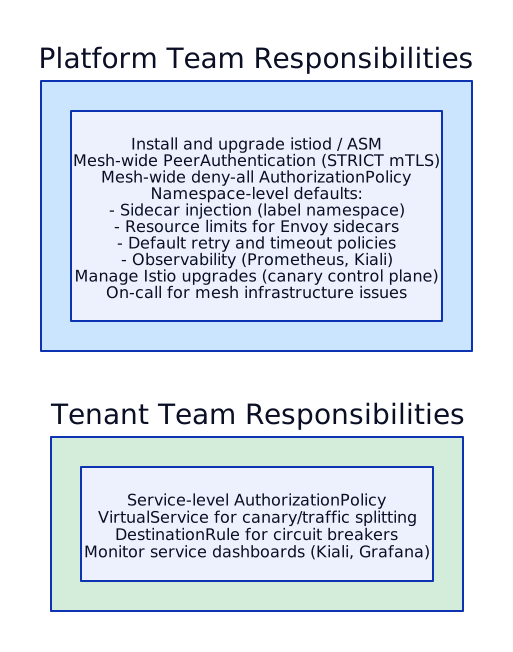
Istio Installation via ArgoCD (Platform Team)
Section titled “Istio Installation via ArgoCD (Platform Team)”# ArgoCD Application for Istio baseapiVersion: argoproj.io/v1alpha1kind: Applicationmetadata: name: istio-base namespace: argocdspec: project: platform source: repoURL: https://istio-release.storage.googleapis.com/charts chart: base targetRevision: 1.22.0 helm: values: | defaultRevision: 1-22 destination: server: https://kubernetes.default.svc namespace: istio-system syncPolicy: automated: prune: false # Never auto-delete Istio CRDs selfHeal: true---# ArgoCD Application for istiodapiVersion: argoproj.io/v1alpha1kind: Applicationmetadata: name: istiod namespace: argocdspec: project: platform source: repoURL: https://istio-release.storage.googleapis.com/charts chart: istiod targetRevision: 1.22.0 helm: values: | meshConfig: accessLogFile: /dev/stdout accessLogFormat: | {"start_time":"%START_TIME%","method":"%REQ(:METHOD)%","path":"%REQ(X-ENVOY-ORIGINAL-PATH?:PATH)%","response_code":"%RESPONSE_CODE%","duration":"%DURATION%"} defaultConfig: holdApplicationUntilProxyStarts: true enableAutoMtls: true pilot: resources: requests: cpu: 500m memory: 2Gi limits: memory: 4Gi autoscaleMin: 2 autoscaleMax: 5 global: proxy: resources: requests: cpu: 50m memory: 64Mi limits: memory: 256Mi destination: server: https://kubernetes.default.svc namespace: istio-system syncPolicy: automated: prune: true selfHeal: trueIstio Ingress Gateway
Section titled “Istio Ingress Gateway”The Istio Gateway resource is an Istio-specific CRD that configures the Istio Ingress Gateway (a standalone Envoy proxy deployment at the edge of the mesh). It is not the same as a Kubernetes Ingress resource or the newer Kubernetes Gateway API resource — although all three solve the problem of getting external traffic into the cluster, they differ significantly in capability, scope, and integration with the mesh.
Key distinction: A Kubernetes Ingress or Gateway API resource configures a generic ingress controller (NGINX, Traefik, etc.) that sits outside the mesh. An Istio Gateway configures the Istio Ingress Gateway Envoy that sits inside the mesh — meaning incoming traffic immediately gets mTLS, AuthorizationPolicy enforcement, VirtualService routing, and full Istio observability from the very first hop.
Decision Matrix: Istio Gateway vs K8s Ingress vs Gateway API
Section titled “Decision Matrix: Istio Gateway vs K8s Ingress vs Gateway API”| Criterion | K8s Ingress | Gateway API | Istio Gateway |
|---|---|---|---|
| Protocol | HTTP/HTTPS only | HTTP, gRPC, TCP, TLS | HTTP, gRPC, TCP, TLS |
| Traffic mgmt | Basic path/host routing | Traffic splitting, header matching | Full Istio traffic management |
| mTLS | External only (to ingress controller) | Depends on implementation | End-to-end mTLS through mesh |
| Auth | Separate auth (external-dns, cert-manager) | Depends on implementation | RequestAuthentication + AuthorizationPolicy |
| Multi-cluster | No | Some implementations | Yes (Istio multi-cluster) |
| Maturity | Stable, widely supported | GA in K8s 1.30+, growing | Stable, Istio-specific |
| Best for | Simple HTTP routing, no mesh | Modern L7 routing, role separation | When using Istio mesh already |
Istio Gateway YAML — TLS Termination at Mesh Edge
Section titled “Istio Gateway YAML — TLS Termination at Mesh Edge”apiVersion: networking.istio.io/v1beta1kind: Gatewaymetadata: name: payment-gateway namespace: istio-systemspec: selector: istio: ingressgateway # Selects the Istio Ingress Gateway deployment servers: - port: number: 443 name: https protocol: HTTPS tls: mode: SIMPLE # TLS termination (MUTUAL for client cert auth) credentialName: payment-api-tls # K8s Secret with cert/key hosts: - "api.payments.finserv.com"The Gateway resource only configures the listener (port, TLS, hosts). Routing rules are defined separately in a VirtualService that binds to this Gateway — this separation of concerns is a key Istio design pattern.
RequestAuthentication — JWT Validation at Mesh Edge
Section titled “RequestAuthentication — JWT Validation at Mesh Edge”RequestAuthentication validates JWT tokens on incoming requests before they reach application pods. This moves authentication from application code to infrastructure.
apiVersion: security.istio.io/v1beta1kind: RequestAuthenticationmetadata: name: jwt-auth namespace: paymentsspec: selector: matchLabels: app: payment-api jwtRules: - issuer: "https://auth.finserv.com" jwksUri: "https://auth.finserv.com/.well-known/jwks.json" forwardOriginalToken: true # Pass validated token to app for claims extractionCombined with an AuthorizationPolicy, you can enforce that only requests with valid JWTs from specific issuers reach the payment API — and further restrict by JWT claims (e.g., request.auth.claims[role] == "partner").
ServiceEntry — Registering External Services in the Mesh
Section titled “ServiceEntry — Registering External Services in the Mesh”By default, Istio in REGISTRY_ONLY outbound mode blocks traffic to services not registered in the mesh. ServiceEntry explicitly registers external dependencies, enabling mTLS egress, observability, and traffic management for outbound calls.
apiVersion: networking.istio.io/v1beta1kind: ServiceEntrymetadata: name: external-payment-processorspec: hosts: - api.stripe.com location: MESH_EXTERNAL ports: - number: 443 name: https protocol: TLS resolution: DNSThis gives you visibility into external calls (latency to Stripe, error rates), enables circuit breakers on external APIs via DestinationRule, and prevents pods from calling unauthorized external services.
Combined Flow — External Request Through Istio Mesh
Section titled “Combined Flow — External Request Through Istio Mesh”
Every hop in this flow is observable (Envoy metrics, distributed traces), authenticated (mTLS + JWT), and authorized (AuthorizationPolicy). Compare this to a traditional NGINX Ingress setup where the ingress controller terminates TLS and forwards plaintext HTTP to pods — losing encryption, identity, and policy enforcement between the ingress controller and the first pod.
Interview: “When Would You Use Istio’s Own Gateway Instead of a K8s Ingress Controller or Gateway API?”
Section titled “Interview: “When Would You Use Istio’s Own Gateway Instead of a K8s Ingress Controller or Gateway API?””Strong Answer:
“It depends on whether you are running a service mesh.
If you have Istio deployed: Use the Istio Gateway. Traffic enters the mesh at the edge, gets mTLS from the first hop, and benefits from VirtualService routing (canary, retries, fault injection), RequestAuthentication (JWT validation), and AuthorizationPolicy — all managed by the same Istio control plane. Adding a separate NGINX ingress creates a gap where traffic is outside the mesh.
If you do NOT have a service mesh: Use Gateway API. It is the successor to K8s Ingress, supports multiple protocols (HTTP, gRPC, TCP), has a clean role-based model (infra team manages GatewayClass, app teams manage HTTPRoutes), and is implemented by most modern ingress controllers. K8s Ingress is fine for simple HTTP routing but lacks features like traffic splitting and header matching.
If you have both mesh and non-mesh workloads: You can use Gateway API as the external entry point and Istio for east-west traffic within the mesh. Istio 1.22+ actually supports the Gateway API as an alternative to its own Gateway CRD — so you can use Gateway API resources and have Istio implement them. This gives you the best of both worlds.”
Enterprise Service Exposure Patterns
Section titled “Enterprise Service Exposure Patterns”This section covers the architectural patterns for exposing Kubernetes services to different consumers — external partners, internal teams, and other microservices. The pattern you choose depends on who the consumer is, what security posture is required, and which cloud you are running on.
Pattern Matrix
Section titled “Pattern Matrix”| Pattern | Use Case | AWS (EKS) | GCP (GKE) |
|---|---|---|---|
| Public API | Partner-facing REST API | ALB Ingress + WAF + Shield | GCP Global External ALB + Cloud Armor |
| Internal API | Cross-account/project | Internal NLB + PrivateLink | Internal LB + Private Service Connect |
| Service-to-Service | Within cluster, zero-trust | Istio VirtualService + AuthorizationPolicy + mTLS | Same (Istio is cloud-agnostic) |
| Mesh Gateway | External through mesh | Istio Ingress Gateway + VirtualService | Same |
| Serverless | Event-triggered backend | API Gateway + Lambda | Cloud Endpoints + Cloud Run |
Full Walkthrough: Expose a Payment API to Partner Banks
Section titled “Full Walkthrough: Expose a Payment API to Partner Banks”This is a common interview scenario. You need to expose a payment processing API that external partner banks call over the internet, while internal microservices also need to call it. Here is the architecture for both AWS and GCP.
AWS Flow:

Why each component:
- Route 53: DNS with health checks and latency-based routing for multi-region failover
- CloudFront: DDoS protection via Shield Advanced (auto-engages during attack), TLS termination with managed certificates, edge caching for static API responses
- WAF: OWASP Top 10 managed rule groups, per-API-key rate limiting (prevent a single partner from saturating the API), geo-blocking if needed
- ALB with target type IP: Routes directly to pod IPs (not through NodePort), works with Istio sidecar — traffic enters the mesh at the pod level
- Istio: mTLS between all services, AuthorizationPolicy ensures only the ALB ingress gateway can call payment-api (prevents lateral access from other pods), VirtualService enables canary deployments
GCP Flow:

GCP-specific notes:
- Global External ALB: Anycast IP with Google’s global network, managed TLS certificates, Cloud CDN for caching
- Cloud Armor: WAF with preconfigured OWASP rules, Adaptive Protection uses ML to detect and mitigate application-layer DDoS, named IP lists for partner whitelisting
- NEG-backed Service: Network Endpoint Groups route directly to pod IPs (like ALB target type IP on AWS), bypasses kube-proxy for lower latency
- Istio config is identical: VirtualService, AuthorizationPolicy, DestinationRule, ServiceEntry — all the same YAML as EKS. This is the portability advantage of service mesh.
Internal Exposure Pattern — PrivateLink / Private Service Connect
Section titled “Internal Exposure Pattern — PrivateLink / Private Service Connect”When internal services in other AWS accounts or GCP projects need to call the payment API without traversing the internet:
AWS PrivateLink:

How it works:
- The Shared Services account creates an NLB fronting the payment-api pods and wraps it in a VPC Endpoint Service
- The Tenant account creates a VPC Interface Endpoint that connects to the Endpoint Service via PrivateLink
- Traffic never leaves AWS’s network — it flows over PrivateLink’s private network fabric
- The Endpoint Service explicitly whitelists which accounts can connect (allowlisted principals)
- The tenant’s app calls the payment API via the VPC Endpoint DNS name, which resolves to private IPs in their own VPC
GCP Private Service Connect:

The GCP equivalent uses Service Attachments (producer side) and PSC Endpoints (consumer side). The consumer gets a private IP in their own VPC that routes to the producer’s service without VPC peering or shared VPCs.
Interview Scenarios for Service Exposure
Section titled “Interview Scenarios for Service Exposure”Interview: “Your bank publishes a payment API. External partners connect over the internet. Internal microservices also need to call it. Design the exposure architecture.”
Strong Answer:
“I would design two separate ingress paths — one external, one internal — with shared backend services.
External path: Partner banks connect via the internet through CloudFront (Shield Advanced for DDoS) → WAF (OWASP rules + per-partner rate limits) → ALB → EKS pods with Istio sidecar. Partners authenticate with mTLS client certificates or OAuth 2.0 client credentials flow. The Istio AuthorizationPolicy on the payment-api pod only accepts traffic from the ALB ingress source.
Internal path: Internal microservices in other AWS accounts connect via PrivateLink. An internal NLB in the shared services account fronts the same payment-api pods. Each consuming account creates a VPC Interface Endpoint. Traffic never leaves AWS’s network. The AuthorizationPolicy on the payment-api pod allows both the ALB ingress source and the internal NLB source.
On GCP, the external path uses Global External ALB + Cloud Armor, and the internal path uses Private Service Connect with Service Attachments. The Istio configuration is identical across both clouds.”
Interview: “Compare the Security Posture of ALB Ingress + WAF vs Istio Ingress Gateway for External APIs”
Strong Answer:
“They operate at different layers and are complementary, not alternatives.
ALB + WAF protects at the network edge: DDoS mitigation (Shield), OWASP rule matching (SQL injection, XSS), rate limiting, geo-blocking, bot detection. It operates at L7 but has no awareness of the service mesh, mTLS identities, or Istio AuthorizationPolicies. It is a network security tool.
Istio Ingress Gateway protects at the mesh edge: mTLS enforcement, JWT validation (RequestAuthentication), identity-based authorization (AuthorizationPolicy), traffic management (canary, retries, circuit breakers). It is an application security tool.
Best practice: Use BOTH. ALB + WAF is the first line of defense against internet threats. Istio Ingress Gateway is the second line that enforces application-level policies. The ALB forwards traffic to the Istio Ingress Gateway pod, which then applies mesh policies before routing to backend services. You get defense in depth — WAF blocks malicious payloads, Istio enforces identity and authorization.”
Interview Scenarios
Section titled “Interview Scenarios”Scenario 1: “Why Would You Introduce a Service Mesh? What Problems Does It Solve?”
Section titled “Scenario 1: “Why Would You Introduce a Service Mesh? What Problems Does It Solve?””Strong Answer:
“A service mesh solves four problems that become critical at enterprise scale:
Security (mTLS): Without a mesh, each team must configure TLS between their services — different languages, different libraries, inconsistent implementation. Istio provides automatic mTLS with zero application code changes. Every pod gets a SPIFFE identity certificate, rotated every 24 hours.
Authorization: AuthorizationPolicy lets us declare which services can call which endpoints. In a bank, the payment service should only be callable by the order service — not by the frontend directly. We enforce this at the mesh layer, not in application code.
Observability: Envoy proxies emit L7 metrics (request rate, error rate, latency per endpoint) and propagate distributed tracing headers without application instrumentation. We get a service dependency graph in Kiali for free.
Resilience: Retries, timeouts, circuit breakers, and outlier detection are configured declaratively via DestinationRule and VirtualService — consistently across all services regardless of language.
The alternative is asking every team to implement this in their application code. With 20 teams writing in 4+ languages, that is not sustainable.”
Scenario 2: “How Does mTLS in Istio Prevent Lateral Movement After a Pod Compromise?”
Section titled “Scenario 2: “How Does mTLS in Istio Prevent Lateral Movement After a Pod Compromise?””Strong Answer:
“If an attacker compromises Pod A in the team-a namespace:
Without mesh: The attacker can scan the network, discover other services via DNS, and make direct HTTP calls to any service in the cluster. Kubernetes NetworkPolicy might restrict L3/L4 traffic, but once you are inside an allowed connection, there is no identity verification.
With Istio STRICT mTLS + AuthorizationPolicy:
- The attacker cannot initiate connections without a valid SPIFFE certificate. Istio STRICT mode rejects any non-mTLS traffic.
- Even if the attacker has the compromised pod’s certificate (
spiffe://cluster.local/ns/team-a/sa/frontend), the AuthorizationPolicy on the payment service only allows calls fromcluster.local/ns/orders/sa/order-service. The compromised frontend identity is denied. - Certificates rotate every 24 hours — the window for a stolen certificate is limited.
- All traffic is logged by Envoy access logs. Security team can see the anomalous connection attempts in real-time.
The mesh creates cryptographic identity boundaries — not just network boundaries.”
Scenario 3: “Design Authorization Policies for a Microservices Application with 10 Services”
Section titled “Scenario 3: “Design Authorization Policies for a Microservices Application with 10 Services””Strong Answer:
“I follow a deny-by-default, allow-explicitly pattern:
Step 1: Apply a deny-all policy at the namespace level. No service can receive traffic unless explicitly allowed.
Step 2: Map the service dependency graph. For example:
frontend → api-gateway → [user-service, order-service, product-service]order-service → payment-service, inventory-servicepayment-service → fraud-detection-serviceinventory-service → warehouse-serviceStep 3: Create one AuthorizationPolicy per target service. Each policy lists exactly which source service principals are allowed, which HTTP methods, and which paths.
Step 4: Add when conditions for extra security — require specific headers like x-request-id, restrict by source namespace, or limit by time window.
Step 5: Test in PERMISSIVE mode first. Deploy a CUSTOM action policy that logs denied requests without blocking them. Review the logs for false positives. Only then switch to DENY.
The central infra team owns the deny-all baseline. Each tenant team owns the allow policies for their services — they know their dependency graph better than we do.”
Scenario 4: “Istio Sidecar Is Causing 5ms Latency Per Request. Is This Acceptable? Alternatives?”
Section titled “Scenario 4: “Istio Sidecar Is Causing 5ms Latency Per Request. Is This Acceptable? Alternatives?””Strong Answer:
“5ms per hop is typical for Envoy sidecar injection — two proxies per request (source sidecar + destination sidecar), each adding 1-3ms. For most web applications serving 200-500ms responses, this is negligible.
When it is NOT acceptable: High-frequency trading, real-time gaming, sub-millisecond latency requirements, or services with 50+ internal hops where latency compounds.
Optimization options before switching away:
- Tune Envoy resource limits — ensure enough CPU for the proxy
- Disable unnecessary Envoy features (access logging, tracing) for latency-critical paths
- Use
Sidecarresource to limit the scope of config pushed to each proxy (reduces xDS overhead)
Alternatives if sidecar latency is truly unacceptable:
- Istio Ambient Mode: ztunnel handles L4 mTLS in kernel space — lower overhead than sidecar. Waypoint proxy only deployed for services needing L7 policies.
- Cilium: eBPF-based mesh, no sidecar at all. Policy enforced in kernel. WireGuard for encryption. Significantly lower latency.
- Proxyless gRPC: For gRPC services, use xDS-native gRPC library — the application process itself implements the mesh logic without a separate proxy.
For our enterprise bank, 5ms per hop is acceptable. We prioritize security (mTLS, authorization) over sub-millisecond optimization.”
Scenario 5: “You Have Services on Both EKS and ECS. How Do You Get Consistent Service-to-Service Auth?”
Section titled “Scenario 5: “You Have Services on Both EKS and ECS. How Do You Get Consistent Service-to-Service Auth?””Strong Answer:
“This is a real-world challenge — Istio is Kubernetes-native, and ECS has its own discovery model. Three options:
Option 1 — ECS Service Connect + IAM for ECS, Istio for EKS: Accept two separate service mesh models. ECS services authenticate via IAM roles, EKS services via Istio mTLS. Inter-platform communication goes through an ALB or API Gateway with IAM auth or JWT validation. Simplest to operate but inconsistent.
Option 2 — HashiCorp Consul: Consul supports both ECS and Kubernetes natively. Consul Connect provides mTLS and service authorization across both platforms with a single control plane. This is the unified approach if you need consistent service mesh across ECS and EKS.
Option 3 — Migrate ECS to EKS: If the long-term strategy is Kubernetes, migrate ECS services to EKS and standardize on Istio. ECS services may run as pods in EKS with minimal refactoring (container images are portable).
For an enterprise bank, I would recommend Option 1 short-term (least disruption) with a roadmap to Option 3. Consul adds operational complexity of a third system.”
Scenario 6: “As the Central Infra Team, How Do You Roll Out Service Mesh to 20 Tenant Teams Without Breaking Them?”
Section titled “Scenario 6: “As the Central Infra Team, How Do You Roll Out Service Mesh to 20 Tenant Teams Without Breaking Them?””Strong Answer:
“This is a multi-phase rollout over 8-12 weeks:
Phase 1 — Observability Only (Week 1-2): Deploy Istio in PERMISSIVE mode. Enable sidecar injection on one pilot namespace. No authorization policies. Teams get metrics and tracing without any traffic disruption. Deploy Kiali for service graph visualization. Demonstrate value.
Phase 2 — Gradual Sidecar Injection (Week 3-6): Enable injection for 3-5 namespaces per week. Still PERMISSIVE mTLS — both plaintext and mTLS connections work. Monitor for any application issues (apps that do custom TLS, apps that parse client IPs from headers, WebSocket apps). Document and fix edge cases.
Phase 3 — STRICT mTLS (Week 7-8): Once all namespaces have sidecars, switch PeerAuthentication to STRICT at the mesh level. This is the big moment — no plaintext traffic. Run for 2 weeks with intensive monitoring.
Phase 4 — Authorization Policies (Week 9-12): Start with deny-all in one namespace. Work with that team to define allow policies. Roll out one team at a time. Each team defines their own AuthorizationPolicy with platform team review.
Keys to success:
- Communication: Slack channel, weekly office hours, runbook for common issues
- Rollback plan: Remove the sidecar injection label, restart pods — instant rollback
- Resource budgets: Allocate extra CPU/memory quota for Envoy sidecars
- Canary upgrades: Istio revision-based upgrade (run two versions side by side)“
References
Section titled “References”- ECS Service Connect Documentation — native service mesh for ECS using Envoy and Cloud Map
- Cloud Service Mesh (Anthos Service Mesh) Documentation — Google-managed Istio with fleet-wide mesh support
Tools & Frameworks
Section titled “Tools & Frameworks”- Istio Documentation — open-source service mesh with mTLS, traffic management, and observability
- Cilium Documentation — eBPF-based networking, security, and service mesh without sidecars
- Linkerd Documentation — ultralight CNCF-graduated service mesh focused on simplicity and security