Distributed Tracing
Where This Fits
Section titled “Where This Fits”
Tracing answers the question: “Where did this request spend its time?” While metrics tell you something is slow and logs tell you what happened, traces show you the full journey of a request across services.
OpenTelemetry (OTel) Overview
Section titled “OpenTelemetry (OTel) Overview”What OpenTelemetry Is
Section titled “What OpenTelemetry Is”
Trace Structure
Section titled “Trace Structure”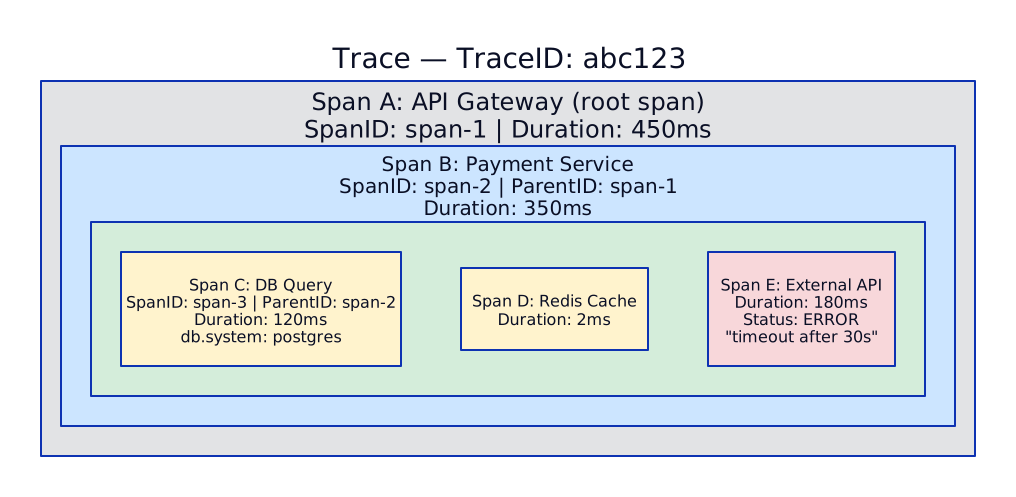
OTel Collector Pipeline
Section titled “OTel Collector Pipeline”Architecture
Section titled “Architecture”
Two-Tier Collector Deployment
Section titled “Two-Tier Collector Deployment”
OTel Collector Configuration
Section titled “OTel Collector Configuration”# Central Gateway Collector (Deployment)apiVersion: v1kind: ConfigMapmetadata: name: otel-gateway-config namespace: monitoringdata: config.yaml: | receivers: otlp: protocols: grpc: endpoint: 0.0.0.0:4317 http: endpoint: 0.0.0.0:4318
processors: # Prevent OOM memory_limiter: check_interval: 5s limit_mib: 1500 spike_limit_mib: 500
# Batch before export batch: send_batch_size: 10000 send_batch_max_size: 11000 timeout: 5s
# Add resource attributes resource: attributes: - key: environment value: production action: upsert
# Tail-based sampling (requires full trace) tail_sampling: decision_wait: 10s num_traces: 100000 policies: # Always sample errors - name: errors type: status_code status_code: status_codes: [ERROR] # Always sample slow requests (>2s) - name: slow-requests type: latency latency: threshold_ms: 2000 # Sample 10% of successful fast requests - name: probabilistic type: probabilistic probabilistic: sampling_percentage: 10 # Always sample specific services - name: critical-services type: string_attribute string_attribute: key: service.name values: [payment-api, auth-service]
# Filter out health check spans (noise) filter: error_mode: ignore traces: span: - 'attributes["http.target"] == "/health"' - 'attributes["http.target"] == "/ready"'
exporters: # Traces → Tempo otlp/tempo: endpoint: tempo-distributor.monitoring:4317 tls: insecure: true
# Span metrics → VictoriaMetrics # Generates RED metrics from traces automatically prometheusremotewrite: endpoint: http://vminsert.monitoring:8480/insert/0/prometheus/api/v1/write
connectors: # Generate metrics from spans (spanmetrics) spanmetrics: histogram: explicit: buckets: [5ms, 10ms, 25ms, 50ms, 100ms, 250ms, 500ms, 1s, 2.5s, 5s, 10s] dimensions: - name: http.method - name: http.status_code - name: service.name exemplars: enabled: true # Link metrics to traces
service: pipelines: traces: receivers: [otlp] processors: [memory_limiter, filter, tail_sampling, batch, resource] exporters: [otlp/tempo, spanmetrics]
# Span-derived metrics pipeline metrics: receivers: [spanmetrics] processors: [batch] exporters: [prometheusremotewrite]Grafana Tempo
Section titled “Grafana Tempo”Architecture
Section titled “Architecture”
Tempo Deployment
Section titled “Tempo Deployment”# Helm values for Tempo distributed mode# helm install tempo grafana/tempo-distributed -f values.yamltempo: storage: trace: backend: s3 s3: bucket: tempo-traces-prod endpoint: s3.us-east-1.amazonaws.com region: us-east-1
retention: 14d # 14-day trace retention
metrics_generator: enabled: true storage: path: /var/tempo/wal remote_write: - url: http://vminsert.monitoring:8480/insert/0/prometheus/api/v1/write processor: service_graphs: enabled: true dimensions: [service.namespace] span_metrics: enabled: true dimensions: [http.method, http.status_code] enable_target_info: true
distributor: replicas: 3 resources: requests: cpu: 500m memory: 512Mi
ingester: replicas: 3 resources: requests: cpu: 500m memory: 1Gi persistence: enabled: true size: 20Gi
querier: replicas: 2 resources: requests: cpu: 500m memory: 1Gi
queryFrontend: replicas: 2Sampling Strategies
Section titled “Sampling Strategies”Head-Based vs Tail-Based Sampling
Section titled “Head-Based vs Tail-Based Sampling”
Metric-Log-Trace Correlation
Section titled “Metric-Log-Trace Correlation”The Three Pillars Connected
Section titled “The Three Pillars Connected”
Setting Up Exemplars
Section titled “Setting Up Exemplars”# Prometheus scrape config to capture exemplars# vmagent or Prometheus configscrape_configs: - job_name: payment-api scrape_interval: 15s # Enable exemplar storage enable_http2: true metrics_path: /metrics static_configs: - targets: ["payment-api:8080"]// Application code: emit metrics with exemplars (Go example)import ( "github.com/prometheus/client_golang/prometheus" "go.opentelemetry.io/otel/trace")
var requestDuration = prometheus.NewHistogramVec( prometheus.HistogramOpts{ Name: "http_request_duration_seconds", Buckets: prometheus.DefBuckets, }, []string{"method", "path", "status"},)
func handleRequest(w http.ResponseWriter, r *http.Request) { start := time.Now() // ... handle request ...
duration := time.Since(start).Seconds() span := trace.SpanFromContext(r.Context())
// Record metric WITH exemplar (trace_id links metric to trace) requestDuration.WithLabelValues( r.Method, r.URL.Path, "200", ).(prometheus.ExemplarObserver).ObserveWithExemplar( duration, prometheus.Labels{"trace_id": span.SpanContext().TraceID().String()}, )}Grafana Data Source Configuration
Section titled “Grafana Data Source Configuration”# Grafana provisioning: link data sources for correlationapiVersion: 1datasources: - name: VictoriaMetrics type: prometheus url: http://vmselect.monitoring:8481/select/0/prometheus jsonData: exemplarTraceIdDestinations: - name: trace_id datasourceUid: tempo urlDisplayLabel: "View Trace"
- name: Loki type: loki url: http://loki-gateway.monitoring:3100 uid: loki jsonData: derivedFields: - name: TraceID matcherRegex: '"trace_id":"([a-f0-9]+)"' url: '$${__value.raw}' datasourceUid: tempo urlDisplayLabel: "View Trace"
- name: Tempo type: tempo url: http://tempo-query-frontend.monitoring:3200 uid: tempo jsonData: tracesToLogs: datasourceUid: loki filterByTraceID: true filterBySpanID: false mapTagNamesEnabled: true tags: - key: service.name value: app tracesToMetrics: datasourceUid: victoriametrics tags: - key: service.name value: service queries: - name: "Request Rate" query: "sum(rate(http_request_duration_seconds_count{$$__tags}[5m]))" - name: "Error Rate" query: "sum(rate(http_request_duration_seconds_count{$$__tags, status=~\"5..\"}[5m]))" serviceMap: datasourceUid: victoriametricsAuto-Instrumentation
Section titled “Auto-Instrumentation”# Zero-code instrumentation for Java apps# OTel Java agent auto-instruments: Spring Boot, gRPC,# JDBC, Jedis/Lettuce, Kafka, HTTP clients, etc.apiVersion: apps/v1kind: Deploymentmetadata: name: payment-apispec: template: spec: initContainers: - name: otel-agent image: ghcr.io/open-telemetry/opentelemetry-java-instrumentation:v2.11.0 command: ["cp", "/javaagent.jar", "/otel/javaagent.jar"] volumeMounts: - name: otel-agent mountPath: /otel containers: - name: api image: registry.example.com/payment-api:v2.1.0 env: - name: JAVA_TOOL_OPTIONS value: "-javaagent:/otel/javaagent.jar" - name: OTEL_SERVICE_NAME value: "payment-api" - name: OTEL_EXPORTER_OTLP_ENDPOINT value: "http://otel-collector.monitoring:4317" - name: OTEL_RESOURCE_ATTRIBUTES value: "service.namespace=payments,deployment.environment=production" - name: OTEL_TRACES_SAMPLER value: "parentbased_traceidratio" - name: OTEL_TRACES_SAMPLER_ARG value: "1.0" # Send all to collector (tail sampling there) volumeMounts: - name: otel-agent mountPath: /otel volumes: - name: otel-agent emptyDir: {}# Auto-instrumentation for Python (Flask/Django/FastAPI)# pip install opentelemetry-distro opentelemetry-exporter-otlp# opentelemetry-bootstrap -a install (auto-installs instrumentors)
# Run with auto-instrumentation:# opentelemetry-instrument \# --service_name payment-api \# --exporter_otlp_endpoint http://otel-collector:4317 \# python app.py
# Or configure programmatically:from opentelemetry import tracefrom opentelemetry.sdk.trace import TracerProviderfrom opentelemetry.sdk.trace.export import BatchSpanProcessorfrom opentelemetry.exporter.otlp.proto.grpc.trace_exporter import OTLPSpanExporterfrom opentelemetry.sdk.resources import Resource
resource = Resource.create({ "service.name": "payment-api", "service.namespace": "payments", "deployment.environment": "production",})
provider = TracerProvider(resource=resource)processor = BatchSpanProcessor( OTLPSpanExporter(endpoint="otel-collector.monitoring:4317"))provider.add_span_processor(processor)trace.set_tracer_provider(provider)
# Manual span for business logictracer = trace.get_tracer("payment-service")
@app.route("/api/payments", methods=["POST"])def process_payment(): with tracer.start_as_current_span("process-payment") as span: span.set_attribute("payment.amount", request.json["amount"]) span.set_attribute("payment.currency", "AED")
try: result = payment_gateway.charge(request.json) span.set_attribute("payment.status", "success") return jsonify(result) except TimeoutError as e: span.set_status(trace.StatusCode.ERROR, str(e)) span.record_exception(e) raiseTraceQL (Tempo Query Language)
Section titled “TraceQL (Tempo Query Language)”# Find traces by service name{resource.service.name = "payment-api"}
# Find error traces{status = error}
# Find slow spans (>2 seconds){duration > 2s}
# Find traces where payment-api called database and it was slow{resource.service.name = "payment-api" && span.db.system = "postgresql" && duration > 1s}
# Find traces with specific HTTP status{span.http.status_code >= 500}
# Structural queries: find traces where service A called service B{resource.service.name = "api-gateway"} >> {resource.service.name = "payment-api"}
# Find traces where any span has an error{status = error} | count() > 0
# Aggregate: P99 duration for payment service{resource.service.name = "payment-api"} | quantile_over_time(duration, 0.99)Interview Scenarios
Section titled “Interview Scenarios”Scenario 1: Design Distributed Tracing for Microservices
Section titled “Scenario 1: Design Distributed Tracing for Microservices”“You have 30 microservices. Design a tracing architecture.”
Strong Answer:
“I’d use OpenTelemetry end-to-end with a two-tier collector:
Instrumentation: Auto-instrument Java services with the OTel Java agent (zero code changes). For Python and Go services, use the OTel SDK with auto-instrumentors that hook into HTTP clients, gRPC, database drivers automatically.
Collection (two-tier):
-
Agent tier (DaemonSet): OTel Collector on every node. Receives OTLP from pods via gRPC (port 4317). Applies memory limiter, filters health check spans, adds cluster/namespace resource attributes. Forwards to gateway.
-
Gateway tier (Deployment, 3 replicas): Receives from all agents. Applies tail-based sampling — keep 100% of error and slow traces, 10% of normal. This is critical because we want every failed payment trace but don’t need every health check.
Storage: Grafana Tempo with S3 backend. 14-day retention (traces are for debugging, not compliance). Tempo’s metrics generator creates span metrics (RED) automatically — these go to VictoriaMetrics.
Correlation: Grafana links metrics (exemplars) → traces → logs. A spike in P99 latency → click exemplar → see the exact trace → click ‘View Logs’ → see the log lines for that request.
Cost: At 10% sampling of 30 services doing 5K RPS total, we store ~500 traces/sec. Tempo on S3 costs about $50-100/month for 14-day retention.”
Scenario 2: Sampling Decision
Section titled “Scenario 2: Sampling Decision”“Should we sample 100% of traces or use sampling? What’s the tradeoff?”
Strong Answer:
“Never 100% in production at scale. Here’s why and what to do:
The math: 30 services at 5K RPS, average 8 spans per trace = 40K spans/sec. At ~500 bytes per span, that’s 20 MB/sec = 1.7 TB/day. At S3 rates, storage alone is $1,200/month for 30 days. Tempo ingestion and querying resources scale linearly.
My sampling strategy (tail-based on the OTel Collector Gateway):
| Policy | Sample Rate | Rationale |
|---|---|---|
| Error traces | 100% | Always debug errors |
| Traces > 2s | 100% | Always debug slow requests |
| Payment service | 100% | Critical path, low volume |
| Auth failures | 100% | Security signal |
| Everything else | 10% | Enough for service graphs and baseline metrics |
Result: Instead of 1.7 TB/day, we store ~200 GB/day. Cost drops 85% while keeping 100% of actionable traces.
Key requirement: Tail-based sampling must happen at the gateway, not per-service. Per-service (head-based) sampling would miss errors that only manifest downstream — a request might succeed at Service A but fail at Service C.”
Scenario 3: Debugging with Traces
Section titled “Scenario 3: Debugging with Traces”“A customer reports their payment took 30 seconds instead of the usual 2 seconds. How do you investigate?”
Strong Answer:
“In Grafana, I follow this workflow:
-
Find the trace: If I have the payment ID, query Loki:
{app=\"payment-api\"} | json | payment_id=\"PAY-12345\". Extract thetrace_idfrom the log line. -
Open trace in Tempo: The trace shows 12 spans across 5 services. I see the waterfall view and immediately notice: the
external-payment-gatewayspan took 28 seconds (the root cause). -
Drill into the span: The span attributes show
http.status_code: 504,http.url: gateway.example.com/charge. The payment gateway timed out. -
Check if it’s systemic: TraceQL:
{resource.service.name=\"payment-api\" && span.http.url =~ \"gateway.example.com.*\" && duration > 5s}over the last hour. If I see many, the external gateway has a problem. -
Check metrics: From the trace view, click ‘View metrics’ — Grafana shows the span metrics (P99 latency for external-payment-gateway calls). If the P99 jumped from 1s to 25s at 10:15 AM, that confirms the timeline.
-
Resolution: If it’s the external gateway, we need circuit breaker configuration (Istio retry + timeout policies) to fail fast at 5s instead of waiting 30s. Also add a fallback path.”
Scenario 4: OTel vs Vendor-Specific APM
Section titled “Scenario 4: OTel vs Vendor-Specific APM”“Why use OpenTelemetry instead of Datadog APM or New Relic?”
Strong Answer:
“Vendor lock-in and cost are the two big reasons:
-
Vendor neutrality: With OTel, we instrument once and can export to any backend — Tempo today, Jaeger tomorrow, Datadog if business requires it. With Datadog’s dd-trace library, you’re locked to Datadog.
-
Cost: Datadog APM charges ~$31/host/month + $0.10 per analyzed span beyond included volume. For 500 hosts doing 50K spans/sec, that’s $18K/month for APM alone. Tempo with S3 backend costs $200-500/month for the same data.
-
Standards compliance: OTel is a CNCF graduated project — the industry standard. SDKs exist for every major language. Most frameworks (Spring Boot, Django, Express) have auto-instrumentors.
-
Flexibility: OTel Collector lets us process telemetry in the pipeline — tail sampling, attribute enrichment, filtering — before it reaches the backend. Vendor agents don’t offer this level of control.
When I’d still use Datadog/New Relic: If the org is small (< 50 engineers), doesn’t have SRE capacity to operate open-source tooling, and values a single-pane-of-glass product. The operational overhead of running Tempo + Loki + VictoriaMetrics is non-trivial — you need at least one dedicated SRE.”
Scenario 5: Context Propagation
Section titled “Scenario 5: Context Propagation”“How does a trace ID travel across microservices? What if one service uses gRPC and another uses HTTP?”
Strong Answer:
“Context propagation is the mechanism that carries the trace context (trace ID, span ID, sampling flag) across service boundaries. OTel handles this transparently:
HTTP: The W3C Trace Context standard defines two headers:
traceparent: 00-<trace-id>-<parent-span-id>-<trace-flags>tracestate: vendor=value(optional, vendor-specific)
gRPC: Same context propagated via gRPC metadata (equivalent to HTTP headers). OTel auto-instruments gRPC clients and servers to inject/extract these.
Message queues (Kafka/SQS/Pub/Sub): OTel injects context into message attributes/headers. The consumer extracts it and creates a new span linked to the producer’s span.
Cross-language: This is the beauty of OTel — a Java producer writes the traceparent header, a Python consumer reads it, and the trace is stitched together seamlessly. The trace ID stays the same across all services regardless of language.
Common pitfall: Custom HTTP clients or message wrappers that don’t propagate headers. The fix is ensuring OTel auto-instrumentation covers the HTTP client library in use, or manually injecting/extracting context.”
Scenario 6: Service Graph and Dependency Mapping
Section titled “Scenario 6: Service Graph and Dependency Mapping”“How do you automatically discover service dependencies without manual documentation?”
Strong Answer:
“Tempo’s metrics generator creates service graphs automatically from trace data:
-
How it works: Tempo analyzes spans and identifies caller → callee relationships. If Service A has a span calling Service B (client span in A, server span in B with the same trace ID), Tempo records that edge.
-
Grafana Service Graph: A visual graph showing all services and their connections — generated automatically from traces. Each edge shows request rate, error rate, and latency.
-
Configuration: Enable
metrics_generator.processor.service_graphsin Tempo config. The generated metrics go to VictoriaMetrics via remote write. Grafana’s Node Graph panel renders them. -
What it reveals: You can immediately see that the payment service depends on 3 downstream services, the auth service is called by 15 services (potential bottleneck), and there’s an unexpected dependency between the notification service and the analytics service.
-
Beyond discovery: Use the service graph to plan blast radius of deployments, identify critical paths, and detect circular dependencies. It replaces manually maintained architecture diagrams that are always outdated.”
References
Section titled “References”- AWS X-Ray Developer Guide — distributed tracing, service maps, and trace analysis
- AWS Distro for OpenTelemetry — AWS-supported OTel distribution for metrics and traces
- Google Cloud Trace Documentation — distributed tracing for applications on GCP
- Cloud Trace with OpenTelemetry — using OTel SDK to export traces to Cloud Trace
Tools & Frameworks
Section titled “Tools & Frameworks”- OpenTelemetry Documentation — CNCF standard for instrumentation, collection, and export of telemetry data
- OTel Collector Documentation — receivers, processors, exporters, and deployment patterns
- Grafana Tempo Documentation — distributed tracing backend with object storage and TraceQL
- W3C Trace Context Specification — standard for distributed trace context propagation
- OTel Java Auto-Instrumentation — zero-code instrumentation for Java applications
- OTel Python Auto-Instrumentation — automatic instrumentation for Python frameworks