Metrics & Monitoring
Where This Fits
Section titled “Where This Fits”
The central infra team operates the metrics platform. Tenant teams get Grafana dashboards scoped to their namespaces, and SLO-based alerting out of the box.
Metrics Collection Architecture
Section titled “Metrics Collection Architecture”
Central Platform Design
Section titled “Central Platform Design”
Prometheus Fundamentals
Section titled “Prometheus Fundamentals”How Prometheus Works
Section titled “How Prometheus Works”
Key Metric Types
Section titled “Key Metric Types”| Type | Description | Example |
|---|---|---|
| Counter | Monotonically increasing | http_requests_total |
| Gauge | Can go up or down | node_memory_available_bytes |
| Histogram | Observations in buckets | http_request_duration_seconds |
| Summary | Pre-calculated quantiles | go_gc_duration_seconds |
Essential PromQL
Section titled “Essential PromQL”# Request rate per second (5-minute window)rate(http_requests_total{job="api"}[5m])
# P99 latency from histogramhistogram_quantile(0.99, rate(http_request_duration_seconds_bucket{job="api"}[5m]))
# Error rate (percentage)sum(rate(http_requests_total{status=~"5.."}[5m]))/sum(rate(http_requests_total[5m])) * 100
# CPU usage per podsum(rate(container_cpu_usage_seconds_total{namespace="payments"}[5m])) by (pod)
# Memory usage percentage per node(1 - node_memory_MemAvailable_bytes / node_memory_MemTotal_bytes) * 100
# Top 5 pods by memory usagetopk(5, container_memory_working_set_bytes{namespace="production"})
# Predict disk full in 4 hourspredict_linear(node_filesystem_avail_bytes{mountpoint="/"}[1h], 4*3600) < 0VictoriaMetrics Deep Dive
Section titled “VictoriaMetrics Deep Dive”Why VictoriaMetrics over Prometheus
Section titled “Why VictoriaMetrics over Prometheus”| Feature | Prometheus | VictoriaMetrics |
|---|---|---|
| Memory usage | High (all in-memory) | 7x less (efficient compression) |
| Storage | Local TSDB only | Local + S3/GCS (built-in) |
| HA/Clustering | Needs Thanos/Mimir | Native cluster mode |
| Ingestion rate | 500K samples/s | 10M+ samples/s |
| Compression | ~1.3 bytes/sample | ~0.4 bytes/sample |
| Query language | PromQL | MetricsQL (PromQL superset) |
| Remote write | Supported | Optimized receiver |
| Downsampling | Manual | Automatic (Enterprise) |
VictoriaMetrics Cluster Architecture
Section titled “VictoriaMetrics Cluster Architecture”
vmagent Configuration
Section titled “vmagent Configuration”# vmagent DaemonSet per clusterapiVersion: apps/v1kind: DaemonSetmetadata: name: vmagent namespace: monitoringspec: selector: matchLabels: app: vmagent template: metadata: labels: app: vmagent spec: serviceAccountName: vmagent containers: - name: vmagent image: victoriametrics/vmagent:v1.106.1 args: - -promscrape.config=/config/scrape.yml - -remoteWrite.url=https://vminsert.monitoring.example.com/insert/0/prometheus/api/v1/write - -remoteWrite.tmpDataPath=/vmagent-remotewrite-data - -remoteWrite.maxDiskUsagePerURL=1GB - -remoteWrite.queues=4 - -remoteWrite.showURL=false # Stream aggregation: reduce cardinality before sending - -remoteWrite.streamAggr.config=/config/aggregation.yml - -promscrape.suppressDuplicateScrapeTargetErrors resources: requests: cpu: 200m memory: 256Mi limits: memory: 512Mi volumeMounts: - name: config mountPath: /config - name: buffer mountPath: /vmagent-remotewrite-data volumes: - name: config configMap: name: vmagent-config - name: buffer emptyDir: sizeLimit: 2Gi# vmagent scrape config (scrape.yml)global: scrape_interval: 30s external_labels: cluster: "prod-us-east-1" environment: "production"
scrape_configs: # Kubernetes pod auto-discovery - job_name: kubernetes-pods kubernetes_sd_configs: - role: pod relabel_configs: - source_labels: [__meta_kubernetes_pod_annotation_prometheus_io_scrape] action: keep regex: "true" - source_labels: [__meta_kubernetes_pod_annotation_prometheus_io_path] action: replace target_label: __metrics_path__ regex: (.+) - source_labels: [__meta_kubernetes_pod_annotation_prometheus_io_port, __meta_kubernetes_pod_ip] action: replace target_label: __address__ regex: (.+);(.+) replacement: $2:$1 - source_labels: [__meta_kubernetes_namespace] target_label: namespace - source_labels: [__meta_kubernetes_pod_name] target_label: pod
# kubelet / cAdvisor metrics - job_name: kubelet scheme: https tls_config: insecure_skip_verify: true bearer_token_file: /var/run/secrets/kubernetes.io/serviceaccount/token kubernetes_sd_configs: - role: node relabel_configs: - target_label: __address__ replacement: kubernetes.default.svc:443 - source_labels: [__meta_kubernetes_node_name] target_label: __metrics_path__ replacement: /api/v1/nodes/$1/proxy/metrics/cadvisor
# kube-state-metrics - job_name: kube-state-metrics static_configs: - targets: ["kube-state-metrics.monitoring:8080"]
# node-exporter - job_name: node-exporter kubernetes_sd_configs: - role: node relabel_configs: - source_labels: [__address__] regex: (.+):(.+) target_label: __address__ replacement: $1:9100Stream Aggregation (Reduce Cardinality)
Section titled “Stream Aggregation (Reduce Cardinality)”# aggregation.yml — aggregate before remote_write# Reduces ingestion volume by 60-80%- match: '{__name__=~"container_cpu_usage_seconds_total"}' interval: 1m outputs: [total] by: [namespace, pod, container]
- match: '{__name__=~"container_memory_working_set_bytes"}' interval: 1m outputs: [last] by: [namespace, pod, container]
- match: '{__name__=~"http_request_duration_seconds_bucket"}' interval: 1m outputs: [total] by: [namespace, service, le, method, status_code]VictoriaMetrics Cluster Deployment (Helm)
Section titled “VictoriaMetrics Cluster Deployment (Helm)”# Helm values for victoria-metrics-cluster chart# helm repo add vm https://victoriametrics.github.io/helm-charts/# helm install vmcluster vm/victoria-metrics-cluster -f values.yaml
vminsert: replicaCount: 3 resources: requests: cpu: 500m memory: 512Mi limits: memory: 1Gi extraArgs: maxLabelsPerTimeseries: "40" replicationFactor: "2"
vmstorage: replicaCount: 3 storageDataPath: /vmstorage-data persistentVolume: enabled: true size: 100Gi storageClass: gp3-encrypted retentionPeriod: "90d" resources: requests: cpu: "1" memory: 2Gi limits: memory: 4Gi extraArgs: dedup.minScrapeInterval: "30s" search.maxUniqueTimeseries: "1000000"
vmselect: replicaCount: 3 resources: requests: cpu: 500m memory: 1Gi limits: memory: 2Gi extraArgs: search.maxQueryDuration: "120s" search.maxConcurrentRequests: "16"
# Cache configuration cacheMountPath: /select-cache persistentVolume: enabled: true size: 10GiAlternative: Grafana Mimir
Section titled “Alternative: Grafana Mimir”
When to Choose Mimir vs VictoriaMetrics
Section titled “When to Choose Mimir vs VictoriaMetrics”| Criteria | VictoriaMetrics | Grafana Mimir |
|---|---|---|
| Ease of ops | Simpler (3 components) | More components (6+) |
| Storage | Local disk (fast) | S3/GCS (infinite, cheaper) |
| Memory | Very low | Higher (ingesters cache) |
| Grafana integration | Standard Prometheus datasource | Native (Grafana-native histograms, exemplars) |
| Multi-tenancy | Via labels + Grafana org | Native tenant isolation |
| License | Open-source (Apache 2.0) | AGPLv3 |
| Support | Community + Enterprise | Grafana Cloud + Enterprise |
| Best for | <10M active series | >10M active series |
Ingesting Cloud Provider Metrics into Grafana
Section titled “Ingesting Cloud Provider Metrics into Grafana”CloudWatch Metrics into Grafana
Section titled “CloudWatch Metrics into Grafana”
Option 1: Grafana CloudWatch Data Source (simple, real-time)
- Direct API calls to CloudWatch
- No additional infrastructure
- Cost: CloudWatch API charges ($0.01 per 1,000 GetMetricData requests)
- Best for: dashboards with few panels, ad-hoc queries
Option 2: YACE Exporter (production, PromQL)
# YACE (yet-another-cloudwatch-exporter) configapiVersion: v1kind: ConfigMapmetadata:  name: yace-config  namespace: monitoringdata:  config.yml: |    discovery:      jobs:        - type: AWS/RDS          regions: [us-east-1]          period: 300          length: 300          metrics:            - name: CPUUtilization              statistics: [Average, Maximum]            - name: DatabaseConnections              statistics: [Sum]            - name: FreeableMemory              statistics: [Average]            - name: ReadIOPS              statistics: [Average]
        - type: AWS/ApplicationELB          regions: [us-east-1]          period: 60          length: 300          metrics:            - name: RequestCount              statistics: [Sum]            - name: TargetResponseTime              statistics: [Average, p99]            - name: HTTPCode_ELB_5XX_Count              statistics: [Sum]
Option 1: Grafana Cloud Monitoring Data Source
- Direct MQL or PromQL queries against Cloud Monitoring API
- No extra infrastructure
- Supports Monitoring Query Language (MQL) for GCP-specific metrics
Option 2: GMP (Google-Managed Prometheus)
- GKE clusters auto-collect metrics into Cloud Monitoring
- Query via PromQL in Grafana (Cloud Monitoring datasource with PromQL mode)
- No Prometheus server to manage in GKE Autopilot clusters
SLO-Based Alerting
Section titled “SLO-Based Alerting”Defining SLOs
Section titled “Defining SLOs”
SLO Recording Rules
Section titled “SLO Recording Rules”# Prometheus / vmalert recording rules for SLOsapiVersion: operator.victoriametrics.com/v1beta1kind: VMRulemetadata: name: payment-api-slos namespace: monitoringspec: groups: - name: payment-api-slo interval: 30s rules: # SLI: availability (non-5xx responses) - record: slo:payment_api:availability:rate5m expr: | sum(rate(http_requests_total{job="payment-api", status!~"5.."}[5m])) / sum(rate(http_requests_total{job="payment-api"}[5m]))
# SLI: latency (requests under 300ms) - record: slo:payment_api:latency:rate5m expr: | sum(rate(http_request_duration_seconds_bucket{job="payment-api", le="0.3"}[5m])) / sum(rate(http_request_duration_seconds_count{job="payment-api"}[5m]))
# Error budget remaining (30-day window) - record: slo:payment_api:availability:error_budget_remaining expr: | 1 - ( (1 - slo:payment_api:availability:rate5m) / (1 - 0.999) )
# Multi-window multi-burn-rate alerts # Fast burn: 14.4x error rate over 1h (pages immediately) - alert: PaymentAPIHighErrorBudgetBurn expr: | ( 1 - slo:payment_api:availability:rate5m < 0.999 - (14.4 * (1 - 0.999)) ) and ( 1 - sum(rate(http_requests_total{job="payment-api", status!~"5.."}[1h])) / sum(rate(http_requests_total{job="payment-api"}[1h])) > 14.4 * (1 - 0.999) ) for: 2m labels: severity: critical team: payments annotations: summary: "Payment API burning error budget 14.4x faster than allowed" dashboard: "https://grafana.example.com/d/payment-slo" runbook: "https://runbooks.example.com/payment-api-errors"
# Slow burn: 1x error rate over 3d (ticket) - alert: PaymentAPISlowErrorBudgetBurn expr: | ( 1 - sum(rate(http_requests_total{job="payment-api", status!~"5.."}[3d])) / sum(rate(http_requests_total{job="payment-api"}[3d])) > 1 * (1 - 0.999) ) for: 1h labels: severity: warning team: payments annotations: summary: "Payment API slowly burning error budget — investigate within 24h"Grafana SLO Dashboard Design
Section titled “Grafana SLO Dashboard Design”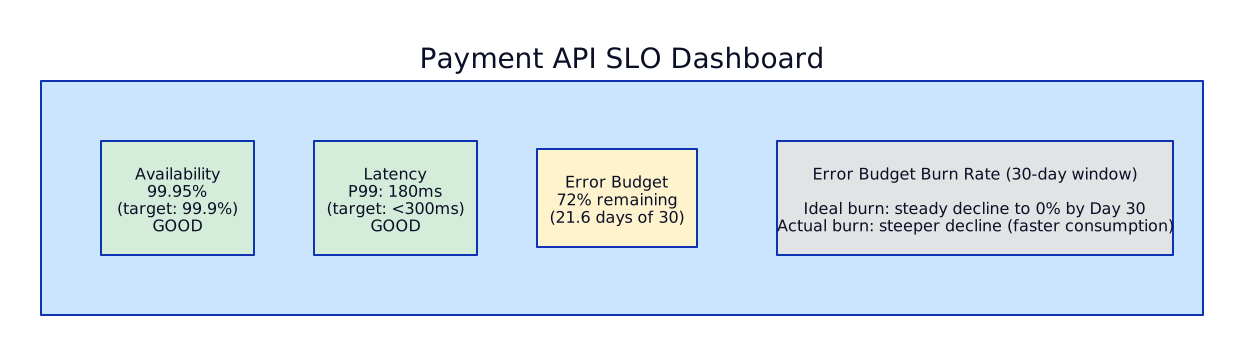
Essential Grafana Dashboards
Section titled “Essential Grafana Dashboards”What the Central Platform Team Provides
Section titled “What the Central Platform Team Provides”| Dashboard | Audience | Key Panels |
|---|---|---|
| Cluster Overview | Platform team | Node count, pod capacity, CPU/memory utilization, pod scheduling rate |
| Namespace Usage | Tenant teams | CPU/memory requests vs limits vs actual, pod count, PVC usage |
| SLO Overview | Everyone | SLI values, error budget remaining, burn rate for all services |
| Node Health | Platform team | Node conditions, disk pressure, memory pressure, PID pressure |
| Ingress Traffic | Platform team | RPS, latency percentiles, error rate per ingress |
| Cost Attribution | FinOps | CPU/memory cost per namespace (via Kubecost metrics) |
Alertmanager Configuration
Section titled “Alertmanager Configuration”# Alertmanager config for enterprise routingapiVersion: v1kind: Secretmetadata: name: alertmanager-config namespace: monitoringstringData: alertmanager.yml: | global: resolve_timeout: 5m slack_api_url: "https://hooks.slack.com/services/xxx" pagerduty_url: "https://events.pagerduty.com/v2/enqueue"
route: receiver: default-slack group_by: [alertname, cluster, namespace] group_wait: 30s group_interval: 5m repeat_interval: 4h
routes: # Critical alerts → PagerDuty (pages on-call) - match: severity: critical receiver: pagerduty-critical group_wait: 10s repeat_interval: 1h
# Warning alerts → Slack channel - match: severity: warning receiver: team-slack repeat_interval: 12h
# Tenant-specific routing by namespace label - match_re: namespace: "payments.*" receiver: payments-team-slack - match_re: namespace: "lending.*" receiver: lending-team-slack
receivers: - name: default-slack slack_configs: - channel: "#alerts-platform" title: '{{ .GroupLabels.alertname }}' text: >- {{ range .Alerts }} *Cluster:* {{ .Labels.cluster }} *Namespace:* {{ .Labels.namespace }} *Description:* {{ .Annotations.summary }} {{ end }}
- name: pagerduty-critical pagerduty_configs: - service_key: "<pagerduty-integration-key>" severity: critical description: '{{ .GroupLabels.alertname }}: {{ .CommonAnnotations.summary }}'
- name: payments-team-slack slack_configs: - channel: "#alerts-payments"
- name: lending-team-slack slack_configs: - channel: "#alerts-lending"
inhibit_rules: # Don't fire warning if critical is already firing - source_match: severity: critical target_match: severity: warning equal: [alertname, cluster, namespace]Cloud-Native Monitoring — CloudWatch & GCP Cloud Monitoring
Section titled “Cloud-Native Monitoring — CloudWatch & GCP Cloud Monitoring”Every cloud provider includes a built-in monitoring service that automatically collects metrics from managed services. CloudWatch captures CPU utilization from EC2, connection counts from RDS, invocation durations from Lambda, and request latency from ALB — all without any agent installation or configuration. GCP Cloud Monitoring does the same for Compute Engine, Cloud SQL, Cloud Functions, and Cloud Load Balancing. These cloud-native monitoring services are the first line of visibility into your infrastructure and the only source for metrics from fully managed services that do not expose Prometheus-compatible endpoints.
The question enterprise platform teams face is not whether to use cloud-native monitoring — you must, because managed services like RDS and Lambda do not expose /metrics endpoints for Prometheus to scrape. The question is whether cloud-native monitoring is sufficient as your sole monitoring platform or whether you need open-source tooling (Prometheus, VictoriaMetrics, Loki, Grafana) alongside it. For Kubernetes-heavy workloads at scale, the answer is almost always “use both.” Cloud-native monitoring for managed services, Prometheus/VictoriaMetrics for Kubernetes workloads and application metrics, and Grafana as the unified dashboard layer that queries both.
The cost implications of this decision are significant. CloudWatch charges per custom metric, per API call (GetMetricData, PutMetricData), per alarm, and per dashboard widget query. At enterprise scale with hundreds of services and thousands of metrics, CloudWatch costs can exceed $50,000/month. Open-source alternatives running on your own compute have predictable, linear costs tied to compute and storage — not API call volume. Understanding this cost model is essential for any cloud architect responsible for an observability platform budget.
Amazon CloudWatch
Section titled “Amazon CloudWatch”Metrics:
CloudWatch automatically collects metrics for all AWS services at no additional cost for basic monitoring (5-minute intervals for EC2, 1-minute for most other services). Detailed monitoring (1-minute intervals for EC2) and high-resolution metrics (1-second intervals for custom metrics) are available at additional cost. Custom metrics are published via the PutMetricData API or the CloudWatch Agent installed on EC2/ECS/EKS instances.
CloudWatch Metric Math allows you to create derived metrics from existing ones using arithmetic expressions. For example, calculating error rate as errors / total_requests * 100 without creating a new custom metric. Anomaly detection applies machine learning to create dynamic thresholds based on historical patterns — far more useful than static thresholds for metrics with daily or weekly seasonality.
CloudWatch Metrics Architecture==================================
Automatic Collection (zero config):  ├── EC2: CPUUtilization, NetworkIn/Out, DiskReadOps, StatusCheckFailed  ├── RDS: CPUUtilization, DatabaseConnections, FreeableMemory, ReadIOPS, WriteIOPS  ├── ALB: RequestCount, TargetResponseTime, HTTPCode_ELB_5XX, ActiveConnectionCount  ├── Lambda: Invocations, Duration, Errors, Throttles, ConcurrentExecutions  ├── SQS: ApproximateNumberOfMessagesVisible, ApproximateAgeOfOldestMessage  ├── DynamoDB: ConsumedReadCapacityUnits, ThrottledRequests  └── EKS: via Container Insights (pod, node, cluster metrics)
Custom Metrics (you publish):  ├── Application metrics: request counts, business KPIs, queue depths  ├── CloudWatch Agent: memory utilization, disk usage (not collected by default!)  ├── Embedded Metric Format (EMF): publish metrics from Lambda via structured logs  └── PutMetricData API: programmatic metric publication
High-Resolution Metrics:  ├── Standard: 1-minute granularity (most services)  ├── Detailed: 1-minute for EC2 (costs extra)  ├── High-resolution: 1-second granularity (custom metrics only)  └── Use case: detecting sub-minute spikes in latency or error rates
Metric Math:  ├── METRICS("m1") / METRICS("m2") * 100   → error rate percentage  ├── ANOMALY_DETECTION_BAND(m1, 2)          → ML-based dynamic threshold  ├── FILL(m1, 0)                            → replace missing data points  └── SEARCH(' {AWS/ApplicationELB} MetricName="RequestCount" ', 'Sum', 300)      → search across all ALBs for request count
Alarms:
CloudWatch alarms evaluate a metric against a threshold and trigger actions when the threshold is breached. Simple alarms monitor a single metric. Composite alarms combine multiple alarms with AND/OR logic, which dramatically reduces noise — instead of getting paged for “CPU high” and “memory high” and “disk high” separately, a composite alarm fires only when all three are true simultaneously, indicating a genuine capacity problem rather than a transient spike.
# Simple alarm: RDS CPU > 80% for 5 minutesresource "aws_cloudwatch_metric_alarm" "rds_cpu_high" {  alarm_name          = "rds-cpu-high"  comparison_operator = "GreaterThanThreshold"  evaluation_periods  = 5        # 5 consecutive periods  metric_name         = "CPUUtilization"  namespace           = "AWS/RDS"  period              = 60       # 1-minute intervals  statistic           = "Average"  threshold           = 80  alarm_description   = "RDS CPU above 80% for 5 minutes"
  alarm_actions = [aws_sns_topic.pagerduty.arn]  ok_actions    = [aws_sns_topic.pagerduty.arn]  # Notify on recovery too
  dimensions = {    DBClusterIdentifier = aws_rds_cluster.main.cluster_identifier  }}
# Anomaly detection alarm: ALB latency anomalyresource "aws_cloudwatch_metric_alarm" "alb_latency_anomaly" {  alarm_name          = "alb-latency-anomaly"  comparison_operator = "GreaterThanUpperThreshold"  evaluation_periods  = 3  threshold_metric_id = "ad1"  alarm_description   = "ALB latency exceeds ML-predicted band"
  alarm_actions = [aws_sns_topic.pagerduty.arn]
  metric_query {    id          = "m1"    return_data = true
    metric {      metric_name = "TargetResponseTime"      namespace   = "AWS/ApplicationELB"      period      = 300      stat        = "p99"      dimensions = {        LoadBalancer = aws_lb.main.arn_suffix      }    }  }
  metric_query {    id          = "ad1"    expression  = "ANOMALY_DETECTION_BAND(m1, 2)"  # 2 standard deviations    label       = "Latency Anomaly Band"    return_data = true  }}
# Composite alarm: only page when BOTH cpu AND memory are criticalresource "aws_cloudwatch_composite_alarm" "rds_capacity_critical" {  alarm_name = "rds-capacity-critical"
  alarm_rule = "ALARM(${aws_cloudwatch_metric_alarm.rds_cpu_high.alarm_name}) AND ALARM(${aws_cloudwatch_metric_alarm.rds_memory_low.alarm_name})"
  alarm_actions = [aws_sns_topic.pagerduty.arn]  alarm_description = "RDS capacity critical: both CPU and memory stressed"}
Synthetics:
CloudWatch Synthetics runs canary scripts on a schedule to monitor endpoints, APIs, and multi-step workflows. Canaries are Lambda-based and can simulate user interactions (login, checkout, form submission). They detect degradation before real users notice — if your canary’s latency increases from 500ms to 2000ms, you have early warning of a problem.
# CloudWatch Synthetics canary — monitor payment API healthresource "aws_synthetics_canary" "payment_api_health" {  name                 = "payment-api-health"  artifact_s3_location = "s3://${aws_s3_bucket.canary_artifacts.id}/canary/"  execution_role_arn   = aws_iam_role.canary.arn  runtime_version      = "syn-nodejs-puppeteer-7.0"  handler              = "apiCanary.handler"
  schedule {    expression = "rate(5 minutes)"  # Run every 5 minutes  }
  run_config {    timeout_in_seconds = 60    memory_in_mb       = 960    active_tracing     = true  # X-Ray tracing for canary runs  }
  zip_file = data.archive_file.canary_script.output_path
  # Alert if canary fails 2 consecutive runs  success_retention_period = 31  failure_retention_period = 31}
Contributor Insights:
Identifies the top contributors to a metric pattern. For example: “which 10 IP addresses are making the most requests?” or “which 10 API endpoints have the highest latency?” This is invaluable during incidents — quickly identifying whether the problem is global or concentrated on a specific resource, customer, or endpoint.
Application Insights:
Automated detection and visualization of application issues for .NET, SQL Server, Java, and IIS workloads. Sets up CloudWatch alarms and dashboards automatically based on detected application components. Most useful for lift-and-shift Windows workloads where manual instrumentation is impractical.
GCP Cloud Monitoring
Section titled “GCP Cloud Monitoring”Metrics Explorer:
Cloud Monitoring automatically collects metrics from all GCP services. The Metrics Explorer provides a visual query builder for browsing metrics, creating charts, and setting up alerts. For complex queries, MQL (Monitoring Query Language) offers programmatic access to metrics with filtering, aggregation, and alignment operations. MQL is functionally equivalent to PromQL but with GCP-specific syntax and native access to all GCP resource metadata.
GCP Cloud Monitoring Architecture====================================
Automatic Collection (zero config):  ├── Compute Engine: CPU utilization, disk I/O, network traffic  ├── Cloud SQL: CPU, connections, replication lag, disk usage  ├── Cloud Load Balancing: request count, latency, error rate  ├── Cloud Functions: execution count, duration, errors, memory usage  ├── Pub/Sub: message count, publish latency, subscription backlog  ├── GKE: pod/node/container metrics (via GKE Monitoring)  └── Cloud Run: request count, latency, container instance count
Custom Metrics:  ├── Cloud Monitoring API: write custom metrics programmatically  ├── OpenTelemetry: export metrics to Cloud Monitoring  └── Google Managed Prometheus (GMP): PromQL-compatible collection on GKE
MQL (Monitoring Query Language):  ├── fetch gce_instance::compute.googleapis.com/instance/cpu/utilization  │     | filter zone == 'us-central1-a'  │     | align mean_aligner(5m)  │     | group_by [instance_name], mean(val())  ├── More expressive than Metrics Explorer UI  └── Required for complex alerting conditions
Alerting Policies:
Cloud Monitoring alerting supports threshold-based, absence-based, and MQL-based conditions. Notification channels include email, Slack, PagerDuty, SMS, webhooks, and Pub/Sub (for custom automation). Alerting policies can be scoped to specific resources via labels, projects, or resource types.
# Terraform: GCP Cloud Monitoring Alert — Cloud SQL CPUresource "google_monitoring_alert_policy" "cloudsql_cpu" {  display_name = "Cloud SQL CPU > 80%"  combiner     = "OR"
  conditions {    display_name = "CPU Utilization"
    condition_threshold {      filter          = "resource.type = \"cloudsql_database\" AND metric.type = \"cloudsql.googleapis.com/database/cpu/utilization\""      comparison      = "COMPARISON_GT"      threshold_value = 0.8      duration        = "300s"  # Must be above threshold for 5 minutes
      trigger {        count = 1      }
      aggregations {        alignment_period   = "60s"        per_series_aligner = "ALIGN_MEAN"      }    }  }
  notification_channels = [    google_monitoring_notification_channel.pagerduty.id  ]
  alert_strategy {    auto_close = "604800s"  # Auto-close after 7 days if not resolved  }}
# Notification channel: PagerDutyresource "google_monitoring_notification_channel" "pagerduty" {  display_name = "PagerDuty - Platform Team"  type         = "pagerduty"
  labels = {    service_key = var.pagerduty_service_key  }}
Uptime Checks:
Equivalent to CloudWatch Synthetics. HTTP(S), TCP, and ICMP checks from Google’s global probing locations. Monitors endpoint availability from multiple geographic regions — if your API is reachable from Iowa but not from Tokyo, uptime checks detect it.
# Terraform: GCP Uptime Checkresource "google_monitoring_uptime_check_config" "payment_api" {  display_name = "Payment API Health Check"  timeout      = "10s"  period       = "60s"  # Check every 1 minute
  http_check {    path         = "/health"    port         = 443    use_ssl      = true    validate_ssl = true  }
  monitored_resource {    type = "uptime_url"    labels = {      project_id = var.project_id      host       = "api.payments.example.com"    }  }
  # Check from multiple regions  selected_regions = ["USA", "EUROPE", "ASIA_PACIFIC"]}
Cloud Logging Integration:
Cloud Logging provides log-based metrics — create numeric metrics from log patterns without changing application code. For example, count HTTP 500 errors by extracting the status code from access logs. Log sinks route logs to BigQuery (for analytics), Pub/Sub (for streaming), or Cloud Storage (for archival). Exclusion filters reduce cost by dropping debug-level logs before they are stored.
Cloud Logging Cost Optimization==================================
Log Sinks (route logs to cheaper storage):  ├── BigQuery: for log analytics (query with SQL)  ├── Cloud Storage: for long-term archival (cheapest)  ├── Pub/Sub: for streaming to external systems  └── Splunk/Datadog: via Pub/Sub integration
Exclusion Filters (reduce ingestion cost):  ├── Exclude debug/trace logs: resource.type="k8s_container" AND severity="DEBUG"  ├── Exclude health check logs: httpRequest.requestUrl="/health"  ├── Exclude noisy GKE system logs: resource.type="k8s_container" AND  │     resource.labels.namespace_name="kube-system"  └── Impact: typically reduces log volume by 40-60%
Log-Based Metrics:  ├── Count 5xx errors: metric from log filter 'httpRequest.status >= 500'  ├── Extract latency: distribution metric from log field 'httpRequest.latency'  └── No application code changes needed
When to Use Cloud-Native vs Open-Source Monitoring
Section titled “When to Use Cloud-Native vs Open-Source Monitoring”| Criterion | Cloud-Native (CloudWatch / GCP Monitoring) | Open-Source (Prometheus / VictoriaMetrics / Loki) |
|---|---|---|
| Setup | Zero — built-in for all managed services | Deploy, configure, and maintain the stack |
| AWS/GCP service metrics | Automatic (RDS, Lambda, ALB, Cloud SQL) | Requires CloudWatch Exporter or GCP exporter |
| Kubernetes metrics | Container Insights / GKE Monitoring (limited depth) | Prometheus native: kube-state-metrics, node-exporter, cAdvisor |
| Application metrics | PutMetricData API (per-metric cost) | Prometheus scrapes /metrics endpoints (free) |
| Query language | CloudWatch Insights / MQL | PromQL / LogQL (richer, larger community, more tutorials) |
| Cost at scale | Expensive: per-metric, per-API call, per-alarm | Predictable: compute + storage only |
| Cost example (50 clusters) | $50-100K/month (custom metrics + API calls) | $10-20K/month (VM compute + EBS storage) |
| Portability | Locked to one cloud provider | Multi-cloud, any K8s cluster, on-prem |
| Dashboards | CloudWatch Dashboards / GCP Dashboards | Grafana (richer, 5000+ community dashboards) |
| Long-term storage | CloudWatch: 15 months (expensive) | Thanos/Mimir/VictoriaMetrics on object storage (cheap, unlimited) |
| Alerting | CloudWatch Alarms / GCP Alerting Policies | Alertmanager (more flexible routing, inhibition, grouping) |
| Community | AWS/GCP documentation | Massive open-source community, CNCF ecosystem |
Enterprise Pattern: Use Both Together
Section titled “Enterprise Pattern: Use Both Together”The optimal architecture for most enterprises combines cloud-native monitoring for managed services with open-source tooling for Kubernetes workloads, unified through Grafana as the single dashboard layer. This gives you the best of both worlds: automatic metrics collection from managed services (which cannot expose Prometheus endpoints) and the rich ecosystem of Prometheus/Grafana for everything else.

Interview Scenarios for Cloud-Native Monitoring
Section titled “Interview Scenarios for Cloud-Native Monitoring”“Why would you choose Prometheus over CloudWatch for a multi-cluster EKS setup?”
“For a multi-cluster EKS setup, Prometheus (or VictoriaMetrics) is the clear choice for Kubernetes workload monitoring, while CloudWatch remains essential for managed services. Here’s why:
PromQL is more powerful. CloudWatch Metrics Insights is improving but still lacks the expressiveness of PromQL for complex calculations — percentile aggregations across dimensions, ratio computations, prediction functions, and label-based filtering. When an SRE needs to write histogram_quantile(0.99, sum(rate(http_request_duration_seconds_bucket[5m])) by (le, service)), there is no CloudWatch equivalent that is as clean.
Grafana ecosystem is richer. There are thousands of community-maintained Grafana dashboards for Kubernetes (kube-state-metrics, node-exporter, CoreDNS, Ingress-NGINX). The CloudWatch dashboard ecosystem is much smaller. When a new team onboards, they get pre-built Grafana dashboards that work immediately.
Cost is predictable at scale. CloudWatch charges per custom metric ($0.30/month per metric for the first 10K), per API call ($0.01 per 1000 GetMetricData requests), and per alarm ($0.10/month per standard alarm). With 50 EKS clusters, each with hundreds of pods exposing dozens of metrics, CloudWatch custom metrics costs explode exponentially. Prometheus/VictoriaMetrics running on a few EC2 instances costs a fixed amount regardless of how many metrics you scrape.
Portability. If the organization runs EKS and GKE (or plans to), Prometheus works identically on both. CloudWatch only covers AWS. A single Grafana instance with Prometheus datasources for all clusters gives a unified view across clouds.
But you still need CloudWatch for managed services. RDS, ALB, Lambda, SQS, DynamoDB — none of these expose /metrics endpoints. The YACE exporter bridges this gap by scraping CloudWatch metrics and exposing them as Prometheus metrics, but the simpler approach is adding a CloudWatch datasource directly in Grafana alongside the Prometheus datasource.”
Interview Scenarios
Section titled “Interview Scenarios”Scenario 1: Design a Centralized Metrics Platform
Section titled “Scenario 1: Design a Centralized Metrics Platform”“You have 15 EKS clusters across 3 regions. Design a centralized metrics platform.”
Strong Answer:
“I’d build a hub-spoke model with VictoriaMetrics:
Per cluster (spoke): Deploy vmagent as a DaemonSet. It scrapes kubelet, kube-state-metrics, node-exporter, and application /metrics endpoints. vmagent adds cluster and region external labels, then remote-writes to the central VictoriaMetrics cluster. I use stream aggregation on vmagent to reduce cardinality — aggregating container-level metrics to namespace level before sending.
Central hub (Shared Services account): VictoriaMetrics cluster mode — 3 vminsert (stateless write), 3 vmstorage (sharded with replication factor 2), 3 vmselect (stateless read). 90-day retention on fast storage. This handles 5M+ active series easily.
Visualization: Grafana with VictoriaMetrics datasource. Pre-built dashboards for cluster overview, namespace usage, and SLOs. Tenant teams get Grafana orgs scoped to their namespaces via label-based access control.
Alerting: vmalert evaluates recording and alerting rules against vmselect. Routes through Alertmanager with team-based routing (payments team alerts go to #alerts-payments Slack and PagerDuty).
Why VictoriaMetrics over Mimir? For 15 clusters with 5M series, VM is simpler to operate (3 components vs 6+) and uses significantly less memory. If we grow past 50M series, I’d consider Mimir with S3 backend for cost-effective long-term storage.”
Scenario 2: Prometheus vs VictoriaMetrics
Section titled “Scenario 2: Prometheus vs VictoriaMetrics”“We’re running Prometheus in each cluster. Why would we change?”
Strong Answer:
“Prometheus per-cluster works, but at enterprise scale you hit three problems:
-
No global view: You can’t query across clusters. ‘Show me P99 latency for the payments service across all clusters’ requires querying 15 separate Prometheus instances.
-
Memory: Prometheus stores all active series in memory. At 500K series per cluster, each Prometheus needs 8-12 GB RAM. VictoriaMetrics’ vmagent doing the same scraping needs 256-512 MB.
-
No long-term storage: Prometheus local TSDB has limited retention (usually 15-30 days due to disk/memory). Capacity planning and trend analysis need months of data.
My recommendation: Replace Prometheus with vmagent per cluster (same scrape configs, drop-in replacement). Central VictoriaMetrics cluster for storage and querying. Teams notice zero difference in their dashboards — the data source just changes from local Prometheus to central VM.”
Scenario 3: High Cardinality
Section titled “Scenario 3: High Cardinality”“A team added a
user_idlabel to their HTTP metrics. Now our Prometheus is OOM. What happened?”
Strong Answer:
“Classic cardinality explosion. If they have 1M users and 10 metric names, that’s 10M time series instead of 10. Each active series costs approximately 3-4 KB in Prometheus memory, so 10M series = 30-40 GB RAM.
Immediate fix:
- Remove the
user_idlabel from metrics (it belongs in logs or traces, not metrics) - If they need per-user metrics, use a recording rule that pre-aggregates:
sum by (endpoint, status) (rate(http_requests_total[5m]))— this collapses the user dimension
Prevention (platform-level guardrails):
- vmagent stream aggregation config that drops labels matching
user_id|customer_id|request_id|trace_id - vmalert rule: alert when a metric exceeds 10K active series
- OPA/Gatekeeper policy that validates ServiceMonitor CRDs — reject if they scrape endpoints exposing high-cardinality labels
- Grafana Mimir/VictoriaMetrics tenant limits: max 500K active series per namespace”
Scenario 4: CloudWatch vs Prometheus
Section titled “Scenario 4: CloudWatch vs Prometheus”“The team says ‘CloudWatch already monitors our AWS resources — why do we need Prometheus?’”
Strong Answer:
“CloudWatch is essential for AWS infrastructure metrics — RDS CPU, ALB latency, Lambda invocations. But it has limitations for a platform team:
-
No application metrics: CloudWatch doesn’t know about your app’s business logic (order processing rate, payment failures, queue depth in your code). Prometheus scrapes
/metricsendpoints that your app exposes. -
No Kubernetes visibility: CloudWatch Container Insights gives basic pod/node metrics but lacks the depth of kube-state-metrics (pod phase, deployment rollout status, resource quota usage).
-
Cross-cloud: If you run GKE and EKS, CloudWatch only covers AWS. A Prometheus/VictoriaMetrics stack works identically on both.
-
Query language: PromQL is far more powerful than CloudWatch Metrics Insights for complex queries (percentile calculations, ratio computations, predictions).
My recommendation: Use both. CloudWatch for AWS infrastructure metrics (RDS, ALB, Lambda) — ingest into Grafana via CloudWatch datasource or YACE exporter. Prometheus/vmagent for application metrics, Kubernetes metrics, and custom SLOs. Single Grafana for unified dashboards.”
Scenario 5: Monitoring a New Service
Section titled “Scenario 5: Monitoring a New Service”“A team is launching a new payment processing service. What metrics should they instrument?”
Strong Answer:
“I follow the RED and USE methods:
RED (for request-driven services):
- Rate:
payment_requests_total(counter) — with labels:method,status_code,payment_type - Errors:
payment_errors_total(counter) — with labels:error_type(timeout, validation, downstream) - Duration:
payment_request_duration_seconds(histogram) — buckets at 0.05, 0.1, 0.25, 0.5, 1, 2.5, 5, 10
USE (for infrastructure resources):
- Utilization: CPU, memory, connection pool usage
- Saturation: queue depth, thread pool pending, connection pool waiting
- Errors: OOM kills, connection timeouts, disk errors
Business metrics:
payment_amount_total(counter) — for revenue trackingpayment_processing_inflight(gauge) — for capacity planningpayment_downstream_call_duration_seconds(histogram) — for dependency monitoring
SLOs I’d define:
- Availability: 99.99% (payment is critical path)
- Latency: P99 under 500ms for payment initiation
- Error budget: 4.32 min/month — alerts at 14.4x burn rate”
Scenario 6: Grafana Multi-Tenancy
Section titled “Scenario 6: Grafana Multi-Tenancy”“How do you give 20 teams access to Grafana without them seeing each other’s data?”
Strong Answer:
“Three layers of isolation:
-
Data source level: VictoriaMetrics or Mimir supports label-based access. Configure Grafana data source with a default label filter:
{namespace=~'team-a.*'}. Use Grafana provisioning to create per-team datasources with pre-filtered queries. -
Grafana Organizations: Each team gets a Grafana org with their own dashboards and datasources. Platform team has a global org with cross-cutting views. SSO integration maps AD groups to Grafana orgs automatically.
-
Dashboard provisioning: Platform team provides dashboard-as-code via Git. Standard dashboards (namespace overview, SLO tracker) are provisioned automatically when a namespace is created. Teams can create custom dashboards in their org but cannot modify platform dashboards.
RBAC: Viewers can see dashboards but not edit. Editors can create dashboards in their org. Admins (platform team only) manage datasources and provisioned dashboards.”
Scenario 7: Alert Fatigue
Section titled “Scenario 7: Alert Fatigue”“The on-call team is getting 200 alerts per day. Most are noise. How do you fix this?”
Strong Answer:
“Alert fatigue is a platform team failure. Here’s my systematic approach:
-
Audit all alerts: Export all firing alerts from the last 30 days. Categorize: actionable (required human intervention), informational (auto-resolved), noise (false positives). Typically 70% are noise.
-
Apply the SLO model: Replace symptom-based alerts (CPU > 80%) with SLO-based alerts (error budget burn rate). A pod at 85% CPU is fine if the SLO is met. Only alert when user-facing service quality degrades.
-
Multi-window burn rates: Instead of alerting on 5-minute spikes, use Google’s multi-window approach — fast burn (2% budget in 1h → page) and slow burn (5% budget in 6h → ticket). This eliminates transient spikes.
-
Aggregation and deduplication: Group alerts by service, not by pod. ‘Pod payments-abc-123 is OOMKilling’ x50 becomes ‘50 pods in payments namespace are OOM.’
-
Target: <5 critical pages per week, <20 warnings per day. Every alert must have a runbook link and a clear owner.”
Scenario 8: Metrics Storage Sizing
Section titled “Scenario 8: Metrics Storage Sizing”“How much storage do you need for metrics from 15 clusters, 90-day retention?”
Strong Answer:
“Let me size it:
Ingestion estimate:
- 15 clusters x 200 nodes average = 3,000 nodes
- Per node: kubelet (500 series), node-exporter (2,000), cAdvisor (1,000 per pod x 30 pods = 30,000)
- kube-state-metrics: ~500 series per node
- Application metrics: ~5,000 series per namespace x 20 namespaces per cluster = 100,000
Total raw series per cluster: ~133,000 series After stream aggregation (60% reduction): ~53,000 per cluster 15 clusters: ~800,000 active series
Storage calculation (VictoriaMetrics):
- VM compression: ~0.4 bytes per data point
- 30s scrape interval = 2 points/min = 2,880/day per series
- 800K series x 2,880 points/day x 0.4 bytes = ~921 MB/day
- 90 days: ~83 GB
My recommendation: 3x vmstorage with 100 GB each (300 GB total) gives comfortable headroom with replication factor 2. On gp3 EBS, that’s about $24/month in storage costs — trivial compared to the compute for vminsert/vmselect/vmstorage instances.
In practice, I’d start with 200 GB per vmstorage node and monitor actual usage with vm_data_size_bytes metric.”
Scenario 9: Migrating from Datadog to Open Source
Section titled “Scenario 9: Migrating from Datadog to Open Source”“Leadership wants to move from Datadog to open-source to save costs. What’s your plan?”
Strong Answer:
“Datadog typically costs $15-25 per host per month for infrastructure monitoring, plus $0.10 per ingested GB for logs. For 500 hosts, that’s $90-150K/year. Open source can reduce this by 70-80%.
Migration plan:
Phase 1 (Month 1): Metrics — Deploy vmagent alongside the Datadog agent. Both scrape the same targets. Central VictoriaMetrics cluster for storage. Recreate top 20 Datadog dashboards in Grafana. Run in parallel for 2 weeks to validate data parity.
Phase 2 (Month 2): Alerting — Migrate Datadog monitors to vmalert/Alertmanager rules. Map Datadog notification channels to Alertmanager receivers (Slack, PagerDuty). Run in parallel for 1 week.
Phase 3 (Month 3): Logs — Deploy Grafana Alloy (replaces Datadog agent for logs). Ship to Loki instead of Datadog Logs. Recreate log-based dashboards and alerts.
Phase 4 (Month 4): APM/Tracing — Instrument apps with OpenTelemetry SDK. Ship traces to Tempo. Remove Datadog APM library.
Phase 5: Decommission — Remove Datadog agents, cancel contract.
Cost comparison:
- Datadog: ~$120K/year (500 hosts, infra + logs + APM)
- Open source: ~$30K/year (VM cluster compute + storage + Grafana Enterprise license)
- Savings: ~$90K/year
Risk: Open source requires platform team expertise to operate. Budget for 1 dedicated SRE for the observability platform.”
References
Section titled “References”- Amazon Managed Service for Prometheus — managed Prometheus-compatible monitoring
- Amazon Managed Grafana — managed Grafana for dashboards and alerting
- Amazon CloudWatch Metrics — AWS infrastructure metrics collection
- Google Managed Prometheus (GMP) — managed Prometheus collection and querying on GKE
- Cloud Monitoring Documentation — GCP infrastructure metrics, MQL, and dashboards
Tools & Frameworks
Section titled “Tools & Frameworks”- Prometheus Documentation — TSDB, PromQL, scraping, recording rules, and alerting
- VictoriaMetrics Documentation — high-performance Prometheus-compatible TSDB with cluster mode
- Grafana Documentation — dashboards, data sources, alerting, and multi-tenancy
- Thanos Documentation — highly available Prometheus setup with long-term storage
- Grafana Mimir Documentation — horizontally scalable metrics backend with object storage
- YACE (Yet Another CloudWatch Exporter) — export CloudWatch metrics to Prometheus format