Connectivity — Transit Gateway, Peering & Hybrid
Where This Fits
Section titled “Where This Fits”This page covers the Network Hub Account — the central connectivity layer that stitches together every workload account, on-premises data center, and partner network. Transit Gateway (AWS) and Shared VPC + NCC (GCP) live here.

Every workload VPC attaches to Transit Gateway as a spoke. The Network Hub Account owns the TGW and controls all inter-VPC and internet-bound routing through route tables.
Hub-Spoke Topology — Why Not Mesh?
Section titled “Hub-Spoke Topology — Why Not Mesh?”In a mesh topology, every VPC peers with every other VPC. With n VPCs, you need n*(n-1)/2 peering connections. For 20 VPCs, that is 190 peering connections — each requiring route updates on both sides. This does not scale.
Hub-spoke solves this: every spoke VPC connects to ONE central hub (Transit Gateway). Adding a new VPC requires ONE attachment, not n-1 peering connections. The hub controls routing — spokes do not need to know about each other.

AWS Transit Gateway — Deep Dive
Section titled “AWS Transit Gateway — Deep Dive”Transit Gateway (TGW) is a regional network transit hub that connects VPCs, VPN connections, Direct Connect gateways, and TGW peering connections (cross-region). It operates at Layer 3 (IP routing).
Key Concepts
Section titled “Key Concepts”| Concept | Description |
|---|---|
| TGW | The hub itself — regional resource, one per region |
| Attachment | A connection from a VPC, VPN, Direct Connect, or peered TGW to the TGW |
| Route Table | TGW has its own route tables (separate from VPC route tables). Controls where traffic goes between attachments |
| Association | Links an attachment to a route table — determines which route table is used for traffic FROM that attachment |
| Propagation | An attachment can propagate its routes into a route table — the attachment’s CIDR automatically appears as a route |
| Static Route | Manually added routes in TGW route tables (e.g., default route to inspection VPC) |
| Appliance Mode | Ensures symmetric routing for stateful appliances — both directions of a flow go through the same AZ |
How TGW Route Tables Work
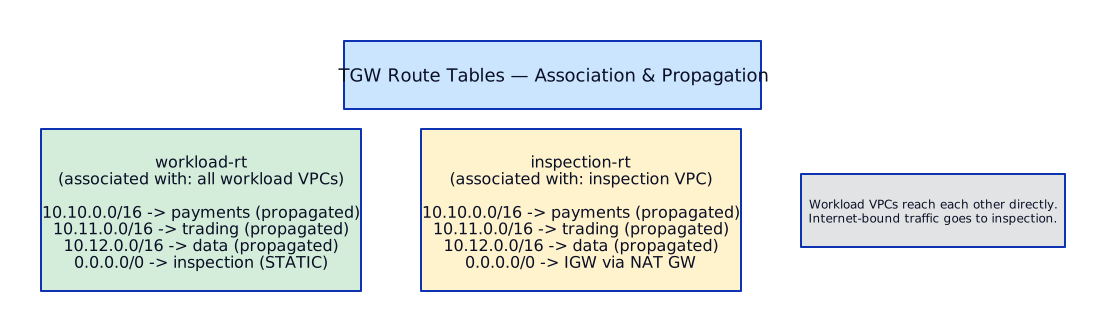
Section titled “How TGW Route Tables Work”This is the most misunderstood part of TGW. There are two actions on every route table:
- Association: “Traffic FROM this attachment uses THIS route table to decide where to go next”
- Propagation: “This attachment ADVERTISES its CIDR INTO this route table so others can find it”
Network Segmentation via TGW Route Tables
Section titled “Network Segmentation via TGW Route Tables”In our bank, we use separate TGW route tables to enforce environment isolation:

Full Architecture — Centralized Egress with Inspection
Section titled “Full Architecture — Centralized Egress with Inspection”
Routing Details in the Inspection VPC
Section titled “Routing Details in the Inspection VPC”The Inspection VPC needs careful routing to avoid loops:

GCP Connectivity — Shared VPC & Network Connectivity Center
Section titled “GCP Connectivity — Shared VPC & Network Connectivity Center”GCP Shared VPC is fundamentally different from AWS TGW. Instead of connecting separate VPCs, you share ONE VPC across multiple projects.
Concepts:
- Host Project: owns the VPC, subnets, firewall rules, Cloud NAT, Cloud Router. Managed by the central infra team.
- Service Project: attached to the host project. Workload teams deploy GKE clusters, VMs, Cloud SQL into subnets owned by the host project.
- IAM bindings: service project users need
compute.networkUseron specific subnets to deploy resources.

Key advantages over AWS TGW model:
- No data processing charges for inter-project communication (same VPC)
- Simpler routing — no TGW route tables to manage
- Firewall rules apply uniformly across all projects
Key limitations:
- Maximum ~1000 service projects per host project (soft limit, can be raised)
- All projects share the same VPC and IP space — CIDR planning is critical
- Service project teams cannot create their own firewall rules (by design — central team controls)
- Subnet-level IAM is needed to restrict which teams can deploy to which subnets
Network Connectivity Center (NCC) is GCP’s hub-spoke connectivity service — the closest equivalent to AWS Transit Gateway. It connects multiple VPC networks, on-prem networks, and other clouds through a central hub.
NCC vs AWS TGW — Conceptual Mapping:
| AWS Transit Gateway | GCP NCC | Notes |
|---|---|---|
| TGW | NCC Hub | Central connectivity resource |
| VPC Attachment | VPC Spoke | Connect a VPC to the hub |
| VPN Attachment | Hybrid Spoke (HA VPN) | On-prem via VPN tunnels |
| DX Attachment | Hybrid Spoke (Interconnect) | On-prem via dedicated link |
| N/A | Router Appliance Spoke | Third-party NVA or SD-WAN |
| TGW Route Table | Automatic route exchange | NCC exchanges routes between all spokes automatically |
| TGW Route Table segmentation | Route filtering via export/import policies | Less granular than TGW route tables |
NCC Hub-Spoke Architecture:
The NCC hub is a global resource. Spokes can be in any region. When a VPC spoke is added, all its subnets become reachable from all other spokes via the hub. This is similar to TGW with default_route_table_propagation = "enable" — all spokes see each other by default.

Spoke Types in Detail:
-
VPC Spokes — connect entire VPC networks to the hub. All subnets in the VPC are advertised. The VPC can be in any project within the same organization.
-
Hybrid Spokes (HA VPN / Interconnect) — connect on-prem or other-cloud networks. BGP sessions on Cloud Router advertise on-prem routes into the hub, and hub routes back to on-prem.
-
Router Appliance Spokes — a Compute Engine VM running a third-party network appliance (Palo Alto, Cisco, Fortinet, SD-WAN). The VM runs BGP with Cloud Router and acts as a transit point. Use this for:
- SD-WAN overlay networks (Cisco Viptela, VMware Velocloud)
- Third-party firewall inspection between spokes
- Custom routing logic that Cloud Router cannot express
Router Appliance Integration:

Route Exchange Mechanics:
NCC route exchange works differently from AWS TGW route tables:
- Automatic: by default, all spokes exchange all routes with each other. There is no “association” or “propagation” step like TGW.
- Filtering: use route advertisement settings on Cloud Router to control which routes a spoke advertises. You can suppress specific prefixes or advertise only summary routes.
- Priority: routes have a priority value (0-65535, lower = preferred). When multiple spokes advertise the same prefix, the lowest priority wins. Use this for active/passive failover.
- No segmentation by default: unlike TGW where you can create separate route tables for prod and non-prod, NCC exchanges all routes globally. To achieve segmentation, use separate NCC hubs or firewall rules.
| Route Exchange Behavior | AWS TGW | GCP NCC |
|---|---|---|
| Default route sharing | Disabled (explicit propagation) | Enabled (all spokes see each other) |
| Segmentation | Multiple route tables | Separate NCC hubs or firewall rules |
| Static routes | Yes (manual entries) | No (BGP only for hybrid, auto for VPC) |
| Route priority/preference | Longest prefix match | Priority value + longest prefix match |
| Asymmetric routing control | Appliance mode on attachment | Cloud Router MED / route priority |
Multi-Region NCC Patterns:
Since the NCC hub is a global resource, multi-region connectivity is straightforward. VPC spokes in different regions automatically exchange routes through the hub. Data travels over Google’s private backbone.

NCC vs Shared VPC — Decision Matrix:
| Factor | Shared VPC | NCC | Recommendation |
|---|---|---|---|
| Use case | Single org, single security boundary | Multi-VPC, multi-org, M&A | Use both — Shared VPC within a region, NCC across regions |
| IP space | Single VPC, shared IP space | Separate VPCs, separate IP spaces | NCC if teams need independent IP planning |
| Firewall control | Central team controls all rules | Each VPC has independent firewall rules | NCC if teams need firewall autonomy |
| Cost | No inter-project data charges | Data transfer charges between spokes | Shared VPC for high-volume east-west traffic |
| Scale | ~1000 service projects per host | No practical spoke limit | NCC for very large orgs with many VPCs |
| Isolation | Shared network namespace | Strong network isolation between VPCs | NCC for regulated workloads needing isolation |
| On-prem connectivity | Cloud Router + Interconnect in host project | Hybrid spokes connect directly to hub | Either works — NCC simplifies multi-DC |
| Transitivity | N/A (single VPC) | All spokes can reach each other via hub | NCC eliminates peering mesh |
| SD-WAN / NVA | Not supported natively | Router Appliance spokes | NCC for SD-WAN integration |
| Typical enterprise | Regional Shared VPC per environment | NCC hub connecting regional Shared VPCs | Combine both for global enterprise |
Terraform — NCC Hub + Spoke Setup:
# network-hub-project/ncc.tf — Network Connectivity Center
# ─── NCC Hub ──────────────────────────────────────────resource "google_network_connectivity_hub" "main" {  project     = var.network_hub_project  name        = "bank-ncc-hub"  description = "Global enterprise NCC hub connecting regional Shared VPCs"
  labels = {    environment = "production"    managed_by  = "platform-team"  }}
# ─── VPC Spokes (one per regional Shared VPC) ─────────
resource "google_network_connectivity_spoke" "apac" {  project  = var.network_hub_project  name     = "spoke-apac-shared-vpc"  hub      = google_network_connectivity_hub.main.id  location = "asia-southeast1"
  linked_vpc_network {    uri                   = google_compute_network.apac_shared_vpc.self_link    exclude_export_ranges = []  # Export all subnets  }
  labels = {    region = "apac"  }}
resource "google_network_connectivity_spoke" "emea" {  project  = var.network_hub_project  name     = "spoke-emea-shared-vpc"  hub      = google_network_connectivity_hub.main.id  location = "europe-west1"
  linked_vpc_network {    uri                   = google_compute_network.emea_shared_vpc.self_link    exclude_export_ranges = []  }
  labels = {    region = "emea"  }}
resource "google_network_connectivity_spoke" "amer" {  project  = var.network_hub_project  name     = "spoke-amer-shared-vpc"  hub      = google_network_connectivity_hub.main.id  location = "us-east1"
  linked_vpc_network {    uri                   = google_compute_network.amer_shared_vpc.self_link    exclude_export_ranges = []  }
  labels = {    region = "amer"  }}
# ─── Hybrid Spoke: HA VPN to On-Prem DC ──────────────
resource "google_network_connectivity_spoke" "onprem_vpn" {  project  = var.network_hub_project  name     = "spoke-onprem-dubai-vpn"  hub      = google_network_connectivity_hub.main.id  location = "me-central1"
  linked_vpn_tunnels {    uris = [      google_compute_vpn_tunnel.onprem_tunnel_0.self_link,      google_compute_vpn_tunnel.onprem_tunnel_1.self_link,    ]    site_to_site_data_transfer = true  # Allow spoke-to-spoke via this tunnel  }
  labels = {    site = "dubai-dc"  }}
# ─── Hybrid Spoke: Interconnect to London DC ─────────
resource "google_network_connectivity_spoke" "onprem_interconnect" {  project  = var.network_hub_project  name     = "spoke-onprem-london-interconnect"  hub      = google_network_connectivity_hub.main.id  location = "europe-west1"
  linked_interconnect_attachments {    uris = [      google_compute_interconnect_attachment.london_primary.self_link,      google_compute_interconnect_attachment.london_secondary.self_link,    ]    site_to_site_data_transfer = true  }
  labels = {    site = "london-dc"  }}
# ─── Router Appliance Spoke: Palo Alto NVA ───────────
resource "google_compute_instance" "nva" {  project      = var.network_hub_project  name         = "palo-alto-nva-1"  machine_type = "n2-standard-8"  zone         = "europe-west1-b"
  can_ip_forward = true  # Required for NVA
  boot_disk {    initialize_params {      image = "paloaltonetworksgcp-public/vmseries-flex-byol-1110"      size  = 60    }  }
  network_interface {    network    = google_compute_network.emea_shared_vpc.id    subnetwork = google_compute_subnetwork.nva_subnet.id  }
  metadata = {    serial-port-enable = "TRUE"  }
  labels = {    role = "network-appliance"  }}
resource "google_network_connectivity_spoke" "nva" {  project  = var.network_hub_project  name     = "spoke-palo-alto-nva"  hub      = google_network_connectivity_hub.main.id  location = "europe-west1"
  linked_router_appliance_instances {    instances {      virtual_machine = google_compute_instance.nva.self_link      ip_address      = google_compute_instance.nva.network_interface[0].network_ip    }    site_to_site_data_transfer = true  }
  labels = {    appliance = "palo-alto"  }}
# Cloud Router for BGP peering with NVAresource "google_compute_router" "nva_router" {  project = var.network_hub_project  name    = "nva-bgp-router"  network = google_compute_network.emea_shared_vpc.id  region  = "europe-west1"
  bgp {    asn = 64515  }}
resource "google_compute_router_interface" "nva_if" {  project                 = var.network_hub_project  name                    = "nva-bgp-if"  router                  = google_compute_router.nva_router.name  region                  = "europe-west1"  private_ip_address      = "169.254.10.1"  redundant_interface     = ""  subnetwork              = google_compute_subnetwork.nva_subnet.self_link}
resource "google_compute_router_peer" "nva_peer" {  project                   = var.network_hub_project  name                      = "nva-bgp-peer"  router                    = google_compute_router.nva_router.name  region                    = "europe-west1"  peer_ip_address           = google_compute_instance.nva.network_interface[0].network_ip  peer_asn                  = 65001  # NVA's BGP ASN  advertised_route_priority = 100  interface                 = google_compute_router_interface.nva_if.name
  router_appliance_instance = google_compute_instance.nva.self_link}
# ─── Outputs ──────────────────────────────────────────
output "ncc_hub_id" {  value = google_network_connectivity_hub.main.id}
output "ncc_spoke_ids" { value = { apac = google_network_connectivity_spoke.apac.id emea = google_network_connectivity_spoke.emea.id amer = google_network_connectivity_spoke.amer.id onprem_vpn = google_network_connectivity_spoke.onprem_vpn.id onprem_interconnect = google_network_connectivity_spoke.onprem_interconnect.id nva = google_network_connectivity_spoke.nva.id }}Shared VPC Terraform — Full Enterprise Setup:
# Enterprise-grade Shared VPC with per-region subnets, Cloud NAT,# Cloud NGFW, and service project attachments
# ─── VPC Network (global) ────────────────────────────
resource "google_compute_network" "shared_vpc" {  project                 = var.host_project_id  name                    = "bank-prod-vpc"  auto_create_subnetworks = false  routing_mode            = "GLOBAL"  # Critical — enables cross-region routing  mtu                     = 1460}
# ─── Enable Shared VPC Host ──────────────────────────
resource "google_compute_shared_vpc_host_project" "host" {  project = var.host_project_id}
# ─── Regional Subnets ────────────────────────────────
variable "regional_subnets" {  type = map(object({    region  = string    subnets = map(object({      cidr           = string      purpose        = string      secondary_ranges = optional(map(string), {})    }))  }))  default = {    emea = {      region = "europe-west1"      subnets = {        private = {          cidr    = "10.16.0.0/20"          purpose = "workloads"          secondary_ranges = {            gke-pods     = "100.64.0.0/14"            gke-services = "100.68.0.0/20"          }        }        data = {          cidr    = "10.16.16.0/20"          purpose = "databases"        }        proxy = {          cidr    = "10.16.32.0/24"          purpose = "REGIONAL_MANAGED_PROXY"        }      }    }    apac = {      region = "asia-southeast1"      subnets = {        private = {          cidr    = "10.0.0.0/20"          purpose = "workloads"          secondary_ranges = {            gke-pods     = "100.72.0.0/14"            gke-services = "100.76.0.0/20"          }        }        data = {          cidr    = "10.0.16.0/20"          purpose = "databases"        }        proxy = {          cidr    = "10.0.32.0/24"          purpose = "REGIONAL_MANAGED_PROXY"        }      }    }  }}
resource "google_compute_subnetwork" "subnets" {  for_each = { for item in flatten([    for region_key, region in var.regional_subnets : [      for subnet_key, subnet in region.subnets : {        key     = "${region_key}-${subnet_key}"        name    = "bank-${region_key}-${subnet_key}"        region  = region.region        cidr    = subnet.cidr        purpose = subnet.purpose        secondary_ranges = subnet.secondary_ranges      }    ]  ]) : item.key => item }
  project       = var.host_project_id  name          = each.value.name  network       = google_compute_network.shared_vpc.id  region        = each.value.region  ip_cidr_range = each.value.cidr
  purpose = each.value.purpose == "REGIONAL_MANAGED_PROXY" ? "REGIONAL_MANAGED_PROXY" : "PRIVATE"  role    = each.value.purpose == "REGIONAL_MANAGED_PROXY" ? "ACTIVE" : null
  private_ip_google_access = true  log_config {    aggregation_interval = "INTERVAL_5_SEC"    flow_sampling        = 0.5    metadata             = "INCLUDE_ALL_METADATA"  }
  dynamic "secondary_ip_range" {    for_each = each.value.secondary_ranges    content {      range_name    = secondary_ip_range.key      ip_cidr_range = secondary_ip_range.value    }  }}
# ─── Cloud NAT (per region) ──────────────────────────
resource "google_compute_router" "nat_router" {  for_each = var.regional_subnets
  project = var.host_project_id  name    = "bank-nat-router-${each.key}"  network = google_compute_network.shared_vpc.id  region  = each.value.region}
resource "google_compute_router_nat" "nat" {  for_each = var.regional_subnets
  project                            = var.host_project_id  name                               = "bank-nat-${each.key}"  router                             = google_compute_router.nat_router[each.key].name  region                             = each.value.region  nat_ip_allocate_option             = "AUTO_ONLY"  source_subnetwork_ip_ranges_to_nat = "ALL_SUBNETWORKS_ALL_IP_RANGES"
  log_config {    enable = true    filter = "ERRORS_ONLY"  }}
# ─── Service Project Attachments ─────────────────────
resource "google_compute_shared_vpc_service_project" "service" {  for_each        = { for sp in var.service_projects : sp.project_id => sp }  host_project    = var.host_project_id  service_project = each.value.project_id
  depends_on = [google_compute_shared_vpc_host_project.host]}
# IAM: allow service projects to use specific subnetsresource "google_compute_subnetwork_iam_member" "network_user" {  for_each = {    for pair in flatten([      for sp in var.service_projects : [        for subnet_key in sp.allowed_subnets : {          key        = "${sp.project_id}-${subnet_key}"          project_id = sp.project_id          subnet_key = subnet_key        }      ]    ]) : pair.key => pair  }
  project    = var.host_project_id  region     = google_compute_subnetwork.subnets[each.value.subnet_key].region  subnetwork = google_compute_subnetwork.subnets[each.value.subnet_key].name  role       = "roles/compute.networkUser"  member     = "serviceAccount:${each.value.project_id}@${each.value.project_id}.iam.gserviceaccount.com"}
# GKE host service agent for Shared VPCresource "google_project_iam_member" "gke_host_agent" {  for_each = { for sp in var.service_projects : sp.project_id => sp if sp.uses_gke }  project  = var.host_project_id  role     = "roles/container.hostServiceAgentUser"  member   = "serviceAccount:service-${data.google_project.service[each.key].number}@container-engine-robot.iam.gserviceaccount.com"}
# ─── Hierarchical Firewall Policy ────────────────────
resource "google_compute_firewall_policy" "org_policy" {  short_name = "bank-global-firewall-policy"  parent     = "organizations/${var.org_id}"}
resource "google_compute_firewall_policy_rule" "deny_ingress_default" {  firewall_policy = google_compute_firewall_policy.org_policy.id  priority        = 65534  action          = "deny"  direction       = "INGRESS"  description     = "Default deny all ingress"
  match {    layer4_configs {      ip_protocol = "all"    }    src_ip_ranges = ["0.0.0.0/0"]  }}
resource "google_compute_firewall_policy_rule" "allow_iap" {  firewall_policy = google_compute_firewall_policy.org_policy.id  priority        = 1000  action          = "allow"  direction       = "INGRESS"  description     = "Allow IAP for SSH/RDP"
  match {    layer4_configs {      ip_protocol = "tcp"      ports       = ["22", "3389"]    }    src_ip_ranges = ["35.235.240.0/20"]  # IAP range  }}
resource "google_compute_firewall_policy_association" "org" {  name              = "bank-org-firewall-assoc"  firewall_policy   = google_compute_firewall_policy.org_policy.id  attachment_target  = "organizations/${var.org_id}"}
VPC Peering vs Transit Gateway — Decision Framework
Section titled “VPC Peering vs Transit Gateway — Decision Framework”| Factor | VPC Peering | Transit Gateway |
|---|---|---|
| Scale | Does not scale (n^2 connections) | Scales linearly (n connections) |
| Transitivity | NOT transitive (A↔B + B↔C does not mean A↔C) | Transitive (all spokes can reach each other) |
| Cost | No hourly charge, no data processing charge | $0.05/hr per attachment + $0.02/GB data processing |
| Latency | Slightly lower (direct) | Slightly higher (1 additional hop) |
| Cross-region | Yes (inter-region peering) | Yes (inter-region TGW peering) |
| Cross-account | Yes | Yes |
| Route management | Manual routes on both sides | Centralized route tables with propagation |
| Bandwidth | No limit (same as within VPC) | Up to 50 Gbps per VPC attachment |
| Security inspection | Cannot insert firewall inline | Can route through inspection VPC |
| Overlapping CIDRs | Not allowed | Not allowed |
Decision:
- Use VPC Peering for: 2-3 VPCs with stable topology, high-throughput needs (e.g., EKS ↔ Shared Services), cost-sensitive data transfer
- Use Transit Gateway for: 5+ VPCs, centralized security inspection, on-prem connectivity, environment segmentation, any enterprise architecture
Hybrid Connectivity — Direct Connect & Cloud Interconnect
Section titled “Hybrid Connectivity — Direct Connect & Cloud Interconnect”Enterprise banks always have on-premises data centers that need private, dedicated connectivity to the cloud. Public internet is not acceptable for production traffic — latency is variable, bandwidth is shared, and regulatory requirements often mandate private links.
Direct Connect (DX) provides a dedicated physical connection between your on-prem data center and AWS.
Key concepts:
- Connection: physical port (1 Gbps or 10 Gbps) at a Direct Connect location (colocation facility)
- Virtual Interface (VIF): logical connection over the physical port
- Private VIF: connects to VPCs (via Direct Connect Gateway → TGW or VGW)
- Public VIF: connects to AWS public services (S3, DynamoDB) over private link
- Transit VIF: connects to Transit Gateway via Direct Connect Gateway
- Direct Connect Gateway (DXGW): global resource that connects DX to TGWs in multiple regions
- LAG (Link Aggregation Group): bundle multiple DX connections for higher bandwidth

Redundancy patterns:
- Standard HA: 2 DX connections at the SAME DX location (protects against port/device failure)
- Maximum resilience: 2 DX connections at DIFFERENT DX locations (protects against facility failure)
- VPN backup: Site-to-site VPN over internet as failover when DX goes down (lower bandwidth, higher latency, but works)
BGP configuration:
- On-prem announces its CIDRs (172.16.0.0/12) to AWS via BGP
- AWS announces VPC CIDRs (10.0.0.0/8) back to on-prem
- BGP community tags control route propagation (e.g.,
7224:8100= local region preference) - BFD (Bidirectional Forwarding Detection) for sub-second failover
Cloud Interconnect provides dedicated connectivity between on-prem and GCP.
Types:
- Dedicated Interconnect: physical 10 Gbps or 100 Gbps connection at a Google edge PoP. You own the physical port.
- Partner Interconnect: connect through a supported service provider (lower commitment — 50 Mbps to 50 Gbps). Use when you cannot reach a Google edge PoP.
Key concepts:
- VLAN Attachment: logical connection over the Interconnect link, associated with a Cloud Router
- Cloud Router: terminates BGP, learns on-prem routes, advertises VPC subnets
- Global dynamic routing: when VPC routing mode is GLOBAL, Cloud Router advertises ALL subnets in the VPC across all regions (not just the local region)

Redundancy:
- Google requires minimum 2 VLAN attachments in 2 edge availability domains for 99.99% SLA
- For 99.99% across metros: 4 VLAN attachments across 2 metros
- HA VPN as backup (over internet) — lower bandwidth, encrypted, automatic failover via Cloud Router BGP
GCP advantage: with global dynamic routing, a single Interconnect in europe-west1 provides reachability to ALL subnets in ALL regions of the VPC. AWS requires DX Gateway + TGW peering for multi-region access from one DX connection.
VPN as Backup
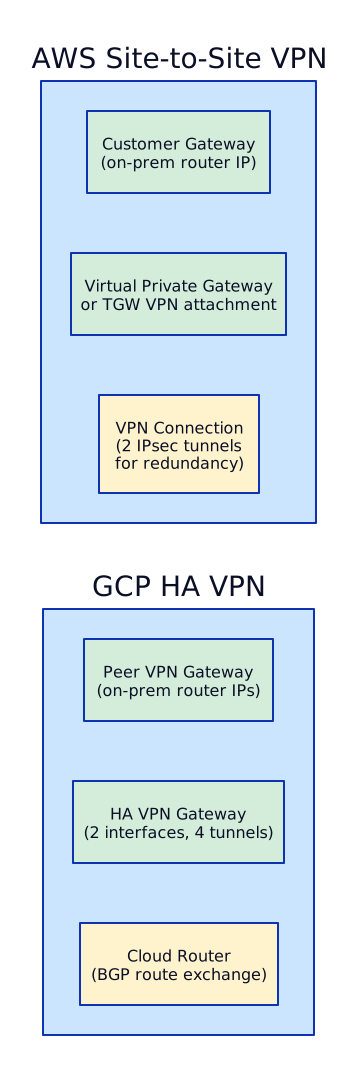
Section titled “VPN as Backup”Both AWS and GCP support site-to-site VPN as a backup path when the dedicated link fails.
Multi-Region Connectivity
Section titled “Multi-Region Connectivity”Inter-Region TGW Peering:
Each region has its own TGW. You peer them together for cross-region routing. TGW peering is NOT transitive — if Region A peers with Region B and Region B peers with Region C, Region A cannot reach Region C without a direct peering.
GCP’s Global VPC eliminates most multi-region complexity.
Since a single VPC spans all regions, subnets in europe-west1 and me-central1 can communicate directly — no peering, no NCC hub, no additional configuration.

Cross-region firewall is handled by network firewall policies (applied globally to the VPC) or hierarchical firewall policies (applied at org/folder level).
For inspection, Cloud NGFW Enterprise endpoints are regional — deploy one per region where you need IPS inspection.
Packet Trace: Pod A in VPC-1 Reaches RDS in VPC-2 via TGW
Section titled “Packet Trace: Pod A in VPC-1 Reaches RDS in VPC-2 via TGW”This is a common interview question. Walk through every hop.
Setup:
- Pod A runs in an EKS cluster in
payments-prodVPC (10.10.0.0/16), private subnet (10.10.1.0/24) - RDS instance is in
data-platform-prodVPC (10.12.0.0/16), data subnet (10.12.2.50) - Both VPCs are attached to Transit Gateway in the Network Hub Account

Terraform — Transit Gateway & Shared VPC
Section titled “Terraform — Transit Gateway & Shared VPC”# network-hub-account/tgw.tf — Transit Gateway Configuration
resource "aws_ec2_transit_gateway" "main" { description = "Enterprise bank TGW" amazon_side_asn = 64512 auto_accept_shared_attachments = "disable" # Manual approval default_route_table_association = "disable" # Explicit route tables default_route_table_propagation = "disable" # Explicit propagation dns_support = "enable" vpn_ecmp_support = "enable" # ECMP for VPN tunnels multicast_support = "disable"
tags = { Name = "bank-tgw-eu-west-1" }}
# Share TGW with workload accounts via AWS RAMresource "aws_ram_resource_share" "tgw" { name = "tgw-share" allow_external_principals = false # Same org only}
resource "aws_ram_resource_association" "tgw" { resource_arn = aws_ec2_transit_gateway.main.arn resource_share_arn = aws_ram_resource_share.tgw.arn}
resource "aws_ram_principal_association" "workloads_ou" { principal = "arn:aws:organizations::111111111111:ou/o-xxx/ou-xxx-workloads" resource_share_arn = aws_ram_resource_share.tgw.arn}
# ─── TGW Route Tables ──────────────────────────────
resource "aws_ec2_transit_gateway_route_table" "prod" { transit_gateway_id = aws_ec2_transit_gateway.main.id tags = { Name = "prod-rt" }}
resource "aws_ec2_transit_gateway_route_table" "non_prod" { transit_gateway_id = aws_ec2_transit_gateway.main.id tags = { Name = "non-prod-rt" }}
resource "aws_ec2_transit_gateway_route_table" "shared_services" { transit_gateway_id = aws_ec2_transit_gateway.main.id tags = { Name = "shared-services-rt" }}
resource "aws_ec2_transit_gateway_route_table" "inspection" { transit_gateway_id = aws_ec2_transit_gateway.main.id tags = { Name = "inspection-rt" }}
# ─── Inspection VPC Attachment ──────────────────────
resource "aws_ec2_transit_gateway_vpc_attachment" "inspection" { transit_gateway_id = aws_ec2_transit_gateway.main.id vpc_id = aws_vpc.inspection.id subnet_ids = aws_subnet.inspection_tgw[*].id
appliance_mode_support = "enable" # CRITICAL transit_gateway_default_route_table_association = false transit_gateway_default_route_table_propagation = false
tags = { Name = "inspection-vpc-attachment" }}
# Associate inspection attachment with inspection route tableresource "aws_ec2_transit_gateway_route_table_association" "inspection" { transit_gateway_attachment_id = aws_ec2_transit_gateway_vpc_attachment.inspection.id transit_gateway_route_table_id = aws_ec2_transit_gateway_route_table.inspection.id}
# Default route in prod RT → inspection VPC (for internet egress)resource "aws_ec2_transit_gateway_route" "prod_default" { destination_cidr_block = "0.0.0.0/0" transit_gateway_attachment_id = aws_ec2_transit_gateway_vpc_attachment.inspection.id transit_gateway_route_table_id = aws_ec2_transit_gateway_route_table.prod.id}
# Default route in non-prod RT → inspection VPCresource "aws_ec2_transit_gateway_route" "non_prod_default" { destination_cidr_block = "0.0.0.0/0" transit_gateway_attachment_id = aws_ec2_transit_gateway_vpc_attachment.inspection.id transit_gateway_route_table_id = aws_ec2_transit_gateway_route_table.non_prod.id}
# ─── Direct Connect Gateway ────────────────────────
resource "aws_dx_gateway" "main" { name = "bank-dxgw" amazon_side_asn = 64513}
resource "aws_dx_gateway_association" "tgw" { dx_gateway_id = aws_dx_gateway.main.id associated_gateway_id = aws_ec2_transit_gateway.main.id
allowed_prefixes = ["10.0.0.0/8"] # Advertise cloud CIDRs to on-prem}
# ─── VPN as DX Backup ──────────────────────────────
resource "aws_customer_gateway" "on_prem" { bgp_asn = 65000 ip_address = "203.0.113.1" # On-prem VPN public IP type = "ipsec.1" tags = { Name = "on-prem-cgw" }}
resource "aws_vpn_connection" "backup" { customer_gateway_id = aws_customer_gateway.on_prem.id transit_gateway_id = aws_ec2_transit_gateway.main.id type = "ipsec.1" static_routes_only = false # Use BGP
tags = { Name = "dx-backup-vpn" }}
# ─── Outputs ────────────────────────────────────────
output "transit_gateway_id" { value = aws_ec2_transit_gateway.main.id}
output "tgw_route_table_ids" { value = { prod = aws_ec2_transit_gateway_route_table.prod.id non_prod = aws_ec2_transit_gateway_route_table.non_prod.id shared_services = aws_ec2_transit_gateway_route_table.shared_services.id inspection = aws_ec2_transit_gateway_route_table.inspection.id }}In workload accounts (called by VPC module):
# Workload account attaches VPC to the shared TGW
data "aws_ec2_transit_gateway" "hub" {  filter {    name   = "tag:Name"    values = ["bank-tgw-eu-west-1"]  }}
# Associate with correct route table (prod or non-prod)resource "aws_ec2_transit_gateway_route_table_association" "this" {  transit_gateway_attachment_id  = module.vpc.tgw_attachment_id  transit_gateway_route_table_id = var.is_production ? data.terraform_remote_state.hub.outputs.tgw_route_table_ids["prod"] : data.terraform_remote_state.hub.outputs.tgw_route_table_ids["non_prod"]}
# Propagate this VPC's CIDR into the appropriate route tablesresource "aws_ec2_transit_gateway_route_table_propagation" "to_prod" {  count                          = var.is_production ? 1 : 0  transit_gateway_attachment_id  = module.vpc.tgw_attachment_id  transit_gateway_route_table_id = data.terraform_remote_state.hub.outputs.tgw_route_table_ids["prod"]}
resource "aws_ec2_transit_gateway_route_table_propagation" "to_shared" {  transit_gateway_attachment_id  = module.vpc.tgw_attachment_id  transit_gateway_route_table_id = data.terraform_remote_state.hub.outputs.tgw_route_table_ids["shared_services"]}
resource "aws_ec2_transit_gateway_route_table_propagation" "to_inspection" { transit_gateway_attachment_id = module.vpc.tgw_attachment_id transit_gateway_route_table_id = data.terraform_remote_state.hub.outputs.tgw_route_table_ids["inspection"]}variable "host_project_id" { default = "bank-network-prod"}
variable "service_projects" { type = list(object({ project_id = string subnets = list(string) # Which subnets this project can use })) default = [ { project_id = "bank-payments-prod" subnets = ["private", "data"] }, { project_id = "bank-trading-prod" subnets = ["private", "data"] }, { project_id = "bank-data-prod" subnets = ["private", "data"] }, ]}
# ─── Enable Shared VPC Host ────────────────────────
resource "google_compute_shared_vpc_host_project" "host" { project = var.host_project_id}
# ─── Attach Service Projects ───────────────────────
resource "google_compute_shared_vpc_service_project" "service" { for_each = { for sp in var.service_projects : sp.project_id => sp } host_project = var.host_project_id service_project = each.value.project_id
depends_on = [google_compute_shared_vpc_host_project.host]}
# ─── IAM: Allow service projects to use subnets ────
resource "google_compute_subnetwork_iam_member" "network_user" { for_each = { for pair in flatten([ for sp in var.service_projects : [ for subnet in sp.subnets : { key = "${sp.project_id}-${subnet}" project_id = sp.project_id subnet = subnet } ] ]) : pair.key => pair }
project = var.host_project_id region = "europe-west1" subnetwork = "bank-prod-vpc-${each.value.subnet}" role = "roles/compute.networkUser" member = "serviceAccount:${each.value.project_id}@${each.value.project_id}.iam.gserviceaccount.com"}
# GKE needs additional permissions in the host projectresource "google_project_iam_member" "gke_host_agent" { for_each = { for sp in var.service_projects : sp.project_id => sp } project = var.host_project_id role = "roles/container.hostServiceAgentUser" member = "serviceAccount:service-${data.google_project.service[each.key].number}@container-engine-robot.iam.gserviceaccount.com"}
data "google_project" "service" { for_each = { for sp in var.service_projects : sp.project_id => sp } project_id = each.value.project_id}
# ─── Cloud Interconnect VLAN Attachment ─────────────
resource "google_compute_interconnect_attachment" "primary" { project = var.host_project_id name = "bank-interconnect-primary" region = "europe-west1" type = "DEDICATED" interconnect = "projects/${var.host_project_id}/global/interconnects/bank-dx-primary" router = google_compute_router.primary.id bandwidth = "BPS_10G"
edge_availability_domain = "AVAILABILITY_DOMAIN_1"}
resource "google_compute_interconnect_attachment" "secondary" { project = var.host_project_id name = "bank-interconnect-secondary" region = "europe-west1" type = "DEDICATED" interconnect = "projects/${var.host_project_id}/global/interconnects/bank-dx-secondary" router = google_compute_router.secondary.id bandwidth = "BPS_10G"
edge_availability_domain = "AVAILABILITY_DOMAIN_2"}
resource "google_compute_router" "primary" { project = var.host_project_id name = "bank-router-primary" network = google_compute_network.main.id region = "europe-west1"
bgp { asn = 64515 advertise_mode = "CUSTOM" advertised_groups = ["ALL_SUBNETS"]
# Advertise summarized cloud range to on-prem advertised_ip_ranges { range = "10.10.0.0/12" description = "Cloud production range" } }}
resource "google_compute_router" "secondary" { project = var.host_project_id name = "bank-router-secondary" network = google_compute_network.main.id region = "europe-west1"
bgp { asn = 64515 advertise_mode = "CUSTOM" advertised_groups = ["ALL_SUBNETS"]
advertised_ip_ranges { range = "10.10.0.0/12" description = "Cloud production range" } }}
# ─── HA VPN as Interconnect Backup ──────────────────
resource "google_compute_ha_vpn_gateway" "backup" { project = var.host_project_id name = "bank-vpn-backup" network = google_compute_network.main.id region = "europe-west1"}
resource "google_compute_external_vpn_gateway" "on_prem" { project = var.host_project_id name = "on-prem-vpn-gw" redundancy_type = "TWO_IPS_REDUNDANCY"
interface { id = 0 ip_address = "203.0.113.1" } interface { id = 1 ip_address = "203.0.113.2" }}
resource "google_compute_vpn_tunnel" "backup" { count = 2 project = var.host_project_id name = "bank-vpn-backup-tunnel-${count.index}" region = "europe-west1" vpn_gateway = google_compute_ha_vpn_gateway.backup.id
peer_external_gateway = google_compute_external_vpn_gateway.on_prem.id peer_external_gateway_interface = count.index vpn_gateway_interface = count.index shared_secret = var.vpn_shared_secret # from Secrets Manager router = google_compute_router.primary.id ike_version = 2}
resource "google_compute_router_interface" "vpn" { count = 2 project = var.host_project_id name = "bank-vpn-if-${count.index}" router = google_compute_router.primary.name region = "europe-west1" ip_range = "169.254.${count.index}.1/30" vpn_tunnel = google_compute_vpn_tunnel.backup[count.index].name}
resource "google_compute_router_peer" "vpn" { count = 2 project = var.host_project_id name = "bank-vpn-peer-${count.index}" router = google_compute_router.primary.name region = "europe-west1" peer_ip_address = "169.254.${count.index}.2" peer_asn = 65000 advertised_route_priority = 200 # Higher than Interconnect (100) = backup interface = google_compute_router_interface.vpn[count.index].name}Cross-Cloud Connectivity (AWS + GCP)
Section titled “Cross-Cloud Connectivity (AWS + GCP)”For multi-cloud enterprises, connecting AWS and GCP requires one of these patterns:

Private Connectivity — PrivateLink & Private Service Connect
Section titled “Private Connectivity — PrivateLink & Private Service Connect”Private connectivity services let you expose a service to consumers in other accounts, VPCs, or organizations without VPC peering, public IPs, or internet traversal. Traffic stays on the provider’s backbone network. This is the foundation for SaaS publishing, shared platform APIs, and accessing AWS/GCP managed services privately.
AWS PrivateLink Architecture
Section titled “AWS PrivateLink Architecture”PrivateLink is a consumer/provider model. The provider publishes a service behind a Network Load Balancer. The consumer creates an Interface VPC Endpoint in their VPC to access it privately.

How it works:
- Provider creates an NLB (internal) and registers targets (EKS pods, EC2, IP targets)
- Provider creates a VPC Endpoint Service pointing to the NLB
- Provider optionally enables acceptance required (manual approval of consumer connections)
- Provider adds allowed principals (specific AWS account IDs or org IDs)
- Consumer creates an Interface VPC Endpoint specifying the service name
- Endpoint creates ENIs in the consumer’s subnets with private IPs
- Consumer’s app connects to the endpoint ENI IP or the private DNS name
Cross-account access: PrivateLink is designed for cross-account use. Provider allows specific accounts; consumers create endpoints in their own VPC. No VPC peering, no route table changes, no CIDR overlap concerns.
Gateway Endpoints vs Interface Endpoints:
| Aspect | Gateway Endpoint | Interface Endpoint |
|---|---|---|
| Services | S3 and DynamoDB ONLY | 100+ AWS services + custom |
| Cost | FREE (no hourly or data charges) | $0.01/hr per AZ + $0.01/GB |
| How it works | Route table entry → prefix list | ENI in your subnet with private IP |
| DNS | No private DNS (uses prefix list routes) | Private DNS (resolves service domain to private IP) |
| Security | VPC endpoint policy (JSON) | Security groups + VPC endpoint policy |
| Cross-region | No | No (same region only) |
Cost comparison — Interface Endpoint vs NAT Gateway for AWS service access:
| Pattern | Monthly Cost (100 GB traffic, 3 AZs) |
|---|---|
| NAT Gateway | $32.40/mo (gateway) + $4.50 (data) = ~$37 |
| Interface Endpoint | $21.60/mo (3 AZ x $7.20) + $1.00 (data) = ~$23 |
| Gateway Endpoint (S3/DDB) | $0 |
For workloads that only need to reach AWS services (not the internet), Interface Endpoints are cheaper than NAT Gateway and more secure (traffic never touches the internet).
Exposing EKS services via PrivateLink:
# Step 1: K8s Service with internal NLB# (applied via kubectl, shown here for reference)# apiVersion: v1# kind: Service# metadata:#   name: shared-api#   annotations:#     service.beta.kubernetes.io/aws-load-balancer-type: "external"#     service.beta.kubernetes.io/aws-load-balancer-nlb-target-type: "ip"#     service.beta.kubernetes.io/aws-load-balancer-scheme: "internal"# spec:#   type: LoadBalancer#   ports:#     - port: 443#       targetPort: 8443#   selector:#     app: shared-api
# Step 2: VPC Endpoint Serviceresource "aws_vpc_endpoint_service" "shared_api" {  acceptance_required        = true  network_load_balancer_arns = [aws_lb.shared_api_nlb.arn]
  allowed_principals = [    "arn:aws:iam::111111111111:root",  # Tenant account 1    "arn:aws:iam::222222222222:root",  # Tenant account 2  ]
  tags = {    Name = "shared-api-endpoint-service"  }}
# Step 3: Consumer creates this in their accountresource "aws_vpc_endpoint" "consume_shared_api" {  vpc_id             = aws_vpc.workload.id  service_name       = aws_vpc_endpoint_service.shared_api.service_name  vpc_endpoint_type  = "Interface"  subnet_ids         = aws_subnet.private[*].id  security_group_ids = [aws_security_group.endpoint_sg.id]
  private_dns_enabled = false  # Use endpoint-specific DNS}
GCP Private Service Connect (PSC)
Section titled “GCP Private Service Connect (PSC)”PSC is GCP’s equivalent of PrivateLink. It has two major use cases: accessing Google APIs privately and publishing/consuming custom services across projects and organizations.

PSC for Google APIs (private access to managed services):
Instead of routing traffic to googleapis.com through the internet or using Private Google Access (which still uses public IPs), PSC creates a private endpoint in your VPC:
- Consumer creates a forwarding rule with a private IP in their VPC
- DNS is configured to resolve
*.googleapis.comto this private IP - Traffic to BigQuery, Cloud SQL, GCS, Pub/Sub — all goes through the private endpoint
- No internet, no public IPs, no NAT
- Works with VPC Service Controls for data exfiltration prevention
PSC for Published Services (cross-project, cross-org):
- Producer deploys service behind an Internal Load Balancer (L4 ILB or L7 ILB)
- Producer creates a Service Attachment with a dedicated NAT subnet
- Producer configures acceptance:
ACCEPT_AUTOMATICorACCEPT_MANUALwith allowed projects - Consumer creates a PSC Endpoint (forwarding rule with
target= service attachment URI) - Consumer gets a private IP in their VPC that routes to the producer service
- No VPC peering, no Shared VPC, no CIDR coordination needed
Terraform for PSC:
# Producer: Service Attachmentresource "google_compute_service_attachment" "shared_api" {  name                  = "shared-api-psc"  region                = "me-central1"  connection_preference = "ACCEPT_MANUAL"
  # NAT subnet — PSC uses SNAT to translate consumer IPs  nat_subnets = [google_compute_subnetwork.psc_nat.id]
  target_service = google_compute_forwarding_rule.internal_lb.id
  consumer_accept_lists {    project_id_or_num = "consumer-project-id"    connection_limit  = 10  }}
resource "google_compute_subnetwork" "psc_nat" {  name          = "psc-nat-subnet"  ip_cidr_range = "10.100.0.0/24"  region        = "me-central1"  network       = google_compute_network.producer_vpc.id  purpose       = "PRIVATE_SERVICE_CONNECT"}
# Consumer: PSC Endpointresource "google_compute_forwarding_rule" "psc_endpoint" {  name                  = "shared-api-psc-endpoint"  region                = "me-central1"  network               = google_compute_network.consumer_vpc.id  ip_address            = "10.30.0.100"  load_balancing_scheme = ""  target                = google_compute_service_attachment.shared_api.id}
# Consumer: PSC for Google APIsresource "google_compute_global_forwarding_rule" "google_apis_psc" {  name                  = "google-apis-psc"  network               = google_compute_network.consumer_vpc.id  ip_address            = google_compute_global_address.google_apis.id  load_balancing_scheme = ""  target                = "all-apis"  # or "vpc-sc" for VPC-SC compatible}
resource "google_compute_global_address" "google_apis" {  name         = "google-apis-psc-ip"  address_type = "INTERNAL"  network      = google_compute_network.consumer_vpc.id  purpose      = "PRIVATE_SERVICE_CONNECT"}
Decision Matrix — PrivateLink vs VPC Peering vs Transit Gateway
Section titled “Decision Matrix — PrivateLink vs VPC Peering vs Transit Gateway”Choosing the right connectivity pattern depends on the traffic pattern, scale, and security requirements:
| Aspect | PrivateLink / PSC | VPC Peering | Transit Gateway / NCC |
|---|---|---|---|
| Use case | Expose single service to consumers | Full network connectivity between 2 VPCs | Hub-spoke for many VPCs |
| CIDR overlap | Allowed (NAT handles it) | NOT allowed (must be unique) | NOT allowed |
| Routing | No route table changes (ENI/forwarding rule) | Requires route table entries both sides | Centralized route tables |
| Scale | Unlimited consumers per service | Max 125 peering connections per VPC | 5,000 attachments per TGW |
| Transitivity | N/A (point-to-point service) | NOT transitive (A↔B, B↔C does NOT give A↔C) | Transitive by design |
| Cross-region | Same region only | Cross-region supported | Cross-region via peering |
| Cross-account | Yes (primary use case) | Yes | Yes (RAM sharing) |
| Security | Consumer can only reach the published service | Full VPC-to-VPC access (filtered by SGs) | Route table segmentation |
| Cost | Per-hour + per-GB | Free (data transfer charges only) | Per-attachment + per-GB |
| Best for | SaaS publishing, shared APIs, AWS service access | Simple 2-VPC connectivity, low traffic | Enterprise multi-account networking |
Interview scenario — “How do you expose a shared API to 50 tenant accounts without VPC peering?”
Answer: Use PrivateLink (AWS) or Private Service Connect (GCP). Deploy the API in a shared services account behind an internal NLB (AWS) or ILB (GCP). Create a VPC Endpoint Service / Service Attachment. Each tenant account creates their own VPC Endpoint / PSC Endpoint. Benefits: (1) No CIDR coordination — tenants can use overlapping CIDRs. (2) No route table management — endpoints are local ENIs. (3) Least-privilege — tenants can only reach the published service, not your entire VPC. (4) Scale — adding tenant 51 is the same as tenant 1. (5) Security — provider controls acceptance, consumer controls security groups on the endpoint.
Hybrid Connectivity — Direct Connect & Cloud Interconnect
Section titled “Hybrid Connectivity — Direct Connect & Cloud Interconnect”Hybrid connectivity bridges on-premises data centers to cloud VPCs over private, dedicated circuits. This is mandatory for regulated industries (banking, healthcare) where internet-based VPN does not meet latency, bandwidth, or compliance requirements.
AWS Direct Connect — Deep Dive
Section titled “AWS Direct Connect — Deep Dive”Direct Connect provides a dedicated physical connection from your data center (or colocation facility) to an AWS Direct Connect location.
Physical Layer:

Provisioning steps:
- Request a DX connection in AWS Console (choose location and port speed)
- AWS provides a LOA-CFA (Letter of Authorization - Connecting Facility Assignment)
- Give LOA-CFA to your colocation provider to provision the cross-connect (physical cable)
- Configure Virtual Interfaces (VIFs) — the logical layer on top of the physical connection
- Establish BGP peering between your router and AWS router
Port speeds: 1 Gbps, 10 Gbps, 100 Gbps (dedicated). Sub-1G via partner connections (50 Mbps to 10 Gbps).
Virtual Interface Types:
| VIF Type | Purpose | Connects To | BGP Peering |
|---|---|---|---|
| Private VIF | Access VPC private IPs | VPC via VGW or DX Gateway | Private ASN |
| Transit VIF | Access VPCs via Transit Gateway | TGW via DX Gateway | Private ASN |
| Public VIF | Access AWS public services (S3, DynamoDB, etc.) | AWS public IP ranges | Public ASN |
DX Gateway — multi-region access from single connection:
A DX Gateway is a global resource that connects a DX connection to VPCs (via VGW) or Transit Gateways in ANY region. One physical connection in Dubai → DX Gateway → VPCs in me-south-1, eu-west-1, us-east-1.
High Availability Pattern (must-know for interviews):
Key HA principles:
- Dual DX connections at SEPARATE facilities — protects against facility failure
- VPN backup — if both DX fail, traffic falls back to VPN over internet
- BGP failover — use MED (Multi-Exit Discriminator) to prefer DX (lower MED) over VPN (higher MED)
- BFD (Bidirectional Forwarding Detection) — sub-second failure detection on DX links
MACsec encryption: Available on 10G and 100G dedicated connections. Encrypts data at Layer 2 between your router and the AWS DX router. Required for compliance in banking/government.
LAG (Link Aggregation Group): Bundle multiple DX connections (same speed, same location) into a single logical connection for higher throughput. Up to 4 connections per LAG.
Terraform:
resource "aws_dx_connection" "primary" {  name      = "dx-primary-dubai"  bandwidth = "10Gbps"  location  = "DXB1"  # Dubai DX location
  tags = {    Environment = "production"    Redundancy  = "primary"  }}
resource "aws_dx_gateway" "main" {  name            = "dx-gateway-main"  amazon_side_asn = "64512"}
resource "aws_dx_transit_virtual_interface" "primary" {  connection_id  = aws_dx_connection.primary.id  dx_gateway_id  = aws_dx_gateway.main.id  name           = "transit-vif-primary"  vlan           = 100  address_family = "ipv4"  bgp_asn        = 65001  # Your on-prem ASN  mtu            = 8500   # Jumbo frames}
resource "aws_dx_gateway_association" "tgw" {  dx_gateway_id         = aws_dx_gateway.main.id  associated_gateway_id = aws_ec2_transit_gateway.hub.id
  allowed_prefixes = [    "10.0.0.0/8",  # All VPC CIDRs  ]}
# VPN backup with higher MEDresource "aws_vpn_connection" "backup" {  customer_gateway_id = aws_customer_gateway.onprem.id  transit_gateway_id  = aws_ec2_transit_gateway.hub.id  type                = "ipsec.1"  static_routes_only  = false  # Use BGP
  tags = {    Name = "vpn-backup-for-dx"  }}
GCP Cloud Interconnect
Section titled “GCP Cloud Interconnect”Cloud Interconnect provides dedicated or partner connections between on-premises and GCP VPC networks.
Dedicated Interconnect:
- Physical connection at a Google colocation facility
- Port speeds: 10 Gbps or 100 Gbps
- You must have equipment (or a partner) at a Google peering facility
- Minimum 2 connections in different facilities for 99.99% SLA (otherwise 99.9%)
Partner Interconnect:
- Connection through a supported service provider (Equinix, Megaport, etc.)
- Bandwidth: 50 Mbps to 50 Gbps
- No need for physical presence at a Google facility
- Good for smaller bandwidth needs or locations far from Google edge
Cross-Cloud Interconnect:
- Direct private connectivity between GCP and AWS/Azure/Oracle
- Google provisions and manages both ends
- Supports 10G and 100G
- Avoids internet transit for multi-cloud architectures

VLAN Attachments: The logical layer on top of the physical connection. Each VLAN attachment establishes a BGP session with a Cloud Router. One physical connection can carry multiple VLAN attachments to different VPCs/regions.
Cloud Router: A fully managed BGP speaker. It dynamically exchanges routes between on-prem and GCP. Supports graceful restart, BFD, and custom route advertisements.
HA pattern:
- Minimum 2 connections in 2 different metropolitan areas
- Each connection has 2 VLAN attachments in 2 different zones
- Cloud Router in each region with 2 BGP sessions (one per zone)
- Result: 99.99% SLA
Terraform:
resource "google_compute_interconnect_attachment" "primary" {  name                     = "interconnect-primary"  region                   = "me-central1"  type                     = "DEDICATED"  interconnect             = "my-dedicated-interconnect"  router                   = google_compute_router.hybrid.id  bandwidth                = "BPS_10G"  admin_enabled            = true  vlan_tag8021q            = 100  candidate_subnets        = ["169.254.10.0/29"]}
resource "google_compute_router" "hybrid" {  name    = "cloud-router-hybrid"  region  = "me-central1"  network = google_compute_network.main.id
  bgp {    asn               = 64514    advertise_mode    = "CUSTOM"    advertised_groups = ["ALL_SUBNETS"]
    advertised_ip_ranges {      range       = "10.0.0.0/8"      description = "All VPC ranges"    }  }}
resource "google_compute_router_peer" "onprem" {  name                      = "bgp-peer-onprem"  router                    = google_compute_router.hybrid.name  region                    = "me-central1"  peer_asn                  = 65001  peer_ip_address           = "169.254.10.2"  advertised_route_priority = 100  interface                 = google_compute_router_interface.primary.name  bfd {    session_initialization_mode = "ACTIVE"    min_receive_interval        = 1000    min_transmit_interval       = 1000    multiplier                  = 5  }}
Hybrid DNS — Resolving Across Cloud and On-Premises
Section titled “Hybrid DNS — Resolving Across Cloud and On-Premises”Hybrid DNS is critical for any organization with workloads split between on-prem and cloud. Servers in AWS need to resolve on-prem hostnames (e.g., ldap.corp.internal), and on-prem servers need to resolve cloud-hosted service names (e.g., api.payments.aws.internal).

Route 53 Resolver Endpoints:
- Inbound Endpoint — ENIs in your VPC that accept DNS queries FROM on-premises or other networks. On-prem DNS servers forward queries for
*.aws.internalto these inbound endpoint IPs. - Outbound Endpoint — ENIs that forward DNS queries FROM your VPC TO on-prem DNS. You create Resolver Rules specifying which domains (e.g.,
corp.internal) should be forwarded to which on-prem DNS server IPs.
Terraform:
# Inbound endpoint — on-prem can resolve cloud namesresource "aws_route53_resolver_endpoint" "inbound" {  name      = "hybrid-dns-inbound"  direction = "INBOUND"
  security_group_ids = [aws_security_group.dns.id]
  ip_address {    subnet_id = aws_subnet.private_a.id    ip        = "10.20.1.10"  }  ip_address {    subnet_id = aws_subnet.private_b.id    ip        = "10.20.2.10"  }}
# Outbound endpoint — cloud resolves on-prem namesresource "aws_route53_resolver_endpoint" "outbound" {  name      = "hybrid-dns-outbound"  direction = "OUTBOUND"
  security_group_ids = [aws_security_group.dns.id]
  ip_address {    subnet_id = aws_subnet.private_a.id  }  ip_address {    subnet_id = aws_subnet.private_b.id  }}
# Forward corp.internal to on-prem DNSresource "aws_route53_resolver_rule" "forward_corp" {  domain_name          = "corp.internal"  name                 = "forward-to-onprem-dns"  rule_type            = "FORWARD"  resolver_endpoint_id = aws_route53_resolver_endpoint.outbound.id
  target_ip {    ip   = "10.0.0.53"    port = 53  }  target_ip {    ip   = "10.0.0.54"    port = 53  }}
# Share rule across accounts via RAMresource "aws_route53_resolver_rule_association" "shared_vpc" {  resolver_rule_id = aws_route53_resolver_rule.forward_corp.id  vpc_id           = aws_vpc.workload.id}
GCP Cloud DNS hybrid resolution:
- DNS Peering Zones — resolve names from another VPC’s private zones (cross-project DNS without forwarding)
- Forwarding Zones — forward queries for specific domains to on-prem DNS servers (via Cloud Interconnect or VPN)
- DNS Server Policy (Inbound) — allows on-prem DNS to forward queries to Cloud DNS for resolution of GCP private zones
Terraform:
# Forwarding zone — cloud to on-premresource "google_dns_managed_zone" "forward_to_onprem" {  name        = "forward-corp-internal"  dns_name    = "corp.internal."  visibility  = "private"
  private_visibility_config {    networks {      network_url = google_compute_network.main.id    }  }
  forwarding_config {    target_name_servers {      ipv4_address    = "10.0.0.53"      forwarding_path = "private"  # Route via Interconnect, not internet    }    target_name_servers {      ipv4_address    = "10.0.0.54"      forwarding_path = "private"    }  }}
# Inbound DNS policy — on-prem resolves GCP namesresource "google_dns_policy" "inbound" {  name                      = "hybrid-inbound-dns"  enable_inbound_forwarding = true
  networks {    network_url = google_compute_network.main.id  }}
# DNS peering — VPC B resolves names from VPC A's private zonesresource "google_dns_managed_zone" "peering" {  name        = "peer-to-shared-vpc"  dns_name    = "shared.internal."  visibility  = "private"
  private_visibility_config {    networks {      network_url = google_compute_network.workload.id    }  }
  peering_config {    target_network {      network_url = google_compute_network.shared.id    }  }}
Split-horizon DNS: A pattern where the same domain name resolves to different IPs depending on WHERE the query originates. For example, api.company.com resolves to a public IP (52.x.x.x) when queried from the internet, but to a private IP (10.x.x.x) when queried from within the VPC or on-prem. Implemented using Route53 private hosted zones (which override public zones for queries from associated VPCs) or GCP private DNS zones.
Interview scenario — “Design hybrid connectivity for a bank with a datacenter in Dubai connecting to both AWS and GCP”
Answer: (1) Physical connectivity: Dedicated Interconnect to GCP at a Dubai colocation facility (e.g., Equinix DX1) + AWS Direct Connect at the same facility. Use Cross-Cloud Interconnect between GCP and AWS for direct cloud-to-cloud traffic. (2) HA: Dual connections at separate facilities for each cloud. VPN backup over internet with BGP failover (lower MED on dedicated links). (3) Routing: BGP with BFD for fast failover. DX Gateway + Transit VIF for AWS multi-VPC access. Cloud Router for GCP. (4) DNS: Route53 Resolver Endpoints + GCP Forwarding Zones both pointing to on-prem AD DNS for corp.internal. On-prem DNS forwards *.aws.internal to Route53 inbound endpoints and *.gcp.internal to Cloud DNS inbound policy IPs. (5) Encryption: MACsec on DX, IPsec on VPN backup, TLS for all application traffic. (6) Bandwidth: Start with 10G to each cloud, monitor utilization, scale with LAG or upgrade to 100G.
Interview scenario — “Your Direct Connect goes down at 2 AM. What happens and how fast do you recover?”
Answer: (1) Detection — BFD detects link failure in under 1 second. BGP session drops. CloudWatch alarm fires (DX connection state change). PagerDuty alert to on-call. (2) Automatic failover — If dual-DX: traffic shifts to second DX connection via BGP reconvergence (~30-60 seconds with BFD). If single DX with VPN backup: BGP reconverges to VPN tunnel (~30-90 seconds). VPN has higher latency and lower bandwidth but maintains connectivity. (3) Impact during failover — TCP connections are dropped and must be re-established. Long-lived DB connections (connection poolers like PgBouncer) may need manual reconnection. (4) Recovery — Work with colo provider to restore physical link (could be hours to days for hardware failure). Meanwhile, VPN/secondary DX carries traffic. (5) Prevention — Always deploy dual-DX at separate facilities. Monitor with CloudWatch metrics: ConnectionState, ConnectionBpsEgress, ConnectionBpsIngress. Run quarterly failover drills.
Multi-Region Networking & Global Load Balancing
Section titled “Multi-Region Networking & Global Load Balancing”Multi-region networking is fundamentally different between AWS and GCP due to one key architectural decision: AWS VPCs are regional (you need multiple VPCs and connect them), while GCP VPCs are global (subnets span regions within a single VPC). This shapes everything from routing to load balancing to disaster recovery.
Transit Gateway Inter-Region Peering
Section titled “Transit Gateway Inter-Region Peering”Since AWS VPCs are regional, connecting workloads across regions requires TGW inter-region peering. Each region has its own Transit Gateway; you peer them together.

TGW peering is encrypted by default and runs over AWS’s global backbone. Route tables at each TGW control which VPCs can reach which cross-region VPCs (segmentation).
AWS Global Accelerator
Section titled “AWS Global Accelerator”Global Accelerator provides two static anycast IPs that route traffic to the nearest healthy AWS endpoint via AWS’s global edge network. Unlike CloudFront, it works for ANY TCP/UDP traffic (not just HTTP).
How it works:
- Client connects to one of the two anycast IPs (same IPs regardless of client location)
- Traffic enters the nearest AWS edge location (~100+ edge locations globally)
- AWS routes traffic over its backbone to the optimal endpoint (based on health, geography, routing policies)
- Endpoints can be ALBs, NLBs, EC2 instances, or Elastic IPs in any region
Use cases:
- Gaming (UDP, low-latency)
- IoT (TCP/MQTT, consistent endpoints)
- VoIP/SIP (UDP, failover without DNS TTL delays)
- Any TCP app where you need fast failover (under 30 seconds vs DNS TTL)
- Multi-region active-active with health-based routing
Global Accelerator vs CloudFront vs Route 53:
| Feature | Global Accelerator | CloudFront | Route 53 |
|---|---|---|---|
| Protocol | TCP, UDP | HTTP, HTTPS, WebSocket | DNS-based (any protocol) |
| Caching | No | Yes (edge cache) | N/A |
| Static IPs | Yes (2 anycast IPs) | No (uses domain names) | No |
| Failover speed | Under 30s | Depends on origin health check | DNS TTL (60-300s typically) |
| Pricing | Per-hour + data transfer premium | Per-request + data transfer | Per-query + health checks |
| Best for | Non-HTTP TCP/UDP, fast failover, static IPs | HTTP/HTTPS with caching, API acceleration | DNS-level routing, weighted/geo/latency |
| DDoS | Shield Standard built-in | Shield Standard + WAF integration | Shield Standard |
Route 53 Routing Policies
Section titled “Route 53 Routing Policies”Route 53 provides seven routing policies for DNS-level traffic management:
| Policy | How It Works | Use Case |
|---|---|---|
| Simple | Returns one record (or multiple values randomly) | Single-region, basic setup |
| Weighted | Distribute traffic by percentage (e.g., 90/10) | A/B testing, blue/green, gradual migration |
| Latency | Route to region with lowest latency for the user | Multi-region apps, best user experience |
| Failover | Active-passive with health checks | DR: primary in UAE, failover to EU |
| Geolocation | Route by user’s country or continent | Compliance (EU data stays in EU), localization |
| Geoproximity | Route by geographic proximity + configurable bias | Shift traffic between regions (Traffic Flow) |
| Multivalue | Return up to 8 healthy IPs | Simple load distribution with health checks |
Active-active with Route 53:
resource "aws_route53_record" "api_latency_uae" {  zone_id        = aws_route53_zone.main.zone_id  name           = "api.example.com"  type           = "A"  set_identifier = "uae"
  alias {    name                   = aws_lb.api_uae.dns_name    zone_id                = aws_lb.api_uae.zone_id    evaluate_target_health = true  }
  latency_routing_policy {    region = "me-south-1"  }}
resource "aws_route53_record" "api_latency_eu" {  zone_id        = aws_route53_zone.main.zone_id  name           = "api.example.com"  type           = "A"  set_identifier = "eu"
  alias {    name                   = aws_lb.api_eu.dns_name    zone_id                = aws_lb.api_eu.zone_id    evaluate_target_health = true  }
  latency_routing_policy {    region = "eu-west-1"  }}
GCP Global VPC — The Biggest Architectural Difference
Section titled “GCP Global VPC — The Biggest Architectural Difference”GCP VPCs are global by default. A single VPC spans ALL regions. Subnets are regional, but instances in different regions within the same VPC can communicate using private IPs with no peering, no gateways, no extra configuration. This is the single biggest difference between AWS and GCP networking.

Implications for enterprise design:
- No TGW equivalent needed for cross-region connectivity — it is built in
- Firewall rules apply VPC-wide (use tags/service accounts to scope)
- CIDR planning is per-subnet, not per-VPC (but still matters for on-prem routing)
- Shared VPC gives cross-project connectivity within the same global VPC
GCP Global External Application Load Balancer
Section titled “GCP Global External Application Load Balancer”GCP’s Global External ALB is one of the most powerful networking primitives in any cloud. It provides:
- Single anycast IP that serves traffic globally (like Global Accelerator + CloudFront combined)
- Cloud CDN integration for caching static content at Google’s edge
- Cloud Armor (WAF + DDoS) applied at the edge before traffic reaches backends
- URL maps for path-based routing (e.g.,
/api/*→ backend A,/static/*→ Cloud CDN) - Cross-region NEG (Network Endpoint Group) backends — pods in GKE clusters across multiple regions behind one LB
- Automatic failover — health checks detect unhealthy backends, traffic shifts to healthy regions

GCP Traffic Director — Internal Cross-Region Service Mesh
Section titled “GCP Traffic Director — Internal Cross-Region Service Mesh”Traffic Director is a managed control plane for Envoy proxies. It provides service mesh capabilities for internal (east-west) traffic across regions:
- Global internal load balancing — route internal requests to the nearest healthy backend across regions
- Traffic splitting — canary deployments (90% stable, 10% canary)
- Circuit breaking — prevent cascading failures
- Outlier detection — automatically eject unhealthy endpoints
- mTLS — mutual TLS between services (via Envoy sidecar or proxyless gRPC)
This is the GCP-native alternative to Istio for organizations that want mesh capabilities without managing Istio control plane.
Comparison — Global LB options:
| Feature | GCP Global External ALB | AWS Global Accelerator | AWS CloudFront | Route 53 |
|---|---|---|---|---|
| Anycast IP | Yes (1 IP) | Yes (2 IPs) | No (domain only) | No |
| L7 routing | Full URL maps, path, header | No (L4 only) | Limited (behaviors) | No (DNS only) |
| WAF | Cloud Armor (built-in) | No (add WAF at ALB) | AWS WAF | No |
| Caching | Cloud CDN (integrated) | No | Yes (primary purpose) | No |
| Cross-region backends | Yes (NEGs) | Yes (endpoints) | Yes (origins) | Yes (records) |
| Failover speed | Seconds (health checks) | Under 30s | Origin failover | DNS TTL |
| Best for | Full-stack global HTTP/HTTPS | Non-HTTP TCP/UDP | HTTP caching + WAF | DNS-level routing |
Active-Active Multi-Region Design Considerations
Section titled “Active-Active Multi-Region Design Considerations”Building a truly active-active multi-region architecture requires solving these networking challenges:
Data replication trade-offs:
| Pattern | Latency | Consistency | Use Case |
|---|---|---|---|
| Synchronous replication | High (cross-region RTT added to every write) | Strong consistency | Financial transactions, inventory counts |
| Asynchronous replication | Low (writes return immediately, replicate in background) | Eventual consistency (data loss window = replication lag) | Analytics, user profiles, session data |
| Conflict-free (CRDTs/last-writer-wins) | Low | Eventual with automatic conflict resolution | Shopping carts, collaborative editing |
Session management:
- Stateless design (preferred): JWTs or signed tokens — no server-side session. Any region can serve any request. This is the foundation of active-active.
- Session affinity (fallback): Sticky sessions via cookie or source IP — problematic because failover breaks sessions. Use only when stateless is impossible (legacy apps).
- Distributed session store: Redis Global Datastore (AWS) or Memorystore (GCP) with cross-region replication — adds latency but maintains sessions during failover.
DNS TTL considerations for failover:
- Lower TTL = faster failover but more DNS queries (higher cost, more resolver load)
- Higher TTL = slower failover but better caching
- Typical production values: 60 seconds for active-active with health checks, 300 seconds for stable single-region
- Problem: Some resolvers and clients ignore TTL (Java’s default DNS cache is forever unless overridden). Always test with real clients.
Interview scenario — “Design multi-region networking for an e-commerce app with users in UAE, EU, and APAC”
Answer: (1) Regions: me-south-1 (UAE), eu-west-1 (EU), ap-southeast-1 (APAC). (2) Global entry point: Route 53 latency-based routing → regional ALBs. Or: Global Accelerator for fast failover + static IPs (if partners need stable endpoints). CloudFront for static assets + API acceleration with caching. (3) Cross-region connectivity: TGW inter-region peering for backend replication traffic. (4) Data strategy: Partition by user region — UAE users’ data lives in me-south-1. Product catalog replicated async to all regions (read replicas). Order writes go to the user’s home region only. DynamoDB Global Tables for session/cart data (multi-region active-active with last-writer-wins). (5) Failover: Route 53 health checks on ALBs. If UAE region fails, latency routing redirects UAE users to EU (next lowest latency). RDS read replica in EU promoted to primary (RPO = replication lag, RTO = promotion time ~5-10 min). (6) DNS: TTL 60 seconds for API endpoints, 300 seconds for static assets. (7) Cost optimization: Use CloudFront for static content to reduce origin load and inter-region data transfer.
Interview Scenarios
Section titled “Interview Scenarios”Scenario 1: “Design networking for a company with 20 VPCs, 3 regions, and 2 on-prem DCs”
Section titled “Scenario 1: “Design networking for a company with 20 VPCs, 3 regions, and 2 on-prem DCs””Answer:
I would design a hub-spoke architecture with Transit Gateway in each region and Direct Connect for on-prem:

TGW route table strategy: Each region’s TGW has prod-rt, non-prod-rt, shared-services-rt, and inspection-rt. Prod VPCs cannot reach non-prod VPCs. All internet-bound traffic goes through the regional inspection VPC.
CIDR planning: Use non-overlapping ranges per region — Region 1 uses 10.10.0.0/12, Region 2 uses 10.50.0.0/12, Region 3 uses 10.60.0.0/12. On-prem uses 172.16.0.0/12.
DNS: Route 53 private hosted zones in each region. Resolver rules shared via RAM for hybrid DNS resolution. On-prem DCs use Route 53 inbound endpoints to resolve AWS private zones.
Scenario 2: “Migrate from VPC peering to Transit Gateway with zero downtime”
Section titled “Scenario 2: “Migrate from VPC peering to Transit Gateway with zero downtime””Answer:
This is a careful, phased migration. The key insight: you can have both VPC peering AND TGW attachment active simultaneously. Routes determine which path traffic takes.
Phase 1 — Preparation (Week 1):
- Deploy TGW in the Network Hub Account
- Create route tables (prod-rt, non-prod-rt, inspection-rt)
- Share TGW via RAM to all workload accounts
- Do NOT add any routes yet — existing peering continues to work
Phase 2 — Parallel Paths (Week 2):
- Attach each VPC to TGW (one at a time, during maintenance windows)
- Add more-specific routes for TEST traffic via TGW
- Example: add route
10.12.2.0/25via TGW (more specific than existing10.12.0.0/16via peering) - Only traffic to that /25 goes via TGW; everything else stays on peering
- Example: add route
- Validate latency, throughput, connectivity
Phase 3 — Cutover (Week 3-4):
- For each VPC pair, replace peering routes with TGW routes
- Remove
10.12.0.0/16 → pcx-xxxxfrom route table - Add
10.12.0.0/16 → tgw-xxxx(or use broader10.0.0.0/8 → tgw-xxxx) - Route table updates are atomic and take effect immediately — no downtime
- Remove
- Add default route (0.0.0.0/0 → TGW) for centralized egress
Phase 4 — Cleanup (Week 5):
- Verify all traffic flows via TGW (check VPC Flow Logs)
- Delete VPC peering connections
- Remove stale route table entries
Risk mitigation: keep peering connections active for 1 week after cutover as a rollback option. If something breaks, re-add the peering route (more specific wins).
Scenario 3: “How does GCP Shared VPC differ from AWS Transit Gateway? When would you use each?”
Section titled “Scenario 3: “How does GCP Shared VPC differ from AWS Transit Gateway? When would you use each?””Answer:
They solve the same problem (multi-project/account networking) but use fundamentally different approaches:
GCP Shared VPC — one VPC shared across multiple projects:
- All projects use the SAME VPC network — same IP space, same firewall rules, same routes
- Central team (host project) controls ALL networking; service projects just deploy workloads
- No data processing charges for cross-project communication (same VPC)
- Simpler — fewer moving parts, no route propagation to configure
- Limitation: less isolation between projects (shared firewall namespace, shared IP space)
AWS Transit Gateway — separate VPCs connected via a hub:
- Each account has its OWN VPC — full IP space isolation, independent firewall rules (NACLs + SGs)
- TGW connects them with controlled routing (route tables, propagation)
- Data processing charges ($0.02/GB for cross-VPC traffic)
- More complex but more flexible — fine-grained route table segmentation per environment
- Can insert network inspection (firewall) between VPCs
When to use each:
- Shared VPC: when the central team wants full network control and workload teams just need compute resources. Works well when all workloads share similar security posture.
- Transit Gateway: when you need strong isolation between workloads, centralized security inspection, or when different teams need independent networking control within their accounts.
In practice at our bank: we use TGW on AWS (every team gets their own VPC and we inspect all traffic centrally) and Shared VPC on GCP (central network host project, GKE clusters in service projects). The models suit each cloud’s strengths.
Scenario 4: “Design cross-cloud connectivity between AWS and GCP for a multi-cloud enterprise”
Section titled “Scenario 4: “Design cross-cloud connectivity between AWS and GCP for a multi-cloud enterprise””Answer:
For an enterprise bank running workloads in both AWS and GCP, I would use a partner interconnect solution (Megaport or Equinix Cloud Exchange Fabric) for production traffic, with VPN as backup.

Routing: BGP on both sides. AWS announces 10.0.0.0/8 (cloud CIDRs). GCP announces its subnet CIDRs. MED/local-preference controls preferred path (Megaport primary, VPN backup).
DNS: AWS Route 53 Resolver outbound endpoint forwards *.gcp.bank.internal to GCP Cloud DNS inbound policy IP. GCP Cloud DNS forwarding zone sends *.aws.bank.internal to Route 53 Resolver inbound endpoint. Both travel over the private link.
Security: Traffic between clouds traverses the inspection VPC on AWS (Network Firewall) and Cloud NGFW on GCP. No unfiltered cross-cloud traffic.
Cost: Megaport 1 Gbps port ~$500/month + per-GB egress from each cloud. VPN backup is nearly free (just the tunnel hours). Compare this to Dedicated Interconnect ($1500+/month per port) — partner interconnect is more cost-effective for moderate bandwidth.
Scenario 5: “A team needs private connectivity to an internal API in another team’s VPC. Options?”
Section titled “Scenario 5: “A team needs private connectivity to an internal API in another team’s VPC. Options?””Answer:
Four options, in order of preference for enterprise:
1. Transit Gateway (already in place): If both VPCs are attached to TGW and the route tables allow communication, it already works. The calling VPC has a route to the target VPC’s CIDR via TGW. Security group on the target API allows ingress from the caller’s CIDR. No additional infrastructure needed.
- Pros: zero setup if TGW is configured correctly
- Cons: $0.02/GB data processing
2. AWS PrivateLink / GCP Private Service Connect: The API team publishes their service via NLB + VPC Endpoint Service (AWS) or Internal LB + Service Attachment (GCP). The consuming team creates a VPC Interface Endpoint / PSC Consumer Endpoint in their VPC.
- Pros: unidirectional (consumer cannot reach anything else in provider’s VPC), works across accounts and even across AWS organizations, no CIDR overlap issues
- Cons: API team must set up the endpoint service, additional cost per endpoint
3. VPC Peering (targeted): Peer the two VPCs directly. Add routes on both sides for each other’s CIDRs.
- Pros: no data processing charge, low latency
- Cons: not transitive, bidirectional access (need security groups to restrict), does not work with overlapping CIDRs
4. Service Mesh (application layer): If both teams run on the same Kubernetes cluster or have a service mesh (Istio, Consul), the API is accessible via the mesh’s service discovery — no network-level connectivity changes needed.
- Pros: application-level routing, mTLS, observability
- Cons: requires both teams to be on the mesh, more operational overhead
My recommendation for a bank: PrivateLink / PSC if the API is shared widely (many consumers), TGW if it is point-to-point between two known VPCs. PrivateLink is more secure because it is unidirectional — the consumer gets a private IP in their VPC that points to the API, but cannot scan or access anything else in the API team’s VPC.
References
Section titled “References”- AWS Transit Gateway Documentation — hub-spoke connectivity for VPCs and on-premises networks
- AWS Direct Connect Documentation — dedicated private connectivity to AWS
- GCP Network Connectivity Center Documentation — hub-and-spoke connectivity across VPCs and hybrid networks
- GCP Shared VPC Documentation — sharing VPC networks across multiple projects
- GCP Cloud Interconnect Documentation — dedicated and partner interconnect options
Tools & Frameworks
Section titled “Tools & Frameworks”- Megaport Documentation — software-defined cross-cloud and hybrid connectivity