VPC & Subnet Design
Where This Fits
Section titled “Where This Fits”In our enterprise bank architecture, VPCs are the network boundary for every workload account. The central infrastructure team defines VPC standards — CIDR ranges, subnet tiers, naming conventions, tagging — via reusable Terraform modules. Tenant teams (payments, trading, data platform) consume pre-built VPCs. They never create their own.

Every workload VPC follows the same 3-tier subnet pattern, attaches to Transit Gateway (covered in the Connectivity page), and routes internet-bound traffic through the Network Hub inspection VPC (covered in the Security page).
VPC Fundamentals
Section titled “VPC Fundamentals”A Virtual Private Cloud is a logically isolated network within a cloud provider’s infrastructure. It gives you full control over IP addressing, subnets, routing, and network access control.
AWS VPCs are regional. A VPC lives in one region and cannot span regions. Subnets are scoped to a single Availability Zone.
Key properties:
- CIDR block: primary + up to 4 secondary (e.g.,
10.10.0.0/16) - Subnets: each in one AZ, gets a subset of the VPC CIDR
- Implied router: every VPC has a built-in router; you control it via route tables
- Default vs custom VPC: default VPC exists per region (public subnets, IGW). Enterprise accounts delete it or lock it down via SCP
- DNS:
enableDnsSupportandenableDnsHostnames— both must betruefor private DNS resolution - Tenancy: default (shared hardware) or dedicated (compliance use cases)
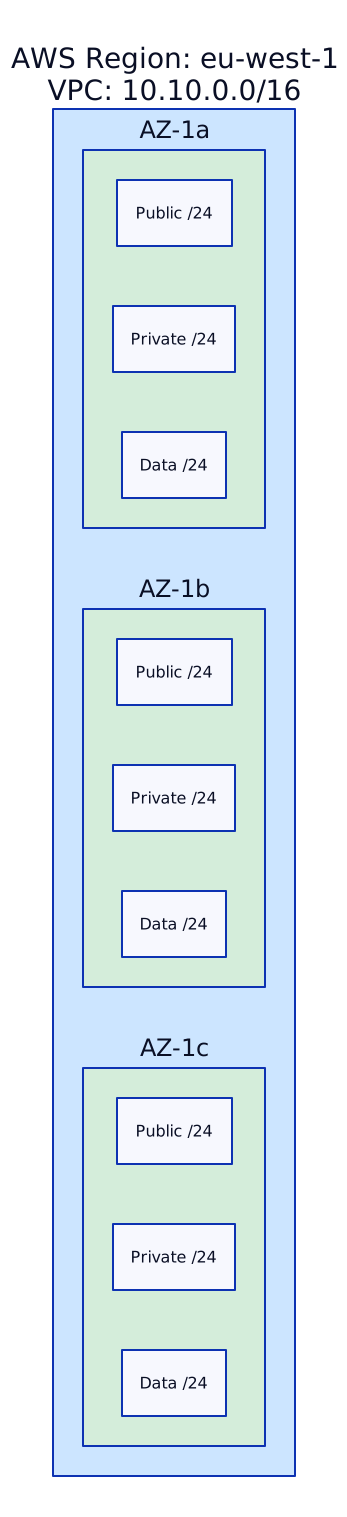
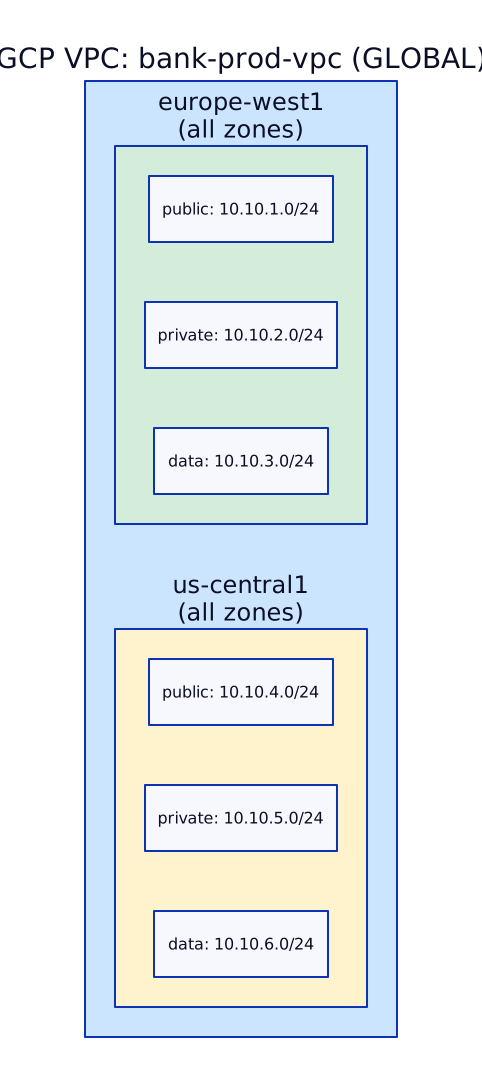
GCP VPCs are global. A single VPC spans all regions. Subnets are regional (they span all zones in that region). This is a fundamental architectural difference from AWS.
Key properties:
- No CIDR at VPC level: you assign CIDRs per subnet, not per VPC
- Subnets are regional: a subnet in
europe-west1is available in all zones within that region (europe-west1-b,-c,-d) - Auto mode vs custom mode: auto mode creates one subnet per region (never use in production). Custom mode = you define every subnet explicitly
- Firewall rules: VPC-level (not subnet-level like NACLs). Use tags or service accounts as targets
- Internal DNS: automatic
*.internalnames for instances within a VPC
Subnet Tiers — The 3-Tier Model
Section titled “Subnet Tiers — The 3-Tier Model”Enterprise networks use tiered subnets to enforce network segmentation at the routing level. Our bank uses three tiers across every workload VPC.
Tier Definitions
Section titled “Tier Definitions”| Tier | Purpose | Route to Internet | Route from Internet | Examples |
|---|---|---|---|---|
| Public | Resources that need inbound internet access | Yes (IGW / Cloud NAT) | Yes (via IGW) | ALB/NLB, bastion hosts, NAT GW |
| Private | Application workloads | Outbound only (via NAT GW) | No | EKS/GKE nodes, EC2/GCE app servers, Lambda |
| Data | Databases, caches, message queues | No internet access | No | RDS, ElastiCache, MSK, Memorystore |
CIDR Planning — Real Enterprise Example
Section titled “CIDR Planning — Real Enterprise Example”CIDR planning is one of the most important and most overlooked tasks. Get it wrong and you face overlapping ranges, exhausted IPs, and inability to peer or route between VPCs.
Our Bank’s CIDR Allocation Plan:
Enterprise CIDR Master Plan============================
10.0.0.0/8  — Cloud allocation (entire RFC 1918 Class A)
Environment Allocation:  10.10.0.0/12  — Production     (10.10.0.0 – 10.15.255.255)  10.20.0.0/12  — Staging        (10.20.0.0 – 10.25.255.255)  10.30.0.0/12  — Development    (10.30.0.0 – 10.35.255.255)  10.40.0.0/12  — Sandbox        (10.40.0.0 – 10.45.255.255)
Infrastructure (shared/hub):  10.0.0.0/16   — Network Hub VPC  10.1.0.0/16   — Shared Services VPC  10.2.0.0/16   — Security VPC
Production VPCs (10.10.0.0/12):  10.10.0.0/16  — payments-prod       (65,534 IPs)  10.11.0.0/16  — trading-prod        (65,534 IPs)  10.12.0.0/16  — data-platform-prod  (65,534 IPs)  10.13.0.0/16  — mobile-api-prod     (65,534 IPs)  ...room for 6 more /16 VPCs
On-Premises:  172.16.0.0/12 — Corporate data center (no overlap with cloud)  192.168.0.0/16— Office networks
Subnet Breakdown for a Single VPC (10.10.0.0/16):
VPC: 10.10.0.0/16 (payments-prod)
AZ-1a (eu-west-1a):  10.10.0.0/24   — public    (251 usable IPs)  10.10.1.0/24   — private   (251 usable IPs)  10.10.2.0/24   — data      (251 usable IPs)
AZ-1b (eu-west-1b):  10.10.10.0/24  — public    (251 usable IPs)  10.10.11.0/24  — private   (251 usable IPs)  10.10.12.0/24  — data      (251 usable IPs)
AZ-1c (eu-west-1c):  10.10.20.0/24  — public    (251 usable IPs)  10.10.21.0/24  — private   (251 usable IPs)  10.10.22.0/24  — data      (251 usable IPs)
Reserved: 10.10.100.0/24 — EKS pod secondary CIDR (if using custom networking) 10.10.200.0/24 — future expansionWhy /24 per subnet? For most enterprise workloads, 251 IPs per subnet per AZ is sufficient. EKS worker nodes need one primary IP each, and pod IPs come from secondary CIDRs (VPC CNI custom networking) or overlay networks. If you expect 500+ nodes in a single AZ, use /23 or /22.
AWS VPC IPAM:
AWS VPC IPAM (IP Address Manager) lets you centrally manage and allocate CIDR blocks across accounts. The central infra team creates IPAM pools and delegates allocation to workload accounts — preventing overlaps.

Route Tables
Section titled “Route Tables”Route tables determine where network traffic is directed. Every subnet must be associated with exactly one route table.
AWS has a main route table (default for unassociated subnets) and custom route tables. Best practice: never use the main route table; create explicit ones per tier.
Public subnet route table:
| Destination | Target | Purpose |
|---|---|---|
| 10.10.0.0/16 | local | Traffic within the VPC |
| 10.0.0.0/8 | tgw-xxxxxxx | All cloud traffic via Transit Gateway |
| 172.16.0.0/12 | tgw-xxxxxxx | On-prem via TGW → Direct Connect |
| 0.0.0.0/0 | tgw-xxxxxxx | Internet via TGW → Network Hub NAT |
Private subnet route table:
| Destination | Target | Purpose |
|---|---|---|
| 10.10.0.0/16 | local | Within VPC |
| 10.0.0.0/8 | tgw-xxxxxxx | Cross-VPC via TGW |
| 172.16.0.0/12 | tgw-xxxxxxx | On-prem via TGW |
| 0.0.0.0/0 | tgw-xxxxxxx | Internet via Network Hub inspection |
| pl-xxxxxxxx | vpce-s3 | S3 via gateway endpoint (prefix list) |
Data subnet route table:
| Destination | Target | Purpose |
|---|---|---|
| 10.10.0.0/16 | local | Within VPC only |
| 10.0.0.0/8 | tgw-xxxxxxx | Cross-VPC (for replication, etc.) |
GCP uses routes (not route tables). Routes are VPC-level resources with priorities.
- System-generated routes: subnet routes (auto-created for each subnet), default internet route (
0.0.0.0/0via default internet gateway) - Custom static routes: you create these (e.g., route to on-prem via VPN tunnel)
- Dynamic routes: learned via Cloud Router from BGP peers (Cloud Interconnect, HA VPN)
Route priority: lower number = higher priority (0-65535). Default route has priority 1000.
Example routes in a workload VPC (Shared VPC service project):
| Destination | Next Hop | Priority | Purpose |
|---|---|---|---|
| 10.10.0.0/16 | subnet route | 0 | Local (auto) |
| 10.0.0.0/8 | NCC hub / VPN tunnel | 100 | Cross-VPC |
| 172.16.0.0/12 | Cloud Interconnect | 100 | On-prem |
| 0.0.0.0/0 | Cloud NAT (in host project) | 1000 | Internet outbound |
NAT Gateway vs Cloud NAT
Section titled “NAT Gateway vs Cloud NAT”Private subnets need outbound internet access (package updates, API calls, pulling container images). NAT translates private IPs to public IPs for outbound traffic.
AWS NAT Gateway is a managed, zonal resource. You deploy one per AZ for high availability.
Key characteristics:
- Zonal: deploy in each AZ where you have private subnets
- Elastic IP: each NAT GW gets a static public IP (Elastic IP)
- Bandwidth: up to 100 Gbps per NAT GW (auto-scales)
- Cost: $0.045/hr + $0.045/GB processed (can be expensive at scale)
- No security group: NAT GW does not have a security group attached

Enterprise pattern: In our bank, workload VPCs do NOT have their own NAT GW. Internet traffic routes via TGW to the Network Hub inspection VPC, which has centralized NAT GW + Network Firewall. This means:
- Single point of egress control and logging
- All outbound traffic is inspected by IPS/IDS rules
- Fewer Elastic IPs to manage and allowlist with third-party APIs
Cloud NAT is a managed, regional, software-defined NAT. It is NOT a device — it’s a configuration on Cloud Router.
Key characteristics:
- Regional: one Cloud NAT configuration covers all zones in a region
- No single point of failure: distributed across Google’s infrastructure
- Auto-allocate IPs: GCP assigns public IPs automatically, or you can specify manual IPs
- Per-subnet control: enable Cloud NAT for specific subnets (not entire VPC)
- Endpoint-independent mapping: better compatibility with protocols like SIP, FTP
- Logging: optional per-connection logging (useful for compliance)

Cost advantage: Cloud NAT charges per VM per hour ($0.0044/hr) + per GB ($0.045/GB). For large fleets, it can be cheaper than AWS NAT GW because there is no per-gateway hourly charge.
VPC Endpoints & Private Service Connect
Section titled “VPC Endpoints & Private Service Connect”Accessing AWS/GCP services (S3, DynamoDB, Container Registry, Cloud Storage) from private subnets normally requires going through NAT → internet → service. VPC endpoints and Private Service Connect provide private, direct connectivity — no internet traversal, lower latency, lower cost.
Gateway Endpoints (free, S3 and DynamoDB only):
- Adds a route in your route table pointing to the service via a prefix list
- No ENI, no DNS change — just a route
- Free: no hourly or data processing charges
Interface Endpoints (powered by AWS PrivateLink):
- Creates an ENI in your subnet with a private IP
- DNS resolves the service endpoint to the private IP (via private hosted zone)
- Works for 100+ AWS services: ECR, CloudWatch, SSM, STS, KMS, Secrets Manager, etc.
- Cost: ~$0.01/hr per AZ + $0.01/GB processed
- Requires security group configuration
Gateway Load Balancer Endpoints (for appliances):
- Used to route traffic to third-party security appliances (firewalls, IDS)
- Works with AWS Network Firewall under the hood

Private Google Access (PGA):
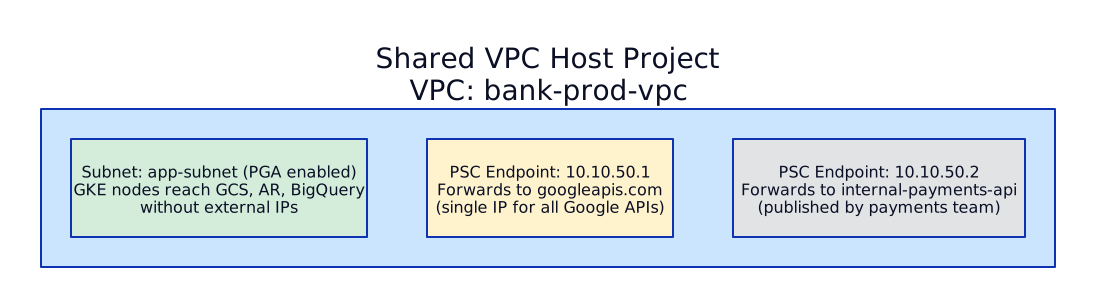
- Enabled per subnet — allows instances without external IPs to reach Google APIs (GCS, BigQuery, Artifact Registry)
- No additional cost
- Uses special IP ranges:
199.36.153.4/30(restricted) or199.36.153.8/30(private) - Restricted PGA: only allows access to Google APIs supported by VPC Service Controls (use this for regulated workloads)
Private Service Connect (PSC):
- Consumer-side endpoint (similar to AWS PrivateLink)
- Creates a forwarding rule with a private IP in your VPC
- Can connect to Google APIs, third-party published services, or your own internal services published across projects
- PSC for Google APIs: single endpoint for all Google APIs (one IP, not per-service like AWS)
- PSC for published services: connect to services in other VPCs/projects without peering
DNS — Route 53 & Cloud DNS
Section titled “DNS — Route 53 & Cloud DNS”DNS is the backbone of service discovery, hybrid connectivity, and multi-account architecture. In our enterprise bank, the Network Hub Account owns all DNS infrastructure.
Public Hosted Zones:
- Internet-facing DNS records (e.g.,
api.bank.com → ALB) - Supports alias records to AWS resources (ALB, CloudFront, S3) — free queries, no TTL issues
Private Hosted Zones:
- Only resolvable within associated VPCs
- Use for internal service discovery:
payments.internal.bank.com - Can associate with VPCs in OTHER accounts (cross-account DNS)
Split-Horizon DNS:
- Same domain name, different answers depending on where the query comes from
- Public zone:
api.bank.com → 52.x.x.x(internet users) - Private zone:
api.bank.com → 10.10.1.50(internal users hit internal ALB)
Route 53 Resolver:
- Inbound endpoints: allow on-prem DNS servers to resolve AWS private hosted zones (on-prem → AWS)
- Outbound endpoints: allow VPCs to resolve on-prem DNS domains (AWS → on-prem)
- Resolver rules: forward queries for
corp.bank.internalto on-prem DNS servers - Rules can be shared across accounts via AWS RAM

Public Zones:
- Internet-facing records with anycast nameservers
- Supports standard record types, DNSSEC
Private Zones:
- Resolvable only within authorized VPC networks
- In Shared VPC: create private zones in host project, authorize the VPC — all service projects can resolve
Split-Horizon DNS:
- Same concept as AWS: public zone for external, private zone for internal
- Private zone takes precedence for queries from within the VPC
Cloud DNS Peering:
- Forward DNS queries from one VPC to another VPC’s private zone
- Used in hub-spoke: spoke VPCs peer DNS to the hub VPC
Inbound/Outbound Server Policies:
- Inbound policy: creates forwarding entry points (IPs) in a VPC — on-prem DNS can forward here
- Outbound forwarding zones: forward queries for specific domains to on-prem DNS servers
- Applied at VPC level

Load Balancing
Section titled “Load Balancing”Load balancers are the front door to every application. Choosing the right type — L4 vs L7, regional vs global, internal vs external — is a critical architecture decision.
Application Load Balancer (ALB) — Layer 7
Section titled “Application Load Balancer (ALB) — Layer 7”- Protocol: HTTP, HTTPS, gRPC, WebSocket
- Routing: path-based (
/api/*), host-based (api.bank.com), header-based, query-string-based - Targets: EC2 instances, IP addresses, Lambda functions, EKS pods (IP mode)
- SSL termination: yes, with ACM certificates
- WAF integration: attach AWS WAF Web ACL directly
- Authentication: built-in OIDC/Cognito authentication on the ALB
- Cross-zone LB: enabled by default (free since 2024)
- Scope: regional — one ALB per region
When to use: web applications, APIs, microservices, anything HTTP/HTTPS. This is your default choice.
Network Load Balancer (NLB) — Layer 4
Section titled “Network Load Balancer (NLB) — Layer 4”- Protocol: TCP, UDP, TLS
- Routing: port-based only (no content inspection)
- Static IPs: each NLB gets one static IP per AZ (or Elastic IP)
- Performance: millions of requests/sec, ultra-low latency (~100us added)
- Preserve source IP: yes (ALB does not by default — uses X-Forwarded-For)
- Targets: EC2 instances, IP addresses, ALB (NLB → ALB pattern for static IPs + L7 routing)
- PrivateLink: expose services via NLB + VPC endpoint service
- Cross-zone LB: disabled by default (enable for even distribution)
When to use: TCP services (databases, MQTT, gaming), extreme performance needs, static IPs required, PrivateLink, TLS passthrough.
Gateway Load Balancer (GWLB) — Layer 3
Section titled “Gateway Load Balancer (GWLB) — Layer 3”- Purpose: route traffic to virtual appliances (firewalls, IDS/IPS)
- Protocol: IP (all traffic, all ports)
- How it works: GENEVE encapsulation to appliance, traffic returns via same GWLB
- Used by: AWS Network Firewall (under the hood), third-party firewalls (Palo Alto, Fortinet)
When to use: centralized network inspection architectures (Network Hub VPC).

GCP load balancers are categorized by scope (global/regional), traffic direction (external/internal), and protocol (HTTP/TCP/UDP).
Global External HTTP(S) Load Balancer — Layer 7
Section titled “Global External HTTP(S) Load Balancer — Layer 7”- Single anycast IP: one IP address serves traffic globally — Google’s edge network routes users to the nearest backend
- Backends: instance groups, NEGs (Network Endpoint Groups — for GKE pods), serverless NEGs (Cloud Run, Cloud Functions)
- URL maps: path/host-based routing (equivalent to ALB rules)
- SSL termination: Google-managed certificates, auto-renewing
- Cloud CDN integration: enable caching at Google’s edge
- Cloud Armor integration: DDoS protection, WAF rules at the edge
- Traffic splitting: percentage-based (canary deployments)
When to use: any internet-facing web application or API. Default choice for GCP external services.
Regional External/Internal HTTP(S) Load Balancer — Layer 7
Section titled “Regional External/Internal HTTP(S) Load Balancer — Layer 7”- Regional scope (not global anycast)
- Use when data residency requires traffic to stay in-region
- Internal variant: for internal microservice-to-microservice communication
TCP/UDP Network Load Balancer — Layer 4
Section titled “TCP/UDP Network Load Balancer — Layer 4”- External: regional, pass-through (preserves source IP), supports TCP/UDP
- Internal: for internal TCP/UDP services (databases, message queues)
- Proxy variant: regional TCP/SSL proxy for TLS termination
TCP/SSL Proxy Load Balancer — Global Layer 4
Section titled “TCP/SSL Proxy Load Balancer — Global Layer 4”- Global anycast IP for TCP traffic
- SSL termination at Google’s edge
- Use for non-HTTP TCP services that need global reach

ALB vs NLB vs GCP Global LB — Quick Comparison
Section titled “ALB vs NLB vs GCP Global LB — Quick Comparison”| Feature | AWS ALB | AWS NLB | GCP Global HTTP(S) LB |
|---|---|---|---|
| Layer | 7 (HTTP) | 4 (TCP/UDP) | 7 (HTTP) |
| Scope | Regional | Regional | Global (anycast) |
| Static IP | No (use Global Accelerator) | Yes | Yes (anycast) |
| Path routing | Yes | No | Yes (URL maps) |
| WAF | Yes (AWS WAF) | No | Yes (Cloud Armor) |
| WebSocket | Yes | Yes (TCP) | Yes |
| SSL termination | Yes | Optional (TLS) | Yes |
| Multi-region | No (need one per region) | No | Yes (native) |
| PrivateLink | No | Yes (endpoint service) | PSC (consumer endpoint) |
Terraform — Reusable VPC Module
Section titled “Terraform — Reusable VPC Module”# modules/vpc/main.tf — Enterprise VPC Module# Deploys a 3-tier VPC across 3 AZs with TGW attachment
variable "vpc_name" { description = "Name of the VPC (e.g., payments-prod)" type = string}
variable "vpc_cidr" { description = "CIDR block for the VPC (e.g., 10.10.0.0/16)" type = string}
variable "azs" { description = "List of availability zones" type = list(string) default = ["eu-west-1a", "eu-west-1b", "eu-west-1c"]}
variable "public_subnets" { description = "CIDR blocks for public subnets" type = list(string)}
variable "private_subnets" { description = "CIDR blocks for private subnets" type = list(string)}
variable "data_subnets" { description = "CIDR blocks for data subnets" type = list(string)}
variable "transit_gateway_id" { description = "Transit Gateway ID for hub-spoke attachment" type = string}
variable "enable_vpc_endpoints" { description = "Deploy standard VPC endpoints (S3, ECR, CloudWatch, etc.)" type = bool default = true}
# ─── VPC ────────────────────────────────────────────
resource "aws_vpc" "this" { cidr_block = var.vpc_cidr enable_dns_support = true enable_dns_hostnames = true
tags = { Name = var.vpc_name Environment = split("-", var.vpc_name)[1] # e.g., "prod" from "payments-prod" ManagedBy = "terraform" Module = "enterprise-vpc" }}
# ─── Subnets ────────────────────────────────────────
resource "aws_subnet" "public" { count = length(var.azs) vpc_id = aws_vpc.this.id cidr_block = var.public_subnets[count.index] availability_zone = var.azs[count.index]
tags = { Name = "${var.vpc_name}-public-${var.azs[count.index]}" Tier = "public" "kubernetes.io/role/elb" = "1" # For ALB Ingress Controller }}
resource "aws_subnet" "private" { count = length(var.azs) vpc_id = aws_vpc.this.id cidr_block = var.private_subnets[count.index] availability_zone = var.azs[count.index]
tags = { Name = "${var.vpc_name}-private-${var.azs[count.index]}" Tier = "private" "kubernetes.io/role/internal-elb" = "1" # For internal ALB }}
resource "aws_subnet" "data" { count = length(var.azs) vpc_id = aws_vpc.this.id cidr_block = var.data_subnets[count.index] availability_zone = var.azs[count.index]
tags = { Name = "${var.vpc_name}-data-${var.azs[count.index]}" Tier = "data" }}
# ─── Route Tables ───────────────────────────────────
resource "aws_route_table" "public" { vpc_id = aws_vpc.this.id tags = { Name = "${var.vpc_name}-public-rt" }}
resource "aws_route_table" "private" { vpc_id = aws_vpc.this.id tags = { Name = "${var.vpc_name}-private-rt" }}
resource "aws_route_table" "data" { vpc_id = aws_vpc.this.id tags = { Name = "${var.vpc_name}-data-rt" }}
# All internet-bound traffic → Transit Gateway (→ Network Hub for inspection)resource "aws_route" "public_default" { route_table_id = aws_route_table.public.id destination_cidr_block = "0.0.0.0/0" transit_gateway_id = var.transit_gateway_id}
resource "aws_route" "private_default" { route_table_id = aws_route_table.private.id destination_cidr_block = "0.0.0.0/0" transit_gateway_id = var.transit_gateway_id}
# Cross-VPC traffic → Transit Gatewayresource "aws_route" "public_cross_vpc" { route_table_id = aws_route_table.public.id destination_cidr_block = "10.0.0.0/8" transit_gateway_id = var.transit_gateway_id}
resource "aws_route" "private_cross_vpc" { route_table_id = aws_route_table.private.id destination_cidr_block = "10.0.0.0/8" transit_gateway_id = var.transit_gateway_id}
resource "aws_route" "data_cross_vpc" { route_table_id = aws_route_table.data.id destination_cidr_block = "10.0.0.0/8" transit_gateway_id = var.transit_gateway_id}
# No default route for data subnets — intentionally isolated from internet
# ─── Route Table Associations ───────────────────────
resource "aws_route_table_association" "public" { count = length(var.azs) subnet_id = aws_subnet.public[count.index].id route_table_id = aws_route_table.public.id}
resource "aws_route_table_association" "private" { count = length(var.azs) subnet_id = aws_subnet.private[count.index].id route_table_id = aws_route_table.private.id}
resource "aws_route_table_association" "data" { count = length(var.azs) subnet_id = aws_subnet.data[count.index].id route_table_id = aws_route_table.data.id}
# ─── Transit Gateway Attachment ─────────────────────
resource "aws_ec2_transit_gateway_vpc_attachment" "this" { transit_gateway_id = var.transit_gateway_id vpc_id = aws_vpc.this.id subnet_ids = aws_subnet.private[*].id # Attach via private subnets
transit_gateway_default_route_table_association = false transit_gateway_default_route_table_propagation = false
tags = { Name = "${var.vpc_name}-tgw-attachment" }}
# ─── VPC Endpoints (Gateway) ────────────────────────
resource "aws_vpc_endpoint" "s3" { count = var.enable_vpc_endpoints ? 1 : 0 vpc_id = aws_vpc.this.id service_name = "com.amazonaws.${data.aws_region.current.name}.s3" vpc_endpoint_type = "Gateway" route_table_ids = [ aws_route_table.private.id, aws_route_table.data.id, ] tags = { Name = "${var.vpc_name}-s3-endpoint" }}
# ─── VPC Endpoints (Interface) ──────────────────────
resource "aws_security_group" "vpc_endpoints" { count = var.enable_vpc_endpoints ? 1 : 0 vpc_id = aws_vpc.this.id name = "${var.vpc_name}-vpce-sg"
ingress { from_port = 443 to_port = 443 protocol = "tcp" cidr_blocks = [var.vpc_cidr] description = "HTTPS from VPC" }
tags = { Name = "${var.vpc_name}-vpce-sg" }}
locals { interface_endpoints = var.enable_vpc_endpoints ? [ "ecr.api", "ecr.dkr", "sts", "logs", "monitoring", "ssm", "kms", "secretsmanager" ] : []}
resource "aws_vpc_endpoint" "interface" { for_each = toset(local.interface_endpoints) vpc_id = aws_vpc.this.id service_name = "com.amazonaws.${data.aws_region.current.name}.${each.value}" vpc_endpoint_type = "Interface" subnet_ids = aws_subnet.private[*].id security_group_ids = [aws_security_group.vpc_endpoints[0].id] private_dns_enabled = true tags = { Name = "${var.vpc_name}-${each.value}-endpoint" }}
data "aws_region" "current" {}
# ─── Outputs ────────────────────────────────────────
output "vpc_id" { value = aws_vpc.this.id }output "public_subnet_ids" { value = aws_subnet.public[*].id }output "private_subnet_ids" { value = aws_subnet.private[*].id }output "data_subnet_ids" { value = aws_subnet.data[*].id }output "tgw_attachment_id" { value = aws_ec2_transit_gateway_vpc_attachment.this.id }Usage:
module "payments_vpc" { source = "../modules/vpc" vpc_name = "payments-prod" vpc_cidr = "10.10.0.0/16" azs = ["eu-west-1a", "eu-west-1b", "eu-west-1c"] public_subnets = ["10.10.0.0/24", "10.10.10.0/24", "10.10.20.0/24"] private_subnets = ["10.10.1.0/24", "10.10.11.0/24", "10.10.21.0/24"] data_subnets = ["10.10.2.0/24", "10.10.12.0/24", "10.10.22.0/24"] transit_gateway_id = data.aws_ec2_transit_gateway.hub.id}# modules/vpc/main.tf — Enterprise GCP VPC Module# Deploys Shared VPC host project with 3-tier subnets
variable "project_id" { description = "GCP project ID (host project for Shared VPC)" type = string}
variable "vpc_name" { description = "Name of the VPC network" type = string}
variable "region" { description = "Primary region for subnets" type = string default = "europe-west1"}
variable "subnets" { description = "Map of subnet configurations" type = map(object({ cidr = string private_google_access = bool purpose = string # public, private, data }))}
variable "enable_cloud_nat" { type = bool default = true}
variable "service_projects" { description = "List of service project IDs to attach to this Shared VPC" type = list(string) default = []}
# ─── Shared VPC Host ────────────────────────────────
resource "google_compute_shared_vpc_host_project" "this" { project = var.project_id}
# ─── VPC Network ────────────────────────────────────
resource "google_compute_network" "this" { project = var.project_id name = var.vpc_name auto_create_subnetworks = false # ALWAYS custom mode in enterprise routing_mode = "GLOBAL"}
# ─── Subnets ────────────────────────────────────────
resource "google_compute_subnetwork" "this" { for_each = var.subnets project = var.project_id name = "${var.vpc_name}-${each.key}" network = google_compute_network.this.id region = var.region ip_cidr_range = each.value.cidr
private_ip_google_access = each.value.private_google_access
log_config { aggregation_interval = "INTERVAL_5_SEC" flow_sampling = 0.5 metadata = "INCLUDE_ALL_METADATA" }
# Secondary ranges for GKE pods and services dynamic "secondary_ip_range" { for_each = each.value.purpose == "private" ? [1] : [] content { range_name = "${each.key}-pods" ip_cidr_range = "100.64.${index(keys(var.subnets), each.key)}.0/20" } }
dynamic "secondary_ip_range" { for_each = each.value.purpose == "private" ? [1] : [] content { range_name = "${each.key}-services" ip_cidr_range = "100.65.${index(keys(var.subnets), each.key)}.0/24" } }}
# ─── Cloud Router + Cloud NAT ───────────────────────
resource "google_compute_router" "this" { count = var.enable_cloud_nat ? 1 : 0 project = var.project_id name = "${var.vpc_name}-router" network = google_compute_network.this.id region = var.region
bgp { asn = 64514 }}
resource "google_compute_router_nat" "this" { count = var.enable_cloud_nat ? 1 : 0 project = var.project_id name = "${var.vpc_name}-nat" router = google_compute_router.this[0].name region = var.region
nat_ip_allocate_option = "AUTO_ONLY" source_subnetwork_ip_ranges_to_nat = "LIST_OF_SUBNETWORKS"
# Only NAT for private subnets, not data subnets dynamic "subnetwork" { for_each = { for k, v in var.subnets : k => v if v.purpose == "private" } content { name = google_compute_subnetwork.this[subnetwork.key].id source_ip_ranges_to_nat = ["ALL_IP_RANGES"] } }
log_config { enable = true filter = "ERRORS_ONLY" }}
# ─── Shared VPC Service Projects ────────────────────
resource "google_compute_shared_vpc_service_project" "this" { for_each = toset(var.service_projects) host_project = var.project_id service_project = each.value
depends_on = [google_compute_shared_vpc_host_project.this]}
# ─── Private Service Connect (Google APIs) ──────────
resource "google_compute_global_address" "psc_google_apis" { project = var.project_id name = "${var.vpc_name}-psc-google-apis" purpose = "PRIVATE_SERVICE_CONNECT" address_type = "INTERNAL" network = google_compute_network.this.id address = "10.255.255.1" prefix_length = 32}
resource "google_compute_global_forwarding_rule" "psc_google_apis" { project = var.project_id name = "${var.vpc_name}-psc-google-apis" network = google_compute_network.this.id ip_address = google_compute_global_address.psc_google_apis.id target = "all-apis" load_balancing_scheme = "" # Required for PSC}
# ─── Outputs ────────────────────────────────────────
output "vpc_id" { value = google_compute_network.this.id }output "vpc_name" { value = google_compute_network.this.name }output "subnet_ids" { value = { for k, v in google_compute_subnetwork.this : k => v.id }}Usage:
module "bank_prod_vpc" {  source     = "../modules/vpc"  project_id = "bank-network-host-prod"  vpc_name   = "bank-prod-vpc"  region     = "europe-west1"
  subnets = {    public = {      cidr                  = "10.10.1.0/24"      private_google_access = true      purpose               = "public"    }    private = {      cidr                  = "10.10.2.0/24"      private_google_access = true      purpose               = "private"    }    data = {      cidr                  = "10.10.3.0/24"      private_google_access = true      purpose               = "data"    }  }
  service_projects = [    "bank-payments-prod",    "bank-trading-prod",    "bank-data-prod",  ]}
DNS Architecture
Section titled “DNS Architecture”DNS is the first thing that happens when a user connects to your application. It is also the most fragile — misconfigured DNS can take down an entire application even when all infrastructure is healthy. Enterprise DNS architecture must handle hybrid resolution (cloud + on-prem), multi-region routing, failover, and compliance requirements.
Route 53 Routing Policies — All 7 Explained
Section titled “Route 53 Routing Policies — All 7 Explained”Route 53 provides seven routing policies. Each serves a different use case. Understanding when to use each is critical for multi-region architecture design.
| Policy | How It Works | Use Case | Example |
|---|---|---|---|
| Simple | Returns one or more values. If multiple, client picks randomly. No health checks on multi-value simple records. | Single-region, basic setup | api.example.com → 52.1.2.3 |
| Weighted | Distribute traffic by weight (0-255). Weight=0 stops traffic. | A/B testing, canary, gradual migration | 90% to v1 ALB, 10% to v2 ALB |
| Latency | Route to the region with lowest latency from the user’s resolver location. | Multi-region active-active | UAE users → me-south-1, EU users → eu-west-1 |
| Failover | Active-passive. Primary record used when healthy; secondary when primary fails health check. | Disaster recovery | Primary: UAE ALB, Failover: EU ALB |
| Geolocation | Route based on user’s country, continent, or “default”. Most specific match wins. | Compliance (data residency), content localization | EU users → EU region (GDPR), US users → US region |
| Geoproximity | Route based on geographic distance + configurable bias. Bias shifts the “boundary” between regions. Requires Traffic Flow. | Fine-tuned geographic routing | Bias UAE region by +50 to capture nearby countries |
| Multivalue | Return up to 8 healthy IP addresses. Client-side load balancing from the returned set. | Simple load distribution with health checks | Return 8 healthy IPs from a pool of 12 |
Key differences that interviewers test:
- Weighted vs Latency: Weighted gives you explicit control (90/10 split). Latency is automatic based on network measurements. Use weighted for controlled rollouts; latency for best user experience.
- Geolocation vs Geoproximity: Geolocation routes by political boundaries (country/continent). Geoproximity routes by physical distance with adjustable bias. Geolocation is binary (country X → region Y); geoproximity is gradient (closer = more likely).
- Failover vs Multivalue: Failover is active-passive (one primary, one secondary). Multivalue is active-active (up to 8 healthy records returned). Use failover for DR; multivalue for simple load distribution.
- Simple vs Multivalue: Both can return multiple IPs, but multivalue supports health checks per record and removes unhealthy IPs from responses. Simple returns all values regardless of health.
GCP Cloud DNS
Section titled “GCP Cloud DNS”GCP Cloud DNS provides authoritative DNS hosting with additional features for enterprise hybrid architectures:
- Public zones: authoritative DNS for internet-facing domains. Anycast DNS servers for low-latency resolution globally.
- Private zones: DNS names visible only within specified VPC networks. Used for internal service discovery (
payments.internal.example.com). - Response policies (DNS firewall): Override DNS responses for specific domains. Use cases: block malicious domains at the DNS layer, redirect internal service names, enforce split-horizon DNS. Rules can return NXDOMAIN (block), return a different IP (redirect), or pass through.
- DNS peering: Resolve names from another VPC’s private DNS zones without forwarding. Cross-project DNS resolution in Shared VPC architectures. No data leaves Google’s network.
- Forwarding zones: Forward DNS queries for specific domains to external DNS servers (typically on-prem AD/BIND). Queries are forwarded via Cloud Interconnect or VPN (private path), NOT over the internet.
Hybrid DNS Architecture
Section titled “Hybrid DNS Architecture”This is one of the most common enterprise DNS patterns — resolving names across cloud and on-premises environments.

How it works:
-
Cloud resolves on-prem names — An application in AWS needs to resolve
ldap.corp.internal. Route 53 Resolver checks its forwarding rules, finds thatcorp.internalshould be forwarded to10.0.0.53(on-prem AD DNS). The query goes out through the Outbound Endpoint ENI, over Direct Connect to on-prem, gets resolved, and the answer comes back. -
On-prem resolves cloud names — An on-prem server needs to resolve
api.payments.aws.internal. The on-prem DNS server has a conditional forwarder pointingaws.internalto the Route 53 Resolver Inbound Endpoint IPs (10.20.1.10,10.20.2.10). The query comes over Direct Connect to the Inbound Endpoint, Route 53 resolves it from the private hosted zone, and returns the answer.
Terraform — Route 53 Resolver + GCP DNS
Section titled “Terraform — Route 53 Resolver + GCP DNS”# Security group for DNS endpoints (UDP/TCP 53)resource "aws_security_group" "dns_resolver" { name = "dns-resolver-endpoints" description = "Allow DNS queries to/from resolver endpoints" vpc_id = aws_vpc.hub.id
ingress { from_port = 53 to_port = 53 protocol = "udp" cidr_blocks = ["10.0.0.0/8"] # On-prem + all VPC CIDRs }
ingress { from_port = 53 to_port = 53 protocol = "tcp" cidr_blocks = ["10.0.0.0/8"] }
egress { from_port = 53 to_port = 53 protocol = "udp" cidr_blocks = ["10.0.0.0/8"] }
egress { from_port = 53 to_port = 53 protocol = "tcp" cidr_blocks = ["10.0.0.0/8"] }}
# Inbound endpoint — on-prem forwards cloud DNS queries hereresource "aws_route53_resolver_endpoint" "inbound" { name = "hybrid-dns-inbound" direction = "INBOUND" security_group_ids = [aws_security_group.dns_resolver.id]
ip_address { subnet_id = aws_subnet.hub_private_a.id ip = "10.20.1.10" } ip_address { subnet_id = aws_subnet.hub_private_b.id ip = "10.20.2.10" }}
# Outbound endpoint — cloud forwards on-prem DNS queries hereresource "aws_route53_resolver_endpoint" "outbound" { name = "hybrid-dns-outbound" direction = "OUTBOUND" security_group_ids = [aws_security_group.dns_resolver.id]
ip_address { subnet_id = aws_subnet.hub_private_a.id } ip_address { subnet_id = aws_subnet.hub_private_b.id }}
# Forwarding rule — send corp.internal queries to on-prem DNSresource "aws_route53_resolver_rule" "forward_corp" { domain_name = "corp.internal" name = "forward-corp-internal" rule_type = "FORWARD" resolver_endpoint_id = aws_route53_resolver_endpoint.outbound.id
target_ip { ip = "10.0.0.53" port = 53 } target_ip { ip = "10.0.0.54" port = 53 }}
# Share forwarding rule with all VPCs via RAMresource "aws_ram_resource_share" "dns_rules" { name = "dns-forwarding-rules" allow_external_principals = true}
resource "aws_ram_resource_association" "dns_rule" { resource_arn = aws_route53_resolver_rule.forward_corp.arn resource_share_arn = aws_ram_resource_share.dns_rules.arn}
# Associate rule with workload VPCsresource "aws_route53_resolver_rule_association" "workload" { resolver_rule_id = aws_route53_resolver_rule.forward_corp.id vpc_id = aws_vpc.workload.id}
# Private hosted zone for cloud-internal namesresource "aws_route53_zone" "cloud_internal" { name = "aws.internal"
vpc { vpc_id = aws_vpc.hub.id }}# Inbound DNS policy — allow on-prem to resolve GCP private zonesresource "google_dns_policy" "hybrid_inbound" { name = "hybrid-inbound-dns" enable_inbound_forwarding = true
networks { network_url = google_compute_network.shared_vpc.id }}
# Forwarding zone — cloud queries for corp.internal go to on-prem DNSresource "google_dns_managed_zone" "forward_corp" { name = "forward-corp-internal" dns_name = "corp.internal." visibility = "private"
private_visibility_config { networks { network_url = google_compute_network.shared_vpc.id } }
forwarding_config { target_name_servers { ipv4_address = "10.0.0.53" forwarding_path = "private" # Via Interconnect, not internet } target_name_servers { ipv4_address = "10.0.0.54" forwarding_path = "private" } }}
# Private zone for GCP-internal namesresource "google_dns_managed_zone" "gcp_internal" { name = "gcp-internal" dns_name = "gcp.internal." visibility = "private"
private_visibility_config { networks { network_url = google_compute_network.shared_vpc.id } }}
# DNS peering — workload VPC resolves names from shared VPC zonesresource "google_dns_managed_zone" "peering_workload" { name = "peer-to-shared-vpc" dns_name = "shared.internal." visibility = "private"
private_visibility_config { networks { network_url = google_compute_network.workload.id } }
peering_config { target_network { network_url = google_compute_network.shared_vpc.id } }}
# Response policy — DNS firewall (block known-bad domains)resource "google_dns_response_policy" "security" { response_policy_name = "security-dns-firewall"
networks { network_url = google_compute_network.shared_vpc.id }}
resource "google_dns_response_policy_rule" "block_malware" { response_policy = google_dns_response_policy.security.response_policy_name rule_name = "block-malware-domain" dns_name = "malware-c2.example.com."
local_data { local_datas { name = "malware-c2.example.com." type = "A" ttl = 300 rrdatas = ["0.0.0.0"] # Sinkhole } }}Interview — “Design DNS architecture for a hybrid environment where some services are on-prem and others in AWS/GCP”
Answer: (1) DNS zones: On-prem owns corp.internal (Active Directory DNS). AWS owns aws.internal (Route 53 private hosted zone). GCP owns gcp.internal (Cloud DNS private zone). Public-facing: Route 53 or Cloud DNS for example.com. (2) Cross-resolution: On-prem DNS has conditional forwarders — aws.internal → Route 53 Inbound Endpoint IPs, gcp.internal → Cloud DNS inbound forwarding IPs. AWS has Resolver Outbound Endpoint with forwarding rule — corp.internal → on-prem DNS IPs via Direct Connect. GCP has forwarding zone — corp.internal → on-prem DNS IPs via Cloud Interconnect (private path). (3) Cross-cloud DNS: AWS and GCP resolve each other’s domains via on-prem DNS as a hub (simplest) or via direct forwarding (GCP forwarding zone → Route 53 Inbound Endpoint). (4) Split-horizon DNS: api.example.com resolves to public IP from internet, private IP from within VPC/on-prem. Implemented via Route 53 private hosted zone (overrides public zone for associated VPCs). (5) DNS security: DNSSEC on public zones. Response policies on GCP for DNS-layer malware blocking. VPC DNS firewall (Route 53 Resolver DNS Firewall) for blocking known-bad domains from VPC workloads. (6) Shared across accounts: RAM (Resource Access Manager) shares Route 53 Resolver rules across all workload accounts so every VPC can resolve on-prem names.
Network Observability
Section titled “Network Observability”You cannot secure or troubleshoot what you cannot see. Network observability provides visibility into traffic patterns, security events, and connectivity issues across your cloud and hybrid infrastructure.
VPC Flow Logs
Section titled “VPC Flow Logs”VPC Flow Logs capture IP traffic metadata for network interfaces, subnets, or entire VPCs. They record source/destination IP, port, protocol, action (ACCEPT/REJECT), packets, and bytes — but NOT packet payloads.
Destinations:
- CloudWatch Logs — real-time queries, dashboards, metric filters. Good for alerting (e.g., alert on rejected traffic spikes). Expensive at scale.
- S3 — cost-effective long-term storage. Query with Athena (SQL over S3). Best for compliance retention (store 1+ year of flow logs).
- Kinesis Data Firehose — streaming to SIEM (Splunk, Datadog, Elastic). Real-time security analytics.
Custom log format — select only the fields you need to reduce cost and noise:
Default fields:version account-id interface-id srcaddr dstaddr srcport dstport protocol packets bytes start end action log-status
Useful additional fields:vpc-id subnet-id instance-id type pkt-srcaddr pkt-dstaddr region az-id traffic-path flow-direction
Transit Gateway Flow Logs — capture traffic crossing TGW attachments. Essential for understanding cross-VPC traffic patterns and identifying unexpected lateral movement.
Traffic Mirroring — Full Packet Capture
Section titled “Traffic Mirroring — Full Packet Capture”Unlike Flow Logs (metadata only), Traffic Mirroring captures FULL PACKETS — headers AND payloads. This is critical for:
- Security forensics — reconstruct attack sequences, analyze malware payloads
- Compliance auditing — prove what data was transmitted (PCI DSS, SOC 2)
- Application debugging — inspect actual HTTP request/response bodies
- IDS/IPS — feed mirrored traffic to an intrusion detection appliance (Suricata, Zeek)
Architecture:

Mirror traffic from specific ENIs (or all ENIs in a subnet) to a target NLB. Apply mirror filter sessions to capture only specific traffic (e.g., only TCP 443, only traffic to specific CIDRs).
Reachability Analyzer
Section titled “Reachability Analyzer”AWS Reachability Analyzer tests connectivity between two endpoints WITHOUT sending actual traffic. It analyzes the network configuration (route tables, security groups, NACLs, VPC peering, TGW routes) and tells you whether traffic CAN reach the destination — and if not, which configuration is blocking it.
Use cases:
- “Can my EKS pod reach this RDS instance?” — answer without sending a packet
- Pre-deployment validation — verify connectivity before deploying an application
- Compliance audits — prove that sensitive resources are NOT reachable from untrusted networks
- Troubleshooting — identify exactly which security group or route table is blocking traffic
Terraform — Flow Logs and Traffic Mirroring
Section titled “Terraform — Flow Logs and Traffic Mirroring”# VPC Flow Logs to S3 (cost-effective, query with Athena)resource "aws_flow_log" "vpc" { vpc_id = aws_vpc.main.id log_destination = aws_s3_bucket.flow_logs.arn log_destination_type = "s3" traffic_type = "ALL" # ACCEPT, REJECT, or ALL
log_format = "$${version} $${account-id} $${interface-id} $${srcaddr} $${dstaddr} $${srcport} $${dstport} $${protocol} $${packets} $${bytes} $${start} $${end} $${action} $${log-status} $${vpc-id} $${subnet-id} $${flow-direction}"
max_aggregation_interval = 60 # 60 seconds (or 600 for lower cost)
tags = { Name = "vpc-flow-logs" }}
# S3 bucket for flow logs (with lifecycle for cost management)resource "aws_s3_bucket" "flow_logs" { bucket = "company-vpc-flow-logs-${data.aws_caller_identity.current.account_id}"}
resource "aws_s3_bucket_lifecycle_configuration" "flow_logs" { bucket = aws_s3_bucket.flow_logs.id
rule { id = "archive-and-expire" status = "Enabled"
transition { days = 90 storage_class = "GLACIER" }
expiration { days = 365 } }}
# Transit Gateway Flow Logsresource "aws_flow_log" "tgw" { transit_gateway_id = aws_ec2_transit_gateway.hub.id log_destination = aws_s3_bucket.flow_logs.arn log_destination_type = "s3" traffic_type = "ALL"
max_aggregation_interval = 60}
# Traffic Mirroring — full packet captureresource "aws_ec2_traffic_mirror_target" "ids" { description = "IDS appliance behind NLB" network_load_balancer_arn = aws_lb.ids_nlb.arn}
resource "aws_ec2_traffic_mirror_filter" "sensitive" { description = "Mirror only traffic to sensitive subnets"}
resource "aws_ec2_traffic_mirror_filter_rule" "capture_db" { traffic_mirror_filter_id = aws_ec2_traffic_mirror_filter.sensitive.id description = "Capture traffic to database subnet" rule_number = 100 rule_action = "accept" destination_cidr_block = "10.10.32.0/20" # Database subnet CIDR source_cidr_block = "0.0.0.0/0" traffic_direction = "ingress" protocol = 6 # TCP}
resource "aws_ec2_traffic_mirror_session" "eks_to_ids" { description = "Mirror EKS node traffic to IDS" network_interface_id = aws_instance.eks_node.primary_network_interface_id traffic_mirror_filter_id = aws_ec2_traffic_mirror_filter.sensitive.id traffic_mirror_target_id = aws_ec2_traffic_mirror_target.ids.id session_number = 1}VPC Flow Logs
Section titled “VPC Flow Logs”GCP VPC Flow Logs capture similar metadata to AWS: source/destination IP, port, protocol, bytes, packets, and the firewall rule that handled the traffic.
Destinations:
- Cloud Logging — real-time log explorer, metrics, alerts. Good for operational monitoring.
- BigQuery — export for large-scale analytics. SQL queries over flow log data. Cost-effective for historical analysis.
- Pub/Sub — streaming to external SIEM or custom analytics pipelines.
Sampling rate configuration: GCP lets you configure the sampling rate (0.0 to 1.0) to balance cost vs visibility. At scale (thousands of VMs), full sampling (1.0) generates massive log volumes. A rate of 0.5 captures 50% of flows — good enough for pattern detection, significantly cheaper.
resource "google_compute_subnetwork" "with_flow_logs" {  name          = "app-subnet"  ip_cidr_range = "10.10.0.0/20"  region        = "me-central1"  network       = google_compute_network.main.id
  log_config {    aggregation_interval = "INTERVAL_5_SEC"    flow_sampling        = 0.5          # 50% sampling    metadata             = "INCLUDE_ALL_METADATA"    filter_expr          = "true"       # Capture all (or use CEL filter)  }}
Packet Mirroring
Section titled “Packet Mirroring”GCP’s equivalent of AWS Traffic Mirroring. Mirror packets from specific instances, subnets, or network tags to an ILB backend (IDS/IPS appliance).
resource "google_compute_packet_mirroring" "security" {  name        = "mirror-to-ids"  region      = "me-central1"  description = "Mirror traffic to IDS appliance"
  network {    url = google_compute_network.main.id  }
  collector_ilb {    url = google_compute_forwarding_rule.ids_ilb.id  }
  mirrored_resources {    subnetworks {      url = google_compute_subnetwork.app.id    }  }
  filter {    ip_protocols = ["tcp"]    cidr_ranges  = ["10.10.32.0/20"]  # Only mirror traffic to DB subnet    direction    = "BOTH"  }}
Connectivity Tests
Section titled “Connectivity Tests”GCP Connectivity Tests are the equivalent of AWS Reachability Analyzer. They trace the path between two endpoints through the network configuration (firewall rules, routes, NAT, load balancers) without sending actual packets.
resource "google_network_management_connectivity_test" "gke_to_sql" {  name = "gke-to-cloudsql"
  source {    ip_address = "10.10.0.50"  # GKE pod IP    network    = google_compute_network.main.id    project_id = var.project_id  }
  destination {    ip_address = "10.10.32.10"  # Cloud SQL private IP    port       = 5432    project_id = var.project_id  }
  protocol = "TCP"}
Output tells you: Each hop in the path, whether the firewall rule allowed or denied the traffic, which route was selected, and the final reachability verdict (REACHABLE, UNREACHABLE, AMBIGUOUS).
Network Debugging Interview Scenario
Section titled “Network Debugging Interview Scenario”Interview — “A pod in EKS can’t reach an RDS instance in a different VPC. Walk through debugging with network tools.”
Answer: (1) Verify the basics — Is the RDS instance in a different VPC? If yes, is there a Transit Gateway attachment or VPC peering between the two VPCs? Check TGW route tables for the RDS VPC CIDR. (2) Reachability Analyzer — Run a reachability analysis from the EKS node ENI to the RDS endpoint IP on port 5432. This will immediately tell you if the issue is routing, security groups, NACLs, or TGW route tables — without sending traffic. (3) Security groups — Check the RDS security group: does it allow inbound TCP 5432 from the EKS node security group ID or CIDR? Since they are in different VPCs, SG ID references do NOT work — you must use CIDR. This is a common mistake. (4) Route tables — Check the EKS subnet route table: is there a route for the RDS VPC CIDR pointing to the TGW? Check the RDS subnet route table: is there a route back to the EKS VPC CIDR via TGW? (5) NACLs — Check both subnets’ NACLs for deny rules. Remember NACLs are stateless — you need both inbound (5432 on RDS subnet) and outbound (ephemeral ports on RDS subnet) rules. (6) DNS — Is the pod resolving the RDS endpoint hostname to the correct private IP? If using a private hosted zone, is it associated with the EKS VPC? Try nslookup from the pod. (7) VPC Flow Logs — Enable flow logs on both the EKS node ENI and RDS ENI. Look for REJECT entries on port 5432. The rejected log entry will show which ENI rejected the traffic. (8) TGW Flow Logs — Check if traffic is even crossing the TGW. If no TGW flow log entries, the traffic is not leaving the EKS VPC (routing issue).
IPv6 Strategy
Section titled “IPv6 Strategy”IPv6 adoption in enterprise cloud is accelerating, driven by IPv4 address exhaustion, mobile carrier networks (which increasingly use IPv6-only with NAT64), and government mandates.
Dual-Stack VPC
Section titled “Dual-Stack VPC”The most common enterprise approach is dual-stack — assign BOTH IPv4 and IPv6 CIDR blocks to VPCs. All instances get both an IPv4 and IPv6 address. Applications work on either protocol without code changes.
- AWS: Assign an IPv6 CIDR block (
/56from Amazon’s pool or BYOIP) to the VPC. Each subnet gets a/64IPv6 CIDR. Security groups and NACLs support IPv6 rules. Route tables support::/0for IPv6 internet via Internet Gateway (no NAT needed — IPv6 addresses are globally unique). - GCP: VPC supports dual-stack natively. Subnets can be configured as dual-stack with both
IPv4andIPv6ranges. GKE supports IPv6 pods and services.
IPv6-Only Subnets
Section titled “IPv6-Only Subnets”AWS supports IPv6-only subnets (since 2022). Instances in these subnets get ONLY an IPv6 address — no IPv4. This eliminates IPv4 address consumption entirely.
Use case: large-scale workloads (data processing, batch jobs, K8s pods) that do not need to communicate with IPv4-only services. EKS pods in IPv6-only subnets can scale to millions of pods without IPv4 CIDR exhaustion.
NAT64 + DNS64
Section titled “NAT64 + DNS64”For IPv6-only workloads that need to reach IPv4-only services (e.g., legacy on-prem systems, third-party APIs):
- DNS64: translates IPv4 DNS responses into synthesized IPv6 addresses
- NAT64: translates between IPv6 and IPv4 at the network layer
This allows IPv6-only pods to communicate with IPv4-only endpoints transparently.
When to Adopt IPv6
Section titled “When to Adopt IPv6”| Scenario | IPv6 Strategy |
|---|---|
| Mobile-heavy apps | Priority — carrier-grade NAT (CGNAT) makes IPv4 unreliable for mobile users. IPv6 provides direct connectivity. |
| IoT | Required — billions of devices cannot share IPv4 addresses. Each device needs a unique address. |
| Government mandates | Required — US federal agencies mandate IPv6 (OMB M-21-07). UAE may follow. |
| Large-scale K8s | Recommended — IPv6 eliminates pod CIDR exhaustion. EKS supports IPv6 pod networking. |
| Legacy enterprise | Optional — dual-stack for new VPCs, IPv4-only for existing workloads. Migrate gradually. |
Enterprise Approach
Section titled “Enterprise Approach”- New VPCs: dual-stack by default (costs nothing extra, provides future flexibility)
- Legacy workloads: IPv4-only (no changes needed, migrate when refactoring)
- Greenfield K8s pods: consider IPv6-only (eliminates CIDR planning headaches at scale)
- Internet-facing ALBs: dual-stack (serve both IPv4 and IPv6 clients)
- GCP GKE: supports dual-stack clusters where pods get both IPv4 and IPv6 addresses. Service type
LoadBalancercan expose IPv6 endpoints.
Interview Scenarios
Section titled “Interview Scenarios”Scenario 1: “Design a VPC architecture for a 3-tier web application”
Section titled “Scenario 1: “Design a VPC architecture for a 3-tier web application””What the interviewer is looking for: Can you map application tiers to network tiers? Do you think about security, HA, and cost?
Answer:
I would design a VPC with three subnet tiers across three AZs for high availability:

In our enterprise bank context, this VPC has no IGW. The ALB in the “public” tier is internal-facing — it receives traffic from the Network Hub’s internet-facing ALB via Transit Gateway. All egress flows through the centralized inspection VPC.
Scenario 2: “How do AWS VPCs differ from GCP VPCs architecturally?”
Section titled “Scenario 2: “How do AWS VPCs differ from GCP VPCs architecturally?””What the interviewer is looking for: Deep understanding of both clouds, not just surface-level knowledge.
Answer:
The fundamental difference is scope:
| Aspect | AWS VPC | GCP VPC |
|---|---|---|
| Scope | Regional — one VPC per region | Global — one VPC spans all regions |
| Subnets | AZ-scoped (one AZ each) | Regional (spans all zones in a region) |
| Cross-region | Requires VPC peering or TGW peering | Same VPC, add subnets in new regions |
| CIDR | Defined at VPC level (primary + secondary) | Defined per subnet (no VPC-level CIDR) |
| Firewalling | NACLs (subnet) + Security Groups (ENI) | Firewall rules at VPC level (priority-based, target by tag/SA) |
| Multi-tenancy | Separate VPCs per account, TGW to connect | Shared VPC: one VPC, multiple projects |
| NAT | NAT Gateway per AZ (device-based) | Cloud NAT per region (software-defined, on Cloud Router) |
| DNS | Route 53 private hosted zones (per VPC) | Cloud DNS private zones (per VPC network) |
Architecture implication: In GCP, a single global VPC simplifies multi-region communication — subnets in europe-west1 and us-central1 can communicate directly. In AWS, you need inter-region TGW peering or VPC peering, adding cost and configuration.
Enterprise implication: GCP’s Shared VPC model (one host project, many service projects) is conceptually different from AWS’s model (one VPC per account, connected via TGW). Neither is “better” — Shared VPC is simpler for networking but requires careful IAM to prevent service projects from modifying shared network resources.
Scenario 3: “Your application in a private subnet needs to call a public API. What are your options?”
Section titled “Scenario 3: “Your application in a private subnet needs to call a public API. What are your options?””Answer:
Three options, in order of preference for an enterprise:
-
Centralized NAT via Network Hub (our bank’s approach): Traffic routes from private subnet → TGW → inspection VPC (Network Firewall inspects, IPS/IDS checks) → NAT GW → internet → public API. Pros: centralized egress control, full visibility, IPS/IDS inspection. Cons: additional latency (~2-5ms), TGW and NAT data processing costs.
-
VPC-local NAT Gateway: Deploy NAT GW in the workload VPC’s public subnet. Private subnet route table has
0.0.0.0/0 → nat-gw. Simpler and lower latency but no centralized inspection — acceptable for non-regulated workloads. -
Forward proxy (Squid/Envoy) in Shared Services: Application connects to an internal proxy that maintains an allowlist of permitted external APIs. Proxy logs every request. More application-level control but adds operational overhead.
What I would NOT do: Put the application in a public subnet or assign it a public IP. This violates defense-in-depth and exposes the instance to inbound internet traffic.
For AWS services specifically: Use VPC endpoints instead of going through NAT. If the application calls S3, use the S3 Gateway Endpoint (free). If it calls SSM Parameter Store, use the SSM Interface Endpoint. This avoids NAT costs entirely for AWS-to-AWS communication.
Scenario 4: “ALB vs NLB — when do you use each?”
Section titled “Scenario 4: “ALB vs NLB — when do you use each?””Answer:
Use ALB when:
- The service speaks HTTP/HTTPS/gRPC (Layer 7 protocol)
- You need content-based routing — path (
/api/v2/*), host (api.bank.com), headers, query strings - You want to integrate WAF for OWASP rule protection
- You want built-in OIDC authentication at the load balancer (offload from application)
- You want to target EKS pods directly via IP-mode target groups (AWS Load Balancer Controller)
- WebSocket support is needed
Use NLB when:
- The service is TCP/UDP (databases, MQTT, gRPC with TLS passthrough, custom protocols)
- You need static IPs (regulatory requirement: firewall allowlisting by IP)
- Extreme performance: millions of requests/sec with sub-millisecond latency
- You need to preserve the source IP address natively (ALB uses X-Forwarded-For header)
- PrivateLink: exposing a service to other VPCs/accounts — NLB is required as the backend for VPC Endpoint Services
- TLS passthrough: NLB can forward TLS traffic without terminating, letting the backend handle decryption
Combined pattern — NLB in front of ALB: When you need both static IPs AND Layer 7 routing, place an NLB in front of an ALB. The NLB provides static IPs; the ALB provides path/host routing. This is common in enterprise environments where partners allowlist by IP address.
Scenario 5: “How does GCP Global Load Balancer differ from AWS ALB?”
Section titled “Scenario 5: “How does GCP Global Load Balancer differ from AWS ALB?””Answer:
The core difference is scope and architecture:
GCP Global External HTTP(S) LB:
- Uses a single anycast IP that is advertised from Google’s edge PoPs worldwide
- Users are routed to the nearest Google edge location automatically (like having a built-in CDN + global routing)
- Backends can span multiple regions — the LB automatically routes to the closest healthy backend
- Built-in Cloud CDN, Cloud Armor (WAF/DDoS), and traffic splitting for canary deployments
- One URL map handles all regions
AWS ALB:
- Regional — one ALB per region per application
- For multi-region, you need ALBs in each region PLUS Route 53 with latency-based routing or Global Accelerator for anycast IPs
- WAF is per-ALB (attached separately in each region)
- No built-in CDN (need CloudFront in front of ALB)
Practical example: If I have a banking API serving users in Europe and Middle East:
-
GCP: One Global LB, backends in
europe-west1andme-central1. Users in Dubai hit the nearest edge, routed tome-central1backend. Users in London hiteurope-west1. Automatic failover if one region goes down. One Cloud Armor policy protects both. -
AWS: ALB in
eu-west-1+ ALB inme-south-1. Route 53 latency-based routing pointsapi.bank.comto the nearest ALB. CloudFront distribution in front for edge caching. Separate WAF Web ACL per ALB (or use AWS Firewall Manager to synchronize). Health checks at Route 53 level for failover.
GCP is operationally simpler for global applications. AWS gives more granular control per region but requires more infrastructure to achieve the same result.
References
Section titled “References”- Amazon VPC Documentation — VPC fundamentals, subnets, route tables, and security groups
- Amazon VPC IPAM Documentation — centralized IP address management across accounts
- Elastic Load Balancing Documentation — ALB, NLB, and GWLB configuration and best practices
- GCP VPC Documentation — VPC networks, subnets, and firewall rules
- Cloud NAT Documentation — managed network address translation for private instances
- Cloud Load Balancing Documentation — global and regional load balancing options
Tools & Frameworks
Section titled “Tools & Frameworks”- Terraform AWS VPC Module — community Terraform module for AWS VPC provisioning