HA & Disaster Recovery
Where This Fits in the Enterprise Architecture
Section titled “Where This Fits in the Enterprise Architecture” The central infra team designs the HA topology (multi-AZ node placement, PDBs as policy), configures DR infrastructure (standby clusters, Velero schedules, DNS failover), and runs DR drills quarterly. Tenant teams define PodDisruptionBudgets for their workloads and must declare their RTO/RPO requirements during onboarding.
High Availability — Within a Single Region
Section titled “High Availability — Within a Single Region”Multi-AZ Node Distribution
Section titled “Multi-AZ Node Distribution”Both EKS and GKE distribute nodes across availability zones automatically when configured correctly.
EKS managed node groups span AZs defined in the subnet configuration. GKE regional clusters run the control plane AND nodes across 3 zones automatically.
resource "aws_eks_node_group" "general" {  cluster_name    = aws_eks_cluster.primary.name  node_group_name = "general"  node_role_arn   = aws_iam_role.node.arn
  # Subnets in different AZs — EKS distributes nodes across them  subnet_ids = [    aws_subnet.private_az1.id,           # me-south-1a    aws_subnet.private_az2.id,           # me-south-1b    aws_subnet.private_az3.id,           # me-south-1c  ]
  scaling_config {    desired_size = 6                     # 2 per AZ    min_size     = 3                     # minimum 1 per AZ    max_size     = 30  }
  instance_types = ["m6i.xlarge"]
  update_config {    max_unavailable_percentage = 25      # rolling update, max 25% at a time  }}
Karpenter multi-AZ: NodePool requirements automatically spread across specified zones:
requirements: - key: topology.kubernetes.io/zone operator: In values: ["me-south-1a", "me-south-1b", "me-south-1c"]resource "google_container_cluster" "primary" { name = "prod-gke-cluster" location = "me-central1" # regional = multi-AZ control plane
# Control plane runs in all 3 zones automatically # 99.95% SLA for regional clusters (vs 99.5% for zonal)
node_locations = [ "me-central1-a", "me-central1-b", "me-central1-c", ]}
resource "google_container_node_pool" "general" { name = "general" cluster = google_container_cluster.primary.name location = "me-central1"
node_count = 2 # 2 per zone = 6 total
autoscaling { min_node_count = 1 max_node_count = 10 location_policy = "BALANCED" # even distribution across zones }}Pod Topology Spread Constraints
Section titled “Pod Topology Spread Constraints”Topology spread constraints tell the scheduler to distribute pods evenly across failure domains (zones, nodes, or custom topology keys).
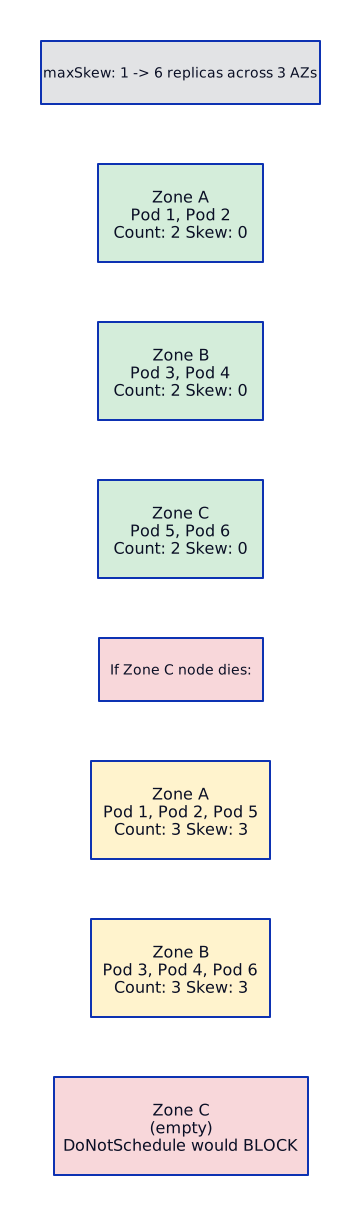
apiVersion: apps/v1kind: Deploymentmetadata:  name: payments-api  namespace: paymentsspec:  replicas: 6  selector:    matchLabels:      app: payments-api  template:    metadata:      labels:        app: payments-api    spec:      topologySpreadConstraints:        # Spread across AZs — hard requirement        - maxSkew: 1          topologyKey: topology.kubernetes.io/zone          whenUnsatisfiable: DoNotSchedule          labelSelector:            matchLabels:              app: payments-api
        # Spread across nodes — soft preference        - maxSkew: 2          topologyKey: kubernetes.io/hostname          whenUnsatisfiable: ScheduleAnyway          labelSelector:            matchLabels:              app: payments-api
      # Anti-affinity as backup (older approach, still valid)      affinity:        podAntiAffinity:          preferredDuringSchedulingIgnoredDuringExecution:            - weight: 100              podAffinityTerm:                labelSelector:                  matchExpressions:                    - key: app                      operator: In                      values: ["payments-api"]                topologyKey: kubernetes.io/hostname
How topology spread works with 6 replicas across 3 AZs:
PodDisruptionBudget (PDB)
Section titled “PodDisruptionBudget (PDB)”PDBs protect workloads during voluntary disruptions — node drains, cluster upgrades, Karpenter consolidation. They do NOT protect against involuntary disruptions (node crash, OOMKill).
apiVersion: policy/v1kind: PodDisruptionBudgetmetadata:  name: payments-api-pdb  namespace: paymentsspec:  # Option A: minimum available (use for critical services)  minAvailable: "60%"                    # at least 60% must be running
  # Option B: maximum unavailable (use for flexible services)  # maxUnavailable: 1                    # at most 1 pod can be down
  selector:    matchLabels:      app: payments-api
PDB interaction with cluster operations:
VOLUNTARY DISRUPTION FLOW===========================
kubectl drain node-1 Karpenter consolidation Cluster upgrade | | | v v v+------------------------------------------------------------------+| Eviction API || "Can I evict pod X from node Y?" || | || v || PDB check: Is minAvailable satisfied AFTER eviction? || | || YES → evict pod, reschedule on another node || NO → block eviction, retry later || | || If blocked too long: || - kubectl drain: hangs (timeout configurable) || - Karpenter: skips node, tries another || - Cluster upgrade: pauses, alerts |+------------------------------------------------------------------+Kyverno policy enforcing PDB existence:
apiVersion: kyverno.io/v1kind: ClusterPolicymetadata: name: require-pdbspec: validationFailureAction: Enforce rules: - name: require-pdb-for-deployments match: any: - resources: kinds: ["Deployment"] namespaces: ["payments", "trading", "lending"] preconditions: all: - key: "{{request.object.spec.replicas}}" operator: GreaterThan value: 1 validate: message: "Production deployments with >1 replica must have a PodDisruptionBudget" deny: conditions: all: - key: "{{request.object.metadata.labels.has-pdb}}" operator: NotEquals value: "true"Disaster Recovery Patterns
Section titled “Disaster Recovery Patterns”DR Pattern Comparison
Section titled “DR Pattern Comparison” RTO RPO COST COMPLEXITY === === ==== ==========Backup-Restore 4-24 hrs 1-24 hrs $ LowPilot Light 1-2 hrs minutes $$ MediumActive-Passive 5-30 min seconds $$$ HighActive-Active ~0 (auto) ~0 $$$$ Very HighPattern 1: Backup-Restore
Section titled “Pattern 1: Backup-Restore” Best for: Non-critical workloads, dev/staging environments, batch processing systems.
Pattern 2: Pilot Light
Section titled “Pattern 2: Pilot Light”
Pattern 3: Active-Passive
Section titled “Pattern 3: Active-Passive”
Pattern 4: Active-Active
Section titled “Pattern 4: Active-Active”
Velero — Cluster Backup and Restore
Section titled “Velero — Cluster Backup and Restore”Velero backs up Kubernetes resources (deployments, services, configmaps, secrets, PVs) and restores them to the same or different cluster.

On EKS, Velero uses S3 for backup storage and EBS Snapshots for persistent volume backups. On GKE, you can use either the native Backup for GKE managed service or Velero with GCS.
# Velero BackupStorageLocationapiVersion: velero.io/v1kind: BackupStorageLocationmetadata:  name: aws-primary  namespace: velerospec:  provider: aws  objectStorage:    bucket: prod-velero-backups-me-south-1    prefix: eks-prod  config:    region: me-south-1    s3ForcePathStyle: "false"
---# Velero VolumeSnapshotLocationapiVersion: velero.io/v1kind: VolumeSnapshotLocationmetadata:  name: aws-ebs  namespace: velerospec:  provider: aws  config:    region: me-south-1
---# Cross-region backup for DRapiVersion: velero.io/v1kind: BackupStorageLocationmetadata:  name: aws-dr  namespace: velerospec:  provider: aws  objectStorage:    bucket: prod-velero-backups-eu-west-1     # DR region bucket    prefix: eks-prod-dr  config:    region: eu-west-1
{ "Version": "2012-10-17", "Statement": [ { "Effect": "Allow", "Action": [ "s3:GetObject", "s3:PutObject", "s3:DeleteObject", "s3:ListBucket", "s3:GetBucketLocation" ], "Resource": [ "arn:aws:s3:::prod-velero-backups-*", "arn:aws:s3:::prod-velero-backups-*/*" ] }, { "Effect": "Allow", "Action": [ "ec2:CreateSnapshot", "ec2:DeleteSnapshot", "ec2:DescribeSnapshots", "ec2:DescribeVolumes", "ec2:CreateTags" ], "Resource": "*" } ]}# Automated cross-region EBS snapshot copy via DLMresource "aws_dlm_lifecycle_policy" "cross_region" { description = "Cross-region EBS snapshots for DR" execution_role_arn = aws_iam_role.dlm.arn state = "ENABLED"
policy_details { resource_types = ["VOLUME"]
schedule { name = "daily-cross-region" create_rule { interval = 6 interval_unit = "HOURS" } retain_rule { count = 14 } cross_region_copy_rule { target = "eu-west-1" encrypted = true cmk_arn = "arn:aws:kms:eu-west-1:111111111111:key/dr-key-id" retain_rule { interval = 7 interval_unit = "DAYS" } } }
target_tags = { Backup = "true" } }}# Enable Backup for GKE on the clusterresource "google_container_cluster" "primary" { name = "prod-gke-cluster" location = "me-central1"
addons_config { gke_backup_agent_config { enabled = true } }}
# Backup planresource "google_gke_backup_backup_plan" "daily" { name = "daily-backup-plan" cluster = google_container_cluster.primary.id location = "me-central1"
backup_config { include_volume_data = true include_secrets = true
selected_namespaces { namespaces = ["payments", "orders", "trading"] } }
backup_schedule { cron_schedule = "0 */6 * * *" # every 6 hours }
retention_policy { backup_delete_lock_days = 7 backup_retain_days = 30 }}
# Restore plan (for DR region)resource "google_gke_backup_restore_plan" "dr_restore" { name = "dr-restore-plan" backup_plan = google_gke_backup_backup_plan.daily.id cluster = google_container_cluster.dr.id # DR cluster location = "europe-west1"
restore_config { namespaced_resource_restore_mode = "DELETE_AND_RESTORE" volume_data_restore_policy = "RESTORE_VOLUME_DATA_FROM_BACKUP" cluster_resource_restore_scope { all_group_kinds = true } }}apiVersion: velero.io/v1kind: BackupStorageLocationmetadata: name: gcs-primary namespace: velerospec: provider: gcp objectStorage: bucket: prod-velero-backups-me-central1 prefix: gke-prod config: serviceAccount: velero-sa@my-project.iam.gserviceaccount.comVelero Scheduled Backups
Section titled “Velero Scheduled Backups”# Schedule full cluster backup every 6 hoursapiVersion: velero.io/v1kind: Schedulemetadata: name: full-cluster-backup namespace: velerospec: schedule: "0 */6 * * *" # every 6 hours template: storageLocation: aws-primary volumeSnapshotLocations: - aws-ebs includedNamespaces: - payments - orders - trading - lending excludedResources: - events - pods # pods are recreated by deployments snapshotMoveData: true # use Kopia to move snapshot data to object storage ttl: 720h # retain for 30 days
---# Critical namespace: more frequent backupapiVersion: velero.io/v1kind: Schedulemetadata: name: payments-hourly namespace: velerospec: schedule: "0 * * * *" # every hour template: storageLocation: aws-primary includedNamespaces: - payments ttl: 168h # retain for 7 daysDNS-Based Failover
Section titled “DNS-Based Failover”# Primary region health checkresource "aws_route53_health_check" "primary" { fqdn = "primary-alb.payments.internal.bank.com" port = 443 type = "HTTPS" resource_path = "/healthz" failure_threshold = 3 request_interval = 10
tags = { Name = "primary-payments-health" }}
# Primary record (failover routing)resource "aws_route53_record" "payments_primary" { zone_id = aws_route53_zone.bank.zone_id name = "payments.bank.com" type = "A"
alias { name = aws_lb.primary_alb.dns_name zone_id = aws_lb.primary_alb.zone_id evaluate_target_health = true }
failover_routing_policy { type = "PRIMARY" }
health_check_id = aws_route53_health_check.primary.id set_identifier = "primary"}
# DR recordresource "aws_route53_record" "payments_dr" { zone_id = aws_route53_zone.bank.zone_id name = "payments.bank.com" type = "A"
alias { name = aws_lb.dr_alb.dns_name zone_id = aws_lb.dr_alb.zone_id evaluate_target_health = true }
failover_routing_policy { type = "SECONDARY" }
set_identifier = "dr"}# Cloud DNS health-checked routingresource "google_dns_record_set" "payments_primary" { name = "payments.bank.com." type = "A" ttl = 60 managed_zone = google_dns_managed_zone.bank.name
routing_policy { wrr { weight = 100 rrdatas = [google_compute_global_address.primary_ip.address]
health_checked_targets { internal_load_balancers { load_balancer_type = "globalL7ilb" ip_address = google_compute_global_address.primary_ip.address port = "443" ip_protocol = "tcp" network_url = google_compute_network.primary.self_link project = var.project_id region = "me-central1" } } }
wrr { weight = 0 # failover only rrdatas = [google_compute_global_address.dr_ip.address] } }}GKE Multi-cluster Ingress (MCI):
# MultiClusterIngress resource (runs on config cluster)apiVersion: networking.gke.io/v1kind: MultiClusterIngressmetadata: name: payments-mci namespace: payments annotations: networking.gke.io/static-ip: "34.120.x.x"spec: template: spec: backend: serviceName: payments-mcs servicePort: 443---# MultiClusterService (exported from each cluster)apiVersion: networking.gke.io/v1kind: MultiClusterServicemetadata: name: payments-mcs namespace: paymentsspec: template: spec: selector: app: payments-api ports: - port: 443 targetPort: 8443 clusters: - link: "me-central1/prod-gke-primary" - link: "europe-west1/prod-gke-dr"Multi-Cluster Management with ArgoCD
Section titled “Multi-Cluster Management with ArgoCD”For DR, ArgoCD in the Shared Services account manages both primary and DR clusters:
ARGOCD MULTI-CLUSTER=====================
Shared Services Account+----------------------------------+|  ArgoCD (management cluster)     ||                                  ||  Application: payments-primary   ||  → target: primary EKS/GKE      ||  → sync: automated              ||                                  ||  Application: payments-dr        ||  → target: DR EKS/GKE           ||  → sync: automated              ||  → replicas: reduced (or 0)     ||                                  ||  ApplicationSet: all-envs        ||  → generates apps for both       ||    clusters from same manifests  |+----------------------------------+       |                    |       v                    v  Primary Cluster      DR Cluster  (full capacity)      (pilot light)
ApplicationSet for multi-cluster DR:
apiVersion: argoproj.io/v1alpha1kind: ApplicationSetmetadata: name: payments-multi-cluster namespace: argocdspec: generators: - list: elements: - cluster: prod-primary url: https://primary-eks.me-south-1.eks.amazonaws.com region: me-south-1 replicas: "6" - cluster: prod-dr url: https://dr-eks.eu-west-1.eks.amazonaws.com region: eu-west-1 replicas: "2" # reduced for pilot-light template: metadata: name: "payments-{{cluster}}" spec: project: production source: repoURL: https://github.com/bank/gitops-repo.git targetRevision: main path: apps/payments/overlays/{{cluster}} destination: server: "{{url}}" namespace: payments syncPolicy: automated: prune: true selfHeal: trueInterview Scenarios
Section titled “Interview Scenarios”Scenario 1: Design HA for a Payment Processing App on EKS
Section titled “Scenario 1: Design HA for a Payment Processing App on EKS”“Design high availability for a payment processing application on EKS that cannot tolerate more than 30 seconds of downtime.”
Answer framework:
Pod level:
- Replicas: minimum 6 (2 per AZ)
- Topology spread:
DoNotScheduleacross zones,ScheduleAnywayacross nodes - PDB:
minAvailable: 60%— at least 4 of 6 pods always running - Health checks: liveness (restart if hung), readiness (remove from LB if unhealthy), startup (grace period for init)
Node level:
- Karpenter: NodePool across 3 AZs, on-demand only (no spot for payments)
- Disruption budget:
nodes: "0"during business hours (no consolidation during trading)
Data level:
- RDS Multi-AZ: synchronous replication, automatic failover (35-60 seconds)
- ElastiCache Redis: Multi-AZ with auto-failover for session/cache
Network level:
- ALB: cross-zone load balancing enabled
- Health checks: ALB target group checks readiness endpoint every 5 seconds
Internet | v +------+------+ | Route 53 | | (failover) | +------+------+ | +------+------+ | ALB | | (cross-zone)| +------+------+ | +---------+---------+ | | | +--+--+ +--+--+ +--+--+ |AZ-1a| |AZ-1b| |AZ-1c| |Pod 1| |Pod 3| |Pod 5| |Pod 2| |Pod 4| |Pod 6| +--+--+ +--+--+ +--+--+ | | | +--+---------+---------+--+ | RDS Multi-AZ | | Primary (AZ-1a) | | Standby (AZ-1b) | +--------------------------+Scenario 2: Full Region Failover Walkthrough
Section titled “Scenario 2: Full Region Failover Walkthrough”“Your primary region is completely down. Walk me through the Kubernetes failover step by step.”
Pre-conditions (must already be in place):
- DR cluster running in pilot-light mode (cluster exists, reduced replicas)
- Velero backups every 6 hours to DR region S3/GCS
- RDS read replica in DR region with async replication
- ArgoCD managing both clusters from a separate management cluster
- Route 53 health checks monitoring primary
Failover steps:
MINUTE 0: Primary region outage detected  - Route 53 health check fails (3 consecutive, 30s interval = ~90 seconds)  - PagerDuty alert fires to on-call SRE
MINUTE 1-2: Automated DNS failover  - Route 53 automatically switches to SECONDARY record  - Traffic starts flowing to DR region ALB  - (DR cluster has reduced replicas — may see degraded performance)
MINUTE 2-5: Scale up DR cluster  - SRE runs: kubectl scale deployment payments-api --replicas=6 -n payments  - OR: ArgoCD overlay for DR is updated with full replica count  - Karpenter provisions additional nodes (60-90 seconds each)
MINUTE 5-10: Database failover  - Promote RDS read replica to standalone primary:    aws rds promote-read-replica --db-instance-identifier payments-db-dr  - Update application config (via Secrets Manager / ConfigMap) with new DB endpoint  - This is the longest step — RDS promotion takes 5-10 minutes
MINUTE 10-15: Validation  - Run smoke tests against DR endpoint  - Verify payment processing end-to-end  - Check monitoring dashboards in DR region  - Confirm no data loss (check last replicated transaction)
MINUTE 15+: Communication  - Update status page  - Notify downstream teams  - Begin root cause analysis on primary
Total RTO: 10-15 minutes (most time spent on DB promotion). RPO: Replication lag of the RDS read replica (typically seconds, up to minutes under heavy load).
Scenario 3: DR Testing Without Affecting Production
Section titled “Scenario 3: DR Testing Without Affecting Production”“How do you test DR for Kubernetes without affecting production?”
DR testing strategy:
- Velero restore test (monthly):
- Create a temporary test cluster in the DR region
- Restore latest Velero backup to the test cluster
- Run automated smoke tests against restored workloads
- Compare resource counts (deployments, services, configmaps) with source
- Tear down test cluster after validation
# Restore to test clustervelero restore create dr-test-$(date +%Y%m%d) \  --from-backup full-cluster-backup-20260315060000 \  --namespace-mappings payments:payments-test \  --restore-volumes=true
# Validatekubectl get deployments -n payments-testkubectl run smoke-test --image=curlimages/curl --rm -it -- \ curl -s http://payments-api.payments-test.svc/healthz-
DNS failover test (quarterly):
- Use a test domain (e.g.,
payments-test.bank.com) that mirrors prod DNS config - Simulate primary health check failure
- Verify traffic switches to DR within expected timeframe
- Measure actual RTO
- Use a test domain (e.g.,
-
Chaos engineering (ongoing):
- Use Litmus Chaos or Chaos Mesh to inject failures
- Kill random pods, nodes, even simulate AZ failure
- Verify PDBs, topology spread, and self-healing work as expected
# Litmus Chaos — simulate AZ failureapiVersion: litmuschaos.io/v1alpha1kind: ChaosEnginemetadata: name: az-failure-test namespace: paymentsspec: appinfo: appns: payments applabel: app=payments-api appkind: deployment chaosServiceAccount: litmus-sa experiments: - name: node-drain spec: components: env: - name: NODE_LABEL value: topology.kubernetes.io/zone=me-south-1a - name: TOTAL_CHAOS_DURATION value: "300" # 5 minutes- Game day (bi-annually):
- Full DR drill with all teams
- Actually fail over production to DR region
- Run for 1-2 hours on DR
- Fail back to primary
- Document lessons learned
Scenario 4: Active-Active Global SaaS Across 2 Regions
Section titled “Scenario 4: Active-Active Global SaaS Across 2 Regions”“Design an active-active Kubernetes deployment across 2 regions for a global SaaS platform serving customers in Middle East and Europe.”
Architecture:
 Key design decisions:
| Decision | Choice | Rationale |
|---|---|---|
| Database | Aurora Global DB | Multi-region, <1s replication, write-forwarding |
| DNS routing | Geoproximity | Route users to nearest region by latency |
| Session state | ElastiCache Global Datastore | Cross-region session replication |
| Static assets | CloudFront / Cloud CDN | Edge-cached globally |
| Conflict resolution | Last-writer-wins + idempotency keys | Payments must be idempotent |
| Cluster management | ArgoCD ApplicationSet | Same manifests, region-specific overlays |
Data consistency for payments:
- Use idempotency keys on all payment requests
- Write-forwarding adds ~2-3s latency for EU writes (acceptable for payments)
- Read-after-write consistency guaranteed in the primary region
- Eventually consistent reads in the secondary (typically <1s lag)
Scenario 5: Pods Stuck in Terminating — What Is Happening?
Section titled “Scenario 5: Pods Stuck in Terminating — What Is Happening?”“A node went down and pods are stuck in Terminating state for over 10 minutes. What’s happening and how do you fix it?”
Root cause analysis:
NODE FAILURE → PODS STUCK TERMINATING=======================================
Node goes NotReady       |       vNode controller waits (pod-eviction-timeout, default 5 min)       |       vMarks pods for deletion       |       vPods enter "Terminating" state       |       +--- Normal case: kubelet runs preStop hook → sends SIGTERM → waits       |    terminationGracePeriodSeconds → sends SIGKILL → pod deleted       |       +--- Node is DOWN: kubelet is not running!            → No one to execute the termination sequence            → Pod stays "Terminating" indefinitely            → API server cannot confirm deletion
Common causes of stuck Terminating:
| Cause | How to Identify | Fix |
|---|---|---|
| Node down, kubelet not running | kubectl get nodes shows NotReady | Force delete pod |
| Finalizer blocking deletion | kubectl get pod -o yaml shows finalizers: | Remove finalizer |
| PV still attached to pod | kubectl describe pod shows volume detach pending | Force detach volume |
| preStop hook hanging | Pod has long terminationGracePeriodSeconds | Reduce grace period |
Resolution steps:
# 1. Check node statuskubectl get nodes# Look for "NotReady" nodes
# 2. Check if pod has finalizerskubectl get pod stuck-pod -n payments -o jsonpath='{.metadata.finalizers}'
# 3. Force delete the pod (last resort)kubectl delete pod stuck-pod -n payments --grace-period=0 --force
# 4. If PV is stuck, force detachaws ec2 detach-volume --volume-id vol-xxx --force# OR for GCP:gcloud compute instances detach-disk node-name --disk=pv-disk
# 5. If finalizer is blocking, patch it outkubectl patch pod stuck-pod -n payments -p '{"metadata":{"finalizers":null}}' --type=merge
# 6. If the node will not recover, delete itkubectl delete node problem-node# Karpenter or CA will provision a replacementQuick Reference — HA & DR Checklist
Section titled “Quick Reference — HA & DR Checklist”HA CHECKLIST (per workload)============================[ ] Replicas >= 3 (minimum 1 per AZ)[ ] Topology spread constraints configured[ ] PDB defined (minAvailable or maxUnavailable)[ ] Liveness, readiness, startup probes[ ] Resource requests and limits set[ ] Anti-affinity for critical pods[ ] Database: Multi-AZ / HA configuration[ ] Cache: Multi-AZ with auto-failover
DR CHECKLIST (per cluster)============================[ ] Velero scheduled backups (every 6 hours)[ ] Backup retention: 30 days minimum[ ] Cross-region backup storage configured[ ] DR cluster exists (pilot-light or active-passive)[ ] DNS failover configured (Route 53 / Cloud DNS)[ ] Database replica in DR region[ ] ArgoCD manages both clusters[ ] DR drill tested in last 90 days[ ] Runbook documented for failover procedure[ ] RTO/RPO documented and validated