Enterprise Platform Design
You are the central platform team at an enterprise bank. Your job is not to run applications — it is to build the platform that lets 500 developers across 50 teams ship safely, fast, and at scale. This page covers how to design, build, and operate that platform.
Where This Fits
Section titled “Where This Fits”
What Is an Internal Developer Platform (IDP)?
Section titled “What Is an Internal Developer Platform (IDP)?”An IDP is the set of tools, workflows, and self-service capabilities that the platform team provides to application teams. It abstracts away infrastructure complexity so developers can focus on writing code.

The Key Principle
Section titled “The Key Principle”App teams should never need to:
- Write Terraform for infrastructure
- SSH into nodes
- Create Kubernetes RBAC manifests
- Manage TLS certificates
- Set up monitoring dashboards from scratch
App teams should be able to:
- Deploy code to any environment via Git push
- Get a preview environment for every PR
- Access their logs and metrics through a portal
- Request a new namespace or database through self-service
- See their cloud costs in real time
Platform Team vs Application Team Responsibilities
Section titled “Platform Team vs Application Team Responsibilities”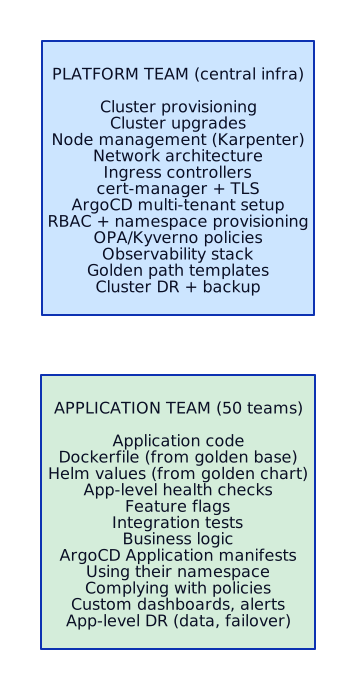
Cluster Strategy
Section titled “Cluster Strategy”One of the most critical decisions: how many clusters, and how do you organize them?
Option 1: Cluster Per Environment (Most Common)
Section titled “Option 1: Cluster Per Environment (Most Common)”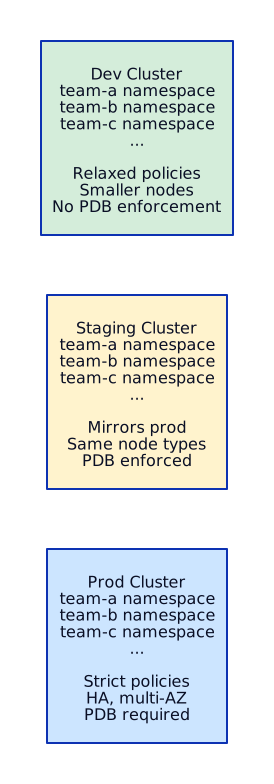 When to use: Standard enterprise setup. Most banks start here.
Pros: Simple blast radius (dev issues don’t affect prod). Clear promotion path.
Cons: Resource waste in dev/staging. All teams share the same cluster size limits.
Option 2: Cluster Per Team (Large Enterprises)
Section titled “Option 2: Cluster Per Team (Large Enterprises)”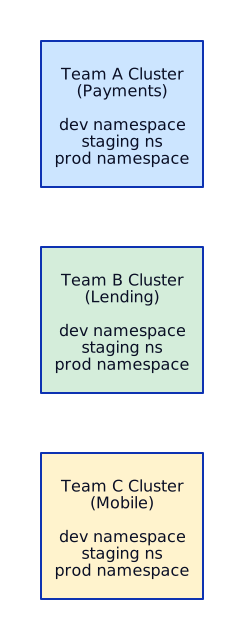 When to use: Regulatory requirements (PCI for payments), extreme isolation needs.
Pros: Total blast radius isolation. Teams can choose upgrade schedules. Different compliance requirements per cluster.
Cons: Expensive. More clusters to manage. Operational overhead scales linearly.
Option 3: Hybrid (Recommended for Enterprise Banks)
Section titled “Option 3: Hybrid (Recommended for Enterprise Banks)”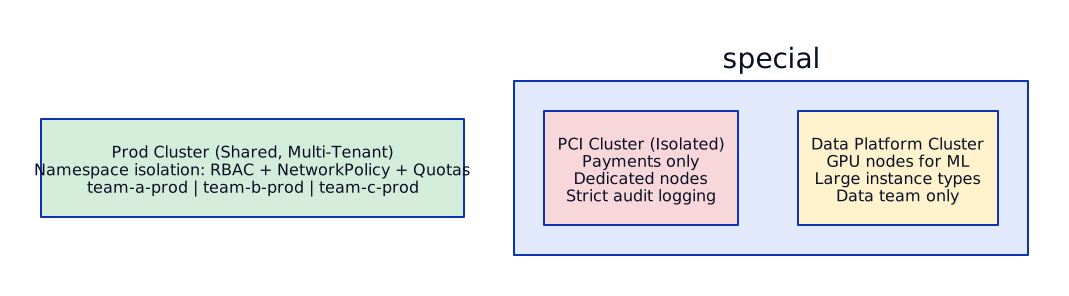
When to use: Most enterprises with regulatory workloads. Balance between isolation and cost.
Pros: PCI workloads isolated as required. General workloads share clusters for efficiency. Data workloads get GPU/high-memory nodes.
Cons: More complexity in cluster management (3-5 clusters vs 1).
Decision Matrix
Section titled “Decision Matrix”
Golden Paths and Templates
Section titled “Golden Paths and Templates”A golden path is the platform team’s recommended way to do something. It is opinionated, tested, and supported. Teams can deviate, but they lose support guarantees.
What Gets Templated
Section titled “What Gets Templated”
Example Golden Path Helm Chart Structure
Section titled “Example Golden Path Helm Chart Structure”# charts/web-service/values.yaml — what app teams customizereplicaCount: 2image: repository: "" # REQUIRED by app team tag: "" # REQUIRED by app team
# Everything below has sane defaults from platform teamresources: requests: cpu: 200m memory: 256Mi limits: memory: 512Mi # No CPU limits (best practice)
autoscaling: enabled: true minReplicas: 2 maxReplicas: 10 targetCPUUtilization: 70
podDisruptionBudget: enabled: true minAvailable: 1
ingress: enabled: true className: alb annotations: alb.ingress.kubernetes.io/scheme: internal alb.ingress.kubernetes.io/healthcheck-path: /healthz
networkPolicy: enabled: true # Default deny + allow rules
serviceMonitor: enabled: true # Prometheus auto-scrapes path: /metrics port: http
securityContext: runAsNonRoot: true readOnlyRootFilesystem: true allowPrivilegeEscalation: falseGovernance: Enforced vs Recommended
Section titled “Governance: Enforced vs Recommended”
Rule of thumb: Enforce anything that affects security or stability. Recommend everything else and make it the path of least resistance.
Self-Service Capabilities
Section titled “Self-Service Capabilities”Namespace Provisioning
Section titled “Namespace Provisioning”When a new team needs a namespace, they should not file a Jira ticket and wait 2 weeks. They should submit a PR or fill a form.

What Gets Provisioned Per Namespace
Section titled “What Gets Provisioned Per Namespace”# Namespace bundle — applied as a single ArgoCD Application---apiVersion: v1kind: Namespacemetadata: name: team-payments-prod labels: team: payments environment: prod cost-center: CC-4521---apiVersion: rbac.authorization.k8s.io/v1kind: RoleBindingmetadata: name: team-payments-admin namespace: team-payments-prodsubjects:- kind: Group name: team-payments # Mapped from SSO group apiGroup: rbac.authorization.k8s.ioroleRef: kind: ClusterRole name: namespace-admin # Platform-defined ClusterRole apiGroup: rbac.authorization.k8s.io---apiVersion: v1kind: ResourceQuotametadata: name: team-quota namespace: team-payments-prodspec: hard: requests.cpu: "8" requests.memory: "16Gi" limits.memory: "32Gi" persistentvolumeclaims: "5" services.loadbalancers: "0" # No public LBs — use Ingress---apiVersion: v1kind: LimitRangemetadata: name: default-limits namespace: team-payments-prodspec: limits: - default: memory: "512Mi" defaultRequest: cpu: "100m" memory: "256Mi" type: Container---apiVersion: networking.k8s.io/v1kind: NetworkPolicymetadata: name: default-deny namespace: team-payments-prodspec: podSelector: {} policyTypes: - Ingress - Egress egress: - to: - namespaceSelector: {} podSelector: matchLabels: k8s-app: kube-dns ports: - port: 53 protocol: UDPDeploy Previews
Section titled “Deploy Previews”Every PR gets an ephemeral environment for testing. Platform team sets up the machinery; app teams get it automatically.

Log Access
Section titled “Log Access”App teams need log access without SSH. The platform provides:

Developer Portal: Backstage / Port
Section titled “Developer Portal: Backstage / Port”The developer portal is the single pane of glass for app teams. It replaces: internal wikis, spreadsheets of services, Slack “who owns this?” questions, and manual onboarding.
What the Portal Shows
Section titled “What the Portal Shows”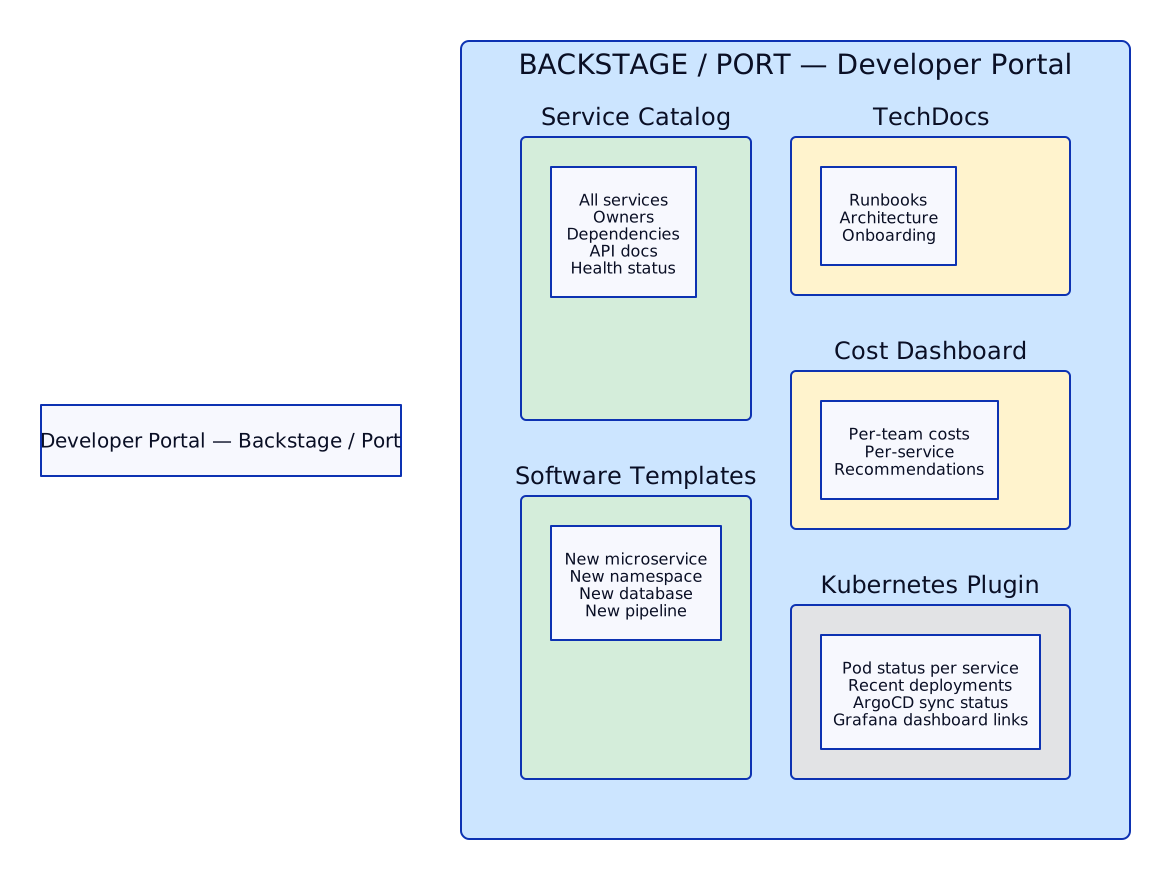
Backstage vs Port
Section titled “Backstage vs Port”
Cost Visibility: Kubecost / OpenCost
Section titled “Cost Visibility: Kubecost / OpenCost”Every namespace gets cost attribution. Teams see what they spend. Platform team sees the overall picture.
How Cost Allocation Works
Section titled “How Cost Allocation Works”
Kubecost vs OpenCost
Section titled “Kubecost vs OpenCost”
Enforcing Cost Labels
Section titled “Enforcing Cost Labels”# Kyverno policy: every namespace MUST have cost-center labelapiVersion: kyverno.io/v1kind: ClusterPolicymetadata: name: require-cost-center-labelspec: validationFailureAction: Enforce rules: - name: check-cost-center match: any: - resources: kinds: - Namespace validate: message: "Namespace must have a 'cost-center' label for chargeback" pattern: metadata: labels: cost-center: "CC-*"Platform Maturity Model
Section titled “Platform Maturity Model”Where is your platform today? Where should it be?

Standardized Cluster Configuration
Section titled “Standardized Cluster Configuration”Every cluster in the fleet must have the same baseline. No snowflakes.
Cluster Baseline Add-Ons
Section titled “Cluster Baseline Add-Ons”
Managing Configuration Across Clusters
Section titled “Managing Configuration Across Clusters”# ApplicationSet that deploys baseline to ALL clustersapiVersion: argoproj.io/v1alpha1kind: ApplicationSetmetadata: name: cluster-baseline namespace: argocdspec: generators: - clusters: selector: matchLabels: platform-managed: "true" template: metadata: name: 'baseline-{{name}}' spec: project: platform source: repoURL: git@github.com:bank/platform-baseline.git path: 'clusters/{{metadata.labels.environment}}' targetRevision: main destination: server: '{{server}}' namespace: kube-system syncPolicy: automated: prune: true selfHeal: true# Cluster API — declarative cluster lifecycleapiVersion: cluster.x-k8s.io/v1beta1kind: Clustermetadata: name: prod-eu-west-1spec: clusterNetwork: pods: cidrBlocks: ["10.244.0.0/16"] services: cidrBlocks: ["10.96.0.0/12"] controlPlaneRef: apiVersion: controlplane.cluster.x-k8s.io/v1beta2 kind: AWSManagedControlPlane # EKS name: prod-eu-west-1-control-plane infrastructureRef: apiVersion: infrastructure.cluster.x-k8s.io/v1beta2 kind: AWSManagedCluster name: prod-eu-west-1---# Managed machine pool (node group)apiVersion: infrastructure.cluster.x-k8s.io/v1beta2kind: AWSManagedMachinePoolmetadata: name: prod-eu-west-1-workersspec: instanceType: m6i.2xlarge scaling: minSize: 3 maxSize: 20# Crossplane — provision cluster as a Kubernetes resourceapiVersion: eks.aws.upbound.io/v1beta1kind: Clustermetadata: name: prod-eu-west-1spec: forProvider: region: eu-west-1 version: "1.29" vpcConfig: - subnetIds: - subnet-abc123 - subnet-def456 endpointPrivateAccess: true endpointPublicAccess: false encryptionConfig: - provider: - keyArn: arn:aws:kms:eu-west-1:123456789012:key/mrk-abc123 resources: - secretsFleet Cluster Upgrades
Section titled “Fleet Cluster Upgrades”Upgrading 15 clusters is not 15 individual upgrades. It is a structured rollout.

Upgrade Commands
Section titled “Upgrade Commands”# EKS control plane upgrade$ aws eks update-cluster-version --name prod-eu-west-1 --kubernetes-version 1.29
# Check upgrade status$ aws eks describe-update --name prod-eu-west-1 --update-id abc-123{ "update": { "status": "InProgress", "type": "VersionUpdate" }}
# Upgrade managed node group (rolling)$ aws eks update-nodegroup-version \ --cluster-name prod-eu-west-1 \ --nodegroup-name workers \ --kubernetes-version 1.29
# Upgrade add-ons$ aws eks update-addon --cluster-name prod-eu-west-1 \ --addon-name coredns --addon-version v1.11.1-eksbuild.1$ aws eks update-addon --cluster-name prod-eu-west-1 \ --addon-name kube-proxy --addon-version v1.29.0-eksbuild.1$ aws eks update-addon --cluster-name prod-eu-west-1 \ --addon-name vpc-cni --addon-version v1.16.0-eksbuild.1
# Check for deprecated APIs BEFORE upgrading$ kubectl get --raw /metrics | grep apiserver_requested_deprecated_apis# Or use pluto:$ pluto detect-all-in-clusterNAME KIND VERSION REPLACEMENT REMOVEDmy-ingress Ingress networking/v1beta1 networking/v1 v1.22Scenario 1: Design a Platform for 500 Developers Across 10 Teams
Section titled “Scenario 1: Design a Platform for 500 Developers Across 10 Teams”Interview question: “You’re hired as the lead platform engineer. The bank has 500 developers, 10 product teams, and they want to move to Kubernetes. Design the platform.”
Answer Framework
Section titled “Answer Framework”
Cluster architecture:

Scenario 2: Standardize Configuration Across 20 Clusters
Section titled “Scenario 2: Standardize Configuration Across 20 Clusters”Interview question: “You inherited 20 Kubernetes clusters across 3 regions, each configured differently. How do you standardize them?”
Answer
Section titled “Answer”
Tools: ArgoCD ApplicationSets (GitOps delivery), Cluster API or Crossplane (lifecycle), Kyverno (policy enforcement).
Scenario 3: Zero to Production — New Microservice
Section titled “Scenario 3: Zero to Production — New Microservice”Interview question: “A team wants to deploy a new microservice. Walk me through the process from zero to production.”

Scenario 4: Fleet Cluster Upgrades Across 15 Clusters
Section titled “Scenario 4: Fleet Cluster Upgrades Across 15 Clusters”Interview question: “How do you handle Kubernetes version upgrades across a fleet of 15 clusters?”
This was covered in detail in the Fleet Cluster Upgrades section above. Key points for the interview:
- Never upgrade all at once — batch by environment, then by criticality
- Pre-upgrade checklist — deprecated APIs (
pluto), add-on compatibility, Helm chart compatibility - Canary approach — dev (2 clusters) → staging (3) → prod batch 1 (3) → prod batch 2 (3) → prod critical (4)
- Soak time — 48h between prod batches, 72h for critical
- Rollback plan — you cannot rollback EKS control plane, so the rollback plan is “fix forward” or “spin up new cluster at old version and migrate workloads”
- Automation — Terraform or Cluster API for control plane, managed node group rolling update for nodes
- Communication — notify all teams 2 weeks before their cluster is upgraded, provide testing window
Scenario 5: Observability — Platform Team vs Application Teams
Section titled “Scenario 5: Observability — Platform Team vs Application Teams”Interview question: “Design observability for the platform team vs application teams. Different needs, shared infrastructure.”

Separation Strategy
Section titled “Separation Strategy”
Implementation:
- Grafana multi-tenancy — use Grafana Organizations or Grafana Cloud stacks per team
- Prometheus label filtering — use
namespacelabel to restrict what each team queries - Loki tenant ID — set Loki tenant ID per namespace via Promtail labels
- RBAC for dashboards — SSO groups mapped to Grafana orgs
- Golden dashboards — platform provides pre-built RED dashboards; teams customize from there
References
Section titled “References”- EKS Best Practices Guide — operational patterns for running EKS at scale
- GKE Enterprise (Anthos) Documentation — multi-cluster fleet management and governance
Tools & Frameworks
Section titled “Tools & Frameworks”- CNCF Platforms Whitepaper — defining what a platform is and why organizations build them
- Backstage Documentation — open-source developer portal for building Internal Developer Platforms
- Kubecost Documentation — Kubernetes cost monitoring and optimization
- Crossplane Documentation — cloud-native control plane for infrastructure provisioning via Kubernetes APIs