IAM Fundamentals — Roles, Policies & Role Assumption
Where This Fits
Section titled “Where This Fits”
The diagram shows a typical enterprise AWS Organization: the Management Account at the top, with Organizational Units (Workloads, Security, Shared Services) containing individual accounts. The dashed arrows represent cross-account role assumption — this is how identities in one account access resources in another, and it is the core pattern you will design and defend as a platform engineer.
As the central infrastructure team, you own IAM strategy across the entire organization. You define:
- Who can access what across accounts (cross-account roles, trust policies)
- How CI/CD pipelines authenticate to cloud APIs (IRSA, Workload Identity, OIDC federation)
- Guardrails that prevent tenant teams from escalating privileges (SCPs, permission boundaries, org policies)
Tenant teams consume pre-built IAM roles and service accounts — they do not create their own cross-account trust relationships or manage federation.
Core Concepts — Identity vs Access
Section titled “Core Concepts — Identity vs Access”| Concept | Definition | AWS | GCP |
|---|---|---|---|
| Authentication | Proving WHO you are | IAM Users, SSO, OIDC tokens | Google Identity, Workload Identity |
| Authorization | Determining WHAT you can do | IAM Policies, SCPs | IAM Roles, Org Policies |
| Identity | A principal that can make API calls | Users, Roles, Federated users | Users, Service Accounts, Groups |
| Access | Permission to perform an action on a resource | Allow/Deny in policies | Role bindings on resources |
How IAM Entities Map Together
Section titled “How IAM Entities Map Together”The Two IAM Models
Section titled “The Two IAM Models”The fundamental architectural difference between AWS and GCP IAM:
AWS Model: “Attach policies TO identities”

- You ask: “What can this user/role do?” — look at their attached policies
- Policies are JSON documents with Effect/Action/Resource/Condition
- A single user can have up to 10 managed policies + unlimited inline policies
GCP Model: “Bind roles AT resources, naming members”

- You ask: “Who can access this resource?” — look at its bindings
- Roles are predefined bundles of permissions (not custom JSON documents)
- Bindings INHERIT downward: org → folder → project → resource
Key Insight: Both achieve the same goal (controlling who can do what), but the mental model is inverted. AWS is identity-centric (“what can Jane do?”), GCP is resource-centric (“who can access this bucket?”).
What is a Role? (AWS) / Service Account? (GCP)
Section titled “What is a Role? (AWS) / Service Account? (GCP)”This is the concept that confuses most people coming from traditional Linux/database user models. A role is NOT a person — it is a temporary identity that any authorized principal can assume.
AWS: IAM Roles — Temporary Identity
Section titled “AWS: IAM Roles — Temporary Identity”An IAM Role is a temporary identity anyone authorized can “put on”
Think of it like a jacket hanging in a secure closet. The jacket has a name tag (ARN), a lock (trust policy — who is allowed to wear it), and pockets full of specific tools (permission policies — what the wearer can do). Anyone with the right key can put on the jacket, use the tools, and then hang it back. The jacket is not a person — it is an identity that grants temporary powers.
Concrete example — Priya (Platform Engineer):
Priya does NOT have an IAM User. She authenticates through Okta SSO, which creates a temporary session by assuming the PlatformAdmin role in the Payments account:
- Trust policy on the role says: “IAM Identity Center (from our Okta federation) can assume this role”
- Permission policy on the role says: “Allow EKS, EC2, S3, CloudWatch actions”
- Session expires in 1 hour — Priya must re-authenticate to continue
- When she switches to the Lending account, she gets a different role with different permissions
| Concept | IAM User | IAM Role |
|---|---|---|
| Credentials | Permanent access keys (long-lived) | Temporary STS tokens (1-12 hours) |
| Belongs to | One person/machine | Anyone authorized by the trust policy |
| Created by | Admin (avoid in enterprise) | Platform team (standard pattern) |
| Revocation | Must delete keys manually | Session expires automatically |
| Use case | Legacy — avoid | SSO, Lambda, EKS pods, cross-account |
GCP: Service Account Impersonation
Section titled “GCP: Service Account Impersonation”A GCP Service Account is an identity (with an email address) that can be impersonated
Unlike AWS roles (which are abstract), GCP service accounts are concrete identities — each one has an email address (e.g., etl-pipeline@prod-project.iam.gserviceaccount.com). They can be impersonated by other principals to obtain short-lived credentials, similar to AWS role assumption.
Concrete example — ETL Pipeline:
The nightly ETL pipeline does NOT run as a human user. It impersonates a dedicated service account:
- Service account:
etl-pipeline@team-a-prod.iam.gserviceaccount.com - IAM binding on the data bucket:
roles/storage.objectViewergranted to this SA - Impersonation: The CI service account has
roles/iam.serviceAccountTokenCreatoron the ETL SA — only CI can impersonate it - Result: CI gets a short-lived OAuth2 token (1 hour) to read data as the ETL SA
| Concept | SA with JSON Key | SA with Impersonation |
|---|---|---|
| Credentials | Permanent JSON key file (long-lived) | Short-lived OAuth2 token (1 hour) |
| Risk | Key file can leak | Token expires automatically |
| Rotation | Manual — must regenerate and redeploy | Automatic — new token each time |
| Best practice | AVOID — disable key creation via org policy | USE — standard enterprise pattern |
Entity Relationships — Real-World Example
Section titled “Entity Relationships — Real-World Example”AWS: Entity Relationships — FinServ Corp
Section titled “AWS: Entity Relationships — FinServ Corp”Company: FinServ Corp (Banking, Dubai/ME-South-1) Accounts: Management, Security, Shared-Services (222222222222), Team-Payments-Prod (111111111111), Team-Lending-Prod, Sandbox
Example 1: Identity Chain — Priya (Platform Engineer)
Section titled “Example 1: Identity Chain — Priya (Platform Engineer)”
Example 2: Cross-Account Role Assumption — Ravi’s Lambda
Section titled “Example 2: Cross-Account Role Assumption — Ravi’s Lambda”Ravi (Payments Developer) built a Lambda that reconciles bank transactions. It needs to read reconciliation rules from S3 in the Shared-Services account.

Example 3: OIDC Federation — GitHub Actions CI/CD
Section titled “Example 3: OIDC Federation — GitHub Actions CI/CD”
Flow: GitHub Actions generates a short-lived OIDC JWT token containing the repo name, branch, and workflow identity. This token is sent to AWS STS via AssumeRoleWithWebIdentity. STS validates the JWT signature against the GitHub OIDC provider’s public keys, checks the trust policy conditions (repo, branch, org), and returns temporary AWS credentials. No long-lived secrets are stored in GitHub — the JWT itself is the proof of identity.
Example 4: Policy Attachment Points — Where Each Type Lives
Section titled “Example 4: Policy Attachment Points — Where Each Type Lives”| Policy Type | Attaches To | FinServ Example | Cannot Attach To |
|---|---|---|---|
| Identity-Based | Users, Groups, Roles | EKSFullAccess on PlatformAdmin permission set | Resources |
| Resource-Based | S3, SQS, KMS, Lambda, SNS, API Gateway | S3 bucket policy on finserv-shared-artifacts allowing Account 111’s role | Users, Groups |
| Permission Boundary | Users, Roles | PlatformTeamBoundary caps platform team: no iam:CreateUser | Groups (common interview trick question) |
| SCP | OUs, Accounts | Workloads OU: Deny iam:CreateUser, Deny regions ≠ me-south-1 | Management Account (another trick — SCPs never apply to mgmt account) |
| Session Policy | AssumeRole / GetFederationToken sessions | CI passes session policy limiting to s3:GetObject on /releases/* only | Cannot EXPAND permissions, only restrict |
Example 5: One API Call Through All Policy Layers
Section titled “Example 5: One API Call Through All Policy Layers”Ravi’s Lambda calls s3:GetObject on finserv-shared-artifacts/reconciliation/rules-v2.json. Here is how AWS evaluates every policy layer:

Reading the diagram: For every API call, AWS evaluates policies in this order: (1) Explicit deny in any policy? → DENY immediately. (2) SCP allows? (3) Resource-based policy allows? (4) Identity-based policy allows? (5) Permission boundary allows? (6) Session policy allows? ALL applicable layers must allow — if any says deny or is silent, access is denied. This is why debugging “Access Denied” requires checking every layer systematically.
GCP: Entity Relationships — FinServ Corp
Section titled “GCP: Entity Relationships — FinServ Corp”Company: FinServ Corp on GCP (same company, GCP setup)
Example 1: Member → Binding → Resource (Platform Team Access)
Section titled “Example 1: Member → Binding → Resource (Platform Team Access)”
Example 2: Service Account Impersonation (CI/CD → Production)
Section titled “Example 2: Service Account Impersonation (CI/CD → Production)”
Example 3: GKE Workload Identity (Pod → GCP API)
Section titled “Example 3: GKE Workload Identity (Pod → GCP API)”
Flow: A GKE pod’s Kubernetes service account is mapped to a GCP service account via an IAM binding (roles/iam.workloadIdentityUser). When the pod calls a GCP API, GKE intercepts the request, exchanges the K8s service account token for a GCP access token, and the API call proceeds as the mapped GCP service account. This eliminates the need for JSON key files inside pods — it is the GCP equivalent of AWS IRSA.
Example 4: Org-Level Deny Policy (Guardrail)
Section titled “Example 4: Org-Level Deny Policy (Guardrail)”
How it works: A deny policy at the org level blocks iam.serviceAccountKeys.create for all principals except the platform admin. Even if a developer has roles/iam.serviceAccountAdmin on their project, the org-level deny overrides it. Deny policies are GCP’s equivalent of AWS SCPs — hierarchical guardrails that prevent dangerous actions regardless of what allow policies exist lower in the hierarchy.
AWS ↔ GCP IAM Mapping
Section titled “AWS ↔ GCP IAM Mapping”| Concept | AWS | GCP | Key Difference |
|---|---|---|---|
| Identity grouping | IAM Groups (attach policies to group) | Google Groups (bind roles to group at resource level) | GCP groups live in Google Workspace/Cloud Identity, not in IAM itself |
| Temporary credentials | sts:AssumeRole → STS tokens (AccessKeyId + SecretAccessKey + SessionToken) | SA Impersonation → OAuth2 access tokens | GCP uses standard OAuth2; AWS uses proprietary STS format |
| Policy model | Policy documents (JSON) attached TO identities | Member + Role bound AT resource level | GCP has no “policy document” concept — roles are predefined permission bundles |
| Permission cap | Permission Boundaries (per user/role) | Deny Policies (org/folder/project-wide) + Org Policy Constraints | AWS boundaries are per-entity; GCP deny policies are hierarchical |
| Inheritance | NO inheritance (each account is isolated; SCPs are the exception) | FULL downward inheritance through org → folder → project → resource | Biggest difference — one GCP binding at folder level can cover 100 projects |
| Service identity | IAM Roles (instance profiles, task roles, IRSA) | Service Accounts (are principals AND can be impersonated) | GCP SAs are email-addressable identities; AWS roles are abstract |
| Cross-account/project | Cross-account role assumption with trust policies + external IDs | Just add SA from another project as member in a binding | GCP is simpler — no trust policy needed for cross-project access |
| External federation | OIDC providers + AssumeRoleWithWebIdentity | Workload Identity Federation (Pool + Provider + SA binding) | Similar concept; GCP adds attribute mappings + conditions layer |
IAM Deep Dive
Section titled “IAM Deep Dive”Policy Structure & Evaluation
Section titled “Policy Structure & Evaluation”IAM Entity Hierarchy
Section titled “IAM Entity Hierarchy”
The AWS IAM entity hierarchy: Users (humans or machine identities with permanent credentials), Groups (collections of users for bulk policy attachment), and Roles (temporary identities assumed via STS). All three can have identity-based policies attached. In enterprise, you will almost never create IAM Users — use SSO (Identity Center) for humans and IAM Roles for machines.
Policy Structure — The Five Elements
Section titled “Policy Structure — The Five Elements”Every IAM policy consists of these elements:
{ "Version": "2012-10-17", "Statement": [ { "Sid": "AllowS3ReadForDataTeam", "Effect": "Allow", "Action": [ "s3:GetObject", "s3:ListBucket" ], "Resource": [ "arn:aws:s3:::data-lake-prod", "arn:aws:s3:::data-lake-prod/*" ], "Condition": { "StringEquals": { "aws:RequestedRegion": "ap-southeast-1" }, "IpAddress": { "aws:SourceIp": "10.0.0.0/8" } } } ]}| Element | Purpose | Notes |
|---|---|---|
Effect | Allow or Deny | Explicit Deny always wins |
Action | API operations | s3:GetObject, ec2:RunInstances |
Resource | ARN of target resource | Use wildcards carefully |
Condition | When the policy applies | IP range, time, tags, region |
Principal | Who this applies to (resource-based only) | Account, role, service, federated user |
Policy Evaluation Logic
Section titled “Policy Evaluation Logic”
IAM Bindings vs IAM Policies
Section titled “IAM Bindings vs IAM Policies”IAM Binding: role: roles/storage.objectViewer members: - user:alice@bank.com - group:data-team@bank.com - serviceAccount:etl-sa@project.iam.gserviceaccount.com
IAM Policy (on a resource): bindings: - role: roles/storage.objectViewer members: [user:alice@bank.com] - role: roles/storage.objectAdmin members: [group:platform-team@bank.com] - role: roles/storage.objectCreator members: [serviceAccount:etl-sa@project.iam.gserviceaccount.com] condition: title: "Only during business hours" expression: "request.time.getHours('Asia/Dubai') >= 8 && request.time.getHours('Asia/Dubai') <= 18"IAM Conditions
Section titled “IAM Conditions”GCP supports conditional role bindings based on:
| Condition Type | Example | Use Case |
|---|---|---|
| Time-based | request.time < timestamp("2026-06-01T00:00:00Z") | Temporary access |
| Resource attributes | resource.name.startsWith("projects/prod-project/") | Scope to specific resources |
| IP-based | origin.ip == "10.0.0.0/8" | VPN-only access |
| Resource type | resource.type == "storage.googleapis.com/Bucket" | Limit to specific resource types |
IAM Deny Policies
Section titled “IAM Deny Policies”Deny policies explicitly deny access, overriding any allow policies. Available at organization, folder, and project levels.
Deny Rule: denied_permissions: - "iam.serviceAccounts.create" - "iam.serviceAccountKeys.create" denial_condition: expression: "!resource.matchTag('env', 'sandbox')" denied_principals: - "principalSet://goog/group/developers@bank.com" exception_principals: - "principal://goog/subject/platform-admin@bank.com"Enterprise use case: Deny all developers from creating service account keys (forcing them to use Workload Identity Federation), except the platform team who may need keys for legacy integrations.
Role Assumption & Impersonation
Section titled “Role Assumption & Impersonation”
The diagram shows the cross-account role assumption flow: a principal in Account A calls STS to assume a role in Account B. The trust policy on the target role controls who can assume it; the permission policy controls what the assumed role can do. This two-policy model (trust + permissions) is the foundation of all AWS cross-account access.
What is sts:AssumeRole?
Section titled “What is sts:AssumeRole?”Instead of distributing long-lived access keys, an IAM principal calls sts:AssumeRole to get temporary credentials (access key + secret key + session token) that expire after 1-12 hours.

What STS returns: When AssumeRole succeeds, STS returns three values — a temporary AccessKeyId, SecretAccessKey, and SessionToken. These work like regular AWS credentials but expire (1-12 hours). The calling principal must include all three in subsequent API calls to act as the assumed role.
Every IAM role has two policy types:
- Trust Policy (who can assume this role):
{ "Version": "2012-10-17", "Statement": [ { "Effect": "Allow", "Principal": { "AWS": "arn:aws:iam::111111111111:root" }, "Action": "sts:AssumeRole", "Condition": { "StringEquals": { "sts:ExternalId": "bank-platform-team-2024" } } } ]}- Permission Policy (what the assumed role can do):
{ "Effect": "Allow", "Action": ["s3:GetObject", "s3:PutObject"], "Resource": "arn:aws:s3:::shared-artifacts-bucket/*"}Cross-Account Role Assumption — Step by Step
Section titled “Cross-Account Role Assumption — Step by Step”
Step 1: Central team creates a role in Account A (Shared Services) with a trust policy allowing Account B.
Step 2: Central team creates/configures the Lambda execution role in Account B with permission to call sts:AssumeRole on the Account A role.
Step 3: At runtime, Lambda calls sts:AssumeRole with the cross-account role ARN.
Step 4: STS validates the trust policy, returns temporary credentials.
Step 5: Lambda uses temp creds to access S3/KMS in Account A.
External IDs — Preventing the Confused Deputy Problem
Section titled “External IDs — Preventing the Confused Deputy Problem”
Key rules:
- The External ID is generated by the SERVICE (SaaS provider), NOT the customer
- Must be 2-1224 characters (alphanumeric plus
+ = , . @ : / -) - Each customer gets a unique External ID
- In enterprise: central infra team assigns External IDs per cross-org integration
AssumeRoleWithWebIdentity — OIDC Federation
Section titled “AssumeRoleWithWebIdentity — OIDC Federation”Used for: IRSA (EKS pods), GitHub Actions, GitLab CI, any OIDC provider.
How IRSA works — step by step (follow the diagram):
- Pod starts with a Kubernetes ServiceAccount annotated with an IAM role ARN. The EKS mutating webhook injects a projected JWT token (signed by the cluster’s OIDC issuer) into the pod at
/var/run/secrets/eks.amazonaws.com/serviceaccount/token - AWS SDK detects the
AWS_WEB_IDENTITY_TOKEN_FILEandAWS_ROLE_ARNenvironment variables (also injected by the webhook) and callssts:AssumeRoleWithWebIdentity, sending the JWT + the target role ARN - STS validates the JWT against the OIDC provider’s public keys (registered in IAM as an OIDC identity provider with the EKS cluster’s issuer URL). It checks the trust policy conditions: does the
subclaim match the expectednamespace:serviceaccount? Does theaudclaim equalsts.amazonaws.com? - If valid, STS returns temporary credentials (AccessKeyId + SecretAccessKey + SessionToken) scoped to the IAM role’s permission policy. These credentials expire and auto-refresh before expiry
Why this matters: Each pod gets its own IAM identity based on its Kubernetes ServiceAccount — no shared node-level IAM role. The central platform team controls which namespace:serviceaccount combinations can assume which IAM roles, and all access is logged in CloudTrail with the pod’s identity.
Trust policy for OIDC federation:
{ "Version": "2012-10-17", "Statement": [ { "Effect": "Allow", "Principal": { "Federated": "arn:aws:iam::111111111111:oidc-provider/oidc.eks.ap-southeast-1.amazonaws.com/id/ABCDEF1234567890" }, "Action": "sts:AssumeRoleWithWebIdentity", "Condition": { "StringEquals": { "oidc.eks.ap-southeast-1.amazonaws.com/id/ABCDEF1234567890:sub": "system:serviceaccount:payments:payment-processor", "oidc.eks.ap-southeast-1.amazonaws.com/id/ABCDEF1234567890:aud": "sts.amazonaws.com" } } } ]}Role Chaining
Section titled “Role Chaining”Role A assumes Role B, then Role B assumes Role C. Use case: CI pipeline assumes a build role, which assumes a deploy role in a different account.

Limitation: When chaining, the maximum session duration drops to 1 hour regardless of the role’s configured maximum (which can be up to 12 hours for direct assumption).
Session Duration and Session Policies
Section titled “Session Duration and Session Policies”- Direct assumption: 1-12 hours (configurable per role)
- Chained assumption: maximum 1 hour
- Session policies: pass an additional policy when calling AssumeRole to further restrict permissions (intersection of role permissions and session policy)
Service Account Impersonation — GCP’s AssumeRole
Section titled “Service Account Impersonation — GCP’s AssumeRole”This is the GCP equivalent of AWS sts:AssumeRole. Instead of distributing JSON key files, a principal impersonates a service account to get short-lived credentials.

Step-by-step flow:
- Grant
roles/iam.serviceAccountTokenCreatoron the target SA to the calling principal - Calling principal calls
generateAccessToken()on the target SA (via API, CLI, or client library) - IAM checks: does the caller have
serviceAccountTokenCreatoron this SA? - If yes, returns a short-lived OAuth2 access token (default 1 hour)
- Caller uses this token to make API calls AS the target SA
CLI usage:
# Human user impersonates a deploy SAgcloud compute instances list \  --impersonate-service-account=deploy-sa@prod-project.iam.gserviceaccount.com
# Generate a token programmaticallygcloud auth print-access-token \  --impersonate-service-account=deploy-sa@prod-project.iam.gserviceaccount.com
Impersonation chaining (delegation):

Impersonation chaining: SA-A impersonates SA-B, then SA-B impersonates SA-C. Use case: a CI runner SA impersonates a build SA, which impersonates a deploy SA in production. Each link in the chain requires a serviceAccountTokenCreator binding. Like AWS role chaining, audit every hop — a chain is only as secure as its weakest link.
Workload Identity Federation — Keyless External Access
Section titled “Workload Identity Federation — Keyless External Access”The GCP equivalent of AssumeRoleWithWebIdentity. External workloads (AWS, Azure, GitHub Actions) get GCP credentials WITHOUT service account JSON keys.

How Workload Identity Federation works — step by step (follow the diagram):
- External workload obtains an OIDC token from its native identity provider. For GitHub Actions, this is a JWT containing the repo name, branch, workflow, and run ID — issued automatically by GitHub’s OIDC provider
- Workload calls GCP STS (
sts.googleapis.com/v1/token) presenting the JWT and specifying the Workload Identity Pool + Provider. GCP STS validates the JWT signature against the provider’s public keys - GCP STS checks attribute conditions defined on the Provider (e.g.,
assertion.repository == "bank/infra-deploy"andassertion.ref == "refs/heads/main"). If conditions fail, authentication is denied - GCP STS returns a federated access token — a short-lived token that represents the external identity within GCP’s IAM system
- Workload exchanges the federated token for a service account access token by calling
generateAccessToken()on the target SA (which hasroles/iam.workloadIdentityUserbound to the federated identity). This returns a standard OAuth2 access token - Workload uses the SA access token to call GCP APIs (Cloud Storage, GKE, BigQuery, etc.) as the service account
Key components:
- Workload Identity Pool: Container for external identities (one per environment or trust boundary)
- Workload Identity Provider: Maps external token attributes (issuer, subject, audience) to GCP attributes
- Attribute mappings: Map external claims to GCP attributes (e.g.,
google.subject = assertion.sub) - Attribute conditions: Filter which external identities can authenticate (e.g., only from
repo:bank/infra-deploy) - Service Account binding: External identity is granted
roles/iam.workloadIdentityUseron a specific SA
AWS IRSA vs GCP Workload Identity Federation — key difference: IRSA is specifically for EKS pods assuming AWS IAM roles. GCP WIF is broader — it federates ANY external OIDC/SAML identity (GitHub Actions, AWS workloads, Azure AD, on-prem) into GCP. For GKE pods specifically, GCP uses GKE Workload Identity (covered in the Entity Relationships section above), which maps Kubernetes service accounts directly to GCP service accounts without needing a Workload Identity Pool.
Identity Types & Guardrails
Section titled “Identity Types & Guardrails”Permission Boundaries
Section titled “Permission Boundaries”A permission boundary sets the maximum permissions an IAM entity can have. It does not GRANT permissions — it CAPS them.
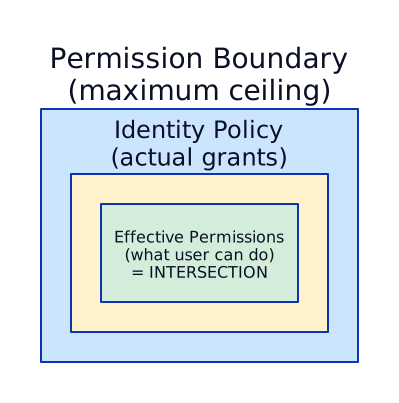
Reading the diagram: The outer box is the identity policy (what policies are attached to the role). The inner box is the permission boundary (the ceiling set by the central team). The effective permissions — what the role can actually do — is the intersection (overlap) of both. Anything in the identity policy but outside the boundary is denied.
Practical example — FinServ Corp Payments team:
Step 1 — Central platform team creates the boundary (an IAM policy):
The boundary is just a regular IAM policy document, but it will be used as a ceiling rather than a grant. The central team creates it via Terraform in the Shared Services account and replicates it to every workload account:
{ "Version": "2012-10-17", "Statement": [ { "Sid": "AllowedServices", "Effect": "Allow", "Action": ["s3:*", "dynamodb:*", "sqs:*", "sns:*", "logs:*", "cloudwatch:*", "lambda:*"], "Resource": "*" }, { "Sid": "DenyPrivilegeEscalation", "Effect": "Deny", "Action": [ "iam:CreateUser", "iam:CreateAccessKey", "iam:DeleteRolePermissionsBoundary", "organizations:*" ], "Resource": "*" } ]}This becomes an IAM managed policy called arn:aws:iam::111111111111:policy/TenantBoundary.
Step 2 — Central team attaches the boundary to every tenant-created role:
There are two parts: (a) provide a Terraform module that automatically includes the boundary, and (b) enforce it via SCP so developers cannot bypass it.
Part A — Terraform module (the easy path):
The platform team publishes an internal Terraform module that all teams must use to create IAM roles. The module hardcodes the boundary:
# modules/tenant-iam-role/main.tf (maintained by platform team)variable "role_name" {}variable "trust_policy" {}variable "policy_arns" { type = list(string) }
resource "aws_iam_role" "this" {  name                 = var.role_name  permissions_boundary = "arn:aws:iam::${data.aws_caller_identity.current.account_id}:policy/TenantBoundary"  assume_role_policy   = var.trust_policy}
resource "aws_iam_role_policy_attachment" "this" {  for_each   = toset(var.policy_arns)  role       = aws_iam_role.this.name  policy_arn = each.value}
When Ravi (Payments developer) creates a Lambda execution role, he uses the module:
# Ravi's Terraform codemodule "lambda_role" { source = "git::https://github.com/finserv/terraform-modules//tenant-iam-role" role_name = "payments-lambda-role" trust_policy = data.aws_iam_policy_document.lambda_trust.json policy_arns = [aws_iam_policy.payments_s3_access.arn]}The boundary is attached automatically — Ravi does not need to know about it and cannot remove it.
Part B — SCP enforcement (the enforcement backstop):
What if Ravi bypasses the module and creates a role directly via the AWS Console or raw Terraform aws_iam_role without the boundary? The SCP blocks it:
{ "Sid": "DenyCreateRoleWithoutBoundary", "Effect": "Deny", "Action": "iam:CreateRole", "Resource": "*", "Condition": { "StringNotEquals": { "iam:PermissionsBoundary": "arn:aws:iam::*:policy/TenantBoundary" } }}This SCP says: “any iam:CreateRole call that does NOT include TenantBoundary as the permissions boundary is denied.” Even if Ravi has AdministratorAccess, he cannot create a role without the boundary. The platform team’s own roles are exempt because they use a different SCP (or are in the management account).
The result: Module makes it easy. SCP makes it mandatory. Together, every tenant role in the account is guaranteed to have the boundary.
Part C — Auto-remediation (detect and fix automatically):
What if you want to ALLOW role creation but automatically attach the boundary after the fact? Use an event-driven Lambda:
CloudTrail logs iam:CreateRole ↓EventBridge rule triggers on "CreateRole" events ↓Lambda function checks: does this role have TenantBoundary? ↓If NO → Lambda calls iam:PutRolePermissionsBoundary to attach it ↓Role now has the boundary — no human intervention needed# EventBridge rule — triggers on any IAM role creationresource "aws_cloudwatch_event_rule" "iam_role_created" { name = "detect-role-without-boundary" description = "Triggers when an IAM role is created"
event_pattern = jsonencode({ source = ["aws.iam"] detail-type = ["AWS API Call via CloudTrail"] detail = { eventSource = ["iam.amazonaws.com"] eventName = ["CreateRole"] } })}
# Lambda target — auto-attaches the boundaryresource "aws_cloudwatch_event_target" "enforce_boundary" { rule = aws_cloudwatch_event_rule.iam_role_created.name arn = aws_lambda_function.enforce_boundary.arn}The Lambda function itself is simple — it reads the role name from the CloudTrail event, checks if PermissionsBoundary is set, and if not, calls PutRolePermissionsBoundary.
Which approach to use — decision matrix:
| Approach | Behavior | Best for |
|---|---|---|
| SCP (Part B) | Blocks role creation without boundary | Strict environments — “no boundary = no role, period” |
| Auto-remediation (Part C) | Allows creation, then auto-attaches boundary | Flexible environments — don’t break developer workflow, but enforce compliance within seconds |
| Both together | SCP blocks, Lambda catches edge cases (roles created by AWS services) | Enterprise production — defense in depth |
Step 3 — Ravi attaches AdministratorAccess (the identity policy):
Ravi attaches AdministratorAccess (which grants * on *). Here is what actually happens at runtime:
| Action Ravi’s role tries | AdministratorAccess says | TenantBoundary says | Result |
|---|---|---|---|
s3:PutObject on payments bucket | Allow | Allow | Allowed (in the intersection) |
dynamodb:Query on payments table | Allow | Allow | Allowed |
ec2:RunInstances (launch a server) | Allow | Not listed (implicit deny) | Denied — outside the boundary |
iam:CreateUser (create a backdoor user) | Allow | Explicit deny | Denied — boundary blocks it |
organizations:LeaveOrganization | Allow | Explicit deny | Denied — boundary blocks it |
Even though Ravi attached the most powerful policy in AWS, the boundary caps his role to S3/DynamoDB/SQS/SNS/CloudWatch/Lambda only. He cannot escape the boundary because the boundary itself denies iam:DeleteRolePermissionsBoundary — the central team made it self-protecting.
Service-Linked Roles vs Service Roles
Section titled “Service-Linked Roles vs Service Roles”These are two different kinds of IAM roles that AWS services use — one AWS creates for you automatically, the other you create yourself. Interviewers test whether you know the difference.
| Service-Linked Role | Service Role | |
|---|---|---|
| Created by | AWS automatically (when you enable a service) | You (or your Terraform) |
| Managed by | AWS — you cannot edit its policies | You — full control over policies |
| Trust policy | Locked to one specific AWS service | You define the trust policy |
| Can delete? | Only after removing all resources that depend on it | Yes, anytime |
| Naming pattern | AWSServiceRoleFor<ServiceName> | Any name you choose |
Practical example — Service-Linked Role:
When you create an Application Load Balancer, AWS automatically creates AWSServiceRoleForElasticLoadBalancing in your account. This role allows the ELB service to register/deregister targets, describe EC2 instances, and manage ENIs. You did not create it, you cannot change its permissions, and you cannot delete it while any ALB exists. AWS needs this role to manage your ALBs — without it, the service cannot function.
Other common service-linked roles: AWSServiceRoleForAutoScaling, AWSServiceRoleForAmazonEKS, AWSServiceRoleForRDS.
Practical example — Service Role:
When you create a Lambda function, YOU create an execution role (e.g., payments-lambda-role) and attach policies that define what the Lambda can access (S3, DynamoDB, SQS). You control every aspect of this role — the trust policy says “Lambda service can assume this,” and the permission policy says exactly which resources the function can touch. You can edit, replace, or delete it anytime.
Other common service roles: ECS task roles, EC2 instance profiles, Step Functions execution roles.
Service Control Policies (SCPs) — Organization-Wide Guardrails
Section titled “Service Control Policies (SCPs) — Organization-Wide Guardrails”SCPs are the top-level policy layer in AWS Organizations. They set the maximum permissions for every principal (users, roles, root) in an account or OU. Like permission boundaries, SCPs do NOT grant access — they only restrict what is allowed.
How SCPs work — the mental model:
Think of SCPs as a fence around an entire account. Inside the fence, IAM policies grant permissions as usual. But no one — not even the account root user — can do anything the fence blocks. The fence is set by the Organization management account, and individual accounts cannot modify or remove it.
Where SCPs attach:

The diagram shows the AWS Organization hierarchy with SCPs at each level. SCPs stack downward — the Production OU’s effective permissions are the intersection of Root OU SCP + Workloads OU SCP + Production OU SCP. Each level can only further restrict, never expand.
Critical rule: SCPs never apply to the Management Account itself. This is a common interview trick question. The management account can always do everything — which is why you should never run workloads in it.
Practical example — FinServ Corp Production OU SCP:
{ "Version": "2012-10-17", "Statement": [ { "Sid": "DenyRegionsOutsideMEandUS", "Effect": "Deny", "Action": "*", "Resource": "*", "Condition": { "StringNotEquals": { "aws:RequestedRegion": ["me-south-1", "us-east-1"] }, "ArnNotLike": { "aws:PrincipalARN": "arn:aws:iam::*:role/OrganizationAccountAccessRole" } } }, { "Sid": "DenyDisablingSecurityServices", "Effect": "Deny", "Action": [ "cloudtrail:StopLogging", "cloudtrail:DeleteTrail", "guardduty:DeleteDetector", "guardduty:DisassociateFromMasterAccount", "config:StopConfigurationRecorder", "config:DeleteConfigurationRecorder" ], "Resource": "*" }, { "Sid": "DenyCreatingIAMUsers", "Effect": "Deny", "Action": [ "iam:CreateUser", "iam:CreateAccessKey", "iam:CreateLoginProfile" ], "Resource": "*" }, { "Sid": "DenyLeavingOrganization", "Effect": "Deny", "Action": "organizations:LeaveOrganization", "Resource": "*" } ]}What this SCP blocks — even for account admins with AdministratorAccess:
| Action | Who tries it | SCP says | Result |
|---|---|---|---|
Launch EC2 in eu-west-1 | Any role in Payments-Prod | Deny (not in me-south-1 or us-east-1) | Blocked |
| Stop CloudTrail logging | Account admin | Explicit deny | Blocked |
| Create an IAM User with access keys | Developer | Explicit deny | Blocked — forces use of SSO/roles |
| Leave the organization | Account root user | Explicit deny | Blocked — prevents account escaping |
Deploy Lambda in me-south-1 | Developer with PowerUser | Not denied by SCP | Allowed (if IAM policy also allows) |
SCPs vs Permission Boundaries — when to use which:
| SCP | Permission Boundary | |
|---|---|---|
| Scope | Entire account or OU (every role, every user) | Individual IAM role or user |
| Set by | Organization management account | Central team attaches to roles |
| Use case | Region lockdown, prevent disabling security tools, deny IAM user creation | Cap tenant-created roles to specific services |
| Granularity | Coarse — same rules for everyone in the account | Fine — different boundaries per role |
| Stacks with | IAM policies (intersection) | IAM policies (intersection) |
Resource Hierarchy and Policy Inheritance
Section titled “Resource Hierarchy and Policy Inheritance”
Key difference from AWS: GCP IAM policies INHERIT downward through the resource hierarchy. A role granted at the organization level applies to every folder, project, and resource. AWS policies do NOT inherit — each account is an independent boundary (SCPs are the exception).
GCP IAM Roles — Three Types
Section titled “GCP IAM Roles — Three Types”| Type | Definition | Example | When to Use |
|---|---|---|---|
| Basic | Owner, Editor, Viewer | roles/editor | NEVER in enterprise (too broad) |
| Predefined | Fine-grained, per-service | roles/storage.objectViewer | Default choice |
| Custom | You define exact permissions | roles/customDeployRole | When predefined is too broad or too narrow |
Service Accounts — The Three Types
Section titled “Service Accounts — The Three Types”This is a common interview question. GCP has THREE distinct types of service accounts — think of them as the GCP equivalent of AWS’s “Service-Linked Roles vs Service Roles,” but with an extra dangerous middle type.
| User-Managed SA | Default SA | Google-Managed Agent | |
|---|---|---|---|
| Created by | You (or Terraform) | Google automatically (when you enable APIs) | Google automatically (internal) |
| Managed by | You — full control | You can modify, but it exists by default | Google — you cannot edit its roles |
| Email pattern | your-name@PROJECT.iam | PROJECT_NUM-compute@developer | service-PROJECT_NUM@service-system |
| Default permissions | None — you grant exactly what it needs | Editor role (near-admin — DANGEROUS) | Service-specific (managed by Google) |
| Can delete? | Yes | Yes, but it may break services using it | No |
| Best practice | Always use this | Disable via org policy | Leave alone, grant KMS if needed |
1. User-Managed Service Accounts — the only type you should use for workloads
SA Name: etl-pipeline@team-a-prod.iam.gserviceaccount.comCreated by: You (or Terraform)Managed by: YouPurpose: Your applications/workloads use theseKeys: Avoid JSON keys — use Workload Identity or impersonation insteadPractical example: The Payments team needs a service account for their nightly ETL pipeline that reads from Cloud Storage and writes to BigQuery. The platform team creates etl-payments@prod-project.iam.gserviceaccount.com via Terraform and grants exactly two roles: roles/storage.objectViewer on the source bucket and roles/bigquery.dataEditor on the target dataset. Nothing more. The pipeline authenticates via Workload Identity (no JSON keys).
2. Default Service Accounts — auto-created, dangerously overpowered
Compute Engine: PROJECT_NUM-compute@developer.gserviceaccount.comApp Engine: PROJECT_ID@appspot.gserviceaccount.comGKE: PROJECT_NUM-compute@developer.gserviceaccount.com (same as Compute)Cloud Functions: PROJECT_ID@appspot.gserviceaccount.comPractical example of the danger: Ravi creates a GKE cluster in payments-prod without specifying a custom service account. GKE uses the Compute Engine default SA (123456-compute@developer.gserviceaccount.com), which has the Editor role. Now every pod in his cluster can: read/write ANY Cloud Storage bucket in the project, modify ANY Pub/Sub topic, delete ANY Cloud SQL instance, and access nearly every other service. A single compromised pod = full project compromise.
3. Google-Managed Service Agents — internal plumbing you mostly ignore
Compute Engine Agent: service-PROJECT_NUM@compute-system.iam.gserviceaccount.comGKE Agent: service-PROJECT_NUM@container-engine-robot.iam.gserviceaccount.comCloud Build Agent: service-PROJECT_NUM@gcp-sa-cloudbuild.iam.gserviceaccount.comDataflow Agent: service-PROJECT_NUM@dataflow-service-producer-prod.iam.gserviceaccount.comThese are the GCP equivalent of AWS Service-Linked Roles. Google creates and manages them for internal service-to-service communication. You cannot create, edit, or delete them.
When you DO need to interact with them: If you use Customer-Managed Encryption Keys (CMEK), the service agent needs permission to use your KMS key. Without this, the service cannot encrypt/decrypt your data:
# Practical example: You want CMEK-encrypted Compute Engine disks.# The Compute Engine agent needs permission to use your KMS key.gcloud projects add-iam-policy-binding PROJECT_ID \ --member="serviceAccount:service-PROJECT_NUM@compute-system.iam.gserviceaccount.com" \ --role="roles/cloudkms.cryptoKeyEncrypterDecrypter"Without this binding, creating a CMEK-encrypted VM disk fails with a permissions error — even though YOU have admin access. The service agent (not you) is the one performing the encryption operation behind the scenes.
Organization Policies — GCP’s Equivalent of SCPs
Section titled “Organization Policies — GCP’s Equivalent of SCPs”GCP Organization Policy Constraints are the equivalent of AWS SCPs. They are guardrails set at the organization, folder, or project level that restrict what resources can be created or configured — regardless of what IAM roles a user has.
Key difference from AWS SCPs: AWS SCPs restrict IAM actions (API calls). GCP Organization Policies restrict resource configurations (what kind of resources can exist). They are complementary to IAM, not a replacement.
Practical example — FinServ Corp organization policies:
| Constraint | What it does | AWS SCP equivalent |
|---|---|---|
constraints/gcp.resourceLocations set to in:me-south1-locations | Only allow resources in ME-South1 (Doha) | Deny regions outside me-south-1 |
constraints/iam.disableServiceAccountKeyCreation | Block all SA JSON key creation | Deny iam:CreateAccessKey |
constraints/iam.automaticIamGrantsForDefaultServiceAccounts | Prevent Editor role on default SAs | No direct equivalent (AWS doesn’t auto-grant) |
constraints/compute.vmExternalIpAccess set to deny all | No public IPs on any VM | Deny ec2:RunInstances with public IP condition |
constraints/sql.restrictPublicIp | No public IPs on Cloud SQL | Deny rds:CreateDBInstance with public access |
constraints/compute.requireShieldedVm | All VMs must be Shielded VMs | No direct equivalent |
How to apply an org policy (Terraform):
# Block SA key creation across the entire organizationresource "google_organization_policy" "disable_sa_keys" {  org_id     = "123456789"  constraint = "constraints/iam.disableServiceAccountKeyCreation"
  boolean_policy {    enforced = true  }}
# Restrict resource locations to Doha region only (on Production folder)resource "google_folder_organization_policy" "restrict_locations" {  folder     = google_folder.production.name  constraint = "constraints/gcp.resourceLocations"
  list_policy {    allow {      values = ["in:me-south1-locations"]    }  }}
Organization Policies vs IAM Deny Policies — when to use which:
| Organization Policy | IAM Deny Policy | |
|---|---|---|
| Controls | Resource configurations (where, what type) | IAM actions (API calls) |
| Use case | ”No VMs outside Doha region”, “No public IPs" | "Developers cannot create SAs”, “No one can delete audit logs” |
| Granularity | Per constraint (boolean or list) | Per IAM action (like SCPs) |
| Exception model | Can override at folder/project level | Exception principals in the deny rule |
| AWS equivalent | SCPs (partially) | SCPs (closer match) |
Enterprise Identity Federation — SSO with Azure AD
Section titled “Enterprise Identity Federation — SSO with Azure AD”In enterprise, humans never authenticate directly with AWS or GCP credentials. They authenticate through a corporate Identity Provider (IdP) — most commonly Azure AD (Microsoft Entra ID) — and the cloud platform trusts that IdP to vouch for the user’s identity.
There are two approaches: SAML-only federation (simpler, works everywhere) and SAML + SCIM (adds automatic user/group lifecycle sync). Both use Azure AD as the IdP.
What is AWS IAM Identity Center?
Section titled “What is AWS IAM Identity Center?”AWS IAM Identity Center (formerly AWS SSO) is the single pane of glass for managing human access across all AWS accounts in an Organization. It sits between your corporate IdP and your AWS accounts:
Key features:
- One sign-in portal (
yourcompany.awsapps.com/start) — users see only the accounts/roles they are assigned to - Permission sets — reusable IAM policy bundles (e.g.,
DeveloperReadOnly,PlatformAdmin) that get deployed as IAM roles in each assigned account - Assignments — map a group or user to a permission set in specific accounts (e.g., “PaymentsDevelopers get DeveloperReadOnly in payments-prod”)
- Temporary credentials — every session is short-lived (1-12 hours), no permanent access keys
- Built-in integrations — AWS CLI v2 (
aws sso login), Console, SDKs all support Identity Center natively
Approach 1: SAML-Only Federation (No SCIM)
Section titled “Approach 1: SAML-Only Federation (No SCIM)”This is the simpler approach — Azure AD handles authentication, but you manage users and groups manually inside Identity Center.
How it works:
- Configure Azure AD as a SAML IdP in Identity Center (exchange metadata XML between Azure AD and AWS)
- When a user signs in: They go to the AWS SSO portal → redirected to Azure AD → authenticate with MFA → Azure AD sends a SAML assertion back to AWS → Identity Center creates a session
- You manually create groups and users inside Identity Center (or use Identity Center’s built-in directory)
- You manually assign groups to permission sets and accounts
Practical example:
Azure AD authenticates Priya (SAML assertion: "priya@finserv.com, MFA verified") ↓Identity Center receives the assertion, matches to local user "priya@finserv.com" ↓Priya sees her assigned accounts: Payments-Dev (PowerUser), Payments-Prod (ReadOnly) ↓She clicks Payments-Dev → Identity Center creates a temporary IAM role session ↓Session expires in 1 hour — she must re-authenticate to continueWhen to use this approach:
- Small teams (under 50 people) where manual group management is feasible
- Organizations that do not have Azure AD Premium P1/P2 (SCIM requires it)
- Proof-of-concept or initial setup before migrating to SCIM
Limitation: When Priya leaves the company and IT disables her Azure AD account, she cannot sign in anymore. But her Identity Center user and group memberships still exist — you must manually clean them up. At scale (200+ people, frequent joins/leaves), this becomes an operational burden.
Approach 2: SAML + SCIM (Automatic Lifecycle Sync)
Section titled “Approach 2: SAML + SCIM (Automatic Lifecycle Sync)”This adds SCIM provisioning on top of SAML — Azure AD automatically creates, updates, and deletes users and groups in Identity Center.
How it works:
- Configure SAML (same as above — handles authentication)
- Configure SCIM (Azure AD → Identity Center API endpoint + bearer token). Azure AD pushes user/group changes every 40 minutes (or on-demand)
- When HR onboards Priya: IT adds her to Azure AD group
SG-AWS-Payments-Developers→ SCIM syncs the group to Identity Center within minutes → Priya automatically gets access to the assigned accounts/permission sets - When Priya leaves: IT disables her Azure AD account → SCIM removes her from Identity Center → ALL AWS access across ALL accounts is revoked automatically
When to use this approach:
- Any enterprise with 50+ people
- Organizations where people frequently join, leave, or change teams
- When you need automated audit compliance (who had access when?)
How GCP Enterprise SSO Works
Section titled “How GCP Enterprise SSO Works”GCP does not have an equivalent of “IAM Identity Center.” Instead, GCP uses Cloud Identity (or Google Workspace) as its identity layer, and you federate Azure AD into Cloud Identity via SAML + optional SCIM.
Key difference from AWS: In AWS, Identity Center is a separate service that maps users to accounts. In GCP, identities live in Cloud Identity (Google’s user directory), and IAM bindings reference those identities directly. There is no intermediate “permission set” concept — you bind roles directly to users or groups at the resource hierarchy level.
Approach 1: SAML-Only Federation (No SCIM)
Section titled “Approach 1: SAML-Only Federation (No SCIM)”How it works:
- Configure Azure AD as a SAML IdP for Cloud Identity (in Google Admin Console → Security → SSO)
- Manually create users in Cloud Identity that match Azure AD emails (e.g.,
priya@finserv.com) - Create Google Groups (e.g.,
payments-developers@finserv.com) and add users manually - Bind roles to groups at the appropriate resource hierarchy level:
Terminal window # Grant developers read-only access to the payments-prod projectgcloud projects add-iam-policy-binding payments-prod \--member="group:payments-developers@finserv.com" \--role="roles/viewer"# Grant developers full access to the payments-dev projectgcloud projects add-iam-policy-binding payments-dev \--member="group:payments-developers@finserv.com" \--role="roles/editor" - When Priya signs in: She goes to Google Cloud Console → redirected to Azure AD → authenticates with MFA → SAML assertion sent back to Google → session created
Limitation: Same as AWS — when Priya leaves, you must manually remove her from Cloud Identity and Google Groups.
Approach 2: SAML + SCIM (Automatic Lifecycle Sync)
Section titled “Approach 2: SAML + SCIM (Automatic Lifecycle Sync)”How it works:
- Configure SAML (same as above — handles authentication)
- Configure SCIM via Azure AD’s “Google Cloud / Cloud Identity” provisioning connector. This automatically syncs users and groups from Azure AD into Cloud Identity
- Azure AD group
SG-GCP-Payments-Developers→ syncs to Google Grouppayments-developers@finserv.com - IAM bindings reference the Google Group — so when SCIM adds/removes members, access updates automatically
Practical example — the full flow:
HR onboards Priya → IT adds her to Azure AD group "SG-GCP-Payments-Developers" ↓SCIM syncs: creates priya@finserv.com in Cloud Identity,adds her to Google Group "payments-developers@finserv.com" ↓IAM binding already exists: payments-developers@finserv.com → roles/viewer on payments-prod ↓Priya signs in via Azure AD SSO → sees payments-prod with viewer access ↓Priya leaves → IT disables Azure AD account → SCIM removes her from Cloud Identity ↓ALL GCP access revoked automatically (no manual cleanup)AWS vs GCP — Enterprise SSO Comparison
Section titled “AWS vs GCP — Enterprise SSO Comparison”| AWS (Identity Center) | GCP (Cloud Identity) | |
|---|---|---|
| Central SSO service | IAM Identity Center (dedicated service) | Cloud Identity + Google Admin Console |
| Permission model | Permission Sets → assigned to accounts | IAM role bindings on resource hierarchy |
| Group concept | Identity Center Groups (synced from IdP) | Google Groups (synced from IdP) |
| Temporary credentials | STS tokens via Identity Center | OAuth2 tokens via Google sign-in |
| CLI auth | aws sso login | gcloud auth login (opens browser for SSO) |
| SCIM support | Yes (built into Identity Center) | Yes (via Cloud Identity provisioning) |
| Multi-account/project | Assign groups to permission sets per account | Bind roles to groups at org/folder/project level |
| Inheritance | No — each account assignment is explicit | Yes — folder-level binding cascades to all child projects |
Terraform — Both Clouds
Section titled “Terraform — Both Clouds”Cross-Account Role with Trust Policy
Section titled “Cross-Account Role with Trust Policy”# In Account A (Shared Services — 222222222222)# Role that Account B (Workload — 111111111111) can assume
resource "aws_iam_role" "cross_account_artifacts" { name = "cross-account-artifacts-reader" max_session_duration = 3600 # 1 hour
# Trust policy — WHO can assume this role assume_role_policy = jsonencode({ Version = "2012-10-17" Statement = [ { Effect = "Allow" Principal = { # Allow the specific Lambda execution role in Account B AWS = "arn:aws:iam::111111111111:role/team-alpha-lambda-role" } Action = "sts:AssumeRole" Condition = { StringEquals = { "sts:ExternalId" = "team-alpha-shared-2024" } } } ] })
tags = { ManagedBy = "platform-team" Environment = "shared" Purpose = "cross-account-artifact-access" }}
# Permission policy — WHAT the assumed role can doresource "aws_iam_role_policy" "artifacts_read" { name = "artifacts-read-policy" role = aws_iam_role.cross_account_artifacts.id
policy = jsonencode({ Version = "2012-10-17" Statement = [ { Effect = "Allow" Action = [ "s3:GetObject", "s3:ListBucket" ] Resource = [ "arn:aws:s3:::shared-artifacts-prod", "arn:aws:s3:::shared-artifacts-prod/*" ] }, { Effect = "Allow" Action = [ "kms:Decrypt", "kms:DescribeKey" ] Resource = [ aws_kms_key.artifacts_key.arn ] } ] })}IRSA Role (EKS Pod → AWS API)
Section titled “IRSA Role (EKS Pod → AWS API)”# OIDC provider for EKS cluster (created once per cluster)data "tls_certificate" "eks" { url = aws_eks_cluster.main.identity[0].oidc[0].issuer}
resource "aws_iam_openid_connect_provider" "eks" { client_id_list = ["sts.amazonaws.com"] thumbprint_list = [data.tls_certificate.eks.certificates[0].sha1_fingerprint] url = aws_eks_cluster.main.identity[0].oidc[0].issuer}
# IAM role for the payments service in the payments namespaceresource "aws_iam_role" "payment_processor" { name = "eks-payment-processor-role"
assume_role_policy = jsonencode({ Version = "2012-10-17" Statement = [ { Effect = "Allow" Principal = { Federated = aws_iam_openid_connect_provider.eks.arn } Action = "sts:AssumeRoleWithWebIdentity" Condition = { StringEquals = { "${replace(aws_eks_cluster.main.identity[0].oidc[0].issuer, "https://", "")}:sub" = "system:serviceaccount:payments:payment-processor" "${replace(aws_eks_cluster.main.identity[0].oidc[0].issuer, "https://", "")}:aud" = "sts.amazonaws.com" } } } ] })}
resource "aws_iam_role_policy_attachment" "payment_sqs" { role = aws_iam_role.payment_processor.name policy_arn = aws_iam_policy.sqs_payment_queue.arn}
# Kubernetes service account annotation (via Helm or kubectl)# metadata:# annotations:# eks.amazonaws.com/role-arn: arn:aws:iam::111111111111:role/eks-payment-processor-rolePermission Boundary for Tenant Roles
Section titled “Permission Boundary for Tenant Roles”# Central team creates this boundary — applied to ALL tenant-created rolesresource "aws_iam_policy" "tenant_boundary" { name = "tenant-permission-boundary" description = "Maximum permissions for any role created by tenant teams"
policy = jsonencode({ Version = "2012-10-17" Statement = [ { Sid = "AllowCommonServices" Effect = "Allow" Action = [ "s3:*", "dynamodb:*", "sqs:*", "sns:*", "logs:*", "cloudwatch:*", "xray:*", "ecr:GetDownloadUrlForLayer", "ecr:BatchGetImage", "ecr:GetAuthorizationToken", ] Resource = "*" }, { Sid = "DenyIAMEscalation" Effect = "Deny" Action = [ "iam:CreateUser", "iam:CreateAccessKey", "iam:AttachUserPolicy", "iam:PutUserPolicy", "iam:DeleteRolePermissionsBoundary", "organizations:*", "account:*", ] Resource = "*" }, { Sid = "DenyNetworkChanges" Effect = "Deny" Action = [ "ec2:CreateVpc", "ec2:DeleteVpc", "ec2:CreateSubnet", "ec2:DeleteSubnet", "ec2:ModifyVpcAttribute", "ec2:CreateInternetGateway", "ec2:AttachInternetGateway", ] Resource = "*" } ] })}Using aws_iam_policy_document Data Source
Section titled “Using aws_iam_policy_document Data Source”# More readable than raw JSON — the preferred Terraform patterndata "aws_iam_policy_document" "deploy_role_trust" { statement { effect = "Allow" actions = ["sts:AssumeRole"]
principals { type = "AWS" identifiers = [ "arn:aws:iam::${var.cicd_account_id}:role/github-actions-runner" ] }
condition { test = "StringEquals" variable = "sts:ExternalId" values = [var.external_id] } }}
resource "aws_iam_role" "deploy" { name = "deploy-to-production" assume_role_policy = data.aws_iam_policy_document.deploy_role_trust.json}Service Account with Impersonation
Section titled “Service Account with Impersonation”# Create a dedicated service account for the ETL pipelineresource "google_service_account" "etl_pipeline" { project = var.project_id account_id = "etl-pipeline" display_name = "ETL Pipeline Service Account" description = "Used by the data team ETL pipeline. Managed by platform team."}
# Grant the SA permissions to read from GCS and write to BigQueryresource "google_project_iam_member" "etl_gcs_reader" { project = var.project_id role = "roles/storage.objectViewer" member = "serviceAccount:${google_service_account.etl_pipeline.email}"}
resource "google_project_iam_member" "etl_bq_writer" { project = var.project_id role = "roles/bigquery.dataEditor" member = "serviceAccount:${google_service_account.etl_pipeline.email}"}
# Allow the CI/CD service account to IMPERSONATE the ETL SAresource "google_service_account_iam_member" "cicd_impersonates_etl" { service_account_id = google_service_account.etl_pipeline.name role = "roles/iam.serviceAccountTokenCreator" member = "serviceAccount:cicd-runner@shared-services.iam.gserviceaccount.com"}Terraform Provider with Impersonation
Section titled “Terraform Provider with Impersonation”# Central pattern: Terraform runs as a low-privilege SA,# impersonates a deploy SA that has actual permissionsprovider "google" { project = var.project_id region = var.region
# Terraform will impersonate this SA for all API calls impersonate_service_account = "terraform-deploy@${var.project_id}.iam.gserviceaccount.com"}
# The Terraform runner SA only needs serviceAccountTokenCreator# on the deploy SA — NOT direct permissions on resourcesWorkload Identity Federation — GitHub Actions
Section titled “Workload Identity Federation — GitHub Actions”# Workload Identity Poolresource "google_iam_workload_identity_pool" "github" { project = var.project_id workload_identity_pool_id = "github-actions-pool" display_name = "GitHub Actions Pool" description = "Pool for GitHub Actions OIDC authentication"}
# Workload Identity Provider — maps GitHub OIDC token claimsresource "google_iam_workload_identity_pool_provider" "github" { project = var.project_id workload_identity_pool_id = google_iam_workload_identity_pool.github.workload_identity_pool_id workload_identity_pool_provider_id = "github-provider" display_name = "GitHub OIDC Provider"
# Map GitHub token claims to GCP attributes attribute_mapping = { "google.subject" = "assertion.sub" "attribute.actor" = "assertion.actor" "attribute.repository" = "assertion.repository" "attribute.ref" = "assertion.ref" }
# CRITICAL: Only allow tokens from YOUR org's repos attribute_condition = "assertion.repository_owner == '${var.github_org}'"
oidc { issuer_uri = "https://token.actions.githubusercontent.com" }}
# Create a deploy service accountresource "google_service_account" "github_deploy" { project = var.project_id account_id = "github-actions-deploy" display_name = "GitHub Actions Deploy SA"}
# Allow the federated identity to impersonate the deploy SA# Scoped to specific reporesource "google_service_account_iam_member" "github_wif" { service_account_id = google_service_account.github_deploy.name role = "roles/iam.workloadIdentityUser" member = "principalSet://iam.googleapis.com/${google_iam_workload_identity_pool.github.name}/attribute.repository/${var.github_org}/infra-deploy"}
# Grant deploy SA permissions (e.g., GKE deploy)resource "google_project_iam_member" "github_gke" { project = var.project_id role = "roles/container.developer" member = "serviceAccount:${google_service_account.github_deploy.email}"}Disable Default Service Accounts
Section titled “Disable Default Service Accounts”# Enterprise guardrail: disable default compute SA in every projectresource "google_project_default_service_accounts" "disable" { project = var.project_id action = "DISABLE" # Options: "DISABLE" (recommended) or "DELETE" # DISABLE is safer — can re-enable if needed # DELETE is permanent}IAM Deny Policy
Section titled “IAM Deny Policy”# Prevent all developers from creating SA keys (force WIF/impersonation)resource "google_iam_deny_policy" "no_sa_keys" { parent = urlencode("cloudresourcemanager.googleapis.com/organizations/${var.org_id}") name = "deny-sa-key-creation" display_name = "Deny SA Key Creation"
rules { deny_rule { denied_principals = ["principalSet://goog/group/developers@bank.com"] denied_permissions = [ "iam.googleapis.com/serviceAccountKeys.create", "iam.googleapis.com/serviceAccountKeys.upload", ] exception_principals = [ "principalSet://goog/group/platform-admins@bank.com" ] } }}Conditional IAM Binding
Section titled “Conditional IAM Binding”# Grant BigQuery access only during business hours in Dubai timezoneresource "google_project_iam_member" "bq_conditional" { project = var.project_id role = "roles/bigquery.dataViewer" member = "group:analysts@bank.com"
condition { title = "business-hours-only" description = "Access restricted to business hours (Dubai time)" expression = "request.time.getHours('Asia/Dubai') >= 8 && request.time.getHours('Asia/Dubai') <= 18" }}Interview Scenarios
Section titled “Interview Scenarios”Scenario 1: Cross-Account S3 Access from Lambda
Section titled “Scenario 1: Cross-Account S3 Access from Lambda”Q: “Explain how a Lambda function in Account A reads from S3 in Account B.”
Model Answer:
There are two approaches — I would recommend the cross-account role assumption pattern for enterprise environments:
Approach: Cross-Account Role Assumption (Recommended)
-
In Account B (S3 owner), create an IAM role
s3-reader-for-account-awith:- Trust policy allowing Account A’s Lambda execution role as principal
- Permission policy granting
s3:GetObjectands3:ListBucketon the specific bucket - External ID condition to prevent confused deputy if this is a multi-tenant setup
-
In Account A, the Lambda execution role needs:
- Permission to call
sts:AssumeRoleon the Account B role ARN
- Permission to call
-
At runtime:
- Lambda calls
sts:AssumeRolewith Account B’s role ARN - STS validates the trust policy and returns temporary credentials
- Lambda uses those temp creds to call
s3:GetObjectin Account B - Credentials expire after the configured session duration
- Lambda calls
Why not just a bucket policy? A bucket policy (resource-based) in Account B allowing Account A’s Lambda role would also work for same-org accounts. However, the role assumption approach is preferred because:
- It provides explicit audit trail (CloudTrail shows the AssumeRole call)
- External IDs prevent confused deputy
- Session duration can be limited
- Central team controls the trust relationship

Scenario 2: Pod-to-Cloud-API — IRSA (AWS) / Workload Identity (GCP)
Section titled “Scenario 2: Pod-to-Cloud-API — IRSA (AWS) / Workload Identity (GCP)”Q: “How do you give a Kubernetes pod secure access to cloud APIs? Explain the full chain.”
Model Answer:
Both clouds solve this the same way: map a Kubernetes ServiceAccount to a cloud IAM identity so each pod gets its own least-privilege credentials. No static keys, no shared node-level permissions.
IRSA (IAM Roles for Service Accounts) lets EKS pods assume IAM roles without instance-level credentials.
Setup (done once by the platform team):
- Create an OIDC provider in IAM that trusts the EKS cluster’s OIDC issuer URL
- Create an IAM role with a trust policy allowing
sts:AssumeRoleWithWebIdentityfrom the OIDC provider, scoped to a specific namespace and Kubernetes service account - Create a Kubernetes ServiceAccount annotated with the IAM role ARN:
eks.amazonaws.com/role-arn: arn:aws:iam::111:role/my-role
Runtime flow (every API call):
- Pod starts with the annotated ServiceAccount
- EKS mutating webhook injects:
AWS_ROLE_ARNenvironment variableAWS_WEB_IDENTITY_TOKEN_FILEpointing to/var/run/secrets/eks.amazonaws.com/serviceaccount/token- A projected service account token volume (JWT signed by the EKS OIDC issuer)
- AWS SDK detects these env vars and calls
sts:AssumeRoleWithWebIdentity - STS validates the JWT against the OIDC provider’s public keys
- STS checks the trust policy conditions (
sub= correct namespace:serviceaccount,aud= sts.amazonaws.com) - STS returns temporary credentials (AccessKeyId, SecretAccessKey, SessionToken)
- SDK uses these credentials for the actual AWS API call (e.g., S3, DynamoDB)
- Credentials are refreshed automatically before expiry
Why this matters for enterprise:
- No IAM user access keys embedded in pods
- Each pod gets only the permissions it needs (no node-level IAM role sharing)
- Central team controls which namespace:serviceaccount combos can assume which roles
- Audit trail shows the pod identity in CloudTrail
GKE Workload Identity is the GCP equivalent of IRSA. The concept is the same — map a Kubernetes service account to a cloud IAM identity — but the mechanism is simpler.
Setup (done once by the platform team):
- Enable Workload Identity on the GKE cluster (set
workloadMetadataConfig.mode = GKE_METADATA) - Create a GCP service account:
payment-processor@prod-project.iam.gserviceaccount.com - Grant it the roles it needs (e.g.,
roles/pubsub.publisheron the payments topic) - Create a Kubernetes ServiceAccount in the target namespace and annotate it:
apiVersion: v1kind: ServiceAccountmetadata:name: payment-processornamespace: paymentsannotations:iam.gke.io/gcp-service-account: payment-processor@prod-project.iam.gserviceaccount.com
- Bind the K8s SA to the GCP SA by granting
roles/iam.workloadIdentityUser:Terminal window gcloud iam service-accounts add-iam-policy-binding \payment-processor@prod-project.iam.gserviceaccount.com \--role="roles/iam.workloadIdentityUser" \--member="serviceAccount:prod-project.svc.id.goog[payments/payment-processor]"
Runtime flow (every API call):
- Pod starts with the annotated K8s ServiceAccount
- Pod calls a GCP API (e.g., Pub/Sub publish). The GCP client library requests credentials from the GKE metadata server
- GKE metadata server intercepts the request (instead of the node’s metadata server) and sees the pod’s K8s ServiceAccount is mapped to a GCP SA
- GKE exchanges the K8s SA token for a GCP OAuth2 access token representing
payment-processor@prod-project.iam.gserviceaccount.com - Pod uses this token for the API call. Token auto-refreshes before expiry
Why this matters for enterprise:
- No JSON key files in pods or environment variables
- Each pod gets only the permissions of its mapped GCP SA
- Central team controls the SA binding — developers cannot map to arbitrary SAs
- Cloud Audit Logs show the GCP SA identity for every API call
IRSA vs GKE Workload Identity — key differences:
| AWS IRSA | GKE Workload Identity | |
|---|---|---|
| Mechanism | Pod gets a JWT → calls STS → gets temp creds | GKE metadata server intercepts → exchanges token transparently |
| App code changes | None (AWS SDK auto-detects env vars) | None (GCP client library auto-detects metadata server) |
| Setup complexity | More complex: OIDC provider + trust policy + conditions | Simpler: one IAM binding + one annotation |
| Trust model | Trust policy on the IAM role (explicit JSON document) | workloadIdentityUser binding on the GCP SA |
| Credential type | STS temporary credentials (3 values) | OAuth2 access token (1 value) |
| Audit | CloudTrail shows pod identity via assumed role session | Cloud Audit Logs show the GCP SA identity |
| Without it | Pods share the EC2 instance profile (node IAM role) | Pods share the node’s default SA (often has Editor role) |
Scenario 3: IAM Design for 200-Person Org
Section titled “Scenario 3: IAM Design for 200-Person Org”Q: “Design IAM for a 200-person org with 50 AWS accounts.”
Model Answer:
I would use AWS IAM Identity Center (successor to AWS SSO) as the single source of truth, federated from the corporate IdP (Azure AD / Microsoft Entra ID in most enterprises).
Architecture:

How the federation works — Azure AD to AWS:
The diagram shows the flow from Azure AD (the corporate identity provider where all 200 employees already have accounts) through IAM Identity Center into individual AWS accounts. Here is how each layer connects:
-
Azure AD (Microsoft Entra ID) is the source of truth for all identities. HR onboards Priya → IT creates her Azure AD account → she is added to the
SG-AWS-Payments-Developerssecurity group. No one touches AWS directly. -
SCIM provisioning (System for Cross-domain Identity Management) automatically syncs Azure AD users and groups into IAM Identity Center every few minutes. When Priya is added to the Azure AD group, SCIM creates her identity in Identity Center and adds her to the matching group — no manual AWS work.
-
IAM Identity Center maps groups to permission sets (which define what you can do) and account assignments (which define where you can go). This is the core mapping:
| Azure AD Group | Identity Center Group | Permission Set | Assigned Accounts | What They Can Do |
|---|---|---|---|---|
SG-AWS-Platform-Admins | PlatformAdmins | AdministratorAccess | All 50 accounts | Full admin (platform team only) |
SG-AWS-Payments-Developers | PaymentsDevelopers | DeveloperPowerUser | Payments-Dev, Payments-Staging | Deploy, read logs, manage Lambda/ECS |
SG-AWS-Payments-Developers | PaymentsDevelopers | DeveloperReadOnly | Payments-Prod | Read-only in production |
SG-AWS-Lending-Developers | LendingDevelopers | DeveloperPowerUser | Lending-Dev, Lending-Staging | Deploy, read logs, manage Lambda/ECS |
SG-AWS-Lending-Developers | LendingDevelopers | DeveloperReadOnly | Lending-Prod | Read-only in production |
SG-AWS-Data-Engineers | DataEngineers | DataEngineerAccess | DataLake-Prod, Analytics-Prod | Glue, Athena, S3, Redshift |
SG-AWS-Security-Auditors | SecurityAuditors | SecurityAudit | All 50 accounts | Read-only security review |
SG-AWS-BreakGlass | BreakGlass | AdministratorAccess + MFA | All 50 accounts | Emergency only (see below) |
-
When Priya signs in: She goes to the AWS SSO portal (
finserv.awsapps.com/start), authenticates via Azure AD (including MFA), and sees only the accounts and roles she is assigned to. She clicksPayments-Dev→DeveloperPowerUserand gets a 1-hour session with temporary credentials. No permanent access keys exist anywhere. -
When Priya leaves the company: IT disables her Azure AD account. SCIM sync removes her from Identity Center within minutes. ALL her AWS access across ALL 50 accounts is revoked instantly — no manual cleanup needed.
Key design decisions:
-
Groups, not individual users. Never assign permission sets to individual users. Map Azure AD security groups to permission sets. When someone joins/leaves, update the Azure AD group — AWS access follows automatically via SCIM.
-
Permission sets per role, not per team. A
DeveloperPowerUserset works for all teams. Team-specific access comes from assignment (which accounts the group is assigned to), not from the permission set itself. This means you maintain 5-6 permission sets, not 50. -
Separate dev/staging vs prod access. Developers get
PowerUserin dev/staging but onlyReadOnlyin production. Deployments to prod happen through CI/CD (OIDC federation), not through human access. -
SCPs as guardrails. Even if a permission set grants broad access, SCPs on the Production OU prevent destructive actions:
- Deny
ec2:TerminateInstanceswithout an approved tag - Deny regions outside
me-south-1andus-east-1 - Deny disabling CloudTrail or GuardDuty
- Deny creating IAM Users or access keys
- Deny
-
Break-glass access. A dedicated
BreakGlasspermission set withAdministratorAccess, assigned only to an emergency Azure AD group that requires:- MFA step-up authentication
- Approval workflow (PIM / Privileged Identity Management in Azure AD)
- Auto-revocation after 4 hours
- All break-glass sessions trigger a PagerDuty alert via CloudTrail → EventBridge → SNS
-
Permission boundaries. All tenant-created IAM roles must include the platform team’s permission boundary (as shown in the Permission Boundaries section above), preventing privilege escalation even if a developer creates a role with
AdministratorAccess.
Scenario 4: GCP Equivalent of AWS Role Assumption
Section titled “Scenario 4: GCP Equivalent of AWS Role Assumption”Q: “What’s the GCP equivalent of AWS role assumption? Walk through the flow.”
Model Answer:
The GCP equivalent is service account impersonation. Here is the complete mapping:
| AWS | GCP |
|---|---|
sts:AssumeRole | generateAccessToken() on a SA |
| Trust policy (principal) | roles/iam.serviceAccountTokenCreator |
| Temporary credentials | Short-lived OAuth2 access token |
| External ID | No direct equivalent (not needed — impersonation is SA-to-SA, not account-to-account) |
| Role ARN | Service Account email |
| Session duration (1-12h) | Token lifetime (default 1h, max 12h) |
Flow:
- A CI/CD pipeline runs as
cicd-runner@shared-services.iam.gserviceaccount.com - It needs to deploy to the production project as
deploy-sa@prod-project.iam.gserviceaccount.com - Platform team grants
roles/iam.serviceAccountTokenCreatorondeploy-satocicd-runner - At runtime,
cicd-runnercallsgenerateAccessToken(deploy-sa) - IAM service validates the permission and returns a short-lived OAuth2 token
- CI/CD pipeline uses this token to make API calls as
deploy-sa - Cloud Audit Logs show: caller =
cicd-runner, acting as =deploy-sa
Key differences from AWS:
- No concept of “trust policy” — instead, you bind
serviceAccountTokenCreatoron the target SA - Impersonation works across projects without needing a shared identity account
- Can chain impersonation with explicit delegation chains
- In Terraform, use
impersonate_service_accountin the provider block
Scenario 5: Debugging S3 Access Denied
Section titled “Scenario 5: Debugging S3 Access Denied”Q: “A developer says they can’t access an S3 bucket. Walk through debugging.”
Model Answer:
I follow a systematic approach through the policy evaluation chain:
Step 1: Identify the principal and action
# Who is making the request?aws sts get-caller-identity# What exactly are they trying to do?Step 2: Check explicit denies
- SCPs on the account’s OU: is there an SCP denying S3 or restricting regions?
- VPC endpoint policy (if accessing via VPC endpoint): does it allow the bucket?
- Bucket policy explicit denies: does the bucket have a
Denystatement matching this principal?
Step 3: Check allow path (identity-based)
- Does the user/role have an identity policy allowing
s3:GetObjecton this specific resource ARN? - If there is a permission boundary, does it also allow
s3:GetObject?
Step 4: Check allow path (resource-based)
- Does the bucket policy allow this principal?
- For cross-account: BOTH identity AND resource policies must allow
Step 5: Check conditions
aws:SourceVpcoraws:SourceVpcecondition — is the request coming from the expected VPC/endpoint?s3:prefixcondition — is the request path matching the allowed prefix?- MFA condition — does the policy require MFA and the user does not have an MFA session?
- Encryption condition — does the policy require
s3:x-amz-server-side-encryption?
Step 6: Tools to use
# IAM Access Analyzer — checks what a principal can accessaws accessanalyzer create-access-preview ...
# IAM Policy Simulator — test policies without making real callsaws iam simulate-principal-policy \  --policy-source-arn arn:aws:iam::111:role/dev-role \  --action-names s3:GetObject \  --resource-arns arn:aws:s3:::data-bucket/reports/q1.csv
# CloudTrail — find the actual denied requestaws cloudtrail lookup-events \  --lookup-attributes AttributeKey=EventName,AttributeValue=GetObject \  --start-time "2026-03-15T00:00:00Z"# Look for errorCode: AccessDenied, errorMessage tells you which policy denied
Scenario 6: GCP Default Service Accounts Danger
Section titled “Scenario 6: GCP Default Service Accounts Danger”Q: “What are GCP default service accounts and why are they dangerous?”
Model Answer:
When you enable certain GCP APIs (Compute Engine, App Engine, Cloud Functions), GCP automatically creates default service accounts in the project. These are dangerous because:
-
They get the
Editorrole by default. Editor grants read/write access to almost every GCP service — storage, databases, Pub/Sub, compute, networking. This violates least privilege. -
Workloads use them automatically. If you create a GCE VM or GKE node pool without specifying a service account, it runs as the default compute SA — meaning it has Editor-level access to everything in the project.
-
Key sprawl risk. Developers may create JSON keys for the default SA without realizing its scope.
Enterprise remediation:
Step 1: Set org policy to disable automatic role grants        constraints/iam.automaticIamGrantsForDefaultServiceAccounts = enforced
Step 2: Disable or delete existing default SAs in all projects        google_project_default_service_accounts { action = "DISABLE" }
Step 3: Create dedicated SAs per workload with minimal permissions        etl-pipeline-sa → roles/storage.objectViewer + roles/bigquery.dataEditor        web-app-sa      → roles/cloudsql.client + roles/secretmanager.secretAccessor
Step 4: Specify SA explicitly on every resource        GKE node pool → service_account = "gke-nodes@project.iam.gserviceaccount.com"        Compute VM   → service_account { email = "vm-sa@project.iam.gserviceaccount.com" }
Scenario 7: Google-Managed Agents vs User-Managed SAs
Section titled “Scenario 7: Google-Managed Agents vs User-Managed SAs”Q: “What are Google-managed service agents vs user-managed service accounts?”
Model Answer:
| Aspect | User-Managed SA | Google-Managed Agent |
|---|---|---|
| Created by | You (or Terraform) | Google automatically |
| Email format | name@PROJECT_ID.iam.gserviceaccount.com | service-PROJECT_NUM@SERVICE.iam.gserviceaccount.com |
| Purpose | Your applications and workloads | Internal GCP service-to-service operations |
| You can delete? | Yes | No (managed by Google) |
| You manage keys? | Yes (but avoid keys, use WIF) | No |
| Example | etl-pipeline@my-proj.iam.gserviceaccount.com | service-12345@compute-system.iam.gserviceaccount.com |
When you interact with Google-managed agents:
-
CMEK (Customer-Managed Encryption Keys): When using Cloud KMS to encrypt Compute Engine disks, you must grant
roles/cloudkms.cryptoKeyEncrypterDecrypterto the Compute Engine service agent so it can encrypt/decrypt on your behalf. -
Shared VPC: The GKE service agent in a service project needs
roles/container.hostServiceAgentUseron the host project’s GKE service agent. -
Cross-project access: Service agents sometimes need IAM roles in other projects for features like cross-project Pub/Sub delivery or cross-project BigQuery reads.
Common Google-managed agents:
Compute Engine: service-PROJECT_NUM@compute-system.iam.gserviceaccount.comGKE: service-PROJECT_NUM@container-engine-robot.iam.gserviceaccount.comCloud Build: service-PROJECT_NUM@gcp-sa-cloudbuild.iam.gserviceaccount.comPub/Sub: service-PROJECT_NUM@gcp-sa-pubsub.iam.gserviceaccount.comDataflow: service-PROJECT_NUM@dataflow-service-producer-prod.iam.gserviceaccount.comCloud Composer: service-PROJECT_NUM@cloudcomposer-accounts.iam.gserviceaccount.comScenario 8: Minimal-Privilege CI/CD Pipeline Design
Section titled “Scenario 8: Minimal-Privilege CI/CD Pipeline Design”Q: “Design a Terraform pipeline where the CI/CD tool has minimal permissions but can deploy to prod.”
Model Answer:
The key principle: the CI runner itself has almost no permissions — it only has the ability to assume/impersonate a deploy role that has the actual permissions.

Key security controls:
- GitHub Actions uses OIDC, no stored AWS credentials
- Trust policy scoped to specific GitHub repo and branch:
repo:bank/infra:ref:refs/heads/main - Deploy role has 1-hour session max
- CloudTrail logs every AssumeRole call with the GitHub run ID
- SCP on production OU prevents the deploy role from modifying IAM or networking

Terraform provider setup:
provider "google" {  project = "prod-project"  region  = "me-central1"  # Doha, Qatar (nearest GCP region — no UAE region yet)
  # Runner SA impersonates deploy SA  impersonate_service_account = "terraform-deploy@prod-project.iam.gserviceaccount.com"}
Key security controls:
- No JSON key files — Workload Identity Federation provides keyless auth
- Attribute conditions restrict to specific repo + branch
- Deploy SA has only the permissions needed for deployment
- Org policy prevents the deploy SA from creating other SAs or keys
- Cloud Audit Logs show the impersonation chain
Cheatsheet — AWS to GCP IAM Mapping
Section titled “Cheatsheet — AWS to GCP IAM Mapping”| AWS Concept | GCP Equivalent | Notes |
|---|---|---|
| IAM Role | Service Account | Both provide temporary identity for workloads |
sts:AssumeRole | generateAccessToken() (SA impersonation) | Both return short-lived credentials |
| Trust Policy | roles/iam.serviceAccountTokenCreator binding | Who can assume/impersonate |
| Permission Policy | IAM role bindings on resources | What the identity can do |
| External ID | No direct equivalent | GCP uses SA-level binding instead of account-level trust |
AssumeRoleWithWebIdentity | Workload Identity Federation | Both federate external OIDC tokens |
| IRSA (EKS) | GKE Workload Identity | Both map K8s SAs to cloud IAM |
| STS temporary credentials | OAuth2 access token | Both expire, both auto-refresh |
| SCP (Organization) | Organization Policy | Both are account/project-level guardrails |
| Permission Boundary | No direct equivalent | GCP uses deny policies + org policies instead |
| IAM Access Analyzer | IAM Recommender | Both analyze unused permissions |
| IAM Policy Simulator | Policy Troubleshooter | Both test policy evaluation |
| Service-Linked Role | Google-Managed Service Agent | Both are managed by the cloud provider |
| IAM User + Access Keys | SA + JSON Key (AVOID both) | Both are long-lived credentials — avoid |
| IAM Identity Center (SSO) | Cloud Identity + Google Groups | Both centralize human access |
| CloudTrail (API logging) | Cloud Audit Logs | Both log every API call with caller identity |
| Resource-based policy (S3, SQS) | IAM binding on resource | GCP applies all IAM at resource hierarchy level |
Policy Evaluation Flowcharts
Section titled “Policy Evaluation Flowcharts”
Quick reference: Trace any API call through this flowchart. Start at the top: is there an explicit deny? If yes, stop — access denied. Then check each allow layer (SCP → resource-based → identity-based → permission boundary → session policy). All applicable layers must say “Allow” for the request to succeed.

Note: GCP IAM is additive — a role granted at the org level cannot be revoked at the project level (except via deny policies). This is fundamentally different from AWS where each account is an independent policy boundary.
Common IAM Mistakes and Fixes
Section titled “Common IAM Mistakes and Fixes”| Mistake | Risk | Fix |
|---|---|---|
| Using IAM Users with access keys | Key leaks, no expiry, no rotation | Use IAM roles + OIDC federation everywhere |
Wildcard Resource: "*" | Overly broad access | Specify exact ARNs or use conditions |
| No External ID in cross-org trust | Confused deputy attacks | Always require External ID for third-party access |
| GCP default SA with Editor | Near-admin on every service | Disable default SAs, use dedicated SAs |
| Inline policies instead of managed | Hard to audit, cannot reuse | Use managed policies attached to roles |
| Not using permission boundaries | Tenant teams can escalate privileges | Enforce boundaries on all tenant-created roles |
| SA JSON key files in repos | Credential exposure | Use Workload Identity Federation (keyless) |
| IRSA without namespace scoping | Any pod can assume the role | Scope trust policy to namespace:serviceaccount |
GCP google_project_iam_policy in TF | Removes all other bindings | Use google_project_iam_member (additive) |
| No MFA on break-glass roles | Unauthorized emergency access | Require MFA condition in trust policy |
GCP Service Account Types — Quick Reference
Section titled “GCP Service Account Types — Quick Reference”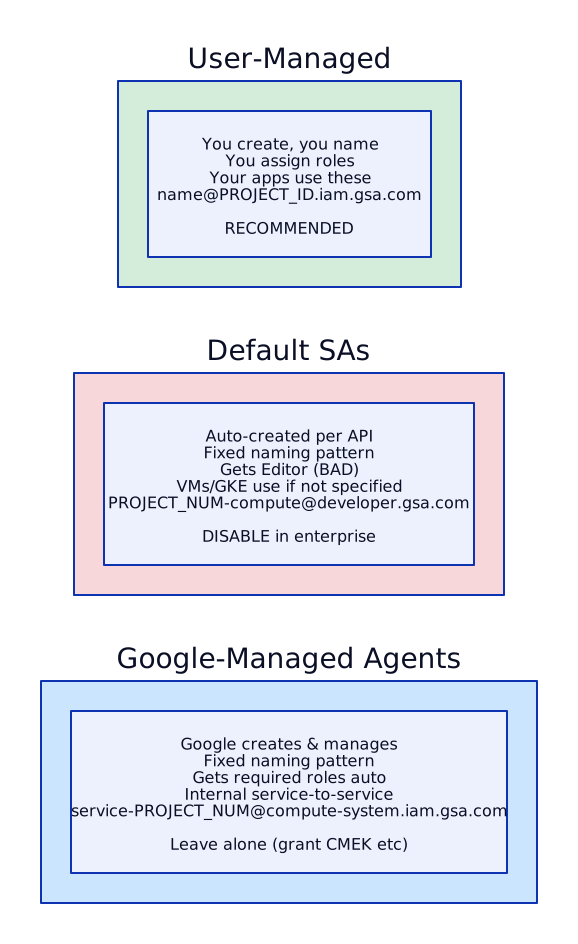
Interview tip: When asked “What types of service accounts exist in GCP?”, name all three: (1) User-managed — you create and control these, the only type you should use for workloads. (2) Default — auto-created with the dangerous Editor role, disable via org policy. (3) Google-managed agents — internal service-to-service communication, you may need to grant them KMS access for CMEK.