Event-Driven Architecture
Where This Fits
Section titled “Where This Fits”The central event bus lives in the Shared Services Account/Project. Workload accounts publish events to and subscribe from this central bus via cross-account rules (EventBridge) or IAM-scoped subscriptions (Pub/Sub). This decouples tenant services — teams communicate through events, not direct API calls.

Event-Driven vs Request-Driven
Section titled “Event-Driven vs Request-Driven”
| Factor | Request-Driven | Event-Driven |
|---|---|---|
| Coupling | Tight — caller knows callee | Loose — publisher does not know subscribers |
| Failure handling | Cascading failures | Isolated — one consumer failing does not affect others |
| Latency | Accumulated (sum of all hops) | Publisher returns immediately |
| Debugging | Simple (follow the request) | Complex (trace events across systems) |
| Ordering | Natural (request/response) | Requires explicit ordering guarantees |
| Best for | CRUD operations, queries | Notifications, workflows, integration |
Event Patterns
Section titled “Event Patterns”Fan-Out Pattern
Section titled “Fan-Out Pattern”One event triggers multiple independent consumers:

Saga Pattern (Distributed Transactions)
Section titled “Saga Pattern (Distributed Transactions)”When a business process spans multiple services, use the saga pattern with compensating actions:

CQRS (Command Query Responsibility Segregation)
Section titled “CQRS (Command Query Responsibility Segregation)”Separate the write model (commands) from the read model (queries):
Cloud Event Services
Section titled “Cloud Event Services”Amazon EventBridge
Section titled “Amazon EventBridge”EventBridge is the enterprise event bus — event routing with content-based filtering, schema discovery, and cross-account delivery.

Amazon SQS
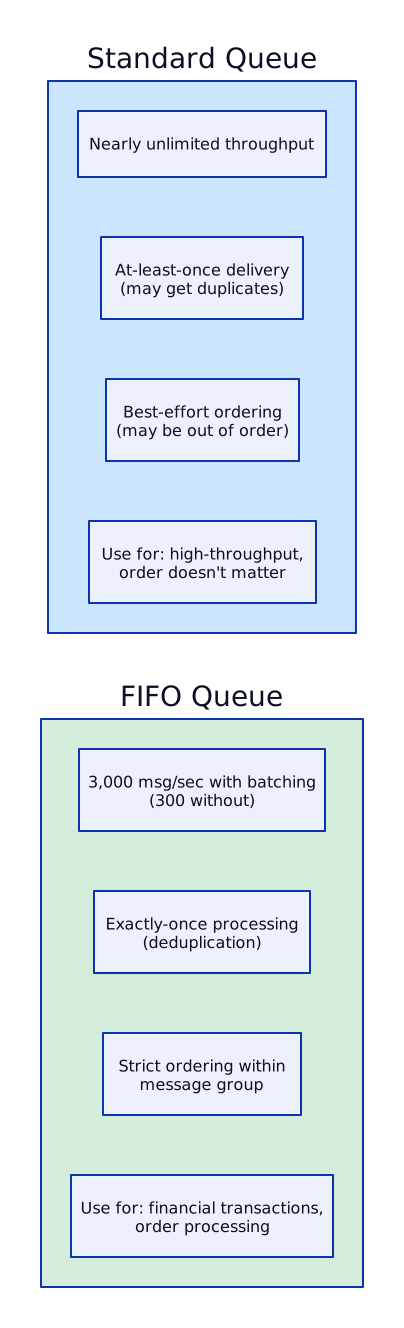
Section titled “Amazon SQS”Point-to-point message queue. One producer, one consumer (or consumer group).
SNS (Fan-Out)
Section titled “SNS (Fan-Out)”SNS is a pub/sub notification service. One message, multiple subscribers.

Kinesis (Real-Time Streaming)
Section titled “Kinesis (Real-Time Streaming)”Kinesis is AWS’s managed streaming platform for real-time data ingestion and processing. Unlike SQS (message queue, point-to-point), Kinesis is a stream (ordered, replayable, multiple consumers).
| Service | Purpose | Use Case |
|---|---|---|
| Kinesis Data Streams | Real-time streaming ingestion | Clickstream, IoT telemetry, log aggregation |
| Kinesis Data Firehose | Managed delivery to destinations | Stream → S3/Redshift/OpenSearch (no code) |
| Kinesis Data Analytics | SQL/Flink on streams | Real-time aggregation, anomaly detection |
When Kinesis vs SQS:
- Kinesis: multiple consumers read same data, ordering within shard, replay capability, real-time analytics
- SQS: single consumer (or consumer group), simpler, per-message processing, no ordering needed (unless FIFO)
Google Cloud Pub/Sub
Section titled “Google Cloud Pub/Sub”
Eventarc (Managed Event Routing)
Section titled “Eventarc (Managed Event Routing)”Eventarc provides managed event routing from Google Cloud services (and custom sources) to Cloud Run, GKE, and Workflows.

# Central EventBridge bus in Shared Services Accountresource "aws_cloudwatch_event_bus" "enterprise" {  name = "enterprise-event-bus"}
# Allow workload accounts to publish eventsresource "aws_cloudwatch_event_bus_policy" "cross_account" {  event_bus_name = aws_cloudwatch_event_bus.enterprise.name
  policy = jsonencode({    Version = "2012-10-17"    Statement = [      {        Sid    = "AllowWorkloadAccountPublish"        Effect = "Allow"        Principal = {          AWS = [            "arn:aws:iam::${var.team_a_account_id}:root",            "arn:aws:iam::${var.team_b_account_id}:root",            "arn:aws:iam::${var.team_c_account_id}:root"          ]        }        Action   = "events:PutEvents"        Resource = aws_cloudwatch_event_bus.enterprise.arn      }    ]  })}
# Rule: route order events to Team-B's SQS queueresource "aws_cloudwatch_event_rule" "order_events" {  name           = "route-order-events"  event_bus_name = aws_cloudwatch_event_bus.enterprise.name
  event_pattern = jsonencode({    source      = ["com.bank.orders"]    detail-type = ["OrderPlaced", "OrderCancelled"]  })}
resource "aws_cloudwatch_event_target" "team_b_queue" {  rule           = aws_cloudwatch_event_rule.order_events.name  event_bus_name = aws_cloudwatch_event_bus.enterprise.name  arn            = "arn:aws:sqs:me-central-1:${var.team_b_account_id}:order-events"
  sqs_target {    message_group_id = "orders"  # For FIFO queues  }
  dead_letter_config {    arn = aws_sqs_queue.dlq.arn  }
  retry_policy {    maximum_retry_attempts       = 3    maximum_event_age_in_seconds = 86400  # 24 hours  }}
# Schema registry for event contractsresource "aws_schemas_registry" "enterprise" {  name        = "enterprise-events"  description = "Schema registry for enterprise event contracts"}
resource "aws_schemas_schema" "order_placed" {  name          = "OrderPlaced"  registry_name = aws_schemas_registry.enterprise.name  type          = "OpenApi3"
  content = jsonencode({    openapi = "3.0.0"    info = {      title   = "OrderPlaced"      version = "1.0.0"    }    paths = {}    components = {      schemas = {        OrderPlaced = {          type = "object"          required = ["orderId", "customerId", "amount", "currency"]          properties = {            orderId    = { type = "string", format = "uuid" }            customerId = { type = "string", format = "uuid" }            amount     = { type = "number" }            currency   = { type = "string", enum = ["AED", "USD", "EUR"] }            items = {              type = "array"              items = {                type = "object"                properties = {                  productId = { type = "string" }                  quantity  = { type = "integer" }                  price     = { type = "number" }                }              }            }            timestamp = { type = "string", format = "date-time" }          }        }      }    }  })}
# Publishing Events from an EKS Pod (Python)import boto3import jsonfrom datetime import datetimeimport uuid
eventbridge = boto3.client('events', region_name='me-central-1')
def publish_order_placed(order): response = eventbridge.put_events( Entries=[ { 'Source': 'com.bank.orders', 'DetailType': 'OrderPlaced', 'Detail': json.dumps({ 'orderId': str(uuid.uuid4()), 'customerId': order['customer_id'], 'amount': order['total'], 'currency': 'AED', 'items': order['items'], 'timestamp': datetime.utcnow().isoformat() }), 'EventBusName': 'arn:aws:events:me-central-1:SHARED_SERVICES_ACCOUNT:event-bus/enterprise-event-bus' } ] ) # Check for failed entries if response['FailedEntryCount'] > 0: for entry in response['Entries']: if 'ErrorCode' in entry: logger.error(f"Failed to publish event: {entry['ErrorCode']}")resource "aws_sqs_queue" "order_processing" { name = "order-processing" visibility_timeout_seconds = 300 # 5 min (must be > Lambda timeout) message_retention_seconds = 1209600 # 14 days receive_wait_time_seconds = 20 # Long polling (reduces empty receives) max_message_size = 262144 # 256 KB
redrive_policy = jsonencode({ deadLetterTargetArn = aws_sqs_queue.order_dlq.arn maxReceiveCount = 3 # After 3 failures, send to DLQ })
sqs_managed_sse_enabled = true # Encryption at rest}
resource "aws_sqs_queue" "order_dlq" { name = "order-processing-dlq" message_retention_seconds = 1209600 # 14 days
sqs_managed_sse_enabled = true}
# CloudWatch alarm on DLQ depthresource "aws_cloudwatch_metric_alarm" "dlq_not_empty" { alarm_name = "order-dlq-has-messages" comparison_operator = "GreaterThanThreshold" evaluation_periods = 1 metric_name = "ApproximateNumberOfMessagesVisible" namespace = "AWS/SQS" period = 60 statistic = "Sum" threshold = 0 alarm_description = "DLQ has failed messages that need investigation" alarm_actions = [var.pagerduty_sns_topic_arn]
dimensions = { QueueName = aws_sqs_queue.order_dlq.name }}
# DLQ redrive policy (replay failed messages back to main queue)resource "aws_sqs_queue_redrive_allow_policy" "order_processing" { queue_url = aws_sqs_queue.order_processing.url
redrive_allow_policy = jsonencode({ redrivePermission = "byQueue" sourceQueueArns = [aws_sqs_queue.order_dlq.arn] })}# Schema for event validationresource "google_pubsub_schema" "order_placed" { name = "order-placed-schema" project = var.shared_services_project_id type = "AVRO" definition = jsonencode({ type = "record" name = "OrderPlaced" fields = [ { name = "orderId", type = "string" }, { name = "customerId", type = "string" }, { name = "amount", type = "double" }, { name = "currency", type = "string" }, { name = "timestamp", type = "string" } ] })}
# Central topic in Shared Services projectresource "google_pubsub_topic" "order_events" { name = "order-events" project = var.shared_services_project_id
schema_settings { schema = google_pubsub_schema.order_placed.id encoding = "JSON" }
message_retention_duration = "604800s" # 7 days
# CMEK encryption kms_key_name = google_kms_crypto_key.pubsub_key.id}
# Dead letter topicresource "google_pubsub_topic" "order_events_dlq" { name = "order-events-dlq" project = var.shared_services_project_id}
# Subscription for Team-A (in their project)resource "google_pubsub_subscription" "team_a_orders" { name = "team-a-order-processing" project = var.team_a_project_id topic = google_pubsub_topic.order_events.id
ack_deadline_seconds = 60 message_retention_duration = "604800s" # 7 days retain_acked_messages = true # For replay capability
enable_exactly_once_delivery = true
# Message ordering enable_message_ordering = true
# Dead letter policy dead_letter_policy { dead_letter_topic = google_pubsub_topic.order_events_dlq.id max_delivery_attempts = 5 }
# Retry policy retry_policy { minimum_backoff = "10s" maximum_backoff = "600s" }
# Filter: only receive OrderPlaced events (not OrderCancelled) filter = "attributes.eventType = \"OrderPlaced\""}
# IAM: Allow Team-A's workload to subscriberesource "google_pubsub_subscription_iam_member" "team_a_subscriber" { subscription = google_pubsub_subscription.team_a_orders.name project = var.team_a_project_id role = "roles/pubsub.subscriber" member = "serviceAccount:${var.team_a_workload_sa}"}
# IAM: Allow Team-A's workload to publish to central topicresource "google_pubsub_topic_iam_member" "team_a_publisher" { topic = google_pubsub_topic.order_events.name project = var.shared_services_project_id role = "roles/pubsub.publisher" member = "serviceAccount:${var.team_a_workload_sa}"}Dead Letter Queues (DLQ) and Error Handling
Section titled “Dead Letter Queues (DLQ) and Error Handling”
DLQ Replay Pattern
Section titled “DLQ Replay Pattern”# SQS DLQ Replay — AWS CLI# Step 1: Inspect messages in DLQaws sqs receive-message \ --queue-url https://sqs.me-central-1.amazonaws.com/ACCOUNT/order-processing-dlq \ --max-number-of-messages 10
# Step 2: Start DLQ redrive (replay messages back to source queue)aws sqs start-message-move-task \ --source-arn arn:aws:sqs:me-central-1:ACCOUNT:order-processing-dlq \ --destination-arn arn:aws:sqs:me-central-1:ACCOUNT:order-processing \ --max-number-of-messages-per-second 10 # Throttle replay to avoid overwhelming consumerExactly-Once Delivery
Section titled “Exactly-Once Delivery”
Idempotent Consumer Pattern (Python):
import boto3import psycopg2from contextlib import contextmanager
def process_order_event(event):    event_id = event['detail']['orderId']
    with db_transaction() as cursor:        # Check if already processed (idempotency key)        cursor.execute(            "SELECT 1 FROM processed_events WHERE event_id = %s FOR UPDATE",            (event_id,)        )        if cursor.fetchone():            logger.info(f"Event {event_id} already processed, skipping")            return  # Idempotent — skip duplicate
        # Process the event        cursor.execute(            "INSERT INTO orders (id, customer_id, amount) VALUES (%s, %s, %s)",            (event_id, event['detail']['customerId'], event['detail']['amount'])        )
        # Record that we processed this event        cursor.execute(            "INSERT INTO processed_events (event_id, processed_at) VALUES (%s, NOW())",            (event_id,)        )        # Both inserts in same transaction — atomic
Schema Registry and Event Contracts
Section titled “Schema Registry and Event Contracts”When 20 teams publish events to a shared bus, you need contracts. A schema registry enforces the structure of events so that a producer cannot break downstream consumers by changing the event format.

EventBridge Schema Registry auto-discovers event schemas from the bus and generates code bindings:
resource "aws_schemas_discoverer" "enterprise_bus" { source_arn = aws_cloudwatch_event_bus.enterprise.arn description = "Auto-discover schemas from enterprise event bus"}Pub/Sub supports Avro and Protocol Buffer schemas with validation at publish time:
resource "google_pubsub_schema" "order_placed_v2" { name = "order-placed-v2" type = "PROTOCOL_BUFFER" definition = <<-EOT syntax = "proto3"; message OrderPlaced { string order_id = 1; string customer_id = 2; double amount = 3; string currency = 4; repeated OrderItem items = 5; string timestamp = 6; string region = 7; // New field in v2 } message OrderItem { string product_id = 1; int32 quantity = 2; double price = 3; } EOT}Managed Kafka — MSK & Confluent Cloud
Section titled “Managed Kafka — MSK & Confluent Cloud”When the event-driven architecture grows beyond simple fan-out patterns into a full enterprise event backbone serving 100+ microservices, you need a streaming platform — not just a message queue. Apache Kafka is the dominant choice for this role. Unlike SQS or Pub/Sub which are message brokers (messages are consumed and removed), Kafka is a distributed commit log where messages persist for configurable durations and multiple independent consumers read from the same topic at their own pace. This fundamental difference makes Kafka suitable for event sourcing, CDC (change data capture), stream processing, and replay scenarios that queues cannot support.
The managed Kafka landscape offers three tiers of operational burden: MSK Provisioned (you choose broker count and instance types — full Kafka compatibility), MSK Serverless (auto-scales with no broker management but fewer features), and Confluent Cloud (fully managed with the richest Kafka ecosystem including ksqlDB, Schema Registry, and Kafka Connect). The choice depends on your team’s Kafka expertise, feature requirements, and budget. For teams new to Kafka, MSK Serverless or Confluent Cloud removes the operational complexity that makes self-hosted Kafka notoriously difficult to run.
The critical architecture question is not “Kafka or not Kafka” but “what is the right tool for each communication pattern?” Using Kafka for simple request-reply between two services is over-engineering. Using SQS for a real-time data pipeline feeding 15 downstream consumers with replay requirements is under-engineering. The decision matrix below helps make this choice systematically.
When Kafka vs Kinesis vs Pub/Sub?
Section titled “When Kafka vs Kinesis vs Pub/Sub?”| Criterion | Kafka (MSK) | Kinesis | Pub/Sub |
|---|---|---|---|
| Message retention | Unlimited (disk-based, configurable) | 7 days max (365 with enhanced) | 31 days max |
| Ordering | Per-partition (strong guarantee) | Per-shard | Per-key (ordering key) |
| Consumer model | Pull (consumer groups, independent offsets) | Pull (enhanced fan-out) or Lambda trigger | Pull (subscriptions) |
| Throughput | Millions msg/sec (add brokers + partitions) | 1 MB/sec per shard (add shards) | Auto-scales (no capacity planning) |
| Exactly-once | Native transactions (producer + consumer) | Requires dedup logic | Not native (at-least-once) |
| Ecosystem | Kafka Connect, Kafka Streams, ksqlDB, Debezium | Kinesis Analytics (Flink) | Dataflow (Apache Beam) |
| Ops overhead | Medium (MSK) / None (MSK Serverless) | None (fully managed) | None (fully managed) |
| Cost model | Per-broker-hour + storage + data transfer | Per-shard-hour + data | Per-message + storage |
| Replay | Consumer seeks to any offset (full replay) | Resharding resets, but timestamp-based | Seek to timestamp on subscription |
| Best for | Event backbone for 100+ services, CDC, log aggregation | Real-time analytics, Lambda triggers | GCP-native event routing, cross-service |
Decision Tree: Which Event/Streaming Platform?=================================================
Is it simple request-reply between 2 services?  └── YES → Use direct API calls (REST/gRPC)
Is it a task queue? (one producer, one consumer, process and delete)  └── YES → Use SQS (AWS) or Cloud Tasks (GCP)
Is it fan-out? (one event, multiple independent consumers, no replay needed)  └── YES → Use SNS+SQS (AWS) or Pub/Sub (GCP) or EventBridge (AWS)
Do you need replay? (reprocess events from 7 days ago for a new consumer)  └── YES → Kafka (MSK) or Kinesis
Do you need exactly-once transactions? (financial data, inventory updates)  └── YES → Kafka (MSK) with transactions
Is it a central event backbone for 50+ microservices with CDC?  └── YES → Kafka (MSK or Confluent Cloud)
Are you GCP-native and want minimal ops?  └── YES → Pub/Sub (different API but covers most use cases)
AWS MSK Deep Dive
Section titled “AWS MSK Deep Dive”MSK Provisioned gives you full Apache Kafka compatibility. You select broker instance types (kafka.m5.large, kafka.m5.2xlarge, etc.), broker count (minimum 3, one per AZ), and EBS storage per broker. Any standard Kafka client library works — MSK is just Kafka running on AWS-managed EC2 instances. You get full access to Kafka features: Kafka Connect, Kafka Streams, transactions, exactly-once semantics, log compaction, and fine-grained topic configuration.
MSK Serverless removes all broker management. You create a cluster, create topics, and produce/consume. AWS manages scaling, patching, and broker placement. The trade-off: fewer Kafka features (no Kafka Connect, limited topic-level configs, no custom broker configs), and throughput is billed per-data-unit rather than per-broker-hour. MSK Serverless is ideal for teams that want Kafka’s API and ecosystem without the operational burden of capacity planning.
Partition strategy is the most important Kafka design decision. Partitions determine parallelism: each partition can have at most one consumer per consumer group. Rule of thumb: start with partitions equal to your maximum expected consumer instances. A topic with 6 partitions can have at most 6 consumers in a single consumer group reading in parallel. Over-partitioning wastes broker resources (file handles, memory) and increases end-to-end latency. Under-partitioning limits throughput. For most services, 6-12 partitions per topic is a good starting point.
Key-based partitioning guarantees ordering for related events. All events with the same partition key (e.g., order_id=123) go to the same partition and are therefore processed in order. Different keys may go to different partitions and are processed in parallel. This is essential for event sourcing: all events for a given aggregate (order, customer, account) must be processed in sequence.

MSK Monitoring — Key Metrics to Watch:
Critical MSK Metrics======================
Broker Health:  ├── kafka.server:BrokerState              → 3 = running (alert if != 3)  ├── ActiveControllerCount                 → must be exactly 1 across cluster  └── UnderReplicatedPartitions             → must be 0 (alert immediately if > 0)
Consumer Lag:  ├── SumOffsetLag (per consumer group)     → gap between latest offset and consumer  ├── MaxOffsetLag                          → worst partition in the group  └── Alert: if lag > 10,000 messages for > 5 minutes → consumer is falling behind
Throughput:  ├── BytesInPerSec (per broker)            → ingestion rate  ├── BytesOutPerSec (per broker)           → consumption rate  └── MessagesInPerSec                      → message rate
Storage:  ├── KafkaDataLogsDiskUsed                 → percentage of EBS used  └── Alert: if > 80% → increase EBS volume or reduce retention
GCP Kafka Options
Section titled “GCP Kafka Options”GCP does not offer a native managed Kafka service equivalent to AWS MSK. This is a deliberate architectural choice — Google positions Pub/Sub as its managed messaging platform. For teams that specifically need the Kafka API and ecosystem (Kafka Connect, Kafka Streams, ksqlDB, Debezium), there are three viable approaches on GCP, each with different trade-offs.
Option 1: Confluent Cloud on GCP is the most operationally simple. Confluent manages the entire Kafka cluster — brokers, ZooKeeper (or KRaft), storage, networking, patching. The cluster runs in your GCP region with VPC peering for private connectivity. You get the full Confluent ecosystem: Schema Registry, Kafka Connect with 200+ pre-built connectors, ksqlDB for stream processing, and cluster linking for cross-region replication. The trade-off is cost — Confluent Cloud is significantly more expensive than self-hosted Kafka, typically 3-5x the infrastructure cost. For teams without deep Kafka expertise, this premium buys operational peace.
Option 2: Self-hosted Kafka on GKE using the Strimzi Kubernetes operator gives full control and the lowest cost at scale. Strimzi manages Kafka brokers, ZooKeeper (or KRaft mode), Kafka Connect, and MirrorMaker as Kubernetes custom resources. You get the flexibility to tune every Kafka configuration, choose your own Schema Registry (Confluent Schema Registry is open-source), and pay only GKE compute costs. The trade-off is significant operational burden: you manage upgrades, scaling, persistent volumes, monitoring, and disaster recovery. This is appropriate for teams with deep Kafka and Kubernetes expertise operating at very high scale where managed service costs are prohibitive.
Option 3: Use Pub/Sub instead of Kafka. For many use cases, Pub/Sub provides equivalent functionality with zero operational burden. Pub/Sub supports message ordering (via ordering keys), dead letter topics, exactly-once delivery (at-least-once with dedup), schema validation (Avro, Protocol Buffers), and message filtering. The API is different from Kafka’s, so it requires code changes, but the semantics are similar enough for most event-driven patterns. Pub/Sub is the right choice for GCP-native architectures where the Kafka ecosystem (Connect, Streams) is not required.
GCP Kafka Decision Tree=========================
Do you need the Kafka API specifically?  ├── NO → Use Pub/Sub (simpler, fully managed, GCP-native)  └── YES → Continue...
Do you need Kafka Connect ecosystem (200+ connectors)?  ├── YES → Confluent Cloud on GCP (managed, rich ecosystem)  └── NO → Continue...
Is cost the primary concern at very high scale (>100 TB/day)?  ├── YES → Self-hosted Kafka on GKE (Strimzi operator)  └── NO → Confluent Cloud on GCP (managed, less ops)
Do you have 2+ engineers with deep Kafka operational experience? ├── YES → Self-hosted is viable └── NO → Confluent Cloud (don't self-host without expertise)resource "aws_msk_cluster" "enterprise" { cluster_name = "enterprise-event-backbone" kafka_version = "3.6.0" number_of_broker_nodes = 3 # One per AZ
broker_node_group_info { instance_type = "kafka.m5.large" # 2 vCPU, 8 GB RAM client_subnets = var.private_subnet_ids # One subnet per AZ security_groups = [aws_security_group.msk.id]
storage_info { ebs_storage_info { volume_size = 500 # GB per broker provisioned_throughput { enabled = true volume_throughput = 250 # MB/s } } } }
encryption_info { encryption_in_transit { client_broker = "TLS" # Encrypt client-broker traffic in_cluster = true # Encrypt inter-broker replication } encryption_at_rest_kms_key_arn = var.kms_key_arn }
configuration_info { arn = aws_msk_configuration.enterprise.arn revision = aws_msk_configuration.enterprise.latest_revision }
open_monitoring { prometheus { jmx_exporter { enabled_in_broker = true # JMX metrics for Prometheus/vmagent } node_exporter { enabled_in_broker = true # Node-level metrics } } }
logging_info { broker_logs { cloudwatch_logs { enabled = true log_group = aws_cloudwatch_log_group.msk.name } } }
tags = { Environment = "production" Team = "platform" }}
# Kafka broker configurationresource "aws_msk_configuration" "enterprise" { name = "enterprise-config" kafka_versions = ["3.6.0"]
server_properties = <<-EOT auto.create.topics.enable=false default.replication.factor=3 min.insync.replicas=2 num.partitions=6 log.retention.hours=168 log.retention.bytes=-1 message.max.bytes=1048576 compression.type=lz4 unclean.leader.election.enable=false EOT}
# MSK Connect for CDC (Debezium)resource "aws_mskconnect_connector" "debezium_cdc" { name = "debezium-postgres-cdc"
kafkaconnect_version = "2.7.1"
capacity { autoscaling { min_worker_count = 1 max_worker_count = 4 mcu_count = 1
scale_in_policy { cpu_utilization_percentage = 20 } scale_out_policy { cpu_utilization_percentage = 80 } } }
connector_configuration = { "connector.class" = "io.debezium.connector.postgresql.PostgresConnector" "database.hostname" = var.rds_endpoint "database.port" = "5432" "database.user" = var.db_username "database.password" = var.db_password "database.dbname" = "orders" "database.server.name" = "orders-db" "table.include.list" = "public.orders,public.payments" "topic.prefix" = "cdc" "plugin.name" = "pgoutput" "publication.autocreate.mode" = "filtered" "key.converter" = "org.apache.kafka.connect.json.JsonConverter" "value.converter" = "org.apache.kafka.connect.json.JsonConverter" "transforms" = "unwrap" "transforms.unwrap.type" = "io.debezium.transforms.ExtractNewRecordState" }
kafka_cluster { apache_kafka_cluster { bootstrap_servers = aws_msk_cluster.enterprise.bootstrap_brokers_tls vpc { security_groups = [aws_security_group.msk_connect.id] subnets = var.private_subnet_ids } } }
plugin { custom_plugin { arn = aws_mskconnect_custom_plugin.debezium.arn revision = aws_mskconnect_custom_plugin.debezium.latest_revision } }
service_execution_role_arn = aws_iam_role.msk_connect.arn}
# Schema Registry — AWS Glue Schema Registryresource "aws_glue_registry" "enterprise" { registry_name = "enterprise-events" description = "Schema registry for enterprise event contracts"}
resource "aws_glue_schema" "order_placed" { schema_name = "OrderPlaced" registry_arn = aws_glue_registry.enterprise.arn data_format = "AVRO" compatibility = "BACKWARD" # New schema must read old data schema_definition = jsonencode({ type = "record" name = "OrderPlaced" namespace = "com.bank.orders" fields = [ { name = "orderId", type = "string" }, { name = "customerId", type = "string" }, { name = "amount", type = "double" }, { name = "currency", type = "string" }, { name = "timestamp", type = "string" } ] })}# Strimzi Kafka on GKE — Cluster CRDapiVersion: kafka.strimzi.io/v1beta2kind: Kafkametadata: name: enterprise-kafka namespace: kafkaspec: kafka: version: 3.6.0 replicas: 3 listeners: - name: tls port: 9093 type: internal tls: true authentication: type: tls config: offsets.topic.replication.factor: 3 transaction.state.log.replication.factor: 3 transaction.state.log.min.isr: 2 default.replication.factor: 3 min.insync.replicas: 2 log.retention.hours: 168 storage: type: persistent-claim size: 500Gi class: premium-rwo # GKE SSD persistent disk resources: requests: cpu: "2" memory: 8Gi limits: memory: 8Gi zookeeper: replicas: 3 storage: type: persistent-claim size: 50Gi class: premium-rwo entityOperator: topicOperator: {} userOperator: {}Enterprise Pattern: MSK as Central Event Backbone
Section titled “Enterprise Pattern: MSK as Central Event Backbone”In a large microservices architecture, MSK (or Confluent Cloud) serves as the central nervous system. All domain events flow through Kafka topics, enabling loose coupling between services while providing a durable, replayable event log. This pattern combines three key capabilities:
-
Domain events: Microservices publish business events (OrderPlaced, PaymentProcessed, InventoryReserved) to Kafka topics. Other services subscribe to events they care about. No direct service-to-service calls for asynchronous workflows.
-
CDC (Change Data Capture): Debezium monitors database transaction logs and publishes every INSERT, UPDATE, DELETE as a Kafka event. This enables real-time data synchronization between services without application-level dual-write (which is inherently inconsistent). CDC into Kafka is the most reliable way to get data from operational databases to analytics systems.
-
Schema Registry: Enforces event contracts across all producers and consumers. Schemas are versioned with backward compatibility rules — a producer cannot publish a breaking schema change that would crash existing consumers. AWS Glue Schema Registry or Confluent Schema Registry both serve this purpose.
Interview Scenarios for Kafka
Section titled “Interview Scenarios for Kafka”“Design a real-time data pipeline. When do you choose Kafka over Kinesis?”
“The decision comes down to three factors: consumer model, retention needs, and ecosystem.
Choose Kafka (MSK) when: (1) Multiple independent consumer groups need to read the same data at their own pace — Kafka’s consumer group model handles this natively, while Kinesis requires enhanced fan-out or SNS fan-out to multiple streams. (2) You need unlimited retention — some regulatory use cases require keeping an immutable event log for years, Kafka supports this with tiered storage. Kinesis maxes at 365 days. (3) You need the Kafka Connect ecosystem — 200+ connectors for CDC (Debezium), S3 sinks, Elasticsearch sinks, JDBC sources. Building these integrations from scratch with Kinesis is months of work.
Choose Kinesis when: (1) You want zero operational overhead and your throughput fits within shard limits. (2) You want Lambda integration — Kinesis triggers Lambda functions natively with event source mapping, batching, and error handling. Kafka-Lambda integration exists but is less mature. (3) You need real-time SQL analytics — Kinesis Analytics (managed Apache Flink) provides stream processing without additional infrastructure.
For this pipeline, I’d choose MSK if we have 10+ downstream consumers with different processing speeds and need CDC from databases. I’d choose Kinesis if it’s a simpler pipeline with 2-3 consumers and we want Lambda-based processing.”
“You have 500 microservices. Would you use an event bus (EventBridge) or a streaming platform (Kafka)? Why?”
“Both, for different purposes. EventBridge for event routing and integration, Kafka for the core event backbone.
EventBridge is excellent for: routing events between services based on content (event rules with filtering), integrating with AWS services (Lambda, Step Functions, SQS, API destinations), and providing a managed schema registry. It is a router, not a store — events are delivered and forgotten.
Kafka is essential for: durable event storage (replay events from 7 days ago for a new consumer), high-throughput stream processing (aggregations, joins, windowing via Kafka Streams or ksqlDB), CDC from databases (Debezium), and serving as the single source of truth for event history.
In practice, I’d use both: microservices publish domain events to Kafka topics (durable, replayable). An EventBridge pipe reads from Kafka and routes specific event types to AWS-native targets (Lambda, Step Functions) for services that prefer the EventBridge integration model. This gives you the durability and ecosystem of Kafka with the routing flexibility of EventBridge.”
Interview Scenarios
Section titled “Interview Scenarios”Scenario 1: “Design an Event-Driven Order Processing System Handling 10K Orders per Minute”
Section titled “Scenario 1: “Design an Event-Driven Order Processing System Handling 10K Orders per Minute””Strong Answer:
“10K orders per minute is about 167 per second — well within the capacity of both EventBridge and Pub/Sub.
Architecture:
Order API (EKS pods) publishes order.placed events to the central EventBridge bus in the Shared Services Account. The event contains: orderId, customerId, items, amount, currency, timestamp.
Fan-out via EventBridge rules:
- Rule 1: Route to Payment SQS queue (Team-B account) — process payment
- Rule 2: Route to Inventory SQS queue (Team-C account) — reserve stock
- Rule 3: Route to Notification Lambda (Team-D account) — send confirmation email
- Rule 4: Route to Analytics Kinesis stream — real-time dashboards
Each consumer is independent: Payment failing does not block inventory. Each has its own DLQ with CloudWatch alarms. Retry policy: 3 attempts with exponential backoff.
Ordering: SQS FIFO queues with orderId as the message group ID — events for the same order are processed in sequence. Different orders process in parallel.
Exactly-once: Consumer-side idempotency. Each processor stores processed orderIds in DynamoDB. Before processing, check if the orderId exists. This handles the case where SQS delivers the same message twice.
Schema: EventBridge Schema Registry validates event format. Breaking changes require a versioning process (v1 and v2 published simultaneously during migration).
Monitoring: CloudWatch metrics on SQS queue depth, consumer lag, DLQ depth, EventBridge failed invocations. PagerDuty alert if DLQ depth > 0 or consumer lag > 5 minutes.”
Scenario 2: “How Do You Handle Failed Events and Ensure Nothing Is Lost?”
Section titled “Scenario 2: “How Do You Handle Failed Events and Ensure Nothing Is Lost?””Strong Answer:
“Multiple layers of protection:
Layer 1 — Retries: EventBridge retries failed target invocations for up to 24 hours with exponential backoff. SQS consumers get 3 attempts (configurable via maxReceiveCount). Pub/Sub retries with configurable backoff (10s to 600s).
Layer 2 — Dead Letter Queue: After exhausting retries, the message moves to a DLQ. The DLQ has a 14-day retention period — plenty of time to investigate and replay.
Layer 3 — Alerting: CloudWatch alarm fires the moment a single message appears in the DLQ. PagerDuty notification to the on-call engineer. The alert includes the queue name and approximate message count.
Layer 4 — Replay: Once the root cause is fixed (bug in consumer code, downstream service restored), we replay messages from the DLQ back to the source queue using SQS StartMessageMoveTask or Pub/Sub Seek to a timestamp. We throttle replay to avoid overwhelming the consumer.
Layer 5 — Audit trail: Every event published is logged with a unique eventId and timestamp. If we suspect data loss, we can reconcile the producer’s log against the consumer’s processed events log.
Layer 6 — Event store (for critical systems): For financial transactions, we write every event to S3/GCS as an immutable log before publishing to EventBridge/Pub/Sub. Even if the entire messaging system fails, we can rebuild state from the event store.”
Scenario 3: “As the Central Team, How Do You Provide a Shared Event Bus for 20 Teams?”
Section titled “Scenario 3: “As the Central Team, How Do You Provide a Shared Event Bus for 20 Teams?””Strong Answer:
“This is a platform engineering problem — provide self-service with guardrails.
Infrastructure (platform team owns):
- Central EventBridge custom bus in the Shared Services Account
- Resource policy allowing workload accounts to
PutEvents - Schema Registry for event contract validation
- DLQ in Shared Services with alarms
- Monitoring dashboards (events published/consumed per team)
Governance (platform team enforces):
- Event naming convention:
com.bank.{team}.{entity}.{action}— e.g.,com.bank.orders.order.placed - Schema registration required before publishing (prevents unstructured events)
- Backward compatibility required for schema changes
- Rate limiting per source (EventBridge has account-level throttling)
Self-service (tenant teams own):
- Teams create their own EventBridge rules to subscribe to events they care about
- Teams define their own SQS/Lambda targets in their workload accounts
- Teams manage their own consumer logic, DLQ monitoring, and replay
Terraform module the platform team provides:
module "event_subscription" {  source = "git::https://github.com/bank/terraform-modules//event-subscription"
  event_bus_arn  = data.aws_cloudwatch_event_bus.enterprise.arn  team_name      = "team-b"  event_patterns = [    {      source      = ["com.bank.orders"]      detail_type = ["OrderPlaced"]    }  ]  target_sqs_arn = aws_sqs_queue.order_events.arn  dlq_arn        = aws_sqs_queue.order_events_dlq.arn}
Teams use this module in their Terraform — they specify which events they want and where to deliver them. The platform team reviews PRs for convention compliance.”
Scenario 4: “SQS vs Kinesis — When Would You Choose Each?”
Section titled “Scenario 4: “SQS vs Kinesis — When Would You Choose Each?””Strong Answer:
“The fundamental difference: SQS is a queue (messages are consumed and deleted), Kinesis is a stream (messages persist for the retention period and multiple consumers read independently).
Choose SQS when:
- You need a simple task queue (one producer, one consumer group)
- Messages should be processed once and removed
- You do not need to replay processed messages
- Throughput is variable (SQS scales automatically with no shard management)
- Example: order processing, email sending, image resizing
Choose Kinesis when:
- Multiple independent consumers need to read the same data (fan-out without SNS)
- You need to replay messages (reprocess last 7 days of data for a new consumer)
- Ordering is critical (Kinesis guarantees per-shard ordering always, not just in FIFO mode)
- Real-time analytics (Kinesis Analytics can run SQL on the stream)
- High-throughput, append-only log semantics (CDC, clickstream, IoT telemetry)
- Example: real-time transaction monitoring, log aggregation, CDC pipeline
Or use both: Kinesis as the primary stream (durable, replayable) → fan-out to SQS queues for each consumer (independent processing, DLQ per consumer). This gives you durability AND independent consumption.”
Scenario 5: “Design Event Schema Evolution Without Breaking Downstream Consumers”
Section titled “Scenario 5: “Design Event Schema Evolution Without Breaking Downstream Consumers””Strong Answer:
“Schema evolution is critical when 20 teams depend on each other’s events. The rules:
Additive changes are always safe. Adding a new optional field to an event is backward compatible. Old consumers ignore the field, new consumers use it. Example: adding region to the OrderPlaced event.
Removing or renaming fields is a breaking change. A consumer deserializing the event will fail if an expected field is missing.
The evolution process for breaking changes:
- Create a new version: Instead of modifying
OrderPlaced, createOrderPlaced_v2with the new schema. - Publish both versions: The producer publishes both
OrderPlaced(v1) andOrderPlaced_v2during the transition period. This is dual-publishing — more work for the producer but zero impact on consumers. - Consumers migrate: Each team migrates their subscription to the v2 event on their own schedule. The platform team tracks which teams are still on v1.
- Deprecation notice: After all consumers have migrated (verified by schema registry usage metrics), announce v1 deprecation with a 30-day sunset.
- Remove v1: Stop publishing v1. Clean up the schema.
Tooling: EventBridge Schema Registry or Pub/Sub schema validation catches breaking changes at publish time. In CI/CD, run a compatibility check: new schema must be backward compatible with current schema — fail the pipeline if not.”
Scenario 6: “How Do You Ensure Exactly-Once Processing?”
Section titled “Scenario 6: “How Do You Ensure Exactly-Once Processing?””Strong Answer:
“True exactly-once delivery is a distributed systems myth at the transport layer. What we actually achieve is ‘effectively exactly-once’ through two complementary techniques:
Broker-side deduplication:
- SQS FIFO: set a
MessageDeduplicationIdon each message. SQS deduplicates within a 5-minute window. If the same dedup ID is sent twice, SQS silently drops the duplicate. - Pub/Sub: enable
exactly_once_deliveryon the subscription. Pub/Sub tracks acknowledged messages and prevents redelivery of ack’d messages.
Consumer-side idempotency (always required): Even with broker deduplication, edge cases exist (network timeout after processing but before ack, consumer crash after processing but before commit). The consumer must be idempotent:
- Extract a unique event ID from the message (orderId, transactionId)
- Before processing, check a database table:
SELECT 1 FROM processed_events WHERE event_id = ? - If found, skip (already processed)
- If not found, process the event AND insert into
processed_eventsin the same database transaction (atomic) - This guarantees that even if the same message arrives twice, the business logic executes only once
For financial systems: Add a reconciliation job that runs nightly, comparing the producer’s event log against the consumer’s processed events, and flags any discrepancies for manual review.”
References
Section titled “References”- Amazon EventBridge User Guide — event bus, rules, schema registry, and cross-account patterns
- Amazon SQS Developer Guide — standard and FIFO queues, DLQs, and redrive
- Amazon SNS Developer Guide — pub/sub fan-out, message filtering, and delivery
- Amazon Kinesis Data Streams — real-time streaming and shard management
- Google Cloud Pub/Sub Documentation — topics, subscriptions, exactly-once delivery, and schema validation
- Eventarc Documentation — managed event routing from Google Cloud sources to targets
- Pub/Sub Schema Validation — Avro and Protocol Buffer schema enforcement
Tools & Frameworks
Section titled “Tools & Frameworks”- Enterprise Integration Patterns — Hohpe and Woolf’s catalog of messaging patterns (saga, CQRS, fan-out)
- Microservices.io: Saga Pattern — choreography and orchestration-based saga patterns
- CQRS Pattern (Martin Fowler) — command query responsibility segregation explained