Database Architecture
Where This Fits
Section titled “Where This Fits”Databases are provisioned in Workload Accounts (for application databases) or the Data Platform Account (for warehousing). The central infra team defines approved database services, encryption standards, backup policies, and network access patterns. Tenant teams request databases through Terraform modules provided by the platform team.

Database Decision Framework
Section titled “Database Decision Framework”Relational Database Spectrum
Section titled “Relational Database Spectrum”Use this decision tree to choose the right managed relational database:

Comparison Matrix
Section titled “Comparison Matrix”| Feature | RDS | Aurora | Cloud SQL | AlloyDB | Spanner |
|---|---|---|---|---|---|
| Engine | MySQL, PostgreSQL, MariaDB, Oracle, SQL Server | MySQL, PostgreSQL compatible | MySQL, PostgreSQL, SQL Server | PostgreSQL compatible | Proprietary (GoogleSQL, PostgreSQL interface) |
| Performance | Baseline | 5x MySQL, 3x PostgreSQL | Baseline | 4x PostgreSQL | Unlimited horizontal scale |
| Storage | EBS (gp3/io2), max 64TB | Shared distributed, auto-grows to 128TB | SSD, max 64TB | Disaggregated, auto-grows | Managed, auto-splits |
| HA | Multi-AZ (standby replica) | Multi-AZ (3 AZ, 6 storage copies) | Regional (2 zones) | Regional (2 zones) | Multi-zone / multi-region |
| Failover | 60-120s | <30s | 10-30s | ~30s | Automatic, zero downtime |
| Read Replicas | Up to 15 | Up to 15 (same storage) | Up to 10 | Cross-region replicas | Built-in (read from any node) |
| Global | Cross-region read replicas | Global Database (RPO <1s) | Cross-region replicas | Cross-region replicas | Native multi-region (zero RPO) |
| Serverless | No | Serverless v2 (0.5-128 ACU) | No | No | No (always provisioned) |
| Price | $ | $$ | $ | $$ | $$$ |
| Best For | Standard workloads | High-perf AWS apps | Standard GCP workloads | HTAP, analytics on OLTP | Global systems needing consistency |
Aurora Deep Dive
Section titled “Aurora Deep Dive”Architecture: Separated Compute and Storage
Section titled “Architecture: Separated Compute and Storage”
Aurora Key Features
Section titled “Aurora Key Features”| Feature | What It Does | When to Use |
|---|---|---|
| Serverless v2 | Auto-scales compute 0.5-128 ACU | Unpredictable traffic, dev/test environments |
| Global Database | Cross-region replication, RPO <1s, RPO ~0 for storage-level replication | Multi-region HA, disaster recovery |
| I/O-Optimized | Flat pricing for I/O (no per-I/O charge) | I/O-heavy workloads (>25% of bill is I/O) |
| Limitless | Shards writes across multiple DB instances | Write-heavy workloads exceeding single-writer limits |
| Blue/Green Deployments | Create staging env from prod, switch with managed cutover | Zero-downtime upgrades, major version changes |
| Backtrack | Rewind database to a point in time without restore | Quick recovery from bad writes (accidental DELETE) |
Aurora Global Database
Section titled “Aurora Global Database”
AlloyDB Deep Dive (GCP)
Section titled “AlloyDB Deep Dive (GCP)”HTAP Architecture (Hybrid Transactional/Analytical Processing)
Section titled “HTAP Architecture (Hybrid Transactional/Analytical Processing)”
Spanner Deep Dive (GCP)
Section titled “Spanner Deep Dive (GCP)”Globally Distributed, Strongly Consistent
Section titled “Globally Distributed, Strongly Consistent”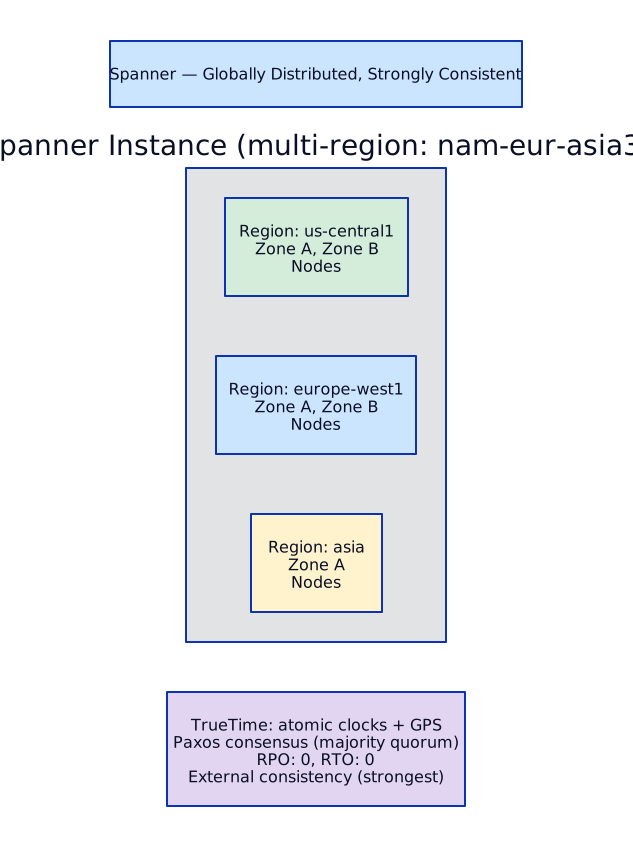
When Spanner vs Aurora Global
Section titled “When Spanner vs Aurora Global”| Criterion | Spanner | Aurora Global |
|---|---|---|
| Multi-region writes | Yes, any node | No, single primary region |
| Consistency | External (strongest) | Eventual (cross-region readers) |
| RPO | 0 | <1 second |
| Horizontal scaling | Unlimited (add nodes) | Limited (single writer, or Limitless preview) |
| SQL compatibility | GoogleSQL + PostgreSQL interface | MySQL / PostgreSQL native |
| ORM support | Limited (improving) | Full (native MySQL/PG) |
| Cost | $$$ (pay per node-hour + storage) | $$ (pay per instance + I/O or flat) |
| Best for | Global ledger, inventory, multi-region writes | AWS-native apps needing DR across regions |
NoSQL Decision Matrix
Section titled “NoSQL Decision Matrix”AWS: DynamoDB
Section titled “AWS: DynamoDB”
| Feature | Detail |
|---|---|
| Capacity | On-Demand (auto-scales, ~7x cost) or Provisioned (set RCU/WCU, use auto-scaling) |
| DAX | In-memory caching layer, microsecond reads, transparent to application |
| Global Tables | Multi-region, multi-active replication, last-writer-wins conflict resolution |
| Streams | Ordered, time-ordered sequence of item changes (CDC for DynamoDB) |
| TTL | Auto-delete expired items (no read/write cost for deletion) |
| Transactions | ACID transactions across up to 100 items (2x cost) |
GCP: Firestore
Section titled “GCP: Firestore”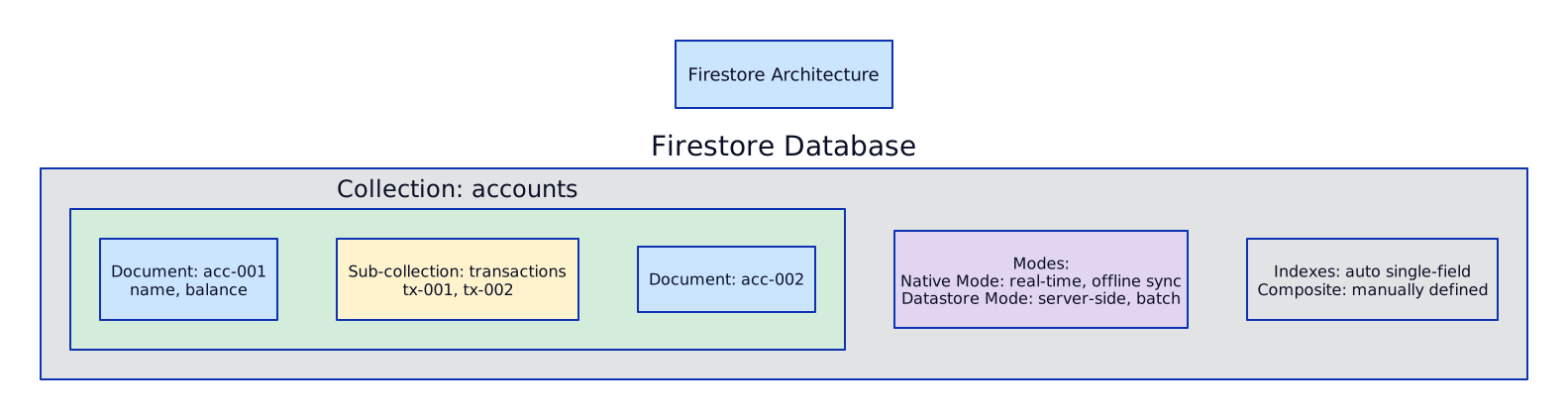
| Feature | Detail |
|---|---|
| Real-time | Snapshot listeners push changes to clients instantly |
| Offline | Local cache, auto-sync when reconnected (mobile SDK) |
| Multi-region | Automatic multi-zone replication, optional multi-region |
| Transactions | ACID transactions with optimistic concurrency |
| Security Rules | Declarative rules for client-side access (Firebase) |
DynamoDB vs Firestore
Section titled “DynamoDB vs Firestore”| Criterion | DynamoDB | Firestore |
|---|---|---|
| Data model | Key-value / document | Document with sub-collections |
| Query | Primary key + GSI | Any field (auto-indexed) |
| Real-time | Streams (server-side) | Snapshot listeners (client-side) |
| Offline sync | No | Yes (mobile SDK) |
| Pricing | Per RCU/WCU or per request | Per read/write/delete operation |
| Best for | High-scale backend services | Mobile/web apps with real-time needs |
Caching: ElastiCache vs Memorystore
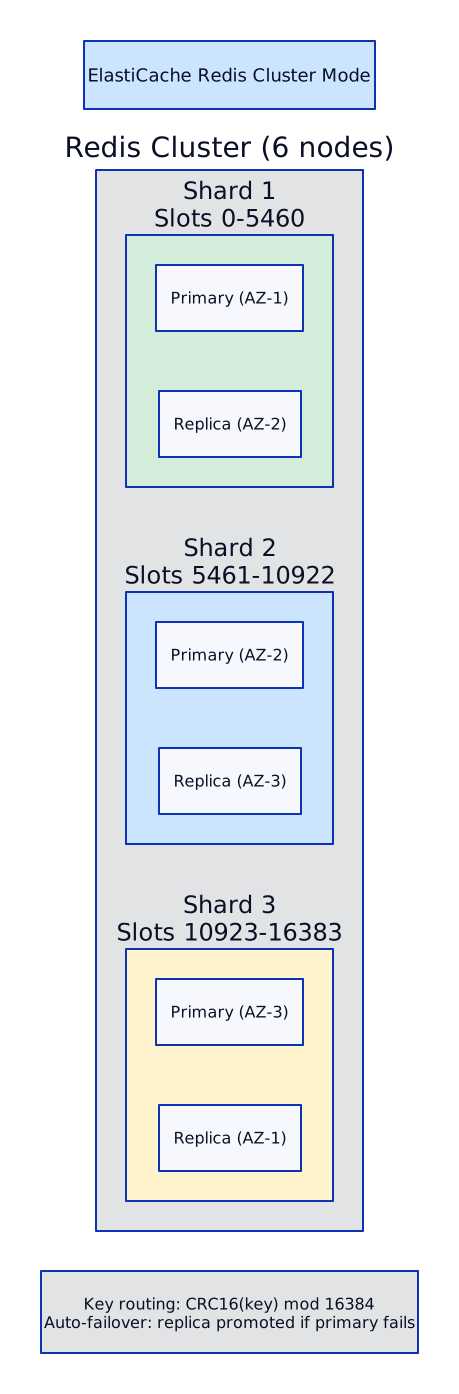
Section titled “Caching: ElastiCache vs Memorystore”AWS: ElastiCache
Section titled “AWS: ElastiCache”| Feature | Redis | Memcached |
|---|---|---|
| Data structures | Strings, hashes, lists, sets, sorted sets, streams | Key-value only |
| Persistence | Optional (RDB snapshots, AOF) | No |
| Replication | Multi-AZ with automatic failover | No |
| Cluster mode | Yes (data sharding, 500 nodes max) | Multi-node (no replication) |
| Global Datastore | Cross-region replication | No |
| Use cases | Session store, leaderboards, rate limiting, pub/sub | Simple caching, ephemeral data |
GCP: Memorystore
Section titled “GCP: Memorystore”| Feature | Redis | Memcached | Valkey |
|---|---|---|---|
| Engine | Redis OSS | Memcached | Valkey (Redis fork, open-source) |
| Tiers | Basic, Standard (HA), Cluster | Standard | Standard, HA |
| HA | Standard tier: auto-failover | No | Cross-zone replicas |
| Cluster | Cluster mode (up to 25 shards) | Multi-node | Cluster mode |
| Max Memory | 300GB per instance | 5TB (distributed) | 300GB per instance |
| Auth | AUTH password, IAM | SASL | AUTH, IAM |
Connection Pooling (Critical for Kubernetes)
Section titled “Connection Pooling (Critical for Kubernetes)”The Problem
Section titled “The Problem”
The Solution
Section titled “The Solution”
AWS: RDS Proxy
Section titled “AWS: RDS Proxy”| Feature | Detail |
|---|---|
| Connection multiplexing | Reuses database connections across clients |
| IAM authentication | Pods authenticate via IAM role (IRSA), no passwords in code |
| Failover handling | Routes to new primary automatically during Aurora failover (applications do not reconnect) |
| Pinning | Some operations (prepared statements, session variables) pin connections — reduces multiplexing effectiveness |
| Endpoints | Default (read/write), read-only (routes to readers), custom (specific target groups) |
| Cost | Per vCPU of the database instance (~$18/vCPU/month) |
IAM Authentication flow with EKS:

GCP: Cloud SQL Auth Proxy
Section titled “GCP: Cloud SQL Auth Proxy”
Why sidecar pattern:
- App connects to
localhost:5432— no connection string changes - Auth Proxy handles TLS, IAM auth, and connection pooling
- Workload Identity: GKE service account mapped to GCP service account, no JSON keys
Alternative: Cloud SQL Connector libraries
- Native Go, Java, Python libraries that handle auth + TLS in-process
- No sidecar needed, but requires code changes
- Recommended for new applications (fewer moving parts)
Replication Patterns
Section titled “Replication Patterns”Synchronous vs Asynchronous
Section titled “Synchronous vs Asynchronous”
Read-Write Splitting Pattern
Section titled “Read-Write Splitting Pattern”
Backup and Recovery
Section titled “Backup and Recovery”Strategy Matrix
Section titled “Strategy Matrix”| Method | RPO | RTO | Use Case |
|---|---|---|---|
| Automated backups | 5 min (backup window) | 30-60 min (restore) | Standard DR |
| PITR (Point-in-Time Recovery) | ~5 seconds | 30-60 min (restore to new instance) | Accidental data deletion/corruption |
| Cross-region backup | Minutes (async copy) | 1-2 hours (restore in new region) | Regional disaster |
| Aurora Backtrack | Seconds | Seconds (rewind in place) | Fast recovery from bad writes |
| Database snapshot | At snapshot time | 30-60 min | Before major changes, migration |


Terraform
Section titled “Terraform”AWS: Aurora PostgreSQL Cluster with RDS Proxy
Section titled “AWS: Aurora PostgreSQL Cluster with RDS Proxy”# --- Aurora PostgreSQL Cluster ---
resource "aws_rds_cluster" "main" { cluster_identifier = "banking-aurora-cluster" engine = "aurora-postgresql" engine_version = "15.4" database_name = "banking" master_username = "dbadmin" manage_master_user_password = true # Secrets Manager auto-rotation
# Storage storage_encrypted = true kms_key_id = aws_kms_key.rds.arn storage_type = "aurora-iopt1" # I/O-Optimized (flat I/O pricing)
# Networking db_subnet_group_name = aws_db_subnet_group.data.name vpc_security_group_ids = [aws_security_group.aurora.id]
# Backup backup_retention_period = 35 # Max retention preferred_backup_window = "03:00-04:00" copy_tags_to_snapshot = true deletion_protection = true skip_final_snapshot = false final_snapshot_identifier = "banking-final-${formatdate("YYYY-MM-DD", timestamp())}"
# Enhanced monitoring enabled_cloudwatch_logs_exports = ["postgresql"]
# Backtrack (MySQL only, not available for PostgreSQL) # backtrack_window = 259200 # 72 hours
tags = { Environment = "production" Team = "platform" CostCenter = "infrastructure" }}
# Writer instanceresource "aws_rds_cluster_instance" "writer" { identifier = "banking-writer" cluster_identifier = aws_rds_cluster.main.id instance_class = "db.r6g.4xlarge" engine = aws_rds_cluster.main.engine engine_version = aws_rds_cluster.main.engine_version
monitoring_interval = 15 # Enhanced monitoring (seconds) monitoring_role_arn = aws_iam_role.rds_monitoring.arn
performance_insights_enabled = true performance_insights_kms_key_id = aws_kms_key.rds.arn performance_insights_retention_period = 731 # 2 years
tags = { Role = "writer" }}
# Reader instances (2 replicas across AZs)resource "aws_rds_cluster_instance" "readers" { count = 2
identifier = "banking-reader-${count.index + 1}" cluster_identifier = aws_rds_cluster.main.id instance_class = "db.r6g.2xlarge" engine = aws_rds_cluster.main.engine engine_version = aws_rds_cluster.main.engine_version
monitoring_interval = 15 monitoring_role_arn = aws_iam_role.rds_monitoring.arn
performance_insights_enabled = true
tags = { Role = "reader" }}
# --- RDS Proxy (connection pooling + IAM auth) ---
resource "aws_db_proxy" "main" { name = "banking-proxy" debug_logging = false engine_family = "POSTGRESQL" idle_client_timeout = 1800 # 30 min require_tls = true role_arn = aws_iam_role.rds_proxy.arn vpc_security_group_ids = [aws_security_group.rds_proxy.id] vpc_subnet_ids = var.data_subnet_ids
auth { auth_scheme = "SECRETS" description = "Aurora master credentials" iam_auth = "REQUIRED" # Force IAM auth (no passwords) secret_arn = aws_rds_cluster.main.master_user_secret[0].secret_arn }}
resource "aws_db_proxy_default_target_group" "main" { db_proxy_name = aws_db_proxy.main.name
connection_pool_config { max_connections_percent = 80 # Use up to 80% of DB max_connections max_idle_connections_percent = 50 connection_borrow_timeout = 120 # seconds to wait for a connection }}
resource "aws_db_proxy_target" "main" { db_proxy_name = aws_db_proxy.main.name target_group_name = aws_db_proxy_default_target_group.main.name db_cluster_identifier = aws_rds_cluster.main.id}
# Read-only proxy endpoint for read replicasresource "aws_db_proxy_endpoint" "read_only" { db_proxy_name = aws_db_proxy.main.name db_proxy_endpoint_name = "banking-proxy-readonly" vpc_subnet_ids = var.data_subnet_ids vpc_security_group_ids = [aws_security_group.rds_proxy.id] target_role = "READ_ONLY"}AWS: DynamoDB with GSI and Auto-Scaling
Section titled “AWS: DynamoDB with GSI and Auto-Scaling”resource "aws_dynamodb_table" "transactions" { name = "banking-transactions" billing_mode = "PROVISIONED" hash_key = "account_id" range_key = "transaction_id"
read_capacity = 100 write_capacity = 50
attribute { name = "account_id" type = "S" }
attribute { name = "transaction_id" type = "S" }
attribute { name = "status" type = "S" }
attribute { name = "created_at" type = "S" }
# GSI: query transactions by status global_secondary_index { name = "status-index" hash_key = "status" range_key = "created_at" projection_type = "ALL" read_capacity = 50 write_capacity = 25 }
# PITR point_in_time_recovery { enabled = true }
# Encryption server_side_encryption { enabled = true kms_key_arn = aws_kms_key.dynamodb.arn }
# TTL for auto-expiring old records ttl { attribute_name = "expires_at" enabled = true }
tags = { Environment = "production" Team = "payments" }}
# Auto-scaling for read capacityresource "aws_appautoscaling_target" "dynamodb_read" { max_capacity = 1000 min_capacity = 100 resource_id = "table/${aws_dynamodb_table.transactions.name}" scalable_dimension = "dynamodb:table:ReadCapacityUnits" service_namespace = "dynamodb"}
resource "aws_appautoscaling_policy" "dynamodb_read" { name = "dynamodb-read-scaling" policy_type = "TargetTrackingScaling" resource_id = aws_appautoscaling_target.dynamodb_read.resource_id scalable_dimension = aws_appautoscaling_target.dynamodb_read.scalable_dimension service_namespace = aws_appautoscaling_target.dynamodb_read.service_namespace
target_tracking_scaling_policy_configuration { predefined_metric_specification { predefined_metric_type = "DynamoDBReadCapacityUtilization" } target_value = 70 # Scale when utilization > 70% scale_in_cooldown = 60 scale_out_cooldown = 60 }}GCP: AlloyDB Cluster and Spanner Instance
Section titled “GCP: AlloyDB Cluster and Spanner Instance”# --- AlloyDB Cluster ---
resource "google_alloydb_cluster" "main" { cluster_id = "banking-alloydb" location = var.region project = var.project_id
network_config { network = google_compute_network.main.id }
# Automated backups automated_backup_policy { enabled = true
weekly_schedule { days_of_week = ["SUNDAY"] start_times { hours = 3 minutes = 0 } }
quantity_based_retention { count = 14 # Keep 14 backups }
backup_window = "3600s" # 1 hour window
encryption_config { kms_key_name = google_kms_crypto_key.alloydb.id } }
# PITR continuous_backup_config { enabled = true recovery_window_days = 14 encryption_config { kms_key_name = google_kms_crypto_key.alloydb.id } }}
# Primary instanceresource "google_alloydb_instance" "primary" { cluster = google_alloydb_cluster.main.name instance_id = "banking-primary" instance_type = "PRIMARY"
machine_config { cpu_count = 16 }
database_flags = { "alloydb.enable_pgaudit" = "on" # Audit logging }}
# Read pool (with columnar engine for analytics)resource "google_alloydb_instance" "read_pool" { cluster = google_alloydb_cluster.main.name instance_id = "banking-read-pool" instance_type = "READ_POOL"
read_pool_config { node_count = 2 }
machine_config { cpu_count = 8 }
# Columnar engine auto-populates frequently queried columns # No explicit config needed -- AlloyDB detects and optimizes}# --- Spanner (global ledger) ---
resource "google_spanner_instance" "ledger" { name = "banking-ledger" config = "regional-${var.region}" # or "nam-eur-asia1" for multi-region display_name = "Banking Ledger" num_nodes = 3 # Each node handles ~10K reads/sec, ~2K writes/sec project = var.project_id
labels = { environment = "production" team = "payments" }}
resource "google_spanner_database" "ledger" { instance = google_spanner_instance.ledger.name name = "ledger"
database_dialect = "POSTGRESQL" # PostgreSQL interface
encryption_config { kms_key_name = google_kms_crypto_key.spanner.id }
version_retention_period = "3600s" # 1 hour PITR
deletion_protection = true}
# IAM: grant specific team accessresource "google_spanner_database_iam_member" "payments_team" { instance = google_spanner_instance.ledger.name database = google_spanner_database.ledger.name role = "roles/spanner.databaseUser" member = "group:payments-team@bank.com"}Object Storage Architecture — S3 & GCS
Section titled “Object Storage Architecture — S3 & GCS”Object storage is the foundation of every cloud architecture — data lakes, static assets, backups, log archives, and ML training data all live here. Understanding storage classes, lifecycle policies, replication, security, and performance characteristics is essential for any cloud architect role.
S3 Storage Classes
Section titled “S3 Storage Classes”| Class | Access Pattern | Durability | Availability | Cost (per GB/month) | Use Case |
|---|---|---|---|---|---|
| Standard | Frequent | 99.999999999% (11 9’s) | 99.99% | $0.023 | Active data, websites, apps |
| Intelligent-Tiering | Unknown/changing | 11 9’s | 99.9% | $0.023 + monitoring fee | When access patterns are unpredictable |
| Standard-IA | Infrequent (~1x/month) | 11 9’s | 99.9% | $0.0125 | Backups, older data still needed occasionally |
| One Zone-IA | Infrequent, non-critical | 11 9’s | 99.5% | $0.01 | Reproducible data, thumbnails, transcoded media |
| Glacier Instant Retrieval | Rare, millisecond access | 11 9’s | 99.9% | $0.004 | Archive with instant access needs (medical images) |
| Glacier Flexible Retrieval | Rare, minutes to hours | 11 9’s | 99.99% | $0.0036 | Long-term archive, compliance data |
| Glacier Deep Archive | Very rare, 12+ hours retrieval | 11 9’s | 99.99% | $0.00099 | 7-10 year compliance retention (SEC, PCI-DSS) |
Key distinction: All S3 classes provide 11 9’s of durability (99.999999999% — you would lose 1 object out of 10 billion over 10,000 years). Availability varies — Standard provides 99.99% (53 minutes downtime/year), One Zone-IA provides 99.5% (1.8 days/year) because data is in a single AZ.
Intelligent-Tiering is the “set it and forget it” class. It automatically moves objects between frequent and infrequent access tiers based on access patterns, with no retrieval fees. It adds a small monitoring fee ($0.0025 per 1,000 objects/month). Use it when you genuinely cannot predict access patterns — for predictable patterns, explicit lifecycle rules are cheaper.
S3 Lifecycle Policies
Section titled “S3 Lifecycle Policies”# S3 Lifecycle Rule — Terraformresource "aws_s3_bucket_lifecycle_configuration" "data_lake" { bucket = aws_s3_bucket.data_lake.id
rule { id = "archive-old-data" status = "Enabled"
filter { prefix = "raw/" }
transition { days = 30 storage_class = "STANDARD_IA" } transition { days = 90 storage_class = "GLACIER_IR" # Glacier Instant Retrieval } transition { days = 365 storage_class = "DEEP_ARCHIVE" } expiration { days = 2555 # 7 years (PCI-DSS compliance) } }
rule { id = "cleanup-incomplete-uploads" status = "Enabled"
filter { prefix = "" }
abort_incomplete_multipart_upload { days_after_initiation = 7 } }
rule { id = "expire-old-versions" status = "Enabled"
filter { prefix = "" }
noncurrent_version_transition { noncurrent_days = 30 storage_class = "STANDARD_IA" } noncurrent_version_transition { noncurrent_days = 90 storage_class = "GLACIER_IR" } noncurrent_version_expiration { noncurrent_days = 365 } }}S3 Access Points
Section titled “S3 Access Points”Access Points simplify access control for multi-tenant data lakes. Instead of one massive bucket policy (which has a 20KB limit and becomes unreadable at scale), each team gets their own access point with its own IAM policy.
# S3 Access Point per teamresource "aws_s3_access_point" "analytics_team" {  bucket = aws_s3_bucket.data_lake.id  name   = "analytics-team-access"
  vpc_configuration {    vpc_id = var.analytics_vpc_id  # Restrict access to specific VPC  }
  public_access_block_configuration {    block_public_acls       = true    block_public_policy     = true    ignore_public_acls      = true    restrict_public_buckets = true  }}
resource "aws_s3_access_point_policy" "analytics_team" {  access_point_arn = aws_s3_access_point.analytics_team.arn
  policy = jsonencode({    Version = "2012-10-17"    Statement = [{      Effect    = "Allow"      Principal = { AWS = "arn:aws:iam::123456789012:role/AnalyticsTeamRole" }      Action    = ["s3:GetObject", "s3:ListBucket"]      Resource = [        "${aws_s3_access_point.analytics_team.arn}",        "${aws_s3_access_point.analytics_team.arn}/object/curated/*"      ]    }]  })}
Object Lock (WORM — Write Once Read Many)
Section titled “Object Lock (WORM — Write Once Read Many)”Object Lock prevents objects from being deleted or overwritten for a specified retention period. Two modes:
- Compliance mode: No one can delete the object — not even the root account. The retention period cannot be shortened. Required for SEC Rule 17a-4 (financial record retention), PCI-DSS, and SOX compliance.
- Governance mode: Authorized users with
s3:BypassGovernanceRetentionpermission can delete objects. Use this for general data protection where you want to prevent accidental deletes but need an escape hatch.
resource "aws_s3_bucket" "compliance" {  bucket = "financial-records-compliance"
  object_lock_enabled = true}
resource "aws_s3_bucket_object_lock_configuration" "compliance" {  bucket = aws_s3_bucket.compliance.id
  rule {    default_retention {      mode = "COMPLIANCE"      years = 7  # SEC Rule 17a-4: 7-year retention    }  }}
Versioning + MFA Delete
Section titled “Versioning + MFA Delete”Enable versioning to recover from accidental deletes (deleted objects become non-current versions, not permanently removed). MFA Delete requires multi-factor authentication to permanently delete object versions or disable versioning — this prevents insider threats and compromised credentials from destroying data.
resource "aws_s3_bucket_versioning" "data_lake" {  bucket = aws_s3_bucket.data_lake.id
  versioning_configuration {    status     = "Enabled"    mfa_delete = "Enabled"  # Requires MFA to permanently delete  }}
GCS Storage Classes
Section titled “GCS Storage Classes”| Class | Min Storage Duration | Cost (per GB/month) | Retrieval Cost | Use Case |
|---|---|---|---|---|
| Standard | None | $0.020 | None | Active data, frequently accessed |
| Nearline | 30 days | $0.010 | $0.01/GB | Monthly access patterns |
| Coldline | 90 days | $0.004 | $0.02/GB | Quarterly access patterns |
| Archive | 365 days | $0.0012 | $0.05/GB | Annual access, compliance retention |
Key difference from AWS: GCS uses minimum storage duration charges instead of separate storage classes with different SLAs. If you delete an object in Nearline before 30 days, you still pay for the full 30 days. Retrieval costs also vary — Archive class has significant retrieval charges, so only use it for data you almost never access.
Dual-region and multi-region buckets: GCS offers built-in geo-redundancy at the bucket level. A dual-region bucket (e.g., us-central1 + us-east1) provides 99.99% availability with automatic failover — no separate replication configuration needed (unlike S3 CRR). Multi-region buckets (e.g., US) replicate across multiple regions in a continent. This is operationally simpler than AWS CRR.
GCS Lifecycle Policies
Section titled “GCS Lifecycle Policies”resource "google_storage_bucket" "data_lake" { name = "enterprise-data-lake-${var.project_id}" location = var.region project = var.project_id
storage_class = "STANDARD"
versioning { enabled = true }
# Lifecycle: transition to cheaper classes over time lifecycle_rule { condition { age = 30 # After 30 days } action { type = "SetStorageClass" storage_class = "NEARLINE" } }
lifecycle_rule { condition { age = 90 # After 90 days } action { type = "SetStorageClass" storage_class = "COLDLINE" } }
lifecycle_rule { condition { age = 365 # After 1 year } action { type = "SetStorageClass" storage_class = "ARCHIVE" } }
# Delete objects after 7 years (compliance) lifecycle_rule { condition { age = 2555 } action { type = "Delete" } }
# Clean up old versions lifecycle_rule { condition { num_newer_versions = 3 # Keep only 3 versions with_state = "ARCHIVED" } action { type = "Delete" } }
# Abort incomplete multipart uploads lifecycle_rule { condition { age = 7 with_state = "ANY" } action { type = "AbortIncompleteMultipartUpload" } }
# Retention policy (WORM equivalent) retention_policy { is_locked = true # Locked = cannot be removed (compliance mode) retention_period = 220752000 # 7 years in seconds }
# Encryption with CMEK encryption { default_kms_key_name = google_kms_crypto_key.storage.id }
# Uniform bucket-level access (no per-object ACLs) uniform_bucket_level_access = true
labels = { environment = "production" team = "data-platform" }}GCS Bucket Lock (WORM equivalent)
Section titled “GCS Bucket Lock (WORM equivalent)”GCS uses retention policies with bucket lock for WORM compliance. When a retention policy is locked, it cannot be removed or shortened — equivalent to S3 Object Lock in compliance mode. Objects cannot be deleted or overwritten until the retention period expires.
Cross-Region Replication (CRR)
Section titled “Cross-Region Replication (CRR)”AWS S3 CRR: Asynchronous replication to a bucket in another region. Typically completes within 15 minutes for most objects. Requires versioning enabled on both source and destination. You can filter by prefix or tag (e.g., only replicate objects tagged backup=true). S3 Replication Time Control (S3 RTC) guarantees 99.99% of objects replicated within 15 minutes for an additional fee.
GCS: Dual-region or multi-region buckets provide built-in geo-redundancy with no separate replication setup. For cross-continent replication, use Transfer Service to copy objects between buckets. Turbo replication (dual-region) guarantees 100% of objects replicated within 15 minutes (RPO = 15 min).
Performance Characteristics
Section titled “Performance Characteristics”| Aspect | S3 | GCS |
|---|---|---|
| Request rate | 3,500 PUT + 5,500 GET per second per prefix | No per-prefix limit (auto-distributes internally) |
| Single object read | Unlimited concurrent reads | 200 read QPS limit per object |
| Multipart upload | Required for objects > 5GB, recommended > 100MB | Parallel composite uploads, required > 5TB |
| Throughput | S3 Transfer Acceleration for global uploads (CloudFront edge) | Parallel uploads, Transfer Service for bulk |
| Hot object | No per-object limit | Use Cloud CDN for hot objects (>200 QPS) |
S3 prefix optimization: S3 partitions data by prefix for parallel access. Distribute objects across prefixes using hash-based naming (e.g., bucket/ab12/object instead of bucket/2024/01/01/object) to avoid hot partition throttling. Modern S3 auto-partitions well, but for extreme workloads (>50,000 requests/sec), prefix distribution still matters.
Encryption Comparison
Section titled “Encryption Comparison”| Method | Who Manages Keys | AWS | GCP |
|---|---|---|---|
| Provider-managed | Cloud provider (default) | SSE-S3 (AES-256, automatic) | Google-managed (AES-256, automatic) |
| Customer-managed (CMEK) | You, via cloud KMS | SSE-KMS (AWS KMS key) | Cloud KMS key |
| Customer-provided | You, outside cloud entirely | SSE-C (you send key with each request) | Customer-supplied encryption key (CSEK) |
Enterprise recommendation: Use CMEK (SSE-KMS / Cloud KMS) for all production data. This gives you control over key rotation, key access policies (who can decrypt), and audit trails (CloudTrail / Cloud Audit Logs show every key usage). Provider-managed encryption is fine for non-sensitive data. Customer-provided keys (SSE-C / CSEK) are rare — only for regulatory scenarios where keys must never exist in the cloud provider’s infrastructure.
Interview: Data Lake Storage Design
Section titled “Interview: Data Lake Storage Design”“Design a data lake storage layer for 50TB/day ingest with 7-year retention for PCI-DSS compliance.”
Strong Answer:
“I would design a tiered storage architecture with lifecycle automation and compliance controls:
Storage Layout:
- Raw zone (
s3://data-lake/raw/): S3 Standard for the current month’s data. This is where ingestion pipelines (Glue, DMS, Firehose) land data in source format. ~1.5PB at any time (30 days x 50TB/day). - Curated zone (
s3://data-lake/curated/): S3 Intelligent-Tiering for cleaned, Parquet-formatted data. Access patterns vary — some datasets are queried daily by analysts, others are rarely touched. Intelligent-Tiering automatically moves data between frequent and infrequent tiers. - Archive zone: Lifecycle policy transitions data older than 1 year to Glacier Deep Archive ($0.00099/GB/month). At 50TB/day, this is ~18PB/year. Deep Archive cost: ~$18K/month per year of data.
Compliance:
- Object Lock in compliance mode with 7-year retention on all objects. Once written, data cannot be deleted by anyone (including root) for 7 years. This satisfies PCI-DSS Requirement 10.7 (retain audit trails for at least 1 year, immediately available, and 7 years total).
- Versioning enabled (required for Object Lock). MFA Delete enabled on the raw zone bucket.
- SSE-KMS encryption with annual key rotation. Key policy restricts decryption to specific IAM roles.
DR:
- S3 Cross-Region Replication to a DR region for the raw and curated zones. Replication Time Control ensures 99.99% replicated within 15 minutes (RPO < 15 min).
- The archive zone does not need CRR — Glacier Deep Archive already stores data across 3+ AZs with 11 9’s durability.
Access:
- S3 Access Points per consuming team (analytics, data science, compliance, fraud detection). Each access point restricts to specific prefixes and VPCs.
- Lake Formation for column-level and row-level access control on the curated zone.
Cost estimate (annual):
- Raw (1.5PB Standard): ~$35K/month
- Curated (varies with IT): ~$15K/month
- Archive year 1 (18PB Deep Archive): ~$18K/month
- CRR doubles raw + curated: ~$50K/month additional
- Total: ~$120-150K/month, scaling linearly with retention years”
Interview Scenarios
Section titled “Interview Scenarios”Scenario 1: Payment System Database
Section titled “Scenario 1: Payment System Database”Q: “Choose a database for a payment processing system handling 50K transactions/second with multi-region HA.”
A: The key requirements are: extreme write throughput (50K TPS), multi-region HA (regulatory compliance for banking), and strong consistency (financial transactions cannot have eventual consistency — double-spending is unacceptable).
My recommendation:
| Requirement | Solution |
|---|---|
| Multi-region + strong consistency | Spanner (GCP) — native multi-region writes with external consistency via TrueTime |
| If AWS-only | Aurora Global Database with single-writer region, <1s RPO. Accept that cross-region reads are eventually consistent |
| 50K TPS | Spanner: scale by adding nodes (each handles ~2K writes/sec, so ~25 nodes). Aurora: single writer with multiple reader replicas |
Why Spanner over Aurora for this use case:

For an enterprise bank, Spanner is the right choice because financial regulations require zero data loss (RPO=0). The cost premium is justified by the regulatory requirement. For a non-banking use case with looser RPO, Aurora Global at 1/10th the cost would be sufficient.
Scenario 2: RDS vs Aurora
Section titled “Scenario 2: RDS vs Aurora”Q: “RDS vs Aurora — when is Aurora worth the premium?”
A: Aurora costs ~20-30% more than equivalent RDS instances. It is worth it when:
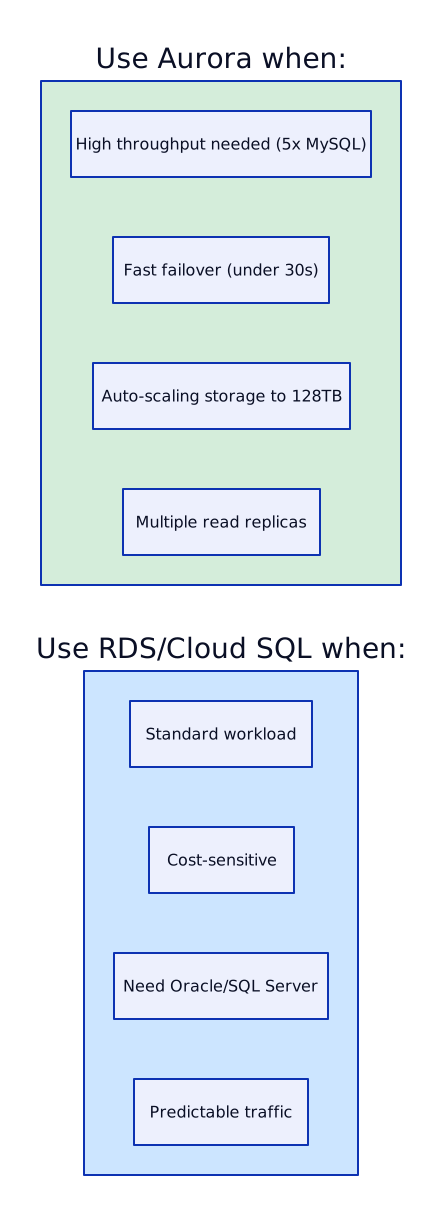
The key architectural difference: Aurora separates compute from storage. Read replicas share the same storage volume — adding a reader does not double storage cost, and replication lag is <10ms because data does not need to be shipped, just log pointers.
Scenario 3: AlloyDB vs Cloud SQL
Section titled “Scenario 3: AlloyDB vs Cloud SQL”Q: “AlloyDB vs Cloud SQL — which for a new PostgreSQL workload?”
A:
| Criterion | Cloud SQL | AlloyDB |
|---|---|---|
| Cost | Lower (standard managed PG) | 2-3x more |
| Performance | Standard PostgreSQL | 4x throughput |
| Analytics | Need separate pipeline (ETL to BigQuery) | Columnar engine (analytics on live data) |
| Storage | Provisioned SSD, max 64TB | Disaggregated, auto-scales |
| HA | Regional (2 zones) | Regional (2 zones) |
| Migrations | Standard pgdump/DMS | Standard pgdump/DMS |
Decision framework:
- Standard OLTP, cost-sensitive → Cloud SQL
- Need real-time analytics on transactional data → AlloyDB (eliminates nightly ETL)
- High throughput (>10K TPS) → AlloyDB (4x performance)
- Need Oracle migration target with best PG compatibility → AlloyDB (better optimizer)
For a banking application where risk teams need real-time dashboards on transaction data, AlloyDB eliminates the 4-6 hour delay of nightly ETL to a warehouse. The columnar engine serves analytical queries directly from the OLTP database.
Scenario 4: Connection Exhaustion from EKS
Section titled “Scenario 4: Connection Exhaustion from EKS”Q: “Your EKS pods are exhausting database connections during scaling events. Fix it.”
A: This is the classic Kubernetes + database anti-pattern. Here is my step-by-step approach:
Diagnosis:
# Check current connections on AuroraSELECT count(*) FROM pg_stat_activity;# Result: 1,847 active connections (max_connections = 2,000)
# Check which client IPs have the most connectionsSELECT client_addr, count(*)FROM pg_stat_activityGROUP BY client_addrORDER BY count DESCLIMIT 10;# Result: 200 distinct IPs (one per pod), ~10 connections each
# Check HPA statuskubectl get hpa -n payments# NAME       TARGETS   MINPODS   MAXPODS   REPLICAS# payments   85%/70%   10        200       185
Root cause: Each pod opens 10 connections (default pool size in most frameworks). HPA scaled from 10 to 185 pods = 1,850 connections. Database max is 2,000 — nearly exhausted.
Fix — deploy RDS Proxy:
- Deploy RDS Proxy between pods and Aurora
- Set proxy
max_connections_percent = 80%(uses up to 1,600 of 2,000 DB connections) - Proxy multiplexes — 2,000 pod connections map to 200-400 actual DB connections
- Enable IAM authentication — pods use IRSA, no database passwords
- Update application connection string to point to RDS Proxy endpoint instead of Aurora endpoint
Additional improvements:
- Reduce per-pod pool size from 10 to 3-5 (most pods have idle connections)
- Set connection timeouts — close idle connections after 5 minutes
- Read/write splitting — reads go to proxy read-only endpoint (spreads load across replicas)
- Connection health checks — pool validates connections before use (detects stale connections after failover)
On GCP: deploy Cloud SQL Auth Proxy as a sidecar in each pod, or use the Cloud SQL Go/Java/Python connector library in the application.
Scenario 5: Oracle Migration to Cloud
Section titled “Scenario 5: Oracle Migration to Cloud”Q: “Design the database strategy for a bank migrating from Oracle on-prem to cloud.”
A: Oracle migration is the most common and most complex enterprise database migration. Here is my approach:

Migration pattern:

Scenario 6: DynamoDB vs Aurora for User Profiles
Section titled “Scenario 6: DynamoDB vs Aurora for User Profiles”Q: “DynamoDB vs Aurora for a user profile service with 100K reads/sec?”
A: The answer depends on the access pattern.

For 100K reads/sec of user profiles by ID:
| Factor | DynamoDB | Aurora |
|---|---|---|
| 100K reads/sec | Easy (on-demand scales automatically) | Needs 4-5 reader replicas (r6g.4xl) |
| Connection limits | No connections (HTTP API) | Max connections per instance |
| Cost at 100K/sec | ~$7,500/month (on-demand) or ~$2,000/month (provisioned + auto-scale) | ~$8,000/month (5 reader instances) |
| Latency | <5ms (single-digit) | 2-10ms (depending on query) |
| With DAX | <1ms (microsecond cache hits) | N/A |
| Complex queries | Limited (PK + SK + GSI only) | Full SQL (JOIN, subquery, window functions) |
Recommendation: DynamoDB with DAX for the user profile service. The access pattern is pure key-value (get profile by user_id), 100K reads/sec is trivial for DynamoDB, and you eliminate connection management entirely. Add a GSI if you need to query by email or phone number.
If the team also needs complex search (full-text, fuzzy matching, faceted search), add OpenSearch fed by DynamoDB Streams — do not try to force complex queries into DynamoDB.
Quick Reference: Database Selection Cheatsheet
Section titled “Quick Reference: Database Selection Cheatsheet”