Compute Services
Where This Fits
Section titled “Where This Fits”
As the central infra team, you define which compute platforms are approved for each workload type. Most enterprise workloads run on Kubernetes (EKS/GKE), but some use cases are better served by managed containers (ECS Fargate/Cloud Run) or serverless functions (Lambda/Cloud Functions).
Compute Decision Framework
Section titled “Compute Decision Framework”
ECS Fargate
Section titled “ECS Fargate”AWS: ECS Fargate Architecture
Section titled “AWS: ECS Fargate Architecture”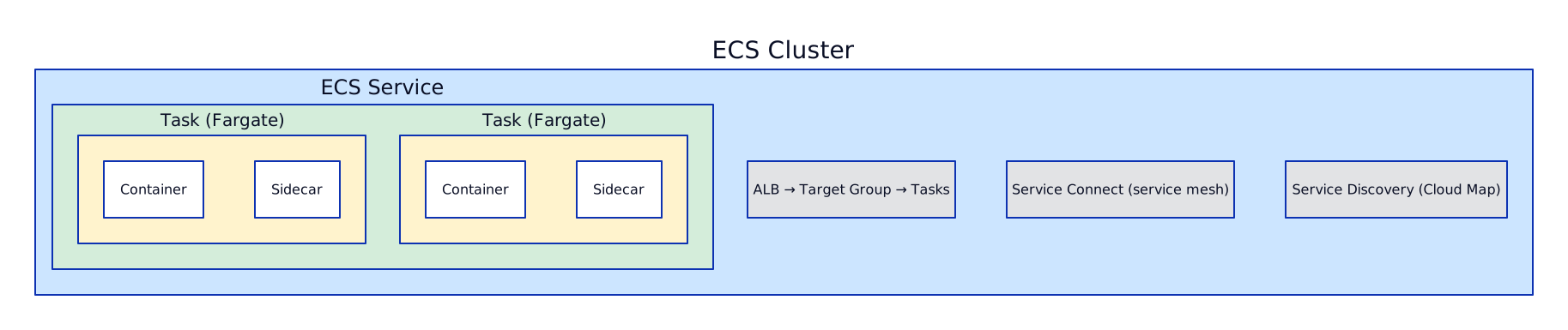
AWS: ECS Key Concepts
Section titled “AWS: ECS Key Concepts”- Task Definition: Blueprint — container images, CPU/memory, ports, env vars, IAM task role
- Task: Running instance of a task definition (like a pod in K8s)
- Service: Maintains desired count, integrates with ALB, handles rolling updates
- Fargate: Serverless compute — no EC2 instances to manage
- Service Connect: Built-in service mesh (no Istio needed)
GCP: Cloud Run Architecture
Section titled “GCP: Cloud Run Architecture”
GCP: Cloud Run Services vs Jobs
Section titled “GCP: Cloud Run Services vs Jobs”| Feature | Cloud Run Service | Cloud Run Job |
|---|---|---|
| Trigger | HTTP requests | Manual, scheduled, or event |
| Scaling | 0 to N instances | Parallel task execution |
| Duration | Request timeout (up to 60 min) | Up to 24 hours |
| Use case | APIs, web apps | Batch processing, migrations |
| Billing | Per request + CPU time | Per task execution time |
# ECS Cluster with Fargateresource "aws_ecs_cluster" "main" {  name = "web-platform"
  setting {    name  = "containerInsights"    value = "enabled"  }
  configuration {    execute_command_configuration {      logging = "OVERRIDE"      log_configuration {        cloud_watch_log_group_name = aws_cloudwatch_log_group.ecs.name      }    }  }}
# Task Definitionresource "aws_ecs_task_definition" "api" {  family                   = "web-api"  network_mode             = "awsvpc"  requires_compatibilities = ["FARGATE"]  cpu                      = "1024"   # 1 vCPU  memory                   = "2048"   # 2 GB  execution_role_arn       = aws_iam_role.ecs_execution.arn  task_role_arn            = aws_iam_role.ecs_task.arn
  container_definitions = jsonencode([    {      name      = "api"      image     = "${aws_ecr_repository.api.repository_url}:latest"      essential = true
      portMappings = [{        containerPort = 8080        protocol      = "tcp"      }]
      environment = [        { name = "DB_HOST", value = aws_rds_cluster.main.endpoint }      ]
      secrets = [        {          name      = "DB_PASSWORD"          valueFrom = aws_secretsmanager_secret.db_password.arn        }      ]
      logConfiguration = {        logDriver = "awslogs"        options = {          "awslogs-group"         = aws_cloudwatch_log_group.api.name          "awslogs-region"        = var.region          "awslogs-stream-prefix" = "api"        }      }
      healthCheck = {        command     = ["CMD-SHELL", "curl -f http://localhost:8080/health || exit 1"]        interval    = 30        timeout     = 5        retries     = 3        startPeriod = 60      }    }  ])}
# ECS Serviceresource "aws_ecs_service" "api" {  name            = "web-api"  cluster         = aws_ecs_cluster.main.id  task_definition = aws_ecs_task_definition.api.arn  desired_count   = 3  launch_type     = "FARGATE"
  network_configuration {    subnets          = var.private_subnet_ids    security_groups  = [aws_security_group.ecs_tasks.id]    assign_public_ip = false  }
  load_balancer {    target_group_arn = aws_lb_target_group.api.arn    container_name   = "api"    container_port   = 8080  }
  deployment_circuit_breaker {    enable   = true    rollback = true  }
  deployment_configuration {    maximum_percent         = 200    minimum_healthy_percent = 100  }}
# Auto Scalingresource "aws_appautoscaling_target" "api" {  max_capacity       = 20  min_capacity       = 3  resource_id        = "service/${aws_ecs_cluster.main.name}/${aws_ecs_service.api.name}"  scalable_dimension = "ecs:service:DesiredCount"  service_namespace  = "ecs"}
resource "aws_appautoscaling_policy" "api_cpu" {  name               = "api-cpu-scaling"  policy_type        = "TargetTrackingScaling"  resource_id        = aws_appautoscaling_target.api.resource_id  scalable_dimension = aws_appautoscaling_target.api.scalable_dimension  service_namespace  = aws_appautoscaling_target.api.service_namespace
  target_tracking_scaling_policy_configuration {    predefined_metric_specification {      predefined_metric_type = "ECSServiceAverageCPUUtilization"    }    target_value       = 70.0    scale_in_cooldown  = 300    scale_out_cooldown = 60  }}
# Cloud Run Serviceresource "google_cloud_run_v2_service" "api" { name = "web-api" location = var.region
template { scaling { min_instance_count = 1 # Avoid cold starts max_instance_count = 100 }
containers { image = "${var.region}-docker.pkg.dev/${var.project_id}/apps/web-api:latest"
ports { container_port = 8080 }
resources { limits = { cpu = "2" memory = "1Gi" } cpu_idle = true # CPU throttled between requests (cheaper) }
env { name = "DB_HOST" value = google_sql_database_instance.main.private_ip_address }
env { name = "DB_PASSWORD" value_source { secret_key_ref { secret = google_secret_manager_secret.db_password.secret_id version = "latest" } } }
startup_probe { http_get { path = "/health" port = 8080 } initial_delay_seconds = 5 period_seconds = 10 failure_threshold = 3 }
liveness_probe { http_get { path = "/health" port = 8080 } period_seconds = 30 } }
# VPC access for private resources (Cloud SQL, Memorystore) vpc_access { connector = google_vpc_access_connector.main.id egress = "PRIVATE_RANGES_ONLY" }
service_account = google_service_account.api.email }
traffic { type = "TRAFFIC_TARGET_ALLOCATION_TYPE_LATEST" percent = 100 }}
# Cloud Run Job (batch processing)resource "google_cloud_run_v2_job" "data_export" { name = "nightly-export" location = var.region
template { parallelism = 10 task_count = 100
template { containers { image = "${var.region}-docker.pkg.dev/${var.project_id}/apps/exporter:latest"
resources { limits = { cpu = "2" memory = "4Gi" } } }
timeout = "3600s" # 1 hour max per task max_retries = 3
service_account = google_service_account.exporter.email } }}
# Schedule the job with Cloud Schedulerresource "google_cloud_scheduler_job" "nightly_export" { name = "trigger-nightly-export" schedule = "0 2 * * *" # 2 AM daily
http_target { http_method = "POST" uri = "https://${var.region}-run.googleapis.com/apis/run.googleapis.com/v1/namespaces/${var.project_id}/jobs/${google_cloud_run_v2_job.data_export.name}:run"
oauth_token { service_account_email = google_service_account.scheduler.email } }}Serverless Functions
Section titled “Serverless Functions”AWS: Lambda Key Characteristics
Section titled “AWS: Lambda Key Characteristics”- Runtime: Up to 15 minutes execution
- Memory: 128 MB to 10,240 MB (CPU scales proportionally)
- Concurrency: 1,000 default (can request increase)
- Cold starts: 100ms-1s (provisioned concurrency eliminates this)
- Triggers: API Gateway, S3, SQS, EventBridge, DynamoDB Streams, Kinesis

GCP: Cloud Functions Key Characteristics (2nd Gen)
Section titled “GCP: Cloud Functions Key Characteristics (2nd Gen)”- Runtime: Up to 9 minutes (60 min for HTTP-triggered)
- Memory: 128 MB to 32 GB
- Concurrency: Up to 1,000 concurrent requests per instance (unlike Lambda’s 1:1)
- Cold starts: Similar to Lambda, mitigate with min instances
- Triggers: HTTP, Pub/Sub, Cloud Storage, Firestore, Eventarc
- Built on Cloud Run: 2nd gen Cloud Functions are Cloud Run services under the hood
# Lambda function with SQS triggerresource "aws_lambda_function" "processor" {  function_name = "order-processor"  role          = aws_iam_role.lambda_exec.arn  handler       = "index.handler"  runtime       = "nodejs20.x"  timeout       = 60  memory_size   = 512
  filename         = data.archive_file.lambda.output_path  source_code_hash = data.archive_file.lambda.output_base64sha256
  environment {    variables = {      TABLE_NAME = aws_dynamodb_table.orders.name      STAGE      = var.environment    }  }
  vpc_config {    subnet_ids         = var.private_subnet_ids    security_group_ids = [aws_security_group.lambda.id]  }
  tracing_config {    mode = "Active"  # X-Ray tracing  }
  dead_letter_config {    target_arn = aws_sqs_queue.dlq.arn  }
  reserved_concurrent_executions = 100
  tags = local.common_tags}
# SQS Event Source Mappingresource "aws_lambda_event_source_mapping" "sqs" {  event_source_arn                   = aws_sqs_queue.orders.arn  function_name                      = aws_lambda_function.processor.arn  batch_size                         = 10  maximum_batching_window_in_seconds = 5  function_response_types            = ["ReportBatchItemFailures"]
  scaling_config {    maximum_concurrency = 50  }}
# Cloud Function (2nd gen) with Pub/Sub triggerresource "google_cloudfunctions2_function" "processor" { name = "order-processor" location = var.region
build_config { runtime = "nodejs20" entry_point = "processOrder" source { storage_source { bucket = google_storage_bucket.functions.name object = google_storage_bucket_object.function_zip.name } } }
service_config { max_instance_count = 100 min_instance_count = 1 # Avoid cold starts available_memory = "512Mi" timeout_seconds = 60 max_instance_request_concurrency = 10 service_account_email = google_service_account.function.email
environment_variables = { PROJECT_ID = var.project_id }
secret_environment_variables { key = "DB_PASSWORD" project_id = var.project_id secret = google_secret_manager_secret.db_password.secret_id version = "latest" }
vpc_connector = google_vpc_access_connector.main.id vpc_connector_egress_settings = "PRIVATE_RANGES_ONLY" }
event_trigger { trigger_region = var.region event_type = "google.cloud.pubsub.topic.v1.messagePublished" pubsub_topic = google_pubsub_topic.orders.id retry_policy = "RETRY_POLICY_RETRY" }}ECS Fargate vs Cloud Run Comparison
Section titled “ECS Fargate vs Cloud Run Comparison”| Feature | ECS Fargate | Cloud Run |
|---|---|---|
| Scale to zero | No (min 1 task) | Yes |
| Max instances | Service-level limits | 100 per service (adjustable) |
| CPU/Memory | Up to 16 vCPU / 120 GB | Up to 8 vCPU / 32 GB |
| Sidecar containers | Yes (multi-container tasks) | Yes (2nd gen) |
| GPU | No | Yes (A100, L4) |
| Service mesh | Service Connect | Built-in with Istio on GKE |
| Traffic splitting | Via ALB weighted target groups | Native revision-based |
| VPC integration | Native (awsvpc mode) | VPC connector or Direct VPC |
| Pricing model | Per-second (vCPU + memory) | Per-request + per-second |
| Startup probe | Health check in task def | Native startup probe |
When NOT to Use Serverless
Section titled “When NOT to Use Serverless”Auto Scaling Deep Dive
Section titled “Auto Scaling Deep Dive”AWS: Auto Scaling Strategies
Section titled “AWS: Auto Scaling Strategies”| Strategy | How It Works | Best For | Latency |
|---|---|---|---|
| Target Tracking | Set target metric (e.g., CPU 70%), ASG adjusts automatically | 80% of use cases, simplest | 1-3 min |
| Step Scaling | Define steps: CPU > 70% add 2, > 90% add 5 | Fine-grained control | 1-3 min |
| Predictive Scaling | ML forecasts traffic patterns, pre-scales before demand | Periodic workloads (daily/weekly cycles) | Pre-emptive |
| Scheduled Scaling | Time-based: scale up at 9 AM, down at 6 PM | Known events, business hours | Immediate |
Target Tracking is the default starting point. You set a target metric value (e.g., average CPU utilization at 70%), and the ASG continuously adjusts capacity to maintain that target. It automatically creates and manages the CloudWatch alarms for you. Scale-out happens when the metric is sustained above the target; scale-in happens when it drops below. Always configure cooldown periods (scale-out cooldown: 60s for fast response, scale-in cooldown: 300s to prevent thrashing) to avoid the ASG oscillating between adding and removing instances every minute.
Step Scaling gives you fine-grained control over scaling actions at different alarm thresholds. You create CloudWatch alarms at multiple breakpoints — for example, CPU > 70% add 2 instances, CPU > 80% add 3 instances, CPU > 90% add 5 instances. This is useful when you need aggressive scaling at high utilization but gentle scaling at moderate utilization. Each step can define a different adjustment type (exact count, percentage change, or fixed increment).
Predictive Scaling uses 14 days of historical CloudWatch data to forecast future traffic patterns using machine learning. It pre-provisions capacity before demand arrives, eliminating the 1-3 minute reactive lag of target tracking. This is ideal for workloads with predictable daily or weekly patterns — for example, a retail application that sees traffic spikes every day at noon or a banking app with high volume on the first of each month. Predictive scaling works alongside target tracking — predictive handles the expected load, target tracking handles unexpected spikes.
Scheduled Scaling is for known events. You define time-based actions: scale to 50 instances at 8:55 AM before business hours, scale down to 10 at 6:05 PM. Use this for Black Friday preparation (scale up 2 hours before the event), marketing campaign launches, or weekly batch processing windows. Combine with target tracking so the ASG can scale beyond the scheduled count if demand exceeds expectations.
Mixed Instances Policy allows a single ASG to use multiple instance types and purchase options (on-demand + spot). Configure a capacity-optimized allocation strategy for spot instances to minimize interruptions. Set an on-demand base capacity (e.g., 10 instances) for guaranteed availability, then use spot for burst capacity above the base. This can reduce compute costs by 60-70% for fault-tolerant workloads.
GCP: Managed Instance Group (MIG) Autoscaler
Section titled “GCP: Managed Instance Group (MIG) Autoscaler”GCP autoscaling is configured on Managed Instance Groups (MIGs). The autoscaler supports multiple signal types that can be combined:
- CPU utilization target: Set a target (e.g., 70%) and MIG adjusts instance count to maintain it. Functionally equivalent to AWS target tracking.
- Load balancer utilization: Scale based on backend service utilization as reported by the HTTP(S) load balancer. Useful when CPU does not accurately reflect load (e.g., I/O-bound applications).
- Custom metrics: Use any Cloud Monitoring metric as a scaling signal — Pub/Sub subscription backlog (queue depth), custom application metrics exported via OpenTelemetry, or external metrics. This is the equivalent of custom CloudWatch metrics in AWS.
- Predictive autoscaling (preview): Similar to AWS predictive scaling, uses historical data to forecast demand and pre-provision capacity.
- Scale-in controls: Define a stabilization window (e.g., do not scale below the maximum of the last 60 minutes) to prevent aggressive scale-down during brief traffic dips. Also set
max_scaled_in_replicasto limit how many instances can be removed in a single scale-down event.
# ASG with Target Tracking + Mixed Instances (On-Demand Base + Spot Scaling)resource "aws_autoscaling_group" "web" {  name                = "web-asg"  vpc_zone_identifier = var.private_subnet_ids  min_size            = 6  max_size            = 100  desired_capacity    = 10
  mixed_instances_policy {    instances_distribution {      on_demand_base_capacity                  = 6    # 6 on-demand always      on_demand_percentage_above_base_capacity = 0    # Everything above = spot      spot_allocation_strategy                 = "capacity-optimized"      spot_max_price                           = ""   # Use on-demand price cap    }
    launch_template {      launch_template_specification {        launch_template_id = aws_launch_template.web.id        version            = "$Latest"      }
      override {        instance_type     = "m6g.xlarge"    # Graviton (primary)        weighted_capacity = "1"      }      override {        instance_type     = "m7g.xlarge"    # Graviton gen 3        weighted_capacity = "1"      }      override {        instance_type     = "m6i.xlarge"    # Intel fallback        weighted_capacity = "1"      }      override {        instance_type     = "c6g.xlarge"    # Compute-optimized Graviton        weighted_capacity = "1"      }    }  }
  # Health check  health_check_type         = "ELB"  health_check_grace_period = 120
  # Instance refresh for rolling deployments  instance_refresh {    strategy = "Rolling"    preferences {      min_healthy_percentage = 75      instance_warmup        = 120    }  }
  tag {    key                 = "Name"    value               = "web-asg"    propagate_at_launch = true  }}
# Target Tracking — CPU at 70%resource "aws_autoscaling_policy" "cpu_target" {  name                   = "cpu-target-tracking"  autoscaling_group_name = aws_autoscaling_group.web.name  policy_type            = "TargetTrackingScaling"
  target_tracking_configuration {    predefined_metric_specification {      predefined_metric_type = "ASGAverageCPUUtilization"    }    target_value       = 70.0    disable_scale_in   = false  }}
# Target Tracking — ALB Request Count per Targetresource "aws_autoscaling_policy" "request_count" {  name                   = "request-count-tracking"  autoscaling_group_name = aws_autoscaling_group.web.name  policy_type            = "TargetTrackingScaling"
  target_tracking_configuration {    predefined_metric_specification {      predefined_metric_type = "ALBRequestCountPerTarget"      resource_label         = "${aws_lb.web.arn_suffix}/${aws_lb_target_group.web.arn_suffix}"    }    target_value = 1000  # 1000 requests per target per minute  }}
# Predictive Scalingresource "aws_autoscaling_policy" "predictive" {  name                   = "predictive-scaling"  autoscaling_group_name = aws_autoscaling_group.web.name  policy_type            = "PredictiveScaling"
  predictive_scaling_configuration {    mode                          = "ForecastAndScale"    scheduling_buffer_time        = 300   # Pre-scale 5 min before predicted demand    max_capacity_breach_behavior  = "HonorMaxCapacity"
    metric_specification {      target_value = 70.0
      predefined_scaling_metric_specification {        predefined_metric_type = "ASGAverageCPUUtilization"        resource_label         = ""      }
      predefined_load_metric_specification {        predefined_metric_type = "ASGTotalCPUUtilization"        resource_label         = ""      }    }  }}
# Scheduled Scaling — Black Friday prepresource "aws_autoscaling_schedule" "black_friday_scale_up" {  scheduled_action_name  = "black-friday-scale-up"  autoscaling_group_name = aws_autoscaling_group.web.name  min_size               = 50  max_size               = 200  desired_capacity       = 80  recurrence             = "0 7 25 11 *"  # Nov 25 at 7 AM UTC}
resource "aws_autoscaling_schedule" "black_friday_scale_down" {  scheduled_action_name  = "black-friday-scale-down"  autoscaling_group_name = aws_autoscaling_group.web.name  min_size               = 6  max_size               = 100  desired_capacity       = 10  recurrence             = "0 6 27 11 *"  # Nov 27 at 6 AM UTC}
# MIG with Autoscalerresource "google_compute_instance_template" "web" { name_prefix = "web-" machine_type = "e2-standard-4" region = var.region
disk { source_image = "debian-cloud/debian-12" auto_delete = true boot = true disk_size_gb = 20 disk_type = "pd-ssd" }
network_interface { subnetwork = google_compute_subnetwork.private.id # No access_config = no external IP }
service_account { email = google_service_account.web.email scopes = ["cloud-platform"] }
metadata_startup_script = file("${path.module}/scripts/startup.sh")
lifecycle { create_before_destroy = true }}
resource "google_compute_region_instance_group_manager" "web" { name = "web-mig" base_instance_name = "web" region = var.region
version { instance_template = google_compute_instance_template.web.id }
named_port { name = "http" port = 8080 }
auto_healing_policies { health_check = google_compute_health_check.web.id initial_delay_sec = 120 }
update_policy { type = "PROACTIVE" minimal_action = "REPLACE" max_surge_fixed = 3 max_unavailable_fixed = 0 # Zero-downtime rolling update }}
resource "google_compute_region_autoscaler" "web" { name = "web-autoscaler" region = var.region target = google_compute_region_instance_group_manager.web.id
autoscaling_policy { min_replicas = 6 max_replicas = 100 cooldown_period = 60
# CPU target — similar to AWS target tracking cpu_utilization { target = 0.7 # 70% }
# Scale-in controls — prevent aggressive scale-down scale_in_control { max_scaled_in_replicas { fixed = 2 # Remove max 2 instances per scale-in event } time_window_sec = 600 # Stabilization: hold for 10 minutes } }}
# Custom metric autoscaling (e.g., Pub/Sub queue depth)resource "google_compute_region_autoscaler" "worker" { name = "worker-autoscaler" region = var.region target = google_compute_region_instance_group_manager.worker.id
autoscaling_policy { min_replicas = 1 max_replicas = 50 cooldown_period = 60
metric { name = "pubsub.googleapis.com/subscription/num_undelivered_messages" type = "GAUGE" target = 100 # Scale when queue depth > 100 per instance filter = "resource.type = pubsub_subscription AND resource.labels.subscription_id = \"orders-sub\"" } }}EC2 / GCE Instance Family Reference
Section titled “EC2 / GCE Instance Family Reference”Understanding instance families is critical for right-sizing recommendations and cost optimization conversations in interviews.
| Family | AWS | GCP | Use Case |
|---|---|---|---|
| General purpose | m6g, m7g (Graviton) | e2, n2 | Web servers, app servers, small databases |
| Compute optimized | c6g, c7g (Graviton) | c2, c2d | Batch processing, ML inference, gaming servers |
| Memory optimized | r6g, r7g, x2gd | m2, m3 | In-memory databases (Redis, SAP HANA), caching, analytics |
| GPU / Accelerator | p4d, p5 (A100/H100) | a2, a3 (A100/H100) | ML training, HPC, video processing, rendering |
| Storage optimized | i3, d3, i4i | — (use local SSD on n2/c3) | HDFS, Cassandra, Elasticsearch, data-intensive workloads |
Interview Deep Dive: Black Friday Scaling
Section titled “Interview Deep Dive: Black Friday Scaling”“How do you handle Black Friday traffic? Your app normally handles 1K RPS but expects 50K RPS for 4 hours.”
Strong Answer:
“I would use a layered scaling strategy that combines proactive and reactive mechanisms:
1. Predictive Scaling (weeks before): Enable AWS predictive scaling, which analyzes the previous year’s Black Friday traffic pattern (if available) to pre-provision capacity. For the first year, use scheduled scaling as a substitute.
2. Scheduled Scaling (2 hours before): Create a scheduled action to scale the ASG to 80% of expected peak capacity 2 hours before the sale starts. This gives instances time to warm up, register with the ALB health check, and populate caches. Set min_size = 40 (assuming each instance handles ~1,250 RPS at 70% CPU).
3. Target Tracking (during event): Keep target tracking active to handle unexpected spikes beyond the scheduled capacity. If actual traffic exceeds 50K RPS, the ASG automatically adds more instances within minutes.
4. Mixed Instances Policy: Use on-demand instances for the base capacity (guarantees availability) and spot instances for burst capacity above the base. With a capacity-optimized spot allocation strategy and 4+ instance type overrides, spot interruption risk is minimal for a 4-hour window.
5. Pre-warm the ALB: For massive scale-up, contact AWS support to pre-warm the Application Load Balancer. ALBs scale gradually and might not handle a sudden jump from 1K to 50K RPS without pre-warming. On GCP, Cloud Load Balancing pre-warms automatically.
6. Cooldown configuration: Set scale-in cooldown to 600 seconds (10 minutes) to prevent premature scale-down during brief traffic dips mid-event. Set scale-out cooldown to 30 seconds for fast response to spikes.
7. Downstream protection: Auto-scaling the web tier is not enough. Ensure the database (Aurora Serverless v2 with sufficient ACU headroom), caching layer (ElastiCache with cluster mode), and any downstream services can also handle 50x load. Rate limit APIs at the API Gateway level as a safety valve.”
Interview Scenarios
Section titled “Interview Scenarios”Scenario 1: Choosing Between EKS, ECS Fargate, and Lambda
Section titled “Scenario 1: Choosing Between EKS, ECS Fargate, and Lambda”“A team wants to deploy a new REST API. They currently have no Kubernetes experience. What compute platform do you recommend?”
Strong Answer:
“It depends on the workload characteristics:
If the API has consistent traffic (>100 RPS sustained): I’d recommend ECS Fargate. It gives them containers without Kubernetes complexity. They define a task definition (container image, CPU/memory, IAM role), create a service with an ALB, and they’re done. Auto-scaling is straightforward with target tracking on CPU/request count.
If the API has bursty traffic or is internal/low-traffic: Cloud Run (GCP) or Lambda + API Gateway (AWS). Cloud Run scales to zero, so they pay nothing during idle periods. Cloud Run also handles containers, so they can migrate to GKE later if needed.
If they’re joining our platform (most likely in an enterprise): They should deploy to our existing EKS/GKE clusters. The platform team provides namespace provisioning, CI/CD templates, observability, and service mesh. The team just writes a Dockerfile and a Kubernetes manifest — we provide the golden path. This is the most cost-effective at scale because we share cluster overhead across all tenants.”
Scenario 2: Cold Start Mitigation
Section titled “Scenario 2: Cold Start Mitigation”“Your Lambda-based API has P99 latency spikes of 3 seconds due to cold starts. How do you fix this?”
Strong Answer:
“Three approaches, in order of impact:
-
Provisioned Concurrency: Keep N Lambda instances warm at all times. Set to your baseline traffic level (e.g., 50 concurrent). Eliminates cold starts for those instances. Cost: you pay for provisioned capacity even when idle. Use Application Auto Scaling to adjust provisioned concurrency by schedule (high during business hours, low at night).
-
Optimize the function: Reduce package size (tree-shake dependencies, use layers for shared code). Use a compiled language (Go, Rust) instead of Java/Python — Go cold starts are 50-100ms vs Java’s 1-3s. Move initialization outside the handler (database connections, SDK clients).
-
Architecture change: If cold starts are unacceptable (financial APIs), move to ECS Fargate or Cloud Run with
min_instance_count = 1. You lose scale-to-zero but guarantee consistent latency. For GCP, Cloud Run with min instances is the easiest migration — same container, zero cold starts.”
Scenario 3: Batch Processing Architecture
Section titled “Scenario 3: Batch Processing Architecture”“Design a system to process 1 million images nightly — resize, apply watermark, and store results.”
Strong Answer:
“I’d use a fan-out pattern:
On AWS:
- S3 event notification → SQS queue (batch source images daily)
- Lambda reads from SQS (batch size 10, concurrency 500)
- Lambda resizes/watermarks using Sharp library
- Results stored to output S3 bucket
- DLQ captures failures for retry
- CloudWatch dashboard tracks: processed count, error rate, queue depth
On GCP:
- Cloud Storage notification → Pub/Sub topic
- Cloud Run Job with
parallelism: 100, task_count: 10000 - Each task processes a batch of 100 images
- Results stored to output GCS bucket
- Dead-letter topic for failures
Why not Step Functions / Workflows? For simple image processing, the SQS/Lambda or Pub/Sub/Cloud Run pattern is simpler and cheaper. Step Functions add value when you need complex orchestration (branching, human approval, error handling per step).
Cost estimate (AWS): 1M Lambda invocations at 512MB, 5s each = ~$4.20. S3 storage for 1M images = ~$23/month. Total: under $30/month.”
Scenario 4: Migration from ECS to Kubernetes
Section titled “Scenario 4: Migration from ECS to Kubernetes”“We have 15 services on ECS Fargate. Leadership wants to move to Kubernetes for standardization. How do you approach this?”
Strong Answer:
“This is a common migration. Here’s my phased approach:
Phase 1: Platform readiness (2-4 weeks)
- Stand up EKS/GKE cluster in the workload account using our platform Terraform modules
- Deploy shared infrastructure: ingress controller, cert-manager, external-dns, external-secrets-operator
- Set up namespaces, RBAC, and resource quotas for each team
- Configure CI/CD pipeline templates (GitHub Actions → ArgoCD)
Phase 2: Translate ECS constructs to K8s (1 week per service)
| ECS Concept | Kubernetes Equivalent |
|---|---|
| Task Definition | Pod spec in Deployment |
| ECS Service | Deployment + Service + HPA |
| ALB target group | Ingress / Gateway API |
| Task IAM role | IRSA / Workload Identity |
| Service Connect | Istio / Linkerd |
| CloudWatch Logs | Loki + Grafana Alloy |
| Parameter Store secrets | External Secrets Operator |
Phase 3: Migrate service by service
- Start with lowest-risk internal service
- Run in parallel (ECS + K8s) with weighted DNS routing
- Validate metrics match (latency, error rate, throughput)
- Cut over DNS, decommission ECS service
- Repeat for all 15 services
Key risk: Teams lose ECS simplicity. Mitigate with golden path templates — a single Helm chart that takes image, port, replicas, and env vars, abstracting K8s complexity.”
References
Section titled “References”- Amazon ECS Developer Guide — task definitions, services, Fargate, and Service Connect
- AWS Fargate Documentation — serverless compute for containers
- AWS Lambda Developer Guide — functions, event sources, provisioned concurrency, and layers
- Cloud Run Documentation — services, jobs, scaling to zero, and traffic splitting
- Cloud Functions Documentation — 2nd gen functions, triggers, and concurrency model
- Cloud Run Jobs — batch and scheduled task execution
Tools & Frameworks
Section titled “Tools & Frameworks”- Terraform AWS ECS Resources — Terraform provider docs for ECS clusters, services, and tasks
- Terraform Google Cloud Run — Terraform provider docs for Cloud Run services and jobs
- AWS Compute Optimizer — right-sizing recommendations for compute resources