Terraform Patterns
Module Structure
Section titled “Module Structure”Standard Enterprise Module Layout
Section titled “Standard Enterprise Module Layout”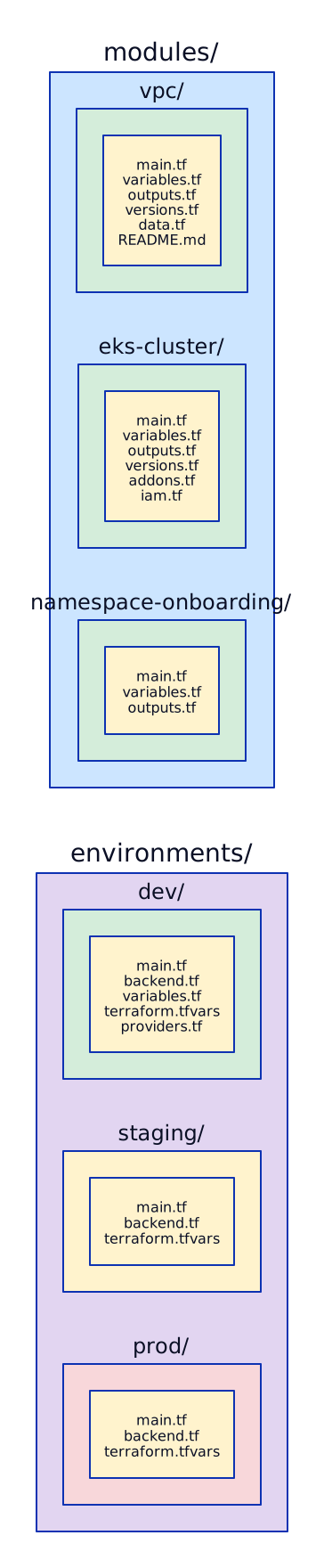
Module Design Principles
Section titled “Module Design Principles”
Remote State
Section titled “Remote State”terraform { backend "s3" { bucket = "terraform-state-prod-123456789" key = "eks/us-east-1/terraform.tfstate" region = "us-east-1" encrypt = true dynamodb_table = "terraform-locks" # Use role assumption for cross-account state role_arn = "arn:aws:iam::123456789012:role/TerraformStateAccess" }}
# State bucket (create once, separate Terraform or manual)resource "aws_s3_bucket" "terraform_state" { bucket = "terraform-state-prod-123456789"
lifecycle { prevent_destroy = true }}
resource "aws_s3_bucket_versioning" "terraform_state" { bucket = aws_s3_bucket.terraform_state.id versioning_configuration { status = "Enabled" # Enables state rollback }}
resource "aws_s3_bucket_server_side_encryption_configuration" "terraform_state" { bucket = aws_s3_bucket.terraform_state.id rule { apply_server_side_encryption_by_default { sse_algorithm = "aws:kms" } }}
resource "aws_dynamodb_table" "terraform_locks" { name = "terraform-locks" billing_mode = "PAY_PER_REQUEST" hash_key = "LockID"
attribute { name = "LockID" type = "S" }}terraform { backend "gcs" { bucket = "terraform-state-prod-project" prefix = "gke/us-central1" # impersonate_service_account = "terraform@project.iam.gserviceaccount.com" }}
# State bucketresource "google_storage_bucket" "terraform_state" { name = "terraform-state-prod-project" location = "US" project = var.shared_project_id
versioning { enabled = true # State rollback capability }
uniform_bucket_level_access = true
lifecycle_rule { condition { num_newer_versions = 10 # Keep 10 versions of state } action { type = "Delete" } }
lifecycle { prevent_destroy = true }}Reading Remote State (Cross-Stack References)
Section titled “Reading Remote State (Cross-Stack References)”# Read VPC state from another Terraform workspacedata "terraform_remote_state" "vpc" { backend = "s3" config = { bucket = "terraform-state-prod-123456789" key = "vpc/us-east-1/terraform.tfstate" region = "us-east-1" }}
# Use outputs from VPC statemodule "eks" { source = "../modules/eks-cluster"
vpc_id = data.terraform_remote_state.vpc.outputs.vpc_id private_subnet_ids = data.terraform_remote_state.vpc.outputs.private_subnet_ids}Workspaces (and When NOT to Use Them)
Section titled “Workspaces (and When NOT to Use Them)”
for_each vs count
Section titled “for_each vs count”# COUNT: use for identical resources (simple replication)resource "aws_subnet" "private" { count = 3
vpc_id = aws_vpc.main.id cidr_block = cidrsubnet(var.vpc_cidr, 8, count.index + 10) availability_zone = data.aws_availability_zones.available.names[count.index]
tags = { Name = "private-${count.index}" }}# Problem: if you remove the first subnet, all indexes shift!# aws_subnet.private[0] → deleted# aws_subnet.private[1] → becomes [0] → RECREATED (dangerous!)
# FOR_EACH: use for distinct resources (preferred)resource "aws_subnet" "private" { for_each = { "private-a" = { cidr = "10.0.10.0/24", az = "us-east-1a" } "private-b" = { cidr = "10.0.11.0/24", az = "us-east-1b" } "private-c" = { cidr = "10.0.12.0/24", az = "us-east-1c" } }
vpc_id = aws_vpc.main.id cidr_block = each.value.cidr availability_zone = each.value.az
tags = { Name = each.key }}# Removing "private-a" only deletes THAT subnet. Others unchanged.# aws_subnet.private["private-a"] → deleted# aws_subnet.private["private-b"] → unchanged (stable address)
# FOR_EACH with a variable (dynamic team onboarding)variable "teams" { type = map(object({ namespace = string cpu_quota = string memory_quota = string })) default = { payments = { namespace = "payments", cpu_quota = "20", memory_quota = "40Gi" } lending = { namespace = "lending", cpu_quota = "10", memory_quota = "20Gi" } }}
resource "kubernetes_namespace" "team" { for_each = var.teams
metadata { name = each.value.namespace labels = { team = each.key managed-by = "terraform" } }}
resource "kubernetes_resource_quota" "team" { for_each = var.teams
metadata { name = "${each.key}-quota" namespace = kubernetes_namespace.team[each.key].metadata[0].name }
spec { hard = { "requests.cpu" = each.value.cpu_quota "requests.memory" = each.value.memory_quota "limits.cpu" = each.value.cpu_quota "limits.memory" = each.value.memory_quota } }}Provider Aliasing for Multi-Region
Section titled “Provider Aliasing for Multi-Region”# providers.tf — multi-region setupprovider "aws" { region = "us-east-1" # Default provider for primary region
default_tags { tags = local.common_tags }}
provider "aws" { alias = "eu" region = "eu-west-1"
default_tags { tags = local.common_tags }}
provider "aws" { alias = "dr" region = "us-west-2"
default_tags { tags = local.common_tags }}
# Use in resourcesresource "aws_vpc" "primary" { # Uses default provider (us-east-1) cidr_block = "10.0.0.0/16"}
resource "aws_vpc" "eu" { provider = aws.eu cidr_block = "10.1.0.0/16"}
resource "aws_vpc" "dr" { provider = aws.dr cidr_block = "10.2.0.0/16"}
# Pass provider to modulesmodule "eks_primary" { source = "../modules/eks-cluster" # Uses default provider automatically vpc_id = aws_vpc.primary.id}
module "eks_eu" { source = "../modules/eks-cluster" providers = { aws = aws.eu } vpc_id = aws_vpc.eu.id}
# ACM certificate must be in us-east-1 for CloudFrontresource "aws_acm_certificate" "cloudfront_cert" { provider = aws.us_east_1 # Explicit even if default domain_name = "app.example.com" validation_method = "DNS"}Multi-Cloud (AWS + GCP)
Section titled “Multi-Cloud (AWS + GCP)”provider "aws" { region = "us-east-1"}
provider "google" { project = var.gcp_project_id region = "us-central1"}
# Cross-cloud VPNresource "aws_vpn_gateway" "to_gcp" { vpc_id = aws_vpc.main.id}
resource "google_compute_ha_vpn_gateway" "to_aws" { name = "to-aws" network = google_compute_network.main.id region = "us-central1"}Import Blocks (Terraform 1.5+)
Section titled “Import Blocks (Terraform 1.5+)”# Import existing resources into Terraform state# (no manual terraform import commands needed)
# Import an existing S3 bucketimport { to = aws_s3_bucket.legacy_data id = "my-existing-bucket-name"}
resource "aws_s3_bucket" "legacy_data" { bucket = "my-existing-bucket-name" # Terraform will verify this matches the real resource}
# Import an existing GCP projectimport { to = google_project.existing id = "projects/my-existing-project"}
# Import an existing EKS clusterimport { to = aws_eks_cluster.existing id = "my-cluster-name"}
# Generate config for imported resources (Terraform 1.5+)# terraform plan -generate-config-out=generated.tf# This writes the HCL for the imported resource automaticallyCommon Patterns
Section titled “Common Patterns”Dynamic Blocks
Section titled “Dynamic Blocks”# Dynamic ingress rules for security groupsvariable "ingress_rules" { type = list(object({ port = number protocol = string cidr_blocks = list(string) description = string })) default = [ { port = 443, protocol = "tcp", cidr_blocks = ["10.0.0.0/8"], description = "HTTPS" }, { port = 8080, protocol = "tcp", cidr_blocks = ["10.0.0.0/8"], description = "App" }, ]}
resource "aws_security_group" "app" { name = "app-sg" vpc_id = aws_vpc.main.id
dynamic "ingress" { for_each = var.ingress_rules content { from_port = ingress.value.port to_port = ingress.value.port protocol = ingress.value.protocol cidr_blocks = ingress.value.cidr_blocks description = ingress.value.description } }
egress { from_port = 0 to_port = 0 protocol = "-1" cidr_blocks = ["0.0.0.0/0"] }}Lifecycle Rules
Section titled “Lifecycle Rules”resource "aws_rds_cluster" "main" { # ...
lifecycle { # Prevent accidental deletion of production database prevent_destroy = true
# Ignore changes made outside Terraform (e.g., manual scaling) ignore_changes = [ engine_version, # Managed by RDS auto-upgrade preferred_backup_window, ]
# Create new resource before destroying old (zero-downtime) create_before_destroy = true }}Moved Blocks (Refactoring)
Section titled “Moved Blocks (Refactoring)”# Rename a resource without destroying and recreating itmoved { from = aws_instance.web_server to = aws_instance.api_server}
# Move a resource into a modulemoved { from = aws_vpc.main to = module.networking.aws_vpc.main}
# Move a resource from count to for_eachmoved { from = aws_subnet.private[0] to = aws_subnet.private["us-east-1a"]}Preconditions and Postconditions
Section titled “Preconditions and Postconditions”variable "environment" { type = string validation { condition = contains(["dev", "staging", "prod"], var.environment) error_message = "Environment must be dev, staging, or prod." }}
resource "aws_instance" "app" { instance_type = var.instance_type ami = var.ami_id
lifecycle { precondition { condition = var.environment != "prod" || var.instance_type != "t3.micro" error_message = "Production instances must not use t3.micro." }
postcondition { condition = self.public_ip != "" error_message = "Instance must have a public IP assigned." } }}State Management Commands
Section titled “State Management Commands”# List all resources in stateterraform state list
# Show details of a specific resourceterraform state show aws_vpc.main
# Move a resource in state (refactoring)terraform state mv aws_instance.old module.new.aws_instance.main
# Remove from state (without destroying the real resource)terraform state rm aws_s3_bucket.legacy# Now the bucket exists but Terraform doesn't manage it
# Pull state to local for inspectionterraform state pull > state.json
# Taint a resource (force recreation on next apply)# Deprecated — use terraform apply -replace=aws_instance.appterraform apply -replace="aws_instance.app"
# Unlock state (if lock is stuck after a crash)terraform force-unlock <lock-id>Provider Version Management
Section titled “Provider Version Management”Terraform providers are external plugins that interact with cloud APIs. Managing their versions is critical in enterprise environments where a provider upgrade can destroy production resources if not handled carefully.
The required_providers block in your terraform configuration declares which providers your code depends on and constrains which versions are acceptable. Version constraints use operators like ~> (pessimistic constraint operator, which allows only the rightmost version component to increment), >= (minimum version), and != (exclude a specific broken version). Getting these constraints right prevents unexpected breaking changes from landing in your infrastructure pipeline while still allowing patch-level security fixes.
The .terraform.lock.hcl file is Terraform’s dependency lock file, generated by terraform init. It records the exact provider versions and their cryptographic hashes. You should always commit this file to version control so that every team member and CI pipeline uses identical provider versions. One common gotcha: provider hashes differ between platforms (linux vs macOS) because providers are compiled per-platform. If your team develops on macOS but CI runs on Linux, you need to pre-generate hashes for both platforms.
# required_providers with version constraintsterraform {  required_version = ">= 1.5.0"
required_providers { aws = { source = "hashicorp/aws" version = "~> 5.0" # Allows 5.x but not 6.0 (pessimistic) } google = { source = "hashicorp/google" version = ">= 5.10, < 6.0" # Minimum 5.10, anything below 6.0 } kubernetes = { source = "hashicorp/kubernetes" version = "!= 2.24.0" # Exclude broken version } }}# Generate lock file hashes for multiple platforms# Run this ONCE, commit the .terraform.lock.hclterraform providers lock \ -platform=linux_amd64 \ -platform=darwin_amd64 \ -platform=darwin_arm64
# Verify lock file is committedgit add .terraform.lock.hclgit commit -m "chore: add provider lock file for cross-platform consistency"Upgrade Workflow: AWS Provider v4 to v5
Section titled “Upgrade Workflow: AWS Provider v4 to v5”The AWS provider v5 was a major breaking change. The most impactful change was the S3 bucket resource split: what was previously a single aws_s3_bucket resource with inline configuration for ACL, versioning, lifecycle rules, CORS, logging, and server-side encryption was split into separate independent resources (aws_s3_bucket_acl, aws_s3_bucket_versioning, aws_s3_bucket_lifecycle_configuration, etc.). This means a naive upgrade causes Terraform to show “destroy and recreate” for resources that are actually just being renamed.
The safe upgrade process requires reading the changelog, understanding which resources were renamed or split, and using moved blocks or terraform state mv to tell Terraform that the existing resources have new addresses. Never run terraform apply on a plan showing 50 destroys without investigating each one.
AWS Provider v4 → v5 Upgrade Workflow======================================
Step 1: Read changelog  └─► https://registry.terraform.io/providers/hashicorp/aws/latest/docs/guides/version-5-upgrade  └─► Key change: S3 bucket config split into separate resources
Step 2: Update version constraint  └─► required_providers { aws = { version = "~> 5.0" } }
Step 3: terraform init -upgrade  └─► Downloads new provider binary
Step 4: terraform plan (DO NOT APPLY)  └─► Review diff carefully  └─► Expect: destroy+recreate for renamed resources  └─► These are FALSE POSITIVES — resources aren't changing, just addresses
Step 5: Add moved blocks for resource renames  └─► Tells Terraform "this is the same resource, new address"
Step 6: terraform plan again  └─► Should now show NO changes (or only expected changes)
Step 7: Test in dev → staging → prod  └─► Never upgrade prod first
# BEFORE (v4): everything inline in aws_s3_bucketresource "aws_s3_bucket" "data" { bucket = "my-data-bucket" acl = "private" # Removed in v5
versioning { # Removed in v5 enabled = true }
server_side_encryption_configuration { # Removed in v5 rule { apply_server_side_encryption_by_default { sse_algorithm = "aws:kms" } } }}
# AFTER (v5): separate resources for each concernresource "aws_s3_bucket" "data" { bucket = "my-data-bucket" # ACL, versioning, encryption are now separate resources}
resource "aws_s3_bucket_acl" "data" { bucket = aws_s3_bucket.data.id acl = "private"}
resource "aws_s3_bucket_versioning" "data" { bucket = aws_s3_bucket.data.id versioning_configuration { status = "Enabled" }}
resource "aws_s3_bucket_server_side_encryption_configuration" "data" { bucket = aws_s3_bucket.data.id rule { apply_server_side_encryption_by_default { sse_algorithm = "aws:kms" } }}
# Use moved blocks to prevent destroy+recreatemoved { from = aws_s3_bucket.data # Old v4 inline config to = aws_s3_bucket.data # Same resource, Terraform re-maps sub-resources}Terraform Testing
Section titled “Terraform Testing”Testing infrastructure code is fundamentally different from testing application code. You cannot unit test a Terraform module in isolation the same way you test a function — the “unit” interacts with cloud APIs. Terraform 1.6 introduced native testing with .tftest.hcl files, which run plan or apply commands and assert conditions on the resulting state. Plan-only tests are fast (seconds) and verify logic without creating real resources. Apply-based tests create real resources in a sandbox account, validate them, and destroy them — slower but provides true integration testing.
Beyond native tests, the ecosystem includes Terratest (Go-based integration testing framework), pre-commit hooks for formatting and security scanning, and policy-as-code tools like OPA/Conftest, Checkov, and Sentinel for validating plans against organizational policies. A mature Terraform testing strategy layers all of these: pre-commit for fast feedback, native tests for module logic, Terratest for integration validation, and policy-as-code for compliance guardrails.
Native terraform test (Terraform 1.6+)
Section titled “Native terraform test (Terraform 1.6+)”# Run with: terraform test
variables { vpc_cidr = "10.0.0.0/16" environment = "test" private_subnets = 3}
# Unit test: plan only (no real resources created)run "vpc_creates_successfully" { command = plan
assert { condition = aws_vpc.main.cidr_block == "10.0.0.0/16" error_message = "VPC CIDR must be 10.0.0.0/16" }
assert { condition = aws_vpc.main.enable_dns_hostnames == true error_message = "DNS hostnames must be enabled" }}
run "subnets_span_azs" { command = plan
assert { condition = length(aws_subnet.private) == 3 error_message = "Must create 3 private subnets across AZs" }
assert { condition = alltrue([ for s in aws_subnet.private : s.map_public_ip_on_launch == false ]) error_message = "Private subnets must not assign public IPs" }}
# Integration test: creates real resources (slower, requires credentials)run "vpc_is_functional" { command = apply
assert { condition = aws_vpc.main.id != "" error_message = "VPC must be created with a valid ID" }
assert { condition = aws_vpc.main.state == "available" error_message = "VPC must be in available state" }}terraform test Command Modes=============================
command = plan ├── No real resources created ├── Fast (seconds) ├── Tests logic: variable validation, count/for_each, conditionals ├── Best for: unit testing modules └── Limitations: cannot test actual cloud behavior
command = apply ├── Creates REAL resources (in sandbox account) ├── Slow (minutes) ├── Tests actual cloud behavior: IAM policies work, networking routes, etc. ├── Best for: integration testing before module release ├── Auto-destroys after test completes └── Risk: costs money, requires cleanup on failure
Mocking Providers (Terraform 1.7+) ├── mock_provider "aws" { ... } ├── Returns fake responses without API calls ├── Useful for testing module logic in CI without cloud credentials └── Limitation: doesn't validate actual cloud behaviorTerratest (Go-Based Integration Testing)
Section titled “Terratest (Go-Based Integration Testing)”// Pattern: deploy → validate → destroy
package test
import ( "testing" "github.com/gruntwork-io/terratest/modules/terraform" "github.com/gruntwork-io/terratest/modules/aws" "github.com/stretchr/testify/assert")
func TestVpcModule(t *testing.T) { t.Parallel()
terraformOptions := &terraform.Options{ TerraformDir: "../modules/vpc", Vars: map[string]interface{}{ "vpc_cidr": "10.99.0.0/16", // Use unique CIDR for test "environment": "test", "region": "us-west-2", // Dedicated test region }, // Retry on transient errors (API throttling, eventual consistency) MaxRetries: 3, TimeBetweenRetries: 5 * time.Second, }
// Destroy resources after test completes (even if test fails) defer terraform.Destroy(t, terraformOptions)
// Deploy the module terraform.InitAndApply(t, terraformOptions)
// Validate outputs vpcId := terraform.Output(t, terraformOptions, "vpc_id") assert.NotEmpty(t, vpcId)
// Validate real AWS resources vpc := aws.GetVpcById(t, vpcId, "us-west-2") assert.Equal(t, "10.99.0.0/16", vpc.CidrBlock)
subnets := aws.GetSubnetsForVpc(t, vpcId, "us-west-2") assert.Equal(t, 3, len(subnets)) // 3 private subnets}Pre-Commit Hooks
Section titled “Pre-Commit Hooks”# Install: pip install pre-commit && pre-commit installrepos: - repo: https://github.com/antonbabenko/pre-commit-terraform rev: v1.96.1 hooks: - id: terraform_fmt # Auto-format HCL files - id: terraform_validate # Syntax validation - id: terraform_tflint # Linting (deprecated patterns, naming) args: - --args=--config=__GIT_WORKING_DIR__/.tflint.hcl - id: terraform_tfsec # Security scanning (hardcoded secrets, open SGs) - id: terraform_checkov # CIS benchmark compliance args: - --args=--framework terraform - --args=--check CKV_AWS_18 # S3 logging - --args=--check CKV_AWS_19 # S3 encryption - --args=--check CKV_AWS_145 # RDS encryptionPolicy-as-Code
Section titled “Policy-as-Code”Policy-as-Code Tools for Terraform====================================
OPA / Conftest ├── Validates terraform plan JSON output against Rego policies ├── Example: "No public S3 buckets", "All RDS must be encrypted" ├── terraform plan -out=plan.tfplan && terraform show -json plan.tfplan > plan.json └── conftest test plan.json --policy policies/
Checkov ├── Scans HCL files directly (no plan required) ├── 1000+ built-in checks (CIS benchmarks, SOC2, HIPAA) ├── Custom checks in Python or YAML └── checkov -d . --framework terraform
Sentinel (HCP Terraform / Terraform Enterprise) ├── HashiCorp's policy-as-code framework ├── Runs between plan and apply (policy check gate) ├── Advisory (warn), soft-mandatory (override), hard-mandatory (block) └── Example: "production workspaces require cost estimate < $1000/month"CI/CD for Terraform
Section titled “CI/CD for Terraform”A well-designed CI/CD pipeline for Terraform replaces the error-prone workflow of engineers running terraform apply from their laptops. The pipeline enforces code quality checks (formatting, linting, security scanning), generates a human-readable plan for review, and only applies changes after PR approval. This eliminates entire classes of problems: state corruption from concurrent applies, unapproved changes reaching production, and security misconfigurations slipping through.
The key architectural decision is authentication. Traditional approaches use static AWS access keys stored as CI secrets, but these are a security risk (keys can leak, don’t rotate automatically, and provide permanent access). Modern pipelines use OIDC federation: GitHub Actions assumes an IAM role directly using a short-lived token, with no static credentials stored anywhere. The IAM role’s trust policy restricts which GitHub repository and branch can assume it.
Cost visibility is another critical pipeline component. Infracost runs against the Terraform plan and posts a cost diff as a PR comment showing exactly how much a change will cost. This catches expensive mistakes before they reach production — like someone provisioning r6g.16xlarge RDS instances when r6g.xlarge would suffice.
Terraform CI/CD Pipeline Architecture=======================================
PR Opened / Updated  │  ├─► terraform fmt --check  │     └── Fail if code isn't formatted (auto-fixable)  │  ├─► terraform validate  │     └── Fail if syntax errors (missing variables, wrong types)  │  ├─► tflint  │     └── Catch deprecated patterns, naming violations  │  ├─► tfsec / checkov  │     └── Security scan: open security groups, unencrypted storage  │  ├─► terraform plan  │     └── Preview all changes (creates, updates, destroys)  │  ├─► Infracost  │     └── Cost diff posted as PR comment: "+$45/month"  │  └─► Plan output posted as PR comment        └── Reviewer sees exactly what will change              │              ▼        PR Approved + Merged to main              │              ▼        terraform apply -auto-approve        (with state locking, no manual intervention)              │              ▼        Post-apply validation        (terraform plan should show "No changes")

Environment Promotion:  dev (auto-apply on merge)    → staging (auto-apply on merge, with smoke tests)      → prod (manual approval gate, then auto-apply)
GitHub Actions with OIDC Authentication
Section titled “GitHub Actions with OIDC Authentication”name: Terraform CI/CD
on: pull_request: paths: ["infra/**"] push: branches: [main] paths: ["infra/**"]
permissions: id-token: write # Required for OIDC contents: read pull-requests: write # Post plan as PR comment
jobs: terraform: runs-on: ubuntu-latest defaults: run: working-directory: infra/ steps: - uses: actions/checkout@v4
# OIDC authentication — no static credentials - uses: aws-actions/configure-aws-credentials@v4 with: role-to-assume: arn:aws:iam::123456789012:role/GitHubActionsTerraform aws-region: us-east-1
- uses: hashicorp/setup-terraform@v3 with: terraform_version: 1.7.0
- name: Terraform Format Check run: terraform fmt -check -recursive
- name: Terraform Init run: terraform init
- name: Terraform Validate run: terraform validate
- name: TFLint uses: terraform-linters/setup-tflint@v4 run: tflint --init && tflint
- name: Terraform Plan id: plan run: terraform plan -no-color -out=tfplan continue-on-error: true
# Post plan as PR comment - uses: actions/github-script@v7 if: github.event_name == 'pull_request' with: script: | const output = `#### Terraform Plan \`\`\` ${{ steps.plan.outputs.stdout }} \`\`\``; github.rest.issues.createComment({ issue_number: context.issue.number, owner: context.repo.owner, repo: context.repo.repo, body: output });
# Infracost — cost diff in PR comment - name: Infracost uses: infracost/actions/setup@v3 - run: | infracost diff --path=. \ --format=json --out-file=/tmp/infracost.json infracost comment github \ --path=/tmp/infracost.json \ --repo=${{ github.repository }} \ --pull-request=${{ github.event.pull_request.number }} \ --behavior=update
# Apply only on merge to main - name: Terraform Apply if: github.ref == 'refs/heads/main' && github.event_name == 'push' run: terraform apply -auto-approve tfplanDrift Detection
Section titled “Drift Detection”name: Terraform Drift Detection
on: schedule: - cron: "0 6 * * *" # Daily at 6 AM UTC
jobs: drift-check: runs-on: ubuntu-latest steps: - uses: actions/checkout@v4 - uses: aws-actions/configure-aws-credentials@v4 with: role-to-assume: arn:aws:iam::123456789012:role/GitHubActionsTerraform aws-region: us-east-1
- name: Check for Drift run: | terraform init terraform plan -detailed-exitcode -no-color > drift.txt 2>&1 EXIT_CODE=$? if [ $EXIT_CODE -eq 2 ]; then echo "DRIFT DETECTED" # Send Slack notification with drift details curl -X POST $SLACK_WEBHOOK -d "{\"text\":\"Terraform drift detected in production. Review: $(cat drift.txt | head -50)\"}" fiAtlantis Alternative
Section titled “Atlantis Alternative”Atlantis: Pull-Request-Driven Terraform=========================================
How it works: 1. Self-hosted server watches GitHub/GitLab for PRs 2. PR opened → Atlantis auto-runs "terraform plan" 3. Plan output posted as PR comment 4. Reviewer approves → comments "atlantis apply" 5. Atlantis runs "terraform apply" and posts result
Advantages over GitHub Actions: ├── Locking: Atlantis locks the workspace — no concurrent applies ├── Plan/apply in same context: no stale plans ├── Self-hosted: runs in your VPC (no secrets in CI) └── Simple config: atlantis.yaml per repo
Disadvantages: ├── Self-hosted: you manage the Atlantis server (HA, upgrades) ├── Single point of failure: if Atlantis is down, no deploys └── Less flexible: no arbitrary CI steps like InfracostState Operations — Advanced
Section titled “State Operations — Advanced”Backend Migration
Section titled “Backend Migration”Moving Terraform state between backends is a high-risk operation that must be handled with extreme care. A state file contains the mapping between every Terraform resource address and its real cloud resource ID. If state is lost or corrupted, Terraform loses track of what it manages, potentially leading to orphaned resources (cloud resources Terraform no longer knows about) or duplicate resources (Terraform creates new ones because it thinks the old ones don’t exist).
The terraform init -migrate-state command handles backend migration automatically: it copies state from the old backend to the new backend. However, if this process is interrupted (network failure, timeout, CTRL+C), you can end up with state partially written to the new backend and the old backend still holding the previous version. Always back up state before migration and verify the migration completed successfully.
# Step 1: Current backend (local)terraform {  backend "local" {    path = "terraform.tfstate"  }}
# Step 2: Change to S3terraform { backend "s3" { bucket = "terraform-state-prod-123456789" key = "networking/terraform.tfstate" region = "us-east-1" encrypt = true dynamodb_table = "terraform-locks" }}# ALWAYS backup state before migrationterraform state pull > backup-$(date +%Y%m%d-%H%M%S).tfstate
# Migrate state to new backendterraform init -migrate-state
# Verify migration succeededterraform plan# Should show: "No changes. Your infrastructure matches the configuration."
# If migration fails mid-way:# 1. State may be in old backend (verify with terraform state pull)# 2. Restore from backup: terraform state push backup-YYYYMMDD-HHMMSS.tfstate# 3. Retry migrationState Splitting
Section titled “State Splitting”As infrastructure grows, monolithic Terraform state files become a liability. A single state file containing networking, compute, databases, and observability resources means that any terraform apply could potentially affect all of them. A bug in a security group rule change could trigger a database recreation if Terraform’s dependency graph links them. State splitting reduces this blast radius by separating resources into independent state files with explicit data source references between them.
The typical enterprise pattern separates state by domain: networking (VPCs, subnets, transit gateways), compute (EKS clusters, node groups), databases (RDS, ElastiCache), and observability (Grafana, VictoriaMetrics). Each state file has its own CI/CD pipeline, its own CODEOWNERS file, and its own blast radius. The networking team can modify VPC routes without any risk of affecting database configurations.
Monolith State vs Split State================================
Monolith (BAD for enterprise):┌─────────────────────────────────┐│ terraform.tfstate               ││  ├── aws_vpc.main               ││  ├── aws_subnet.private[*]      ││  ├── aws_eks_cluster.main       ││  ├── aws_eks_node_group.main    ││  ├── aws_rds_cluster.main       │  ← One bad apply affects everything│  ├── aws_elasticache_cluster.*  ││  ├── helm_release.grafana       ││  └── 200 more resources...      │└─────────────────────────────────┘
Split State (GOOD for enterprise):┌─────────────────┐ ┌─────────────────┐ ┌─────────────────┐│ networking/ │ │ compute/ │ │ database/ ││ tfstate │ │ tfstate │ │ tfstate ││ ├── aws_vpc │ │ ├── aws_eks │ │ ├── aws_rds ││ ├── aws_subnet │◄─┤ ├── node_group │ │ ├── elasticache ││ ├── aws_tgw │ │ └── karpenter │ │ └── secrets ││ └── aws_nat │ └─────────────────┘ └─────────────────┘└─────────────────┘ ▲ ▲ │ │ │ └── data.terraform_remote_state ─────────────┘ (cross-stack references via outputs)# Splitting monolith state into component state files# Step 1: Backup current stateterraform state pull > monolith-backup.tfstate
# Step 2: Move networking resources to new state fileterraform state mv -state-out=networking/terraform.tfstate \ aws_vpc.main \ aws_subnet.private \ aws_nat_gateway.main \ aws_route_table.private
# Step 3: Move compute resourcesterraform state mv -state-out=compute/terraform.tfstate \ aws_eks_cluster.main \ aws_eks_node_group.general \ module.karpenter
# Step 4: Move database resourcesterraform state mv -state-out=database/terraform.tfstate \ aws_rds_cluster.main \ aws_elasticache_replication_group.main
# Step 5: Verify each state filecd networking && terraform plan # Should show no changescd ../compute && terraform plan # Should show no changescd ../database && terraform plan # Should show no changesState Disaster Recovery
Section titled “State Disaster Recovery”State Disaster Recovery Plan==============================
Prevention: ├── S3 versioning: ENABLED (roll back to previous state version) ├── DynamoDB lock table: prevents concurrent modifications ├── Bucket replication: cross-region backup of state bucket ├── Bucket policy: deny s3:DeleteObject (prevent accidental deletion) └── MFA delete: require MFA for state file deletion
Recovery Scenarios:
Scenario 1: State is corrupted (bad apply, manual edit) └─► aws s3api list-object-versions --bucket terraform-state-prod └─► aws s3api get-object --bucket terraform-state-prod \ --key networking/terraform.tfstate \ --version-id <previous-version-id> \ restored.tfstate └─► terraform state push restored.tfstate
Scenario 2: State is completely lost └─► terraform import aws_vpc.main vpc-0123456789abcdef0 └─► terraform import aws_eks_cluster.main my-cluster-name └─► Repeat for every resource (painful but possible) └─► Alternative: terraform plan -generate-config-out=recovered.tf (Terraform 1.5+ generates HCL from imported resources)
Scenario 3: Lock is stuck (apply crashed mid-run) └─► terraform force-unlock <lock-id> └─► terraform plan (verify state is consistent)
GCS equivalent: ├── Built-in versioning: gsutil versioning set on gs://terraform-state ├── Object locking: retention policies prevent deletion └─► gsutil cp gs://terraform-state/networking/terraform.tfstate#<generation> restored.tfstateSensitive Data in State
Section titled “Sensitive Data in State”Terraform state files contain ALL resource attributes as they exist in the cloud provider, including values you might consider sensitive. When you create an RDS instance with a master password, that password is stored in plain text in the state file. When you create an IAM access key, the secret key is in the state. This makes state file security as critical as secrets management.
Marking outputs as sensitive = true prevents the value from appearing in CLI output and terraform output commands, but it does NOT remove the value from the state file. The state file always contains the full truth. This means anyone with read access to your state bucket can extract every secret your Terraform manages.
# Sensitive outputs — hidden from CLI but still in stateoutput "database_password" {  value     = aws_rds_cluster.main.master_password  sensitive = true  # Hidden in CLI output, logs, plan output  # WARNING: still stored in state file in plain text}
output "api_key" {  value     = aws_iam_access_key.deploy.secret  sensitive = true}
# Protect state at rest and in transit# S3 backend with encryptionterraform { backend "s3" { bucket = "terraform-state-prod" key = "app/terraform.tfstate" region = "us-east-1" encrypt = true # SSE-S3 encryption at rest kms_key_id = "arn:aws:kms:us-east-1:123:key/abc-123" # SSE-KMS for envelope encryption dynamodb_table = "terraform-locks" }}
# Restrict state bucket accessresource "aws_s3_bucket_policy" "state_bucket" { bucket = aws_s3_bucket.terraform_state.id
policy = jsonencode({ Version = "2012-10-17" Statement = [ { Sid = "DenyUnencryptedPut" Effect = "Deny" Principal = "*" Action = "s3:PutObject" Resource = "${aws_s3_bucket.terraform_state.arn}/*" Condition = { StringNotEquals = { "s3:x-amz-server-side-encryption" = "aws:kms" } } }, { Sid = "RestrictToTerraformRole" Effect = "Deny" Principal = "*" Action = ["s3:GetObject", "s3:PutObject"] Resource = "${aws_s3_bucket.terraform_state.arn}/*" Condition = { StringNotEquals = { "aws:PrincipalArn" = [ "arn:aws:iam::123456789012:role/TerraformCI", "arn:aws:iam::123456789012:role/TerraformAdmin" ] } } } ] })}Interview Scenarios
Section titled “Interview Scenarios”Scenario 1: Terraform State in a Large Team
Section titled “Scenario 1: Terraform State in a Large Team”“How do you handle Terraform state in a team of 20 engineers?”
Strong Answer:
“State management at scale requires solving three problems: concurrency, blast radius, and access control.
Concurrency: Remote backend with state locking. S3 + DynamoDB on AWS, GCS with built-in locking on GCP. Every terraform plan and apply acquires a lock. If two engineers try to apply simultaneously, the second one gets a lock error instead of corrupting state. CI/CD pipeline is the only system that runs terraform apply — engineers run terraform plan locally for development but never apply from their laptops.
Blast radius: Per-component state files. Networking, compute, database, and observability each have their own state. A bad apply to the observability stack cannot destroy the database. Each component has its own CI/CD pipeline and CODEOWNERS file requiring specific team approvals.
Access control: State bucket has IAM policies restricting read access to the CI service account and a small group of senior engineers. State contains sensitive data (database passwords, API keys), so it’s encrypted at rest with KMS and access is audited via CloudTrail.
Workflow: Engineer opens PR, CI runs terraform plan, plan output is posted as PR comment, reviewer checks the plan, approves, merges. On merge, CI runs terraform apply. No local applies, no shared credentials, full audit trail.”
Scenario 2: Provider Upgrade Breaking Changes
Section titled “Scenario 2: Provider Upgrade Breaking Changes”“The AWS provider upgraded from v4 to v5 and terraform plan shows 50 resources will be destroyed and recreated. What do you do?”
Strong Answer:
“Absolutely do NOT apply. This is almost certainly a false positive from resource renames in the provider upgrade, not actual infrastructure changes.
Investigation steps:
- Read the v4-to-v5 migration guide. The biggest change is S3 bucket resource splitting — what was a single
aws_s3_bucketwith inline ACL, versioning, and encryption configs is now separate resources (aws_s3_bucket_acl,aws_s3_bucket_versioning, etc.). - For each ‘destroy+recreate’ in the plan, check if it’s a renamed resource. If the plan says ‘destroy
aws_s3_bucket.dataand createaws_s3_bucket.data’ with different attributes, it’s likely the inline-to-separate resource split. - Use
movedblocks to tell Terraform the resource has a new address without recreating it. - For attributes that changed names but have the same value, use
lifecycle { ignore_changes }temporarily during migration. - For resources that genuinely need recreation (rare), use
terraform state mvto manually fix the state mapping.
Process: Fix in dev first. Run terraform plan until it shows zero changes. Then staging. Then prod. Each environment gets its own PR with the migration changes. Never batch all environments in one apply.
Prevention: Pin provider versions with ~> (pessimistic constraint). Never use >= without an upper bound in production. Upgrade providers deliberately, not accidentally.”
Scenario 3: State Out of Sync
Section titled “Scenario 3: State Out of Sync”“Someone ran terraform apply locally and now state is out of sync with the CI pipeline. How do you fix it?”
Strong Answer:
“This is a process failure as much as a technical one. Here’s how I handle both:
Immediate fix:
terraform state pullto download current state and inspect what changedterraform planto see the actual drift between state and real infrastructure- Determine: should the manual change be kept or reverted?
- If kept: the local apply already updated state. Run
terraform planfrom CI — if it shows ‘no changes,’ we’re fine. If it shows drift, the local apply may have used different variable values. Fix the code to match the desired state. - If reverted: run
terraform applyfrom CI with the correct code to overwrite the manual change.
- If kept: the local apply already updated state. Run
- Verify:
terraform planfrom CI should show ‘No changes’ after resolution.
Root cause fix:
- Remove local apply permissions. The CI service account’s IAM role should be the only principal with write access to the state bucket and the target AWS account. Engineers get read-only access.
- Require
terraform planin PR — engineers see what their changes will do without the ability to apply. - Add a state bucket access audit: CloudTrail log every
PutObjectto the state bucket. Alert if the caller is not the CI role. - Consider Atlantis or HCP Terraform with workspace locking — engineers literally cannot apply outside the CI pipeline.”
Scenario 4: Importing ClickOps Resources
Section titled “Scenario 4: Importing ClickOps Resources”“You inherited 200 AWS resources created manually (ClickOps). How do you bring them under Terraform?”
Strong Answer:
“This is a common brownfield migration. The key is doing it incrementally, not all at once. Importing 200 resources in one PR is a recipe for errors and reviewer fatigue.
Phased approach:
Phase 1 — Inventory: Use AWS Config or aws resourcegroupstaggingapi get-resources to list all resources. Categorize by service type (VPCs, subnets, EC2, RDS, S3, IAM). Prioritize by risk: import networking and IAM first (they’re the foundation everything else depends on), then compute, then data, then ancillary.
Phase 2 — Import with code generation (Terraform 1.5+):
# Write import blocks for each resourceimport {  to = aws_vpc.main  id = "vpc-0123456789abcdef0"}
import { to = aws_subnet.private["us-east-1a"] id = "subnet-0123456789abcdef0"}# Auto-generate HCL from imported resourcesterraform plan -generate-config-out=generated.tf# Review generated code — it's verbose but functional# Refactor into modules, add variables, clean upPhase 3 — Validate: After importing each batch, run terraform plan. It should show ‘No changes.’ If it shows changes, either the generated code doesn’t match the real resource configuration (fix the code) or there’s a default value difference (use ignore_changes for benign diffs).
Phase 4 — Refactor: Replace the generated flat resources with proper modules. Move from aws_vpc.main to module.networking.aws_vpc.main using moved blocks.
Timeline: 200 resources in batches of 20-30, about 2-3 weeks with testing. Do NOT try to import everything in one weekend.”
Scenario 5: Testing Terraform Modules
Section titled “Scenario 5: Testing Terraform Modules”“How do you test Terraform modules before releasing them to teams?”
Strong Answer:
“I use a layered testing strategy — fast feedback loops for quick iteration, comprehensive tests before release:
Layer 1 — Pre-commit hooks (seconds): Every git commit runs terraform fmt, terraform validate, tflint, and tfsec automatically. Catches formatting issues, syntax errors, deprecated patterns, and security misconfigurations before the code even reaches CI. Zero cost, instant feedback.
Layer 2 — Native terraform test for unit tests (seconds-minutes): Plan-only tests that validate module logic without creating real resources. Assert that the right number of subnets are created, that CIDR ranges don’t overlap, that tags are applied correctly. These run in CI on every PR. Fast, free, and catch logic errors.
Layer 3 — Terratest for integration tests (minutes): Go-based tests that deploy the module in a sandbox AWS account, validate real cloud resources (check that the VPC exists, security groups have the right rules, EKS cluster is healthy), then destroy everything. These run nightly or on release branches — too slow for every PR but essential before publishing a new module version.
Layer 4 — Policy-as-code (seconds): OPA/Conftest policies that validate the terraform plan output against organizational rules: no public S3 buckets, all RDS instances encrypted, no overly permissive IAM policies. These run in CI alongside the plan.
Release process: Semantic versioning (v1.2.3). Git tags trigger the test suite. Only after all layers pass does the module version get published to the internal module registry (Terraform Cloud private registry or a Git-based registry). Teams pin to major versions (source = "git::...?ref=v1") so patch and minor updates are automatic.”
Scenario 6: Slow Terraform Plans
Section titled “Scenario 6: Slow Terraform Plans”“Your terraform plan takes 15 minutes. How do you speed it up?”
Strong Answer:
“15-minute plans indicate a state file that’s too large or provider API calls that are too slow. Multiple strategies to fix it:
1. Split state (biggest impact): A monolith state with 500+ resources means Terraform refreshes every resource on every plan. Split into component state files (networking, compute, database). Each component has 50-100 resources, plans take 1-2 minutes.
2. Target specific modules: During development, use -target=module.networking to plan only the module you’re changing. This skips refreshing unrelated resources. Never use -target in CI — it’s a development tool, not a deployment strategy.
3. Skip refresh when safe: terraform plan -refresh=false skips the API calls to verify current state. Only use when you know state is current (CI just ran a full refresh). Reduces plan time by 50-70% for large states. Risky if someone made manual changes.
4. Increase parallelism: Default is 10 concurrent provider API calls. Increase with terraform plan -parallelism=30 for providers that handle concurrent requests well (AWS, GCP). Don’t go above 50 — you’ll hit API rate limits.
5. Shared plugin cache: Set TF_PLUGIN_CACHE_DIR to avoid re-downloading providers in CI. Provider binaries are 200-500 MB each — downloading them every pipeline run wastes time.
6. Terragrunt for orchestration: If you have 20 state files that need to be planned together, Terragrunt’s run-all plan parallelizes across state files and respects dependency ordering. Much faster than sequential CI jobs.
Root cause: If a single state file is slow, identify which resources are slow to refresh. TF_LOG=DEBUG terraform plan shows API call timing. Often it’s one resource type (e.g., aws_route53_zone data sources querying thousands of records) that can be cached or pre-computed.”